1.3 Treasury Settlement Product

This topic provides systematic instructions to treasury settlement product.

Products could be defined with default preferences for Settlement Netting using Treasury Settlement Product maintenance. The advantage of defining a settlement product would be that it allows to create a broad framework for settlement-netting processes followed. These preferences defined for a product would be applied by default on all settlement schemes and settlement agreements linked to the product.

The details that could be captured for Settlement Product include:
  • A unique code and a brief description for the Product.
  • Basic details about the type of the product, validity, exchange rate to be used, etc.
  • Mapping Accounting roles to chart of accounts.
  • Lifecycle Events applicable with mapping to accounting roles and amount tags.
  • MIS Groups, Classes and Codes applicable.
Products are defined at the Head Office branch by the product control team and made available to all branches.
  • All the modifications to the product configuration would be logged for audit trail purposes.
  • Auto authorization could be enabled for this function.
  1. On the Home screen, type NTDSNPRD in the text box, and click Next.
    The Treasury Settlement Product screen displays.
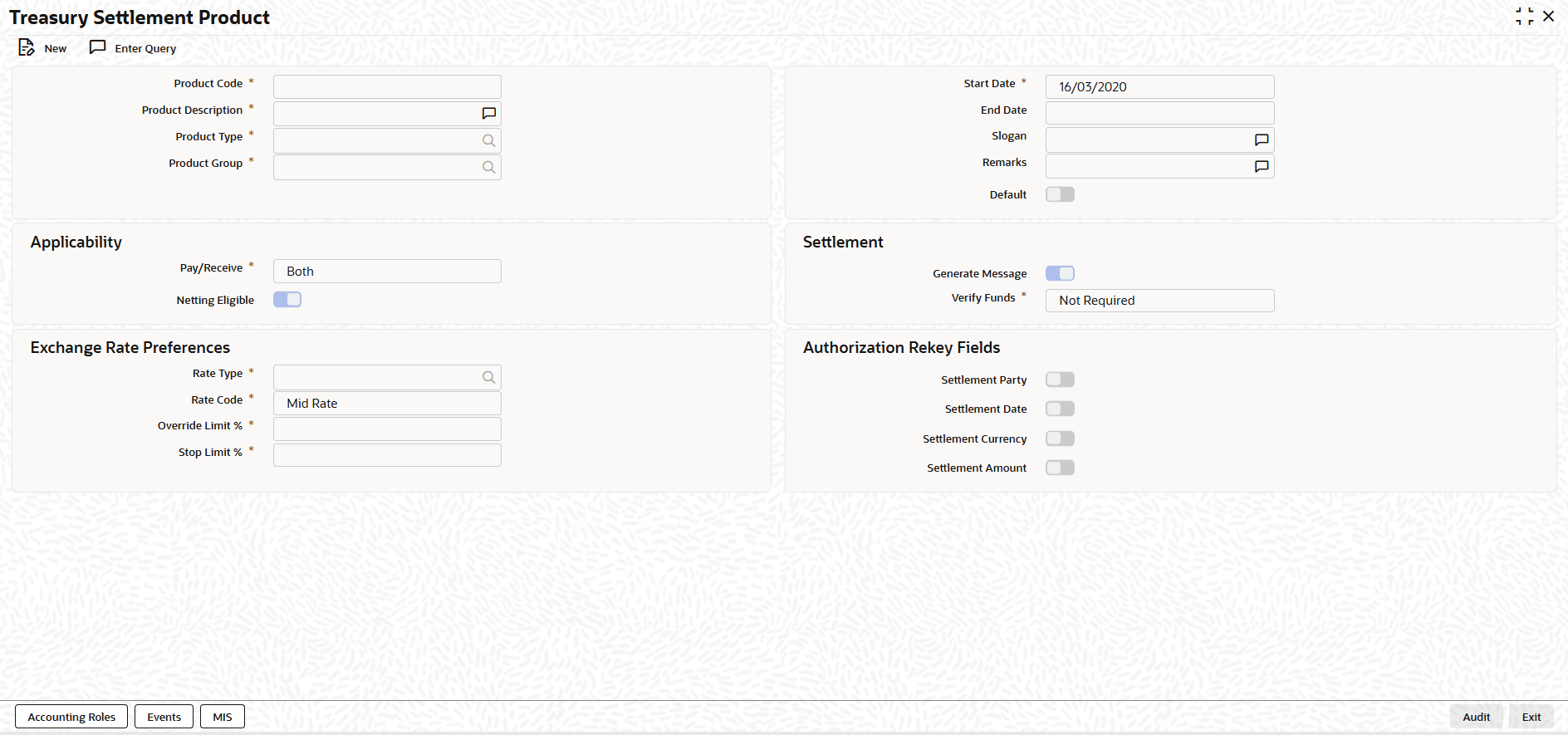
    Figure 1-3 Treasury Settlement Product


  2. On the Treasury Settlement Product screen, Click New.
  3. On the Treasury Settlement Product, Specify the details as required.

    Table 1-3 Treasury Settlement Product - Field Description

    Field Description
    Product Code Specify the unique code that identifies this settlement product throughout Treasury application.
    Product Description Specify the suitable description for the product, preferably unique description to identify easily. This description is displayed along with the code.
    Product Type Select the type of this settlement product.
    Product Group Select the primary product group to which this product belongs to.
    Start Date Select the date from which this product can be used for settlement.
    End Date Select the date up to which this product can be used for settlement. If End Date is not specified, then the product can be used till it is closed.
    Slogan Enter the purpose note for the product, to help the users select appropriate settlement product to link to deal product or netting scheme.
    Remarks Enter the notes about the product intended for bank’s internal reference.
    Default Indicates whether this product can be used as default settlement product for any settlement. Default product can be used when any product cannot be resolved for a settlement.
    Pay/Receive Select the directions of settlement for which this product can be used from drop-down list. The available options are:
    • Pay
    • Receive
    • Both
    Netting Eligible Switch this toggle On, to indicates whether this product can be used for net settlement.
    Generate Message Switch this toggle On, to indicate whether Settlement advice would be allowed to be configured for this product.
    Verify Funds Select the type for balance in the settlement account need to be verified before allowing authorization of the settlement using this product. The available options are:
    • Not Required
    • Verify but Proceed
    • Verify and Stop
    Rate Type Select the exchange rate type for getting the exchange rate to be used for converting the amounts from one cash flows currency to settlement currency and local currency.
    Rate Code Select the exchange rate code for getting the exchange rate to be used. The available options are:
    • Mid Rate
    • Buy/Sell Rate
    Override Limit % Specify the normal variance (as %) allowed for the exchange rate used against the market exchange rate prevailing at that time.
    Stop Limit % Specify the maximum variance (as %) allowed for the exchange rate used against the market exchange rate prevailing at that time.
    Settlement Party Switch this toggle On, to indicates that settlement party field need to be rekeyed during authorization of settlements using this product.
    Settlement Date Switch this toggle On,to indicates that settlement date field need to be rekeyed during authorization of settlements using this product.
    Settlement Currency Switch this toggle On,to indicates that settlement currency field need to be rekeyed during authorization of settlements using this product.
    Settlement Amount Switch this toggle On,to indicates that settlement amount field need to be rekeyed during authorization of settlements using this product.