7.15.1 Checklist Sub Tab
This topic provides information on the Checklist, which records task items and tracks their completion status.
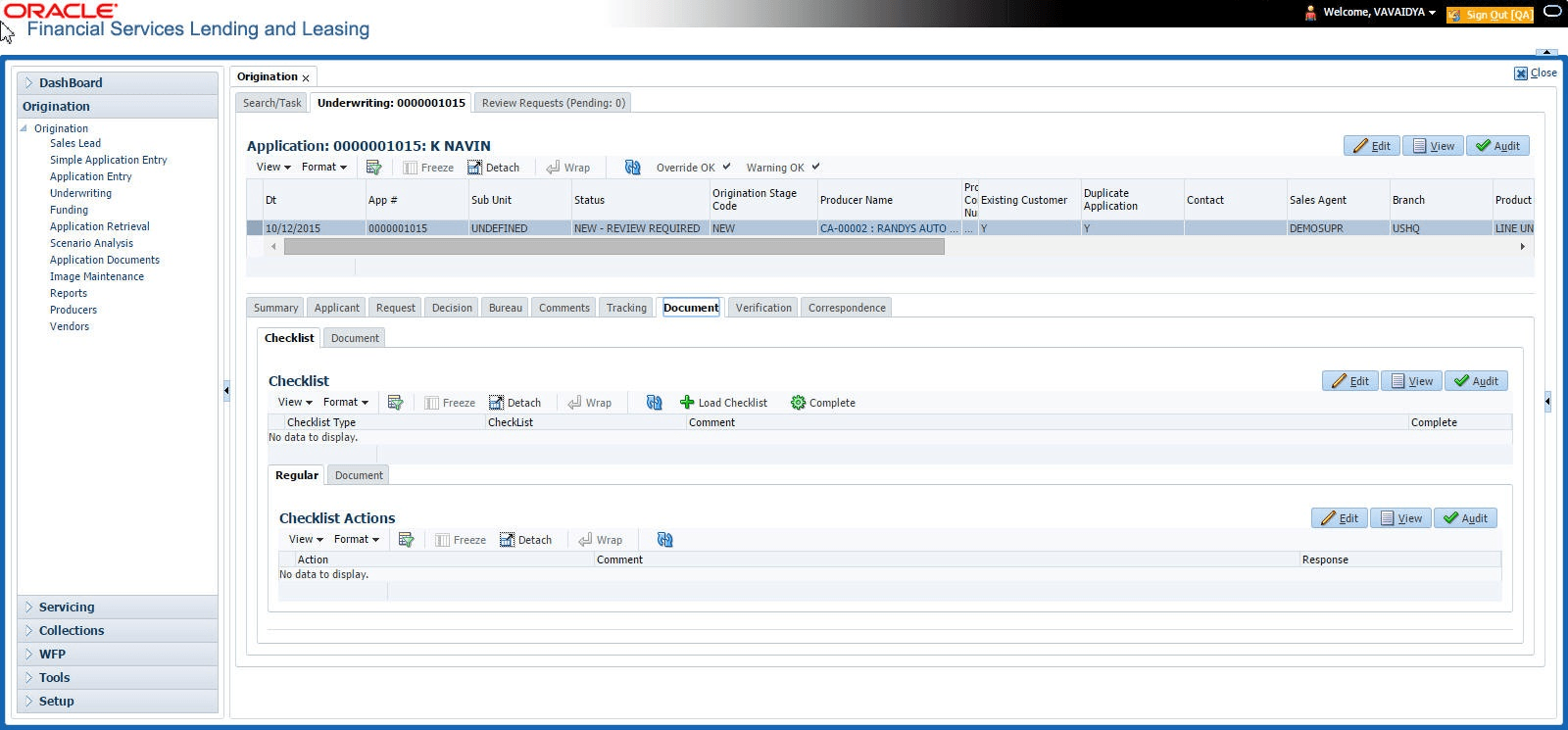
The Checklist sub tab enables user to view tasks performed during the underwriting process.
To view the underwriting Checklist screen
- On the Origination, click Origination. Under Origination, click Underwriting. Under Underwriting, click Underwriting tab.
- Under Underwriting, click
Document. Under Document,
click
Checklist.
The Checklist screen displays.
- If the Checklist section is empty, click Load Checklist in the Checklist section.
- In the Checklist Actions section, click Regular sub tab.
- In Checklist Actions section, complete the tasks listed in the Checklist Action column.
- Use the Yes/No/NA buttons in the Yes No NA column to indicate whether user completed the task or not.
- Use the Comment field to add remarks regarding any of the tasks, if user choose.
- When user are finished completing the tasks, choose Complete in the Checklist section.
- Click Save.
- In the Checklist Actions section, click the Documents sub tab.
- In the Documents section, select the record user want to work with and click View in the Details column.
- In the Documents section, view the following
information:
Table 7-63 Documents
Field Description Action View the action to be performed. Document Type View the document type. Document Sub Type View the document sub type. Status Select the status of the action. Response Use the Yes/No/NA buttons to indicate whether or not user completed the task. Comment Specify comment.
Parent topic: Document Tab