3.4.2 Monitoring Jobs
This topic provides information on monitoring jobs. It explains that job activities are tracked, reviewed, and managed within the system.
The Monitor Jobs screen provides another view of monitoring all system processes, including credit bureau requests and payment posting. This screen displays the data in reverse chronological order of the Run Start Date/Time, whereas the Monitor Batch Jobs screen provides the historical data about each job and job set.
To Monitor Job Details
- On the Dashboard, click
Dashboard. Under Dashboard,
click System Monitor. Under System
Monitor, click
Jobs.
The Jobs screen displays.
- On the Job screen, user can select any of the following type
of jobs which are available in separate tabs:
Table 3-6 Job Screen
Select System Displays Batch Batch jobs (used primarily for the nightly processes). Back Ground User submitted requests, such as reports and payment posting. Credit Request Credit bureau requests. - In the Job Details section, select the time frame based on
elapsed days. User can select any of the following options:
Table 3-7 Job Details
Select System Displays 1 Day All the types of jobs selected in Jobs Type section in last one-day. 1 Week All the types of jobs selected in Jobs Type section in last one-week. 1 Month All the types of jobs selected in Jobs Type section in last one-month. By Date All the types of jobs selected in Jobs Type section for specific duration. User can specify a date range (within 3 months) in Start Dt and End Dt fields using the adjoining calendar. - If user select Failed option in the View section, the system displays failed jobs on the type and time frame user have selected.
- In the Job Details section, user can view the following
information about jobs matching the contents of Job Type, View Last and Failed
boxes:
A brief description of the fields is given below:
Table 3-8 Job Details
Field Description Request Type Displays the job request type. Status Displays the job request status. Job Set Displays the job set code. Job Displays the job description. Thread Displays the job thread. Errors Displays the number of errors. Records Displays the number of records processed by the job. Run Start Date/Time Displays the job run start date time. Run End Date/Time Displays the job run end date time. Description Displays the job request description. Process Dt Displays the job process date. Valid Execution Period Start Date/Time Displays the job start date/time. Valid Execution Period End Date/Time Displays the job end date time. - In the Job Results section, user can view the following information about the Job selected in Job Details section:
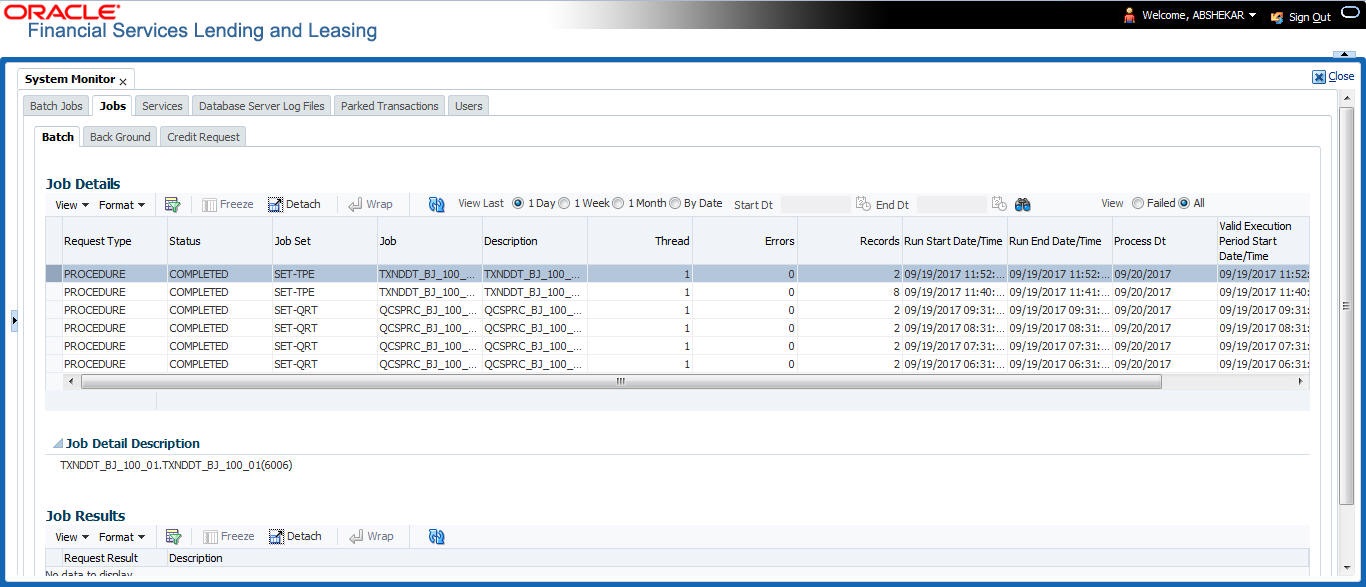
A brief description of the fields is given below:
Table 3-9 Job Results
| Field | Description |
|---|---|
| Request Type | Displays the job request type. |
| Description | Displays the job request description. |
Parent topic: System Monitor