3.5 Producer Analysis
This topic provides information on producer analysis. It presents consolidated insights on producer performance, activities, and outcomes to support evaluation and decision‑making.
The Producer analysis screen enables user to view and know the status of all applications sourced by different Producers.
Navigating to Producer Analysis
- On the Dashboard, click
Dashboard. Under Dashboard, click
Producer
Analysis.
The Producer Analysis screen displays.
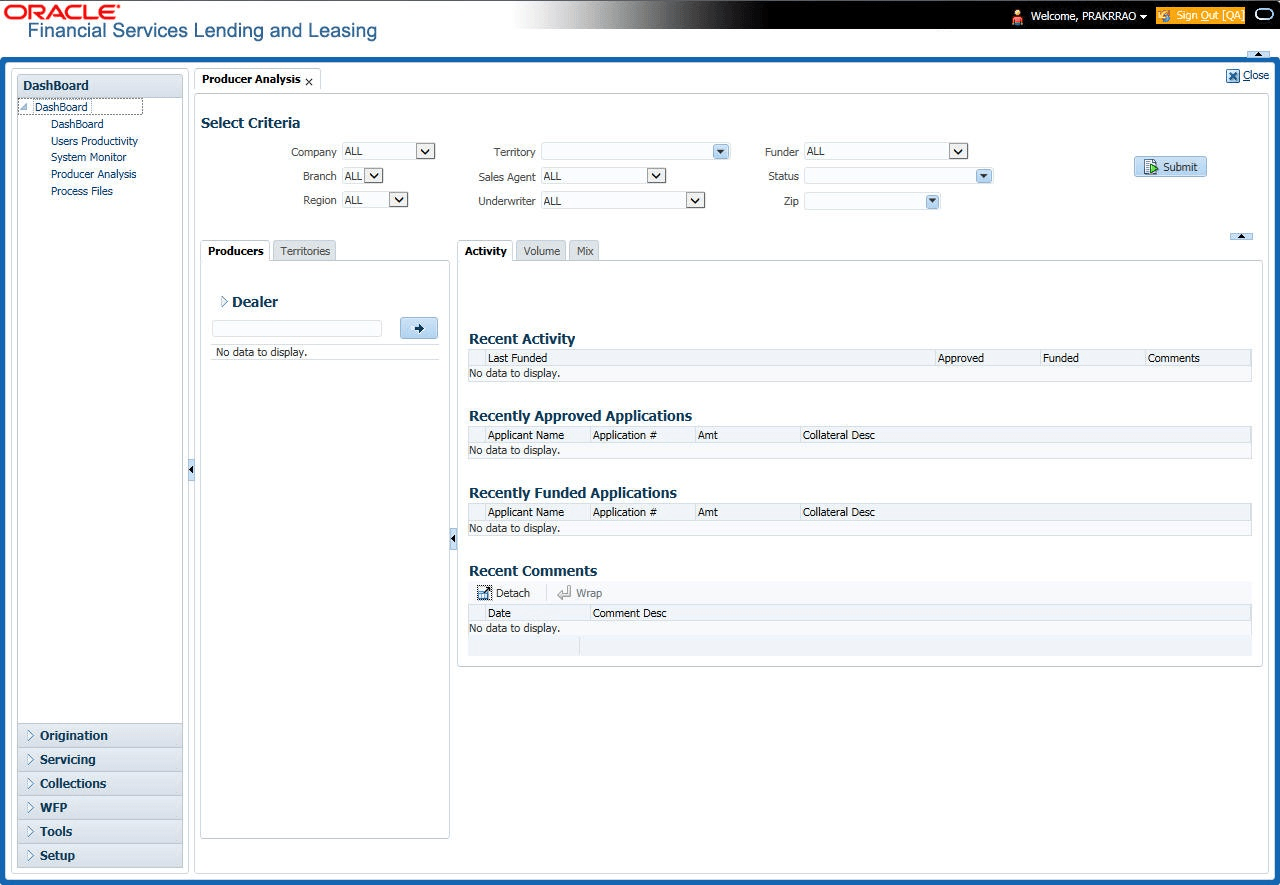
- Company
- Branch
- Region
- Territory
- Sales Agent
- Underwriter
- Funder
User can select the values from the adjoining drop-down list. Click Submit button. System displays the Producer details satisfying the criteria, user selected.
- Producer #
- Name
- Company
- Branch
- Type
Select the producer user need to view the statistics. The system displays the statistics under Summary sub tab and the status and sub status of various applications under Applications sub tab, of the selected producer.
- Year
- Total Apps
- Approved
- Conditioned
- Rejected
- Withdrawn
- Funded
- Amount
- Company
- Branch
- App #
- Date
- Title
- Product
- Status
- Sub Status
Parent topic: Dashboards