Understanding Brand
Introduction
A Brand represents the distinct personality or attributes that set a company, product, or service apart in the marketplace. In Communication Cloud Service, Brand enables you to configure colors and color series as per your specific branding. You can use this for your Chart type content. This will ensure that the Charts generated reflect your branding consistently and enhance visual clarity. Strategic use of colors allows your customers to quickly grasp the essential information and understand the message being communicated.
- Color – You can configure specific colors that define your brand identity. Each color comprises of a color notation type like RGB (Red, Green and Blue) or RGBA (Red, Green, Blue, and Alpha). You can associate required Color configurations to your Color Series and Color Space configurations, to be used across graphical data representation.
- Color Series – You can define an ordered collection (palette) of associated Color configurations, to be used for your communication elements such as chart. In the Color Series configuration you can specify Color Series Expansion Type and Expansion Factors, which are used for expanding the color list required for plotting different values in the Chart. This helps you provide your customers, the required graphical data representations that align with your organization's branding.
- Color Space – You can configure a list of Colors that are appropriate for use in your organization's brand collateral and other communications. This ensures that your brand is consistently represented across all channels of communication and your customers easily relate to it.
- Brand Configuration – It is the top-level configuration within your Marketing Company. It is the core record containing definitions for branding. You can associate Brand configuration to the respective Color Series and Color Space configurations. These Color Series and Color Space configurations can be associated to Color configurations based on marketing requirement.
The following image illustrates the Brand configurations and their associations: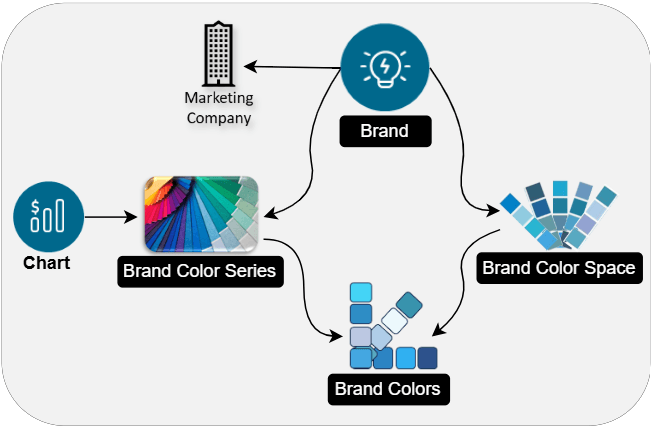
Example
Your financial institution needs to send monthly email communication to your customers to keep them informed about the Credit and Debit transactions conducted through their Bank Account. This email includes a Bar Graph depicting the monthly Debit and Credit amounts throughout the past six months. This helps your customers with their financial planning. The Graph uses your institution's Brand Colors, Brand Color Series and Brand configurations to maintain a unified customer experience and enhance visual clarity of the information shared.
Let us see how Communication Cloud Service Brand configuration helps you with this scenario.
- Color - Configure all your specific Brand Colors using the RGB or RGBA color notation.
- Color Series - Configure Brand Color Series by associating it to the required Color configuration. Then select the Color Series Expansion Type and Expansion Factors. These settings are used to expand the color list required for plotting the Bars of different values in the Graph.
- Brand - Configure Brand associated to your Marketing Company. Associate it to the required Color Series configuration.
- Chart - Configure Chart as per your requirement.
- Content - Configure Content of type Chart as per your requirement.
- Package - Configure a Body Package comprising of Font, Styles, Content of type Text and Chart, Layout, and Document along with User Defined Data Fields for dynamic content.
- Communication - Configure the distribution related configurations required for the communication Email delivery to your customer, such as Communication Email, Communication OCI Email or Twilio Email and Communication.
Execution Flow
When a request is received from your organization, the Communication configuration initiates the process. It triggers the configured Communication Email to create personalized email content using the associated Packages. This email content includes your customer's Bar Graph with credit and debit transaction details. The Graph connects to the associated Color Series to generate Bar Graph using appropriate colors. The assembled email is then managed by the Communication Distribution Email configuration, which passes the request to the associated supplier service integration configuration. The configured supplier service integration uses the selected email supplier service like OCI Email or Twilio SendGrid to securely transmit the email to your customer’s inbox, ensuring reliable and personalized monthly communication.
Functionalities
- Centralized Management - Enables organization-wide definition and control of branding assets and color policies, supporting consistent application across business units.
- Regulatory Compliance - Ensures that branding elements, such as colors are applied according to the corporate policies and marketing regulations.
- Customization and Evolution - Supports versioning, allowing brands to evolve over time and adapt to new market or regulatory requirements.
- Efficient Content Production - Streamlines the use of predefined palettes for charts, visualizations, and marketing materials, enabling quick and consistent design implementation.
Configuration Movement
The Brand, Color, Color Series, and Color Space configurations follow the configuration movement process; that is, if you configure any one of them in one tenancy (non-production), you can move the configuration to different tenancies (pre-production and production) sequentially.
For more information refer, Understanding Configuration Movement topic.