Understanding Distribution Collation
Introduction
Distribution Collation in Communication Cloud Service helps collecting individual communication files, combine them into an organized concatenated PDFs to share it with the downstream applications through SFTP.
Every time a Batch process for File Transfer is completed, the Communication Batch process is initiated to generate the communications along with metadata and then to pass on to the Communication Queue for further processing. Based on the Queue Processing Batch, the entire communications get mapped to a Queue instance and later File Generation Batch process collates the details and generates the concatenated, compressed and encrypted PDFs along with the Index and Summary.
- Communication Queue Category: Organizes Communication Queues based on the Operations Company for which they are applicable.
- Communication Queue: Processes for creating the distinct Queue instances and then sorting the Communications prior to the creation of concatenated, compressed and encrypted PDFs according to the defined threshold parameters, and then distributes the PDFs through SFTP delivery. The Communication Queue also determines if the Index File for each of the Queue Process Output and the Summary File for each of the Queue Process instance to be created and distributed through SFTP delivery.
- Index File: It is a summation of data about each of the Communication belonging to a specific concatenated PDF.
- Summary File: It is a summation of data about a Queue Instance.
Distribution Collation Process Flow
The following steps outline the process flow of Distribution Collation, starting from the Batch creation to the distribution of final PDF to SFTP server. The entire process is divided into the following steps:
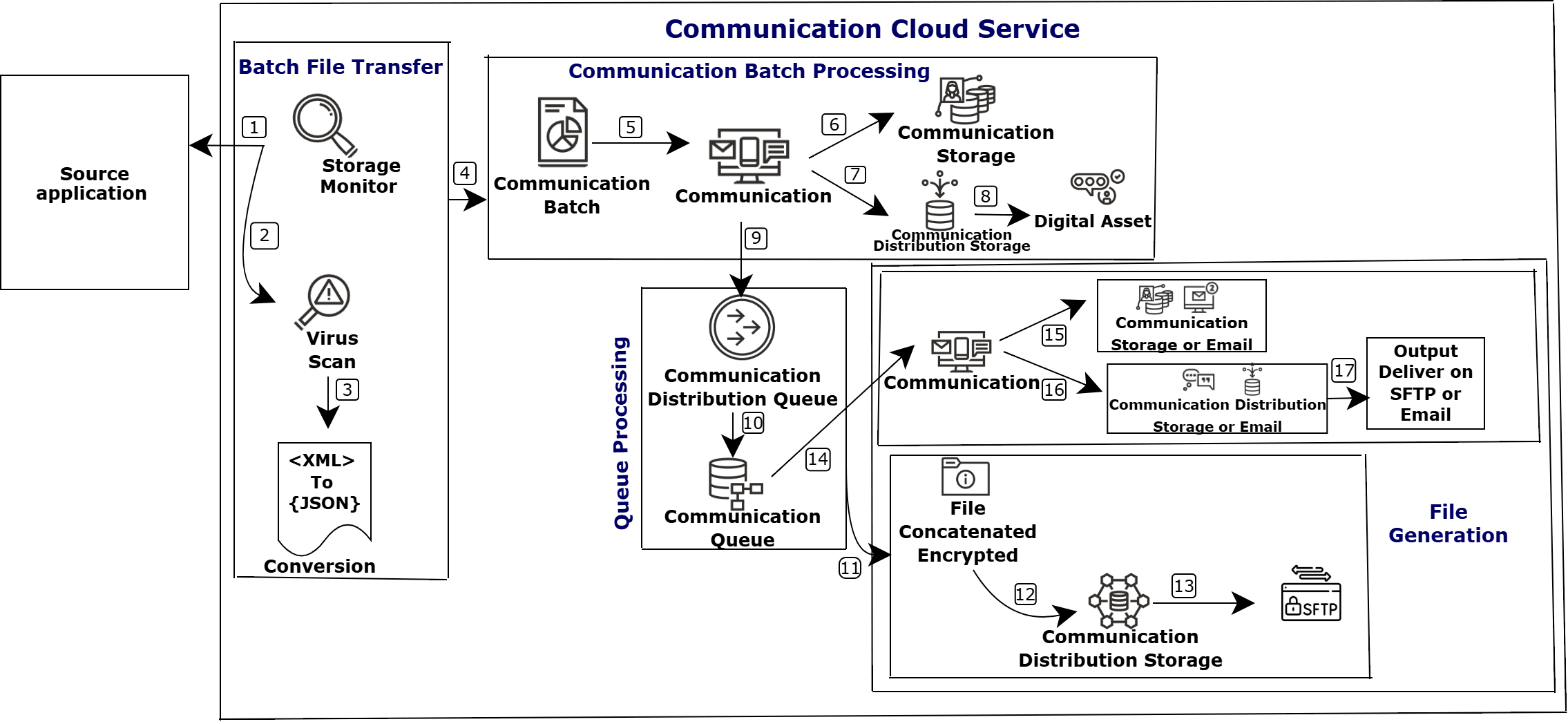
- File Transfer: Communication Cloud Service locates a file in the Source application Object Storage and then runs a Virus Scan and conversion (XML to JSON), if required. After conversion, it initiates the Communication Batch process.
- Communication Batch:
- Communication Batch splits the file into corresponding individual and calls Communication for generating communications.
- Communication calls Communication Storage to create the communication along with metadata and then hands it over to Communication Queue through Communication Distribution Queue for further processing.
- Queue Processing: Based on the Batch schedule, the available Communications within the Queue will be processed and mapped to the Communication Queue instances.
- File Generation:
- Based on the Batch schedule, each Queue instance undergoes processing, to consolidate and create multiple concatenated, compressed and encrypted PDFs per the defined threshold parameters.
- The Communication Queue then calls Communication Distribution Storage to distribute the PDF through SFTP delivery.
- Once the individual PDF within a Queue Instance is uploaded to the SFTP server, Communication Queue calls Communication to generate and distribute the Index report through SFTP.
- Once the distribution of entire PDFs of a Queue Instance is completed, Communication Queue calls Communication to generate and distribute the Summary report through SFTP delivery.
The following image depicts the Distribution Collation process flow:
Functionalities
- Efficient Bulk Delivery: Collects and combines multiple individual communication files into a single, unified PDF, enabling faster and more streamlined large-scale distribution.
- Organized Document Assembly: Ensures all included communications are sorted and group, reducing the effort and potential errors while printing.
- Enhanced Metadata Management: Automates the inclusion of vital metadata such as customer, transaction information, supporting Distribution Collation process.
- Reduced Processing Overhead: Minimizes the number of transmissions to SFTP servers by sending concatenated files instead of multiple individual files, improving processing speed and reducing network load.
- Automated Threshold Management: Triggers collation and distribution automatically when a defined queue threshold is met, eliminating the need for manual intervention.
Your organization wants to distribute a communication by hand or post as a consolidated statements to the print vendor instead of passing it as individual communications. Communication receives the request along with the data, and calls Communication Storage to create the communication. Once the communication is created, Communication calls Communication Distribution Queue and shares the communication and metadata. Communication Distribution Queue calls Communication Queue and shares the received details. Communication Queue processes the communication and metadata for creating the distinct Queue instances, sorts the communications and creates concatenated, compressed, and encrypted PDFs according to the defined threshold parameters, and then distributes these PDFs through SFTP delivery.
Configuration Movement
Configuring a Distribution Collation follows the configuration movement process; that is, if you configure a Distribution Collation in one tenancy (non-production), you can move the configuration to different tenancies (pre-production and production) sequentially.
For more information see, Understanding Configuration Movement topic.