Understanding Search
Introduction
Search Configuration in Communication Cloud Service provides a flexible, configurable framework for defining and executing complex search queries. For example, these queries help you to identify and retrieve Digital Assets, such as PDFs or communication documents based on specific business requirements. You can create search statements that identify, filter, and retrieve the relevant assets, documents, or records during communication generation. For example, you can automatically embed customer-specific marketing flyers, statements, or product information in emails or communications.
By using User Defined Data Fields, the Search configuration ensures that only assets matching with the specific business criteria are included in the final output. You can define search statements using various components, such as User Defined Data, logical operators, and static values. This helps in building complex, business-driven search criteria in Communication Cloud Service. They enable automated, targeted, and accurate content delivery based on customer data, such as account balance, transaction history, age, or promotional eligibility.
Components in Search Configuration
- Search Category - Organizes and categorizes Search Statement, Search Statement Group and Search under an Operations Company for easy management.
- Statement - Defines a search criterion using parameters, such as User Defined Data Fields, operators, and static values. It can be associated to User Defined Data Structures that contains relevant customer and transactional data.
- Statement Group - Combines multiple Statements, enabling creation of more complex, logical search expressions.
- Search - Performs the search, using the defined Statement Groups and Statements to retrieve the required documents or assets for communication output generation.
Search Process Flow
The following steps outline the process flow of Search Configuration, starting from the upload of Digital Assets to the distribution of the personalized PDF to customers:
- Digital Asset Upload: The Digital Asset is uploaded to the repository using the Digital Asset Upload feature in the Communication Cloud Service.
- Communication configuration creation process: The Communication configuration initiates the creation process by calling the Communication Email Configuration.
- Call to Package Assembly Template: The Communication Email configuration then calls the associated Package Assembly Template.
- Content Type check: The Package Assembly Template checks the Content Type in the Content configuration.
- Content Type-Digital Asset: The Content configuration must have set the Content Type as Digital Asset.
- Invoke Search configuration: Under Content configuration, if the Content Type is set to Digital Asset, the Package Assembly Template invokes the associated Search Configuration.
- Search with User Defined Data: The Search configuration uses User Defined Data to create detailed search expressions using logical operators, User Defined Fields, and static values.
- Search Execution: The Search configuration returns the relevant sorting and search expressions based on predefined search criteria.
- API Call to Digital Asset configuration: The Package Assembly Template then makes an API call to the Digital Asset configuration. This call checks the Digital Asset Repository to retrieve the Digital Assets based on the search expressions.
- Response from the Digital Asset: The relevant data, including the digital asset information, is returned to the Package Assembly Template.
- PDF generation: The Package Assembly uses the retrieved Digital Asset data to generate the final PDF output.
- Distribution Process: The generated PDF is then sent back to the Communication configuration, which then initiates Distribution Process to connect with the appropriate supplier service
- PDF distribution: The personalized PDF is sent to the relevant customers.
The following image depicts how the Search Configuration process flows: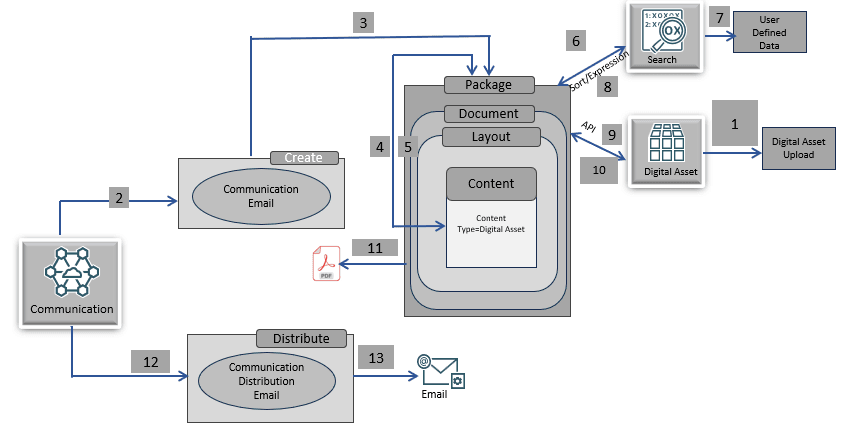
Functionalities
- Customizable Search Criteria: You can create detailed search expressions using logical operators, User Defined Fields, and static values, which helps you to filter results precisely according to your requirements.
- Search Optimization and Efficient Data Retrieval: Search configuration optimizes data retrieval by allowing you to organize search logic strategically, and apply sorting after filtering. This ensures that only the most relevant assets or results are retrieved quickly, improving efficiency and accuracy. It also reduces the time spent manually sorting through large datasets, making the process more effective.
- Dynamic Integration: Search configuration supports mapping to JSON data structures received from the consuming services or applications. This flexibility allows incoming data to be transformed and matched with the existing User Defined Data, enabling better data processing and more accurate results.
For example, your organization wants to identify customers who are over 60 years old, live in Florida or California, and are eligible for a promotional offer.
Communication Cloud Service's Search configuration can help you achieve this scenario:
You need to perform the following configurations:
- User Defined Data Fields. Configure the following fields:
- Age: The customer’s age.
- State: The state where the customer resides.
- Promotional Eligibility: Whether the customer is eligible for a promotional offer.
- User Defined Data Structure: Create a User Defined Data Structure that includes the fields, such as Age, State, and Promotional Eligibility, mapping the relevant customer data.
- Search Configuration:
- Search Category: Create a Search Category (for example, Customer Promotions), and associate it to your Operations Company.
- Statement:
- Define a statement to check if the customer's age is over 60 years, that is
Age > 60. - Define a second statement to check if the customer lives in Florida or California, that is
State = FloridaorState = California. - Define a third statement to check if the customer is eligible for the promotion, that is
PromotionalEligibility = Yes.
- Define a statement to check if the customer's age is over 60 years, that is
- Statement Group: Combine the above three statements using logical operators:
Age > 60 AND (State = 'Florida' OR State = 'California') AND PromotionalEligibility = 'Yes' - Search Execution: The Search execution is responsible for constructing the search and sort expressions based on the configuration. These expressions are then used by to the consuming configuration, which makes the call to perform the search. The configuration then identifies customers who meet the specified conditions: over 60 years old, living in Florida or California, and eligible for the promotional offer.
When a request is received from your organization, the Search configuration initiates the process. It executes the predefined statement group to filter and identify the customers who meet the criteria, that is over 60 years old, residing in Florida or California, and eligible for the promotional offer. When the eligible customers are identified, the Package Assembly retrieves the relevant promotional assets, such as personalized flyers or promotional PDFs, and embeds them into the final communication. The assembled promotional communication is then managed by the Communication Email Distribution configuration, which coordinates the delivery of the personalized communications (email or letter). This configuration calls the appropriate email supplier service (OCI Email or Twilio Email) to securely transmit the promotional emails or letters to the customers, ensuring that the right message reaches the right customer.
Configuration Movement
The Search configuration follows the configuration movement process; that is, if you configure any one of them in one tenancy (non-production), you can sequentially move the configuration to different tenancies (pre-production and production).
For more information, see Understanding Configuration Movement topic.