3.20.9.1 Create Relationship Pricing Configurations
This topic describes the information about the relationship pricing configurations.
- Background
These set of configurations is geared to retrieve attributes to populate the fact values that are used in Relationship Pricing (RP) routines.
Currently there is only one RP routine which performs the following steps:- Retrieve all accounts. Account is a type of an RP aggregate, which is explained in further sections.
- Execute the relationship pricing on all accounts.
- Generate outbound response records of accounts that have changed RP benefits.
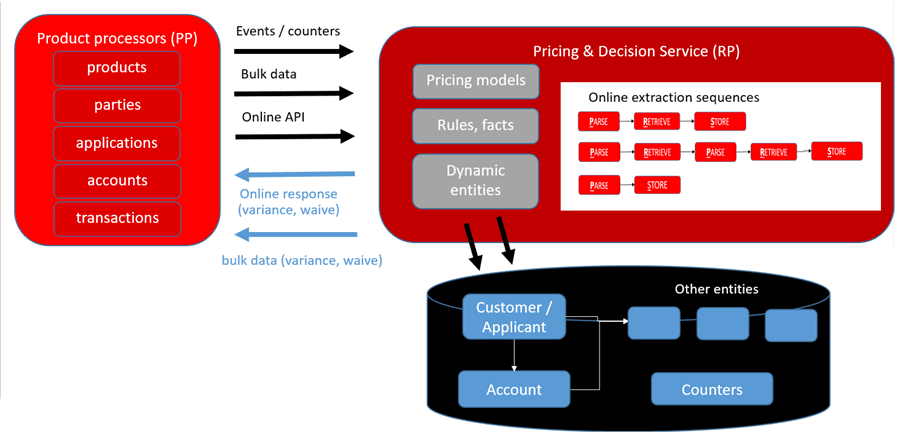
Attribute retrievals can be depicted in the form of the following diagram:
Figure 3-181 Relationship Pricing - Data Flow
RP module has 2 types of attribute retrieval configurations:
- Online attribute retrievals - Attributes are retrieved from 3 sources:
- Reading data off events - RP has ability to subscribe to topics dynamically. It also has the ability to configure the source of attributes from a kafka payload.
- Invoking URLs and reading attributes off response values - RP has the ability to configure a sequence that can either parse, retrieve, store in any order for attribute retrievels.
- Modules directly populate fact values - RP exposes an API for module to directly populate fact and its value in the module.
- Bulk attribute retrievals - Attributes are retrieved in bulk. In this mode, RP uses the "Transfer" and "Transform" modes to populate the stages through which data is transferred.
The stages are:
- Raw data zone - In this zone, data is held for some time and has the same structure as the source. This is regularly cleaned up after the attributes are transferred to the processing zone. The "Transfer" mode facilitates this. This mode uses the fast data transfer configuration.
- Processing zone - This zone has RP data held in a construct called as aggregates. The aggregate has a generic structure that is understood by the RP module and is used by the processing routines. Data is transferred from the raw data to the processing zone by a batch job called "Fact augmenter", which involves some basic transformation routines and places data in the aggregates. The fact augmenter job is the "Transform" mode and is executed in the nightly batch.
- Configuration
Overall attribute retrievals and relationship pricing configuration is configured and executed in the following steps:
STEP 1 - Create Aggregates to hold fact data that is needed for RP calculations. In this example we will create / use 2 aggregates "Party" and "Account". These are seeded as part of deployment. Refer details STEP 1 - RP AGGREGATES
STEP 2 - Create Transaction to Attributes mapping. Identify all sources of attribute information that the RP calculation engine needs to look up. In this example, we will configure attribute / data sources to be facts from the "Party" and "Account" aggregates.
With these 2 steps, the RP job has the information it needs to process.
At this point, the aggregate population routines and the job / batch configurations to invoke the RP job is pending.
STEP 3 - Populate "Account" aggregate using "Transfer" and "Transform". Create data transfer jobs that get bulk data from participating modules into a staged zone in RP. Also, create Fact augmenter jobs that transform data from this staged zone into the RP aggregates. In this example, the data transfer setup will transfer Lending Account data into a staged table with the same structure in RP. The fact augmenter job extracts this data and populates the "Account" aggregate.
STEP 4 - Populate "Party" aggregate using Online Attribute retrievals. Create Sequence Configuration to define multiple steps to retrieve data online. The sequence and the steps are configurable. Example of steps can be "Parse → Retrieve → Store" or "Parse → Store". "Parse" configuration defines extraction of fact data by inspecting event payloads or REST API responses. Event data is retrieved using dynamic subscribers. For this use case we will subscribe to party topic to pull party data during party onboarding / update party event, inspect the data, extract customer segment and store it into PARTY_FACTS table (Party aggregate).
At this point, the aggregate population routines configuration is complete. The job configurations and the batch process configurations is pending.
STEP 5 - Create trigger definitions for invoking the batch jobs. Trigger definitions are necessary to indicate the parameters with which the jobs need to be invoked. In this example, trigger definitions for the following batch jobs are needed - Fact augmenter and RP calculation.
STEP 6 - Create Batch Category definition to trigger a job sequencing engine. In this example, we will use the job category configuration that runs the nightly batches. As part of the end of day processing category, lending account data is transferred to RP. Fact augmenter job extracts this data and populates Account aggregate. Thereafter it executes RP calculation and invokes the data transfer job to populate Lending with RP data.
STEP 1 - RP AGGREGATES
An RP aggregate holds data locally and is created in the RP schema using the "Create Aggregate" screen. When an aggregate is created, a corresponding table is created in the RP schema with "_FACTS" suffix. The bank can create as many aggregates to hold the attribute data that they need as part of its RP calculations.
The table has a generic structure that holds the primary key of the aggregate and the key, value fields of the facts.
For example - If we create a "PAYMENT" aggregate using the "Create Aggregate" screen with payment_id as the primary key, behind the scenes the "PAYMENT_FACTS" table is created.
Refer to PDS documentation for more background:Decision Service and Product Designer
As part of RP deployment, 2 aggregates representing "ACCOUNT" and "PARTY" are seeded.
This results in the following empty tables getting created in RP schema.
- ACCOUNT_FACTS
- PARTY_FACTS
STEP 2- PARTY_FACTS POPULATION - DYNAMIC TOPIC SUBSCRIPTION
Screen:Dynamic Topic Subscription
In previous step PARTY_FACTS aggregate table is created to store party facts.
- External API Invocation (retrieve attributes by invoking party inquiry)
- Read kafka topic during party onboarding / update party (retrieve from party events)
- Party invokes save facts 'RP' call (Party pushes data directly to RP)
In this use case, we are following kafka approach. The Dynamic Topic Subscription screen lets RP add a subscription to existing kafka topics from external modules.
For this use case, this screen adds a subscriber on an existing Party topic "ObpyRetOnboard". Whenever a party is updated, the Party module adds data on this topic.
By virtue of the subscription, RP is able to retrieve this data.
Table 3-156 Retrieve this data by RP
| topicName | eventName | eventDesc | pprCode | eventType | AvroSchema |
|---|---|---|---|---|---|
| ObpyRetOnboard | RetailCustomerOnboarding | Retail Customer Onboarding | OBRL | AVRO | See text below |
Avro schema
 {"namespace":"avro.oracle.fsgbu.plato.eventhub.events","name":"ObpyRetOnboardGenerated","type":"record",
"fields":[{"name":"branchCode","type":"string"},{"name":"userId","type":["null","string"]},{"name":"date","type":["null","string"]},
{"name":"time","type":["null","string"]},{"name":"applicationNumber","type":"string"},{"name":"handoffStatus","type":"string"},
{"name":"sourceProductId","type":["null","string"]},{"name":"eventType","type":"string"},{"name":"externalCustomerNumber",
"type":["null","string"]},{"name":"isKycCompliant","type":["null","string"]},{"name":"partyCategory",
"type":["null","string"]},{"name":"partyId","type":"string"},{"name":"partyType","type":["null","string"]},{"name":"rmId",
"type":["null","string"]},{"name":"firstName","type":"string"},{"name":"middleName","type":["null","string"]},{"name":"lastName",
"type":"string"},{"name":"residentStatus","type":["null","string"]},{"name":"uniqueId","type":["null","string"]},{"name":"customerSegment",
"type":["null","string"]},{"name":"partySubType","type":["null","string"]},{"name":"isCustomer","type":["null","string"]},{"name":"isStaff",
"type":["null","string"]},{"name":"isInsider","type":["null","string"]},{"name":"isSpecial","type":["null","string"]},{"name":"isArmedForce",
"type":["null","string"]},{"name":"isPep","type":["null","string"]},{"name":"isMla","type":["null","string"]},{"name":"isMinor",
"type":["null","string"]},{"name":"isBlacklisted","type":["null","string"]},{"name":"isProspect","type":["null","string"]},
{"name":"amendDateTime","type":"string"},{"name":"applicationDate","type":"string"},{"name":"onboardPayload","type":["null","string"]}]}
Table 3-157 Table
| Field | Value | Description |
|---|---|---|
| Product Processor | OBRL | Dropdown to select relevant product processor (required) |
| Event Description | Retail Customer Onboarding | Enter a description for the event (required) |
| Event Name | ObpyRetOnboard | Auto-filled with the selected event name |
| Clear | Button to clear the form | |
| Subscribe | Button to subscribe to the selected event with filled details |
STEP 3 - PARSE, STORE, EXECUTION SEQUENCE CONFIGURATION
Screen:Parse Configuration
To parse party data received via subscriber and store it in the form of party facts, parse and store configuration is created using Parse configuration and Execution Configuration screen. Party Data captured by above dynamic subscriber will be stored in PARTY_FACTS table with below parse, store, execution sequence configuration.
Table 3-158 Create Parse Configuration Screen
| Field | Value | Description | ||
|---|---|---|---|---|
| Parse Configuration ID | ObpyRetOnboardParse | Specify the unique parse configuration ID. | ||
| Parse Configuration Name | ObpyRetOnboard Event Parse | Specify the description for the parse configuration ID. | ||
| Parse Configuration Type |
Select the type from the drop-down list. The available options are:
|
|||
| Product Processor | OBRL | Select the product processor from the drop-down list. | ||
| Fact Mapping Configuration ID | Specify the unique fact mapping configuration ID. | |||
| Fact Name | ObpyRetOnboardFact1 | partyId | partyId | Click the Search icon and select the fact name from the list. |
| ObpyRetOnboardFact2 | customerSegment | customerSegment | ||
| Fact Value X Path | Specify the xpath to fetch the fact value. | |||
| Action | Click the icons to edit or delete the record. | |||
More details - Create Parse Configuration
Screen:Execute Sequence Configuration
ExecutionSequence configuration is essentially an extractor framework that uses a sequence of execution of parse, retrieve and store configurations. This configuration allows the user to create chain of sequential parse, store, retrieve operations in the steps to retrieve attribute data. Given below is a a depiction of the extractor framework.
Figure 3-182 Extractor Framework - example configuration options
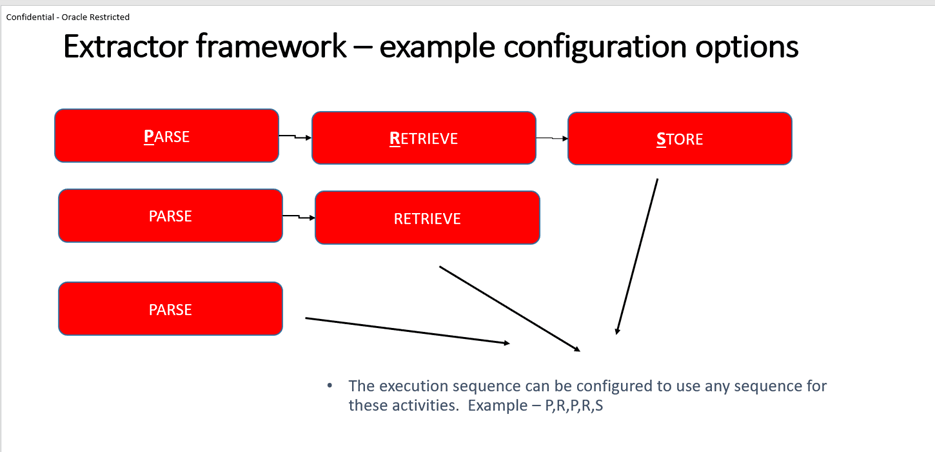
Table 3-159 Create Parse Configuration Screen
| Field | Value | Description | ||
|---|---|---|---|---|
| Execute Sequence ID | ObpyRetOnboard | Specify the unique execute sequence ID. | ||
| Product Processor | OBRL | Select the product processor from the drop-down list for which configuration is being created. | ||
| Execute Sequence Number | Execute Step ID | Execution Type | Execute Sequence Number | Specify the unique sequence number for the execute sequence table. |
| Execute Step ID | ObpyRetOnboardParse | PARSE | 1 | Specify the unique step ID for the execute sequence table. |
| Execution Type | ObpyRetOnboardStore | STORE | STORE | Select the type from the drop-down list. The available options are:
|
Table 3-160 Table
| Field | Value | Description |
|---|---|---|
| Store Configuration | ObpyRetOnboardStore | Specify a unique Store configuration ID. |
| Store Configuration Name | ObpyRetOnboardStore | Specify a unique name for the Store configuration ID. |
| Product Processor | OBRL | Select the product processor from the drop-down list for which configuration is being created. |
| Aggregate | Party | Select the attaching aggregate name to store configuration. |
More details - Create Execution Configuration
STEP 3 - DATA TRANSFER JOBS
Data transfer happens in 2 stages, typically referred to as "Transfer" and "Transform". The "Transfer" is an OBMA platform capability and "Transform" is provided by RP.
- Transfer does pure data transfer at fast speeds and is usually like for like replication, with very little scope for complex transformations.
- Transform is a more RP aware transfer that understands the RP aggregates structure and is able to do some complex transformations.
Transfer:
PLATO Data transfer configuration is a technical maintenance and is done in 2 steps:
Step 1 - Create an app-config that adds a pair of from-data-source and to-data-source. The primary key for this table containing app-config's is app-id, group-id.
Step 2 - The app-id, group-id from the previous step is used in further configurations to define the tables to be transferred.
Refer OBMA infrastructure documentation guide for configuration details.
Note:
- There is no screen to create a data transfer configuration. It is a set of APIs.
- Usually, these configurations are seeded if the source and target data structures are already known.
- Data transfer configurations from OBMA product processors and required for RP processing are seeded as part of its default qualification exercise.
As part of the use case, there are two data transfer configurations needed:
- Transfer Lending data to RP tables.
- Transfer RP tables to Lending.
Additionally, two similar data transfer app-config's are needed for this use case, and have already been seeded as part of deployment.
These are for
SPLRCORE → CMC. This ensures that lending tables pertaining to all servicing data are available for transfer.
CMC → SLPRCORE. This ensures that relationship pricing data can be transferred to lending servicing schema.
The corresponding data transfer jobs that use the corresponding app-config id's and define tables to be transferred are :
- DT_SLP_TB_FACT_CHANGE_DETAILS - This job transfers data from 2 tables from Lending to the RP schema (Tables = SLP_TB_FACT_CHANGE_DETAILS, CMC_CDS_TM_CDS_INBOUND_REQUEST).
- SLP_TB_FACT_CHANGE_DETAILS contains fact information used in RP calculations
- CMC_CDS_TM_CDS_INBOUND_REQUEST contains RP payloads of accounts to be processed.
- DT_RP_RESP_CMC_TO_OBRL - This job transfers RP calculation to Lending. (Table = CMC_CDS_TM_OUTBOUND_RESPONSE)
Transform :
Data transfers using PLATO utility does a like for like table data transfers into the RP schema. Transform is an RP functionality that creates facts from the transferred data.
Check below example.
Example - Let's say Account data is transferred into RP using PLATO. This data is to be transformed into the "Account" aggregate (Table = ACCOUNT_FACTS).
Account Data transferred from "Savings" product processor
Table 3-161 Table
| Account id | Balance | Status |
|---|---|---|
| ******111 | 10000 | Regular |
| ******112 | 5450 | Regular |
"Account" Data in RP
Table 3-162 Table
| Accountid | Fact Data |
|---|---|
| ******111 | |
| ******112 | |
In our example, a transform job is needed for SLP_TB_FACT_CHANGE_DETAILS.
RP Data Transfer & Transform Config creation using screen
While the data transfer configurations for OBMA use cases are seeded, there will be a requirement to create these dynamically if the participating systems are non-OBMA.
Screen:Create / View Transport Fact Mapping
This screen is a coarse-grained configuration capability available to do multiple configurations in one go.
It allows a configurator to select the source and destination tables and choose the columns to be added to the RP aggregates.
- Create the destination tables in the RP schema with the same name and same columns as source. For this example, it is needed to create the SLP_TB_FACT_CHANGE_DETAILS table in RP schema.
- Creates an app-config id for the source and destination data sources, if not already created previously. In our case, the app-config is created as part of the deployment.
- Creates a job by the name of "DT_SLP_TB_FACT_CHANGE_DETAILS", if not already available, that defines for data transfer of SLP_TB_FACT_CHANGE_DETAILS. This is already available as part of deployment.
- Creates a fact augmenter job by the name "FA_SLP_TB_FACT_CHANGE_DETAILS", if not already available, which creates facts to the respective aggregates from the transferred data. These facts correspond to the columns selected from the source table. This is already available as part of deployment.
- Creates a batch category "RP_CATEGORY", if not already created, and adds the above 2 jobs to it. category is created for the '000' branch.
Note:
Typically, '000' is provisioned as the HO branch.Table 3-163 Create Parse Configuration Screen
Field Value Description Source Table Name SLP_TB_FACT_CHANGE_DETAILS The name of the Transport Fact Mapping being created. Select the table name from the drop-down list. Entity Name Account The Transport Fact Mapping ID associated with the Transport Fact Mapping. Select the entity name from the drop-down list. The available options are:
- Account
- Party
Product Processor OBRL Select the product processor from the drop-down list for which configuration is being created. Transformation Configuration Type COLUMN_MAPPING CONTRACT_REF_NUMBER ACCOUNT_ID Select the type from the drop-down list. The available options are:
- COLUMN_MAPPING - The _FACTS table is expected to have a column where data from source tables column is populated directly.
- FLAT_MAPPING - Source tables specific column value is mapped to a facts value in destination table (_FACT table). New row is created in _FACTS table with the specific fact name and value.
COLUMN_MAPPING PARTY_ID PARTY_ID COLUMN_MAPPING PPR_CODE PPR_CODE COLUMN_MAPPING FACT_NAME FACT_NAME COLUMN_MAPPING FACT_NEW_VALUE FACT_VALUE Key Select the key from the drop-down list. Auto generated from given entity name. Value Select the value from the drop-down list. Action Click the icons to edit or delete the record.
More Details -Create Transport Fact Mapping
This ensures that we create the job definition for "Account" aggregate (Table = ACCOUNT_FACTS) data populated for account_ids with the above information.
STEP 4 - TRANSACTION TO ATTRIBUTES MAPPING
As part of the transaction, create configuration to define what entities need to be considered during RP configurations.
Screen:Create / View Relationship Pricing Configuration
Table 3-164 Relationship Pricing Configuration
| Field | Value | Description |
|---|---|---|
| Event/Transaction | RP_DelqEvent | A list of Events (Transactions) to choose from and configure. Click the Search icon and select the events from the list. |
| Product Processor | OBRL | Select the product processor from the drop-down list for which configuration is being created |
| Attribute Source - From Domains Online | Capture a list of execution sequence IDs. | |
| Attribute Source - From Locals RP Store | Party, Account | |
| Attribute Source – Counter |
Configure counter facts that will be required. Counter facts are stored against entity ID. Counter fact can be fetched based on two inputs:
|
STEP 5 - JOB TRIGGER DEFINITION
Trigger definition configurations define the invocation mechanism for the jobs - whether API based or event based, along with some job parameters. Please refer PLATO job configuration guide for more details.
Create trigger definitions for the two batch jobs
There are two batch jobs that fulfil the RP calculation needs for this use case.
- The transform job that transforms data from the lending data received into the RP aggregates. In the earlier step, the fact augmenter job got created. The trigger definition states the invocation conditions for this job.
- The RP calculation job - RP calculations happen in this job
- Create Transaction → Attributes Mapping
Table 3-165 Table
transaction pprCode RP_DelqEvent OBRL -
Table 3-166 Table
sourceType extractorId aggregate LOCAL null Party LOCAL null Account - One of these tables can be used to designate as PIVOT_AGGREGATE. In this case, all accounts are used to calculate RP.
Screen:Task Management → Create Task
Create trigger definition for the transform job. This job takes raw data from product processors and adds it to the RP aggregates
Table 3-167 Create Task
| definitionName | definition |
|---|---|
| RP_TRANSFORM_JOB_TRG_DEFN | |
Create trigger definition for the calculation job. This calculates relationship pricing.
Table 3-168 Create Task
| definitionName | definition |
|---|---|
| RP_CALC_JOB_TRG_DEFN | |
STEP 6 - BATCH CATEGORY
Finally, create the batch category configuration to execute the two jobs by running CUTOFF category.
Batch category configuration involves:
- Defining a category for the batch jobs. Example - the EOD category includes jobs required to be executed as part of End of Day processing
- The sequence in which the batch jobs have to be executed.
Screen:Create / View Batch Category
Table 3-169 Main Resource Table
| resourceName | operationType |
|---|---|
| CUTOFF | CREATE |
Batch Category Table :
This configuration table lays out the batch categories and the sequence in which they execute by defining the dependency of categories on one another. In most cases this is a pre-seeded configuration based on functional capabilities provided in the application. As part of our example - The EOD category contains the RP jobs. This is shown in the next set of tables.
Table 3-170 Batch Category Table
| categoryCode | categoryName | categoryDesc | branchCode | isMultiRun | visibility | isEnabled | categoryGroup | DependsOnCategory |
|---|---|---|---|---|---|---|---|---|
| CUTOFF | CUTOFF | CUTOFF | KP6 | Y | FUNCTIONAL | Y | GENERIC | |
| EOD | EOD | EOD | KP6 | N | FUNCTIONAL | Y | GENERIC | CUTOFF |
| HOUSEKEEPING | HOUSEKEEPING | HOUSEKEEPING | KP6 | N | FUNCTIONAL | N | GENERIC | EOD |
| EOFI | EOFI | EOFI | KP6 | N | FUNCTIONAL | Y | GENERIC | EOD |
| FLIPDATE | FLIPDATE | FLIPDATE | KP6 | N | FUNCTIONAL | Y | GENERIC | EOFI |
| RELEASE_CUTOFF | RELEASE_CUTOFF | RELEASE_CUTOFF | KP6 | N | FUNCTIONAL | Y | GENERIC | FLIPDATE |
As per above table, the CUTOFF category runs first. Then the EOD executes then EOFI and Housekeeping run in parallel and so on.
Batch Category Job Mapping Table
This configuration table lays out the job execution sequence within a category by defining the dependency of jobs on one another. In most cases this is a pre-seeded configuration based on functional capabilities provided in the product. As part of our example - The RP jobs are placed in the EOD category.
Table 3-171 Batch Category Table
| Category Code | Job Code | Enabled | Depends On Job | Depends On Category |
|---|---|---|---|---|
| CUTOFF | MARKCUTOFF_JOB | Y | ||
| EOD | DT_RP_RESP_CMC_TO_OBRL | Y | RP_CALC_JOB | EOD |
| EOD | RP_CALC_JOB | Y | FA_SLP_TB_FACT_CHANGE_DETAILS | EOD |
| EOD | FA_SLP_TB_FACT_CHANGE_DETAILS | Y | DT_SLP_TB_FACT_CHANGE_DETAILS | EOD |
| EOD | DT_SLP_TB_FACT_CHANGE_DETAILS | Y | ||
| HOUSEKEEPING | CHRGSINBOUNDHISTJOB | Y | ||
| HOUSEKEEPING | EVENTDIARYHISTJOB | Y | ||
| EOFI | Markeofi | Y | ||
| FLIPDATE | flipdate | Y | ||
| RELEASE_CUTOFF | Releasecutoff | Y | ||
| RELEASE_CUTOFF | MARK_TI | Y | Releasecutoff | RELEASE_CUTOFF |
Batch Job Table:
This configuration table defines the job execution parameters. In most cases this is a pre-seeded configuration based on in-house performance tuning exercises conducted.
Table 3-172 Batch Category Table
| jobCode | jobDesc | jobType | isMultiRun | pollIntervalInSec | runTmOutInSec | triggerDefinition | jobVisibility | apiMethodType | apiUri |
|---|---|---|---|---|---|---|---|---|---|
| MARKCUTOFF_JOB | MARKCUTOFF_JOB | API | N | 2 | 900 | FUNCTIONAL | POST | http://CMC-BRANCH-SERVICES/cmc-branch-services/batch/markcutoff | |
| DT_SLP_TB_FACT_CHANGE_DETAILS | DT_SLP_TB_FACT_CHANGE_DETAILS | API | Y | 5 | 3600 | TECHNICAL | POST | http://DF-SCHEMA-EXPLORER-SERVICE/df-schema-explorer-service/transportTrigger/transport/ | |
| DT_RP_RESP_CMC_TO_OBRL | DT_RP_RESP_CMC_TO_OBRL | API | Y | 5 | 3600 | TECHNICAL | POST | http://DF-SCHEMA-EXPLORER-SERVICE/df-schema-explorer-service/transportTrigger/transport/ | |
| RP_CALC_JOB | RP_CALC_JOB | BATCH | N | 30 | 3600 | RP_CALC_JOB_TRG_DEFN | FUNCTIONAL | ||
| FA_SLP_TB_FACT_CHANGE_DETAILS | FA_SLP_TB_FACT_CHANGE_DETAILS | BATCH | N | 30 | 3600 | FA_SLP_TB_FACT_CHANGE_DETAILS_TRG_DEFN | FUNCTIONAL | ||
| CHRGSINBOUNDHISTJOB | CHRGSINBOUNDHISTJOB | API | N | 2 | 900 | FUNCTIONAL | POST | http://DF-SCHEMA-EXPLORER-SERVICE/df-schema-explorer-service/transportTrigger/transport/ | |
| EVENTDIARYHISTJOB | EVENTDIARYHISTJOB | API | N | 2 | 900 | FUNCTIONAL | POST | http://DF-SCHEMA-EXPLORER-SERVICE/df-schema-explorer-service/transportTrigger/transport/ | |
| Markeofi | Markeofi | API | N | 2 | 900 | FUNCTIONAL | POST | http://CMC-BRANCH-SERVICES/cmc-branch-services/batch/markeofi | |
| flipdate | flipdate | API | N | 2 | 900 | FUNCTIONAL | POST | http://CMC-BRANCH-SERVICES/cmc-branch-services/batch/flipdate | |
| Releasecutoff | Releasecutoff | API | N | 2 | 900 | FUNCTIONAL | POST | http://CMC-BRANCH-SERVICES/cmc-branch-services/batch/releasecutoff | |
| MARK_TI | MARK_TI | API | N | 2 | 900 | 11 | FUNCTIONAL | POST | http://CMC-BRANCH-SERVICES/cmc-branch-services/batch/markti |
A description of the job fields is given below :
Table 3-173 Description of the job fields
| job field | Description |
|---|---|
| jobCode | A unique identifier code assigned to each job configuration. |
| jobDesc | A textual description providing details about the purpose or function of the job. |
| jobType | Specifies the category or type of job (example, API, BATCH). |
| pollIntervalInSec | The interval, in seconds, at which the system checks the job's status or triggers its execution. |
| runTmOutInSec | The maximum allowed runtime, in seconds, before the job is automatically terminated (timeout). |
| triggerDefinition | Details or parameters defining what triggers the job execution (example, schedule, event, condition). |
| jobVisibility | Defines the visibility or access level of the job (example, public, private, internal). |
| apiMethodType | Specifies the HTTP method used by the job's API (example, GET, POST, PUT, DELETE). |
| apiUri | The API endpoint URI that the job interacts with or calls during execution. |
Execution Steps:
Screen:Batch Job Operations
Execute Batch Category for current date.
Parent topic: Configuring a Relationship Pricing Example