8.1.3 Bring Your Own Key Policy in Customer Tenancy

This topic provides the systematic instructions to define the BYOK policy.

  1. Navigate to the Menu, select Identity & Security, and then Policies.
  2. Click Create Policy.

    Figure 8-14 Policies
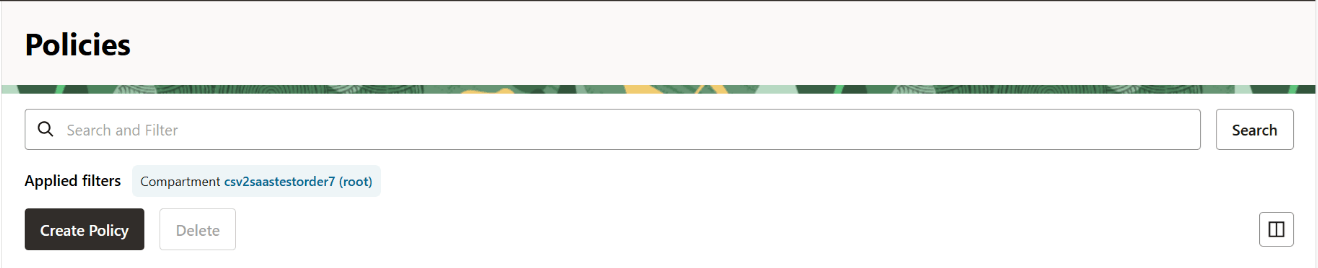

    Policies

  3. Specify a value in the Name and Description field.
  4. Click Show manual editor.

    Figure 8-15 Create Policy
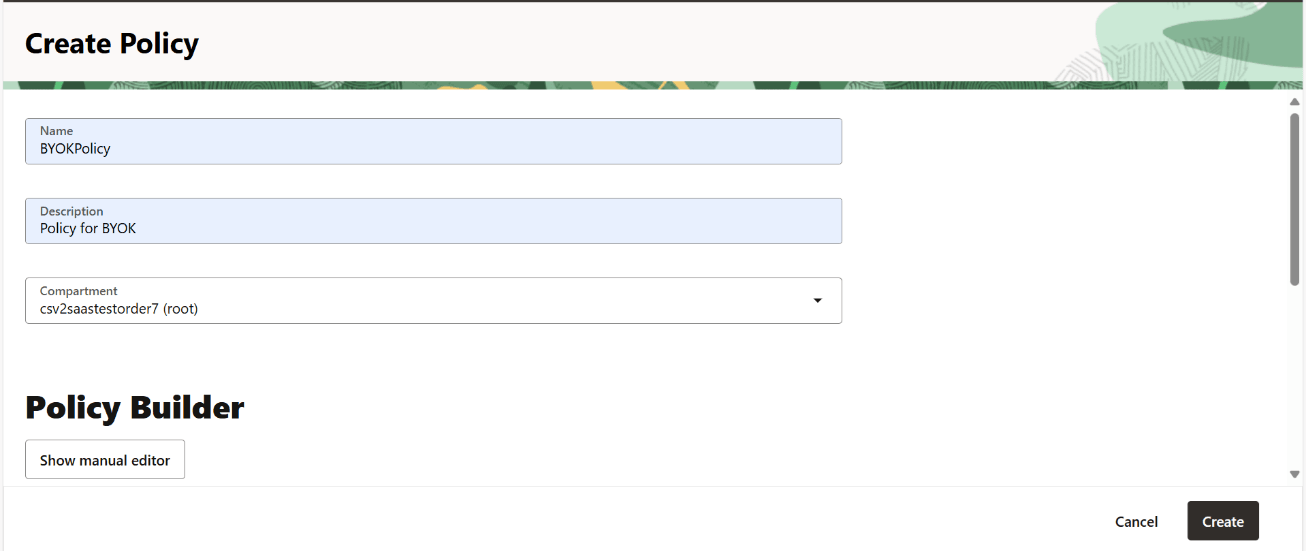

    Create Policy

  5. Specify the following IAM policy statement in the OCI tenancy in the Policy Builder pop-up:
    User can select any of the following set of statements provided for the compartment, in which the Vault and Key are created in previous step:
    1. If the user has selected the Vault or Keys sub-compartment for creation of vaults and keys, then either of the below policy statements can be used:
      1. Policy Statement 1:
        define tenancy <oraclegbuprod> as <GBU_SAAS_tenancy_OCID>
        define dynamic-group <GBU_SAAS_database> as <ADB_compartment_group_OCID>
        define group <GBU_SAAS_key_agent> as <key_agent_group_OCID>
        admit dynamic-group <GBU_SAAS_database> of tenancy SAAS to read vaults in compartment <vault_compartment>
        admit dynamic-group <GBU_SAAS_database> of tenancy SAAS to use keys in compartment <key_compartment>
        admit group <GBU_SAAS_key_agent> of tenancy SAAS to read vaults in compartment <vault_compartment>
        admit group <GBU_SAAS_key_agent> of tenancy SAAS to read keys in compartment <key_compartment>
      2. Policy Statement 2:
        define tenancy <oraclegbuprod> as <GBU_SAAS_tenancy_OCID>
        define dynamic-group <GBU_SAAS_database> as <ADB_compartment_group_OCID>
        define group <GBU_SAAS_key_agent> as <key_agent_group_OCID>
        admit dynamic-group <GBU_SAAS_database> of tenancy <SAAS> to use vaults in tenancy
        admit dynamic-group <GBU_SAAS_database> of tenancy <SAAS> to use keys in tenancy
        admit group <GBU_SAAS_key_agent> of tenancy <SAAS> to use vaults in tenancy
        admit group <GBU_SAAS_key_agent> of tenancy <SAAS> to use keys in tenancy
    2. If the user has selected the Root compartment for creation of vaults and keys, then it is preferred to use the below statement:
      define tenancy <oraclegbuprod> as <GBU_SAAS_tenancy_OCID>
      define dynamic-group <GBU_SAAS_database> as <ADB_compartment_group_OCID>
      define group <GBU_SAAS_key_agent> as <key_agent_group_OCID>
      admit dynamic-group <GBU_SAAS_database> of tenancy <SAAS> to use vaults in tenancy
      admit dynamic-group <GBU_SAAS_database> of tenancy <SAAS> to use keys in tenancy
      admit group <GBU_SAAS_key_agent> of tenancy <SAAS> to use vaults in tenancy
      admit group <GBU_SAAS_key_agent> of tenancy <SAAS> to use keys in tenancy

    Below is the policy statement with replaced placeholder values for OC1, which can be used irrespective of Vaults or Keys in Root compartment/sub-compartment:

    define tenancy oraclegbuprod as ocid1.tenancy.oc1..aaaaaaaa6u6nllkls2lt7bht6rtkn6wr7ya7qaigactc7d5pmubpqdixskbq
    define dynamic-group FSGIU_OBCBCS_ADB_Dynamic_Group as ocid1.dynamicgroup.oc1..aaaaaaaafrvuw5wyyh372vrf4j374on6gjyazxn4ra7uyjp2juabfhanvxoq
    define dynamic-group FSGIU_OBCBCS_BreakGlass_Dynamic_Group as ocid1.dynamicgroup.oc1..aaaaaaaacqjheof5wtmvp35tsvq7rm27734grzwaleg7gmu2ouaq3nl3dajq
    admit dynamic-group FSGIU_OBCBCS_ADB_Dynamic_Group of tenancy oraclegbuprod to use keys in tenancy
    admit dynamic-group FSGIU_OBCBCS_ADB_Dynamic_Group of tenancy oraclegbuprod to use vaults in tenancy
    admit dynamic-group FSGIU_OBCBCS_BreakGlass_Dynamic_Group of tenancy oraclegbuprod to use vaults in tenancy
    admit dynamic-group FSGIU_OBCBCS_BreakGlass_Dynamic_Group of tenancy oraclegbuprod to use keys in tenancy
  6. Click Create.
    The below policy is created:

    Figure 8-16 Policy Information
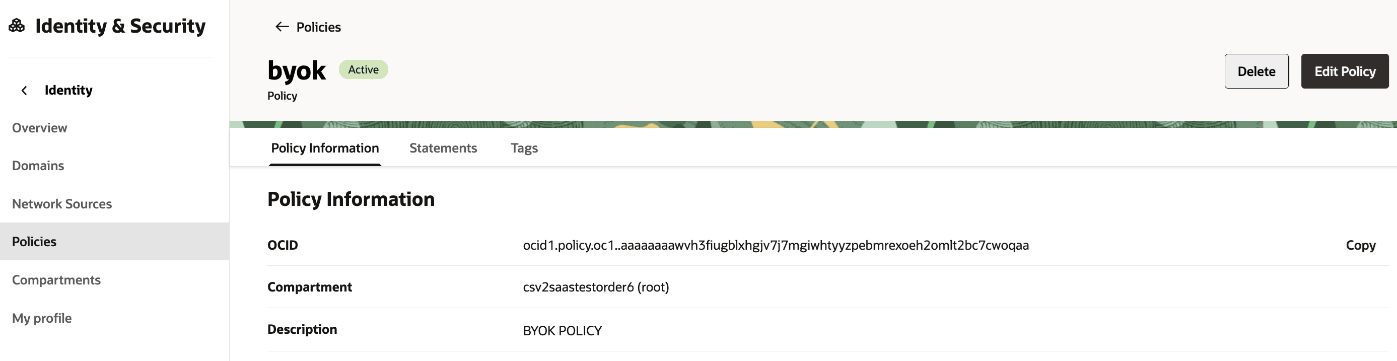

    Policy Information