Increase in Customer's Risk
Use this dashboard to view the Customers whose Risk scores have increased over a period of time due to different sources of risk assessment.
To generate Increase in Customer’s Risk report, follow these steps:
- Navigate to the MIS Reports.
- Expand the KYC option displayed on the LHS.
- Click the Increase in Customer’s Risk option.
- Click the Global Filters icon.
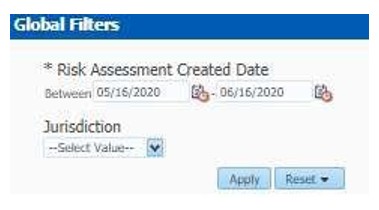
The Global Filters are displayed on the left hand side.
Figure 4-44 Global Filters for Increase in Customer's Risk Report
- Enter the following filter details:
Table 4-15 Customer Risk Score Override Report Filter Descriptions
Field Description Risk Assessment Created Date
Select the date range between which the risk assessment is created. Theformat is DD/MM/YYYY.
Jurisdiction
Select the business jurisdiction (geographic location) of the risk assessment.
The list of jurisdictions that appear in the drop-down list is based on your access permission.
- Click Apply.
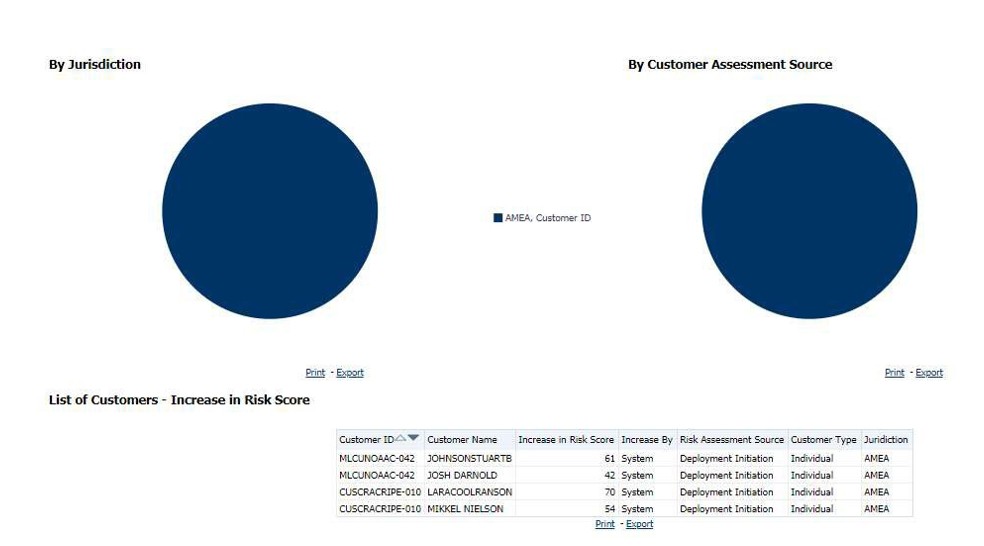
The data is filtered to satisfy all the specified filter conditions, and the result displays the following category of reports:
- Increase in Risk Score By Jurisdiction
- Increase in Risk Score By Customer Assessment Source
- List of Customers - Increase in Risk Score
Figure 4-45 Increase in Customer’s Risk Report