8.4.3 Retiring a Run definition

You can retire a Run definition when a definition is no longer valid and not required to be included in the selection of a new run calculation. To retire a definition once it is approved, follow these steps:
  1. To retire a definition, click the Select icon to select a definition from the list of Run definitions and then click the Run Definition icon . The Run Definition window is displayed.

    Figure 8-29 Run Management Summary – Retire
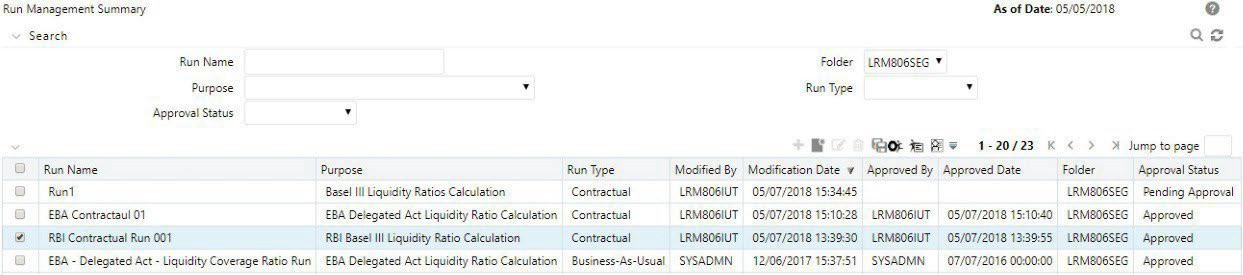

    Illustrates the Run Management Summary screen displaying a run definition that is eligible for retirement. Once a definition is retired, it becomes unavailable for selection in future run executions, ensuring outdated configurations are excluded

  2. Click Retire. A retired definition will not be available for selection as part of a new Run definition.

    Note:

    • The approval status field in the Run Management Summary window allows you to search the pre-defined Run based on a pproval status. This field displays a list of statuses that you have access to as a drop-down that is, Approved, Draft, In Review, Open, Pending Approval or Retired. The selection of a status from the drop-down list displays only those Run definitions that have been defined within the selected status in the Run Management Summary table.
    • Assumption definitions can be approved only by those mapped to the LRM role who has defined the assumption. Multiple levels of approvals are supported.
    • The Run definition, once saved and approved, is registered as a Rule in the Rules Framework of Oracle Financial Services Analytical Applications Infrastructure.