6.6.2 Configuring Manual E-File Submission
If you select the submission mode to be manual, you have to manually submit the E-Files in FinCEN’s E- Filing system, and you have to download the confirmation message XMLs from the same system.
Once the FinCEN’s E-Filing system confirms the request, then you can download the Acknowledgment and upload it against the E-File from the E-Filed Status tab in the OFS CRR US SAR application.
Using the SDTM feature, you can also perform the following configurations.
Note:
These configurations are applicable only for Automatic submission if you select submission mode as S.- Configure the E-File submission path, hostname, username, and password for the directory
- Configure Message Directory submission path, hostname, username, and password for the directory
- Configure Acknowledgement Directory submission path, hostname, username, and password for the directory
- Configure the Archive Directory submission path, hostname, username, and password for the directory
To configure SDTM, follow these steps:
- Login to the OFS CRR application as an Administrator.
- Select Compliance Regulatory Reporting.
- SelectUser Administration. Click Configure Securelane Parameters. The Template Type page is displayed.
- SelectSuspicious Activity Report from the Template Type drop-down. The
configuration details are displayed.
Figure 6-1 Configure SDTM
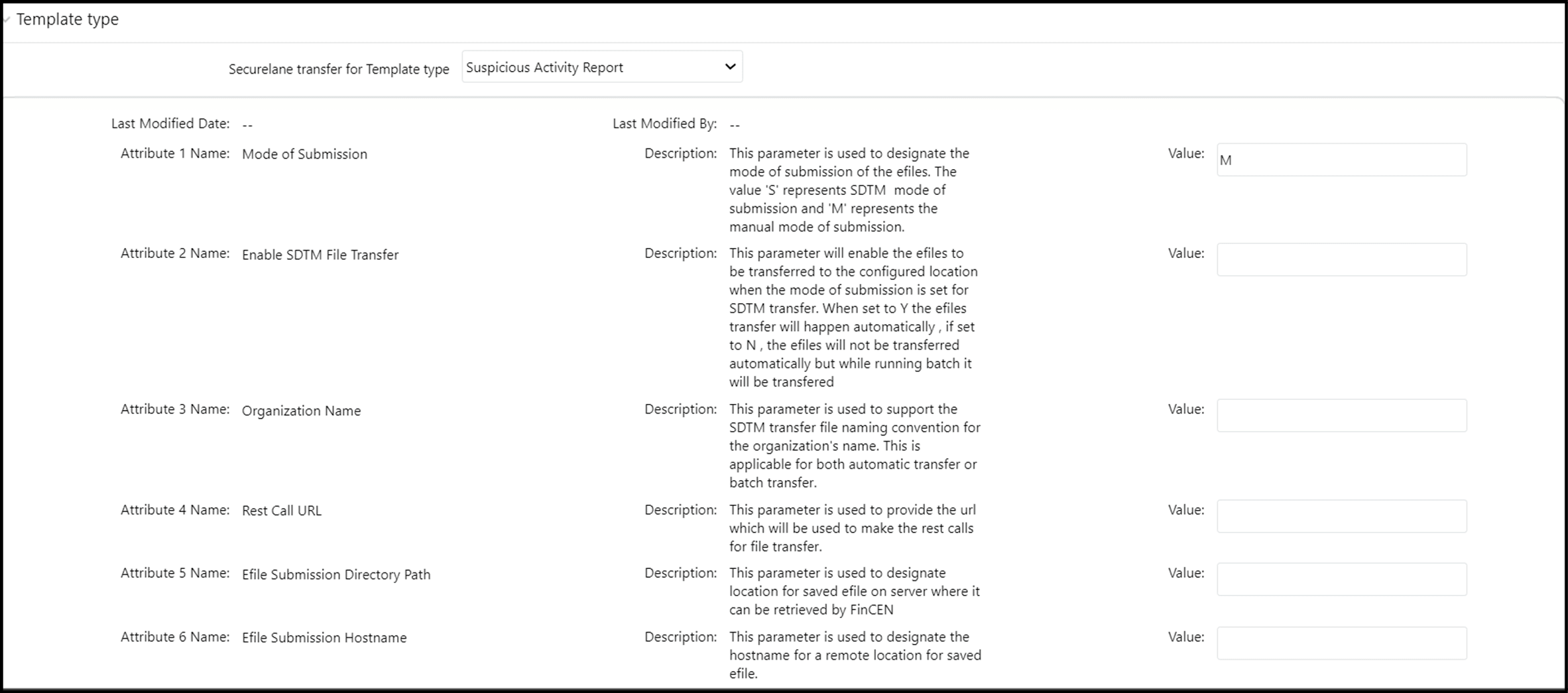
- Enter the information in the Valuefields.
Table 6-1 provides SDTM configuration parameters.
Table 6-1 SDTM Configuration Parameters
Fields Description Attribute 1 Name: Mode of Submission Enter the mode of submission as S or M in the Value field.
This parameter is used to designate the mode of submission of the E-Files. The value 'S' represents the SDTM submission and 'M' represents the manual mode of submission.
NOTE:If you select M as your mode of submission, then no need to update other fields on the page. M is the default value.
Attribute2 Name:
Enable SDTM File Transfer
Enter the mode of submission as Y or N in the Value field.
If you set it to Y, the E-Files transfer automatically. If you set it to N, the E- Files do not transfer automatically, but if you run the E-File batch, they will be transferred.
This parameter enables the E-Files to be transferred to the configured outbound location when the mode of submission is set for SDTM transfer.
Attribute 3 Name: Organization Name Enter the organization name in the Value field.
This parameter is used to support the SDTM E-File naming convention for the organization's name. This is applicable for both automatic transfer and E-File batch transfer.
SDTME-File naming convention is as per the FinCEN guidelines -
SARXST.<unique_value>.<SDTM_UID>.xml.SDTMUID is the organization’s name, and this is the value expected in attribute value -3)
For example,
SARXST.20221117153559.sdtmabcbank.xml.Attribute4 Name: Rest Call URL Enter the rest call URL in the Value field.
This parameter is used to provide the URL which is used to make the rest calls for E-File transfer from UI.
This REST call URL invokes an API that transfers E-Files from application doc storage to an outbound folder.
Note:This REST call URL is applicable when the Mode of Submission value is set to S and Enable SDTM File Transfer (Attribute 2 Name) value is set to Y.
For example,
http://<hostname>:<port>/<context>Attribute5 Name:
E-file Submission Directory Path
Enter the full name of the outbound E-File submission directory path in the Value field.
This parameter is used to provide the location of the outbound folder which holds the E-Files to be sent to FinCEN via SDTM.
For example, directory path -
< /scratch/devuser/SDTMFiles/Efiles>Note:If this directory path is available in the remote server, then you need to provide the Hostname (Attribute 6), Username (Attribute 7), and Password (Attribute 8).
Attribute6 Name:
E-file Submission Hostname
Enter the E-File submission hostname in the Value field.
This parameter is used to provide the hostname of the outbound location for the E-Files on the server, where it can be sent to FinCEN via the SDTM application.
For example, 10.172.10.11
Note: This field is applicable if the E-File Submission Directory Path is configured on a remote server different from the CRR application server.
Attribute7 Name:
E-File Submission Username
Enter the E-File submission username in the Value field.
This parameter is used to identify the username required to log in to the remote server, which has an outbound directory configured as defined in Attribute 6.
Note: This field is applicable if the E-File Submission Directory Path is configuredon a remote server different from the CRR application server.
Attribute8 Name:
E-file Submission Password
Enter the E-File submission password in the Value field.
This parameter is used to log in to access the remote outbound directory for E-File submission.
Note: This field is applicable if the E-File Submission Directory Path is configured on a remote server that is different from the CRR application server. If the public key authentication is enabled then the password is not mandatory.
Attribute 9 Name: Message Directory Path Enter the message directory path in the Value field.
This parameter is used to provide the location of the inbound folder, which holds the messages XML files received from FinCEN via SDTM.
For example, the Message Directory path –
< /scratch/devuser/SDTMFiles/ Messages>Note:If this directory path is available in the remote server, then you need to provide the Hostname (Attribute 10), Username (Attribute 11), and Password (Attribute 12).
Attribute10 Name:
Message Directory Hostname
Enter the message directory hostname in the Value field.
This parameter is used to provide the hostname of the inbound location forthe message XML files received from FinCEN via the SDTM application.
For example, 10.172.10.11
Note:This field is applicable if the Message Directory Path is configured on a remote server different from the CRR application server.
Attribute11 Name:
Message Directory Username
Enter the message directory username in the Value field.
This parameter is used to identify the username required to log in to the remote server which has an inbound directory configured as defined in Attribute 10.
Note:This field is applicable if the Message Directory Path is configured on a remote server different from the CRR application server.
Attribute12 Name:
Message Directory Password
Enter the message directory password in the Value field.
This parameter is used for logging in to access the remote an inbound directory for message XML files.
Note:This field is applicable if the Message Directory Path is configured on a remote server different from the CRR application server.
Attribute13 Name:
Acknowledgement Directory Path
Enter the acknowledgement directory path in the Value field.
This parameter is used to provide the location of the inbound folder which holds the Acknowledgement XML files received from FinCEN via SDTM.
For example,
Acknowledgement Directory path -
< /scratch/devuser/SDTMFiles/ Acknowledgement >Note:If this directory path is available in the remote server, then you need to provide the Hostname (Attribute 14), Username (Attribute 15), and Password (Attribute 16).
Attribute14 Name:
Acknowledgement Directory Hostname
Enter the acknowledgement directory hostname in the Value field.
This parameter is used to provide the hostname of the inbound location for the Acknowledgement XML files received from FinCEN via the SDTM application.
For example, 10.172.10.11
Note: This field is applicable if the Acknowledgement Directory Path is configuredon a remote server different from the CRR application server.
Attribute15 Name:
Acknowledgement DirectoryUsername
Enter the acknowledgement directory username in the Value field.
This parameter is used to identify the username required to log in to the remote server which has an inbound directory configured as defined in Attribute 14.
Note: This field is applicable if the Acknowledgement Directory Path is configured on a remote server different from the CRR application server.
Attribute16 Name:
Acknowledgement Directory Password
Enter the acknowledgement directory password in the Value field.
This parameter is used for logging in to access the remote inbound directory for Acknowledgement XML files.
Note: This field is applicable if the Acknowledgement Directory Path is configured on a remote server different from the CRR application server.
Attribute 17 Name: ArchiveDirectory Path Enter the archive directory path in the Value field.
This parameter is used to provide the location of the folder which holds the Archived E-Files, Message XMLs, and Acknowledgement files once the Acknowledgement batch is executed successfully.
For example,
Archive Directory path -
< /scratch/devuser/SDTMFiles/ Archive >Note:If this directory path is available in the remote server, then you need to provide the Hostname (Attribute 18), Username (Attribute 19), and Password (Attribute 20).
Attribute18 Name:
Archive Directory Hostname
Enter the archive directory hostname in the Value field.
This parameter is used to provide the hostname of the Archive directory location.
For example, 10.172.10.11
Note:This field is applicable if the Archive Directory Path is configured on a remote server different from the CRR application server.
Attribute19 Name:
Archive Directory Username
Enter the archive directory username in the Value field.
This parameter is used to identify the username required to log in to the remote server which has the Archive directory location configured as defined in Attribute 18.
Note:This field is applicable if the Archive Directory Path is configured on a remote server different from the CRR application server.
Attribute20 Name:
Archive Directory Password
Enter the archive directory password in the Value field.
This parameter is used for logging in to access the remote Archive directory location.
Note:This field is applicable if the Archive Directory Path is configured on a remote server different from the CRR application server.
- ClickSave. A confirmation message is displayed.
Note:
These configurations are applicable only for Automatic submission if you select submission mode as S.