Security
Parent topic: Oracle Networking Expectations
Firewalls
The following are industry-standard recommendations.
-
Document your firewall rules.
-
Establish and follow a change procedure for firewall configuration.
-
Use automation to update firewall settings.
-
Review firewall rules regularly.
-
Remove unused or overlapping firewall rules.
-
Audit your logs.
-
Organize your firewall rules to maximize speed.
-
Move some traffic blocking upstream.
-
Upgrade your firewall software and firmware.
-
Communicate with the business.
The following are Oracle expectations.
-
The Client Application Loader (CAL) configures firewall rules on service hosts to allow necessary communications.
-
See the Oracle Simphony Security Guide for Simphony port numbers.
Parent topic: Security
IDS and IPS
Simphony generates a high volume of network traffic, especially in larger deployments. In some cases, issues with check sharing have been traced to unmanaged switches blocking notifications from CAPS due to the large number of messages. After installation, verify that each workstation can use PMC to ‘App Ping’ every other workstation to ensure reliable two-way communication.
Parent topic: Security
Certificates
- Only use certificates offered from trusted Certificates of Authority.
- Do not use self-signed certificates.
- TLS 1.2 is a required minimum encryption standard in Oracle data centers.
- Oracle Restaurants recommends using TLS for on-premises installations.
Parent topic: Security
Certificate Revocation List (CRL)
To check communication to the CRL endpoint:
- From Microsoft Internet Explorer, connect to the HTTPS web server.
- In the address bar, click the lock, and then click View Certificates.
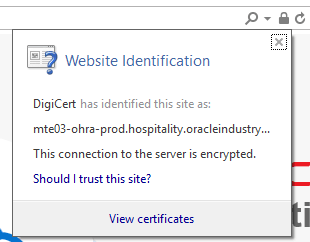
- Click the Details tab, and then scroll to the CRL Distribution
Points field.
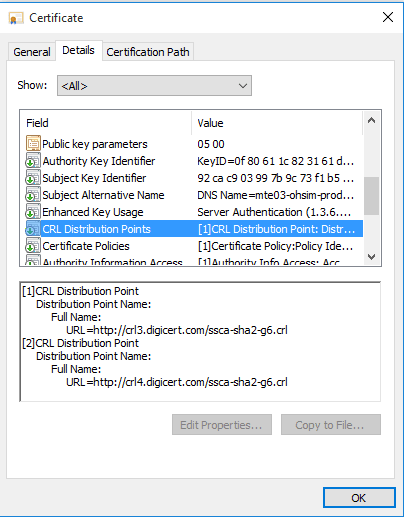
- Copy the URLs shown in the previous figure's example: http://crl3.digicert.com/ssca-sha2-g6.crl and http://crl4.digicert.com/ssca-sha2-g6.crl.
- Go to the URL in Microsoft Internet Explorer, if access is enabled.
Microsoft Internet Explorer prompts you to download a copy of the
CRL List.

Parent topic: Security
Proxy
Simphony workstations and tablets are "proxy aware" and can be configured in the Microsoft Windows operating system to use a proxy server for cloud connectivity.
Parent topic: Security
VLAN and VPN
A Virtual Local Area Network (VLAN) is a group of devices on one or more local area networks (LANs) that are configured to communicate with each other at the data link layer, as if they were on the same physical network. All devices within a VLAN share the same broadcast domain and communicate using their MAC addresses.
VLANs provide a way to segment a network based on end-user needs, such as access to specific resources and services, and are not restricted to a single physical location. A VLAN can span a single floor or multiple buildings. Communication within a VLAN is based on logical, rather than physical, connections.
Switches are used to segment the network by assigning specific ports to particular VLANs. Each device on a VLAN connects to the switch through a cable plugged into its assigned port.
- Enabling the logical grouping of devices, even if they are located across multiple physical sites
- Minimizing the need for additional routers, thereby reducing deployment costs
- Simplifying network administration
- Facilitating easy control and segmentation of broadcast traffic
A VLAN does not provide inherent end-to-end security.
A Virtual Private Network (VPN) is a technology that securely extends a private network over a public network, such as the Internet, and is commonly used to provide remote access to a company’s network resources. VPNs create a secure, virtual tunnel between your device and the destination—whether that is a website, company resources, or a customer site. This tunnel encrypts all traffic passing through it, hides your real IP address, and enables access to content as if you were on the private network. Depending on the protocols used, a VPN can operate at either the data link layer or the network layer.
- Client-to-Site (Remote Access): This type of VPN allows remote users to connect to the network as needed, providing secure access to company resources from any location.
- Site-to-Site: This type of VPN connects entire networks to each other, allowing specific machines on different networks to communicate continuously without requiring separate setup for each connection.
- Providing a high level of security through encryption
- Ensuring privacy and confidentiality of data
- Enhancing the overall efficiency of network access, especially for remote users
- Supporting anonymous file sharing, including use with peer-to-peer (P2P) networks
- Higher costs due to the need for specialized equipment, such as VPN concentrators and routers
- Increased administrative overhead, as managing VPNs requires more advanced knowledge and experience with security protocols
Parent topic: Security