People Management Settings
Use the Point of Sale workspace in People Management to configure a person's POS sign-in, security, and EMC settings.
- In People Management, select the person to configure, select the Point of Sale workspace, and then select the Settings tab.
Figure 5-16 People Management Point of Sale settings
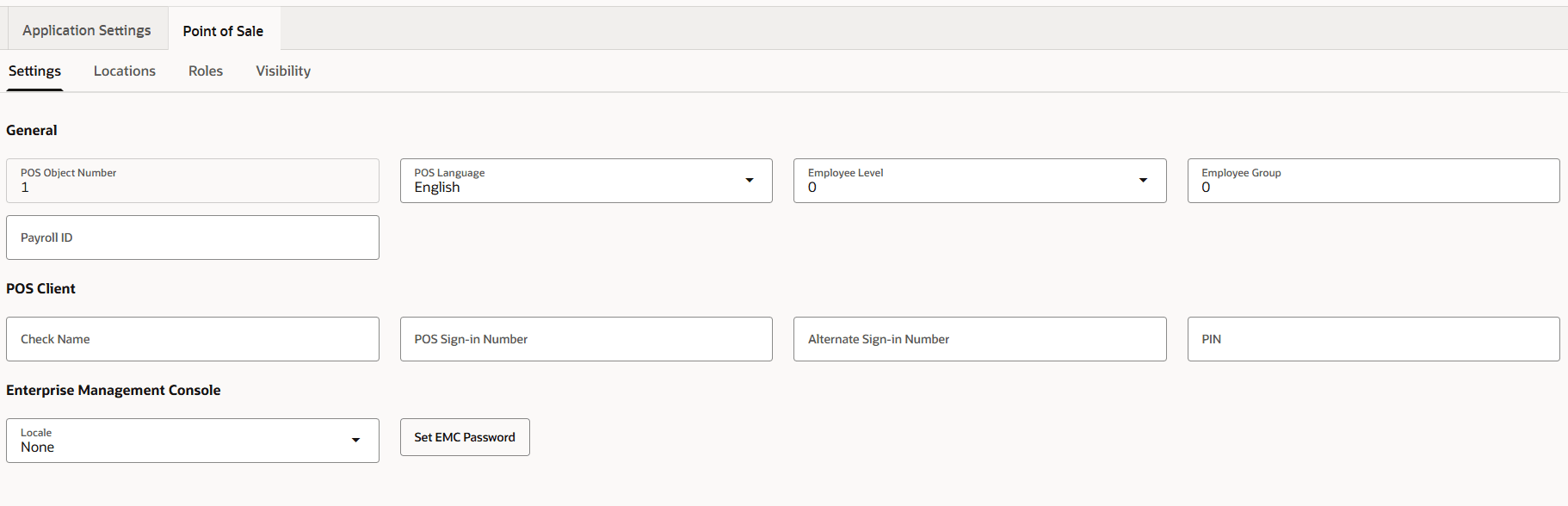
- Configure the settings as needed.
Table 5-22 People Management Point of Sale settings
Field Description POS Object Number
Identifies the person in Simphony POS.
POS Language
Selects the person's default language for the EMC and workstation.
Employee Level
Selects the employee level. This security value controls access to other people's records and the roles that can be assigned. Level 0 provides the highest access and Level 9 provides the lowest. A person with a nonzero level can manage only people at higher numerical levels.
Employee Group
Selects the employee group. Group 0 allows access to all people; another value limits access to people in the same group. During POS operations, a person can authorize another person's action only when the authorizing person's group is 0 or matches the other person's group.
Payroll ID
Enter the external payroll ID for the person. This field is predefined when Labor Management is used.
Check Name
Enter the name to print on guest checks. If blank, Simphony uses the First Name. If both are blank, the person's name does not print on guest checks.
POS Sign-in Number
Enter the ID number used to identify the person on workstations. A role must have the View Employee ID option enabled to display another person's ID.
Alternate Sign-in Number
Enter an ID to use instead of the POS Sign-in Number when signing in to a workstation.
PIN
Enter the person's PIN. A maximum of fifty characters is allowed.
Locale
Select the locale for the person to use in the EMC. The locale determines the characters used for decimal and thousands separators.
Set EMC Password
Sets or changes the person's EMC password.
- Save the changes.