Configuring Safety Codes in Standard Drill
- From the Safety Setup menu, select the code to configure.
- Right-click the blank space on the left and select Add New.
- Enter a short code and the name, and further describe the code in the Comments field.
- The Enabled field is selected by default. Deselect the box to disable the code.
- Click Apply to save the code.
- Right-click the code and select Remove to delete the code from the system.
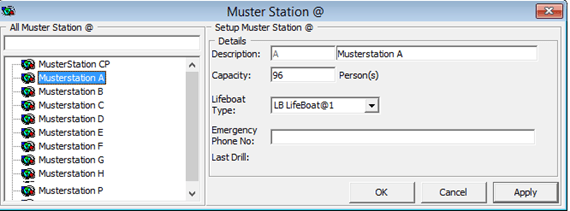
Setting Up Muster Station
- Click Apply to save.
Figure 9-20 Muster Station Setup
Setting Up Lifeboat/Liferaft
A lifeboat/liferaft has a maximum capacity and does require a number of qualified crew to handle them in the event of an emergency.
Figure 9-21 Lifeboat/Liferaft Setup
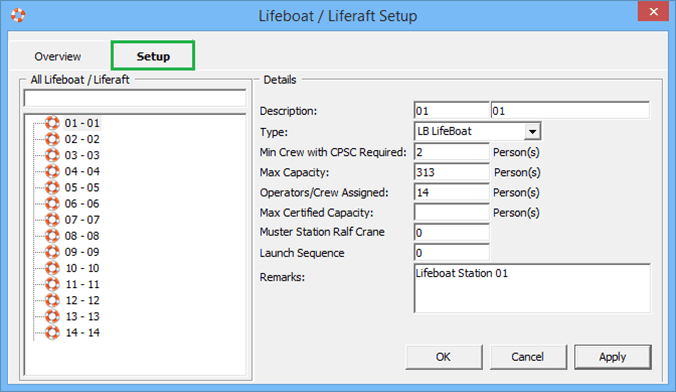
Table 9-11 Lifeboat/Liferaft Setup Field Definition
| Field Name | Description |
|---|---|
|
Description |
Short code and description of the lifeboat/liferaft. |
|
Type |
The type of lifeboat/liferaft. These codes are predefined and hard coded. |
|
Min. Crew with CPSC Required |
Minimum number of CPSC certified crew on lifeboat/liferaft. |
|
Max Capacity |
Maximum capacity allowed per lifeboat/liferaft. |
|
Operators/Crew Assigned |
Number of crew assigned to this lifeboat/raft. |
|
Max Certified Capacity |
Maximum certified capacity of the lifeboat/raft. |
|
Muster Station Raft Crane |
Raft crane the lifeboat is assigned to in Muster Station. |
|
Launch Sequence |
Launch sequence of the lifeboat. |
|
Remarks |
Additional remarks of the lifeboat. |
To set up the codes, repeat the steps in Setting Up Muster Station. You can also duplicate an existing Lifeboat code using the same steps.
Setting Up Drill Definition
Figure 9-22 Drill Definition Setup
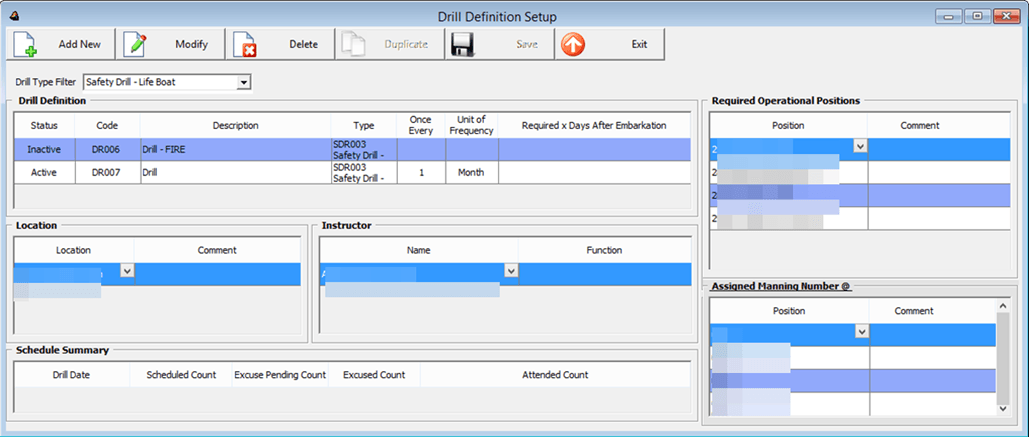
- From the Safety Setup menu, select the Drill Definition.
- To add a new drill, click Add New.
- Select the Status from the drop-down list. and enter the Drill Code and description.
- In the Drill Definition section, select the Drill Type from the drop-down list.
- Enter the Unit of Frequency and Required x Days after embarkation.
- Click Save to save the record.
- Select the drill and click Modify.
- Enter the Location, Instructor, Required Operational Positions and Assigned Manning Number.
- At the Location and Instructor section, right-click and select Add New.
- Select the location from the drop-down list and enter the comment or function, if any.
- At the Required Operational Positions section, right-click and select Add New.
- Add a position individually or select Add All to select multiple positions or all.
- In the Assigned Manning Number section, repeat step 7 and select Assigned Manning number.
Setting Up Course and Certificates
Figure 9-23 Course and Certificates Setup Window
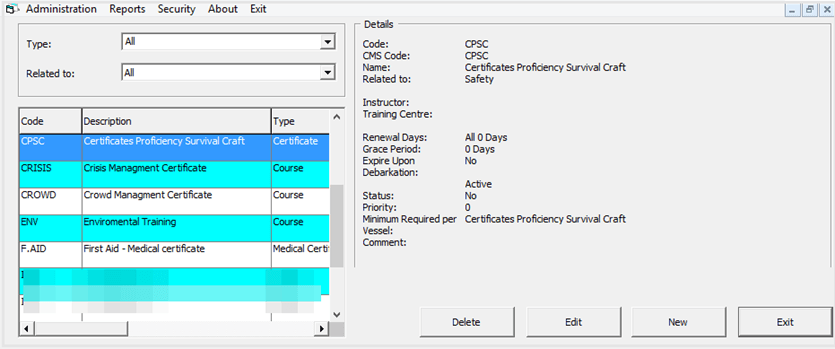
- Select the Course and Certificates from the Safety Setup menu.
- In the Course and Certificate window, click New.
- In the Code and Name section, enter the code and the name of the course.
- Select the Type and Related to from the drop-down list.
- Enter the course description, instructor’s name and the training center location.
- Select the type of expiration section.
- Enter the Minimum Required Per Vessel.
- The Active checkbox is checked by default. Un-check if you wish to disable the course.
- Check the Priority checkbox if the course is a priority.
- Click OK to save the code.