4 Reservation Management
CRS integrations typically involve both sending reservations to OPERA Cloud and receiving reservations from it. This ensures that reservation data remains synchronized across systems, allowing real-time updates for availability, modifications, and cancellations.
OPERA Cloud to Central Reservation System
When reservations are created, modified, or cancelled in OPERA Cloud, updates are sent to the CRS to ensure that availability and booking status remain consistent across all connected channels.
Business Events
Following are the most commonly used Business Events to send reservation data from OPERA Cloud to a Central Reservation System, though others may also apply:
| Module | Business Event | Data Elements | Description |
| RESERVATION | NEW RESERVATION | Select only the primary key and minimal required fields. | Triggered when a reservation is created. |
| RESERVATION | UPDATE RESERVATION | Select only the primary key and minimal required fields. | Triggered when a reservation is updated. |
| RESERVATION | CHECK IN | Select only the primary key and minimal required fields. | Triggered when a reservation is checked in. |
| RESERVATION | CHECK OUT | Select only the primary key and minimal required fields. | Triggered when a reservation is checked out. |
| RESERVATION | REVERSE CHECK IN | Select only the primary key and minimal required fields. | Triggered when a checked-in reservation is reversed and returned to reserved status. |
| RESERVATION | REVERSE CHECK OUT | Select only the primary key and minimal required fields. | Triggered when a checked out reservation is reversed and returned to in-house status. |
| RESERVATION | CANCEL | Select only the primary key and minimal required fields. | Triggered when a reservation is canceled. |
| RESERVATION | NO SHOW | Select only the primary key and minimal required fields. | Triggered when a reservation is no-show. |
| RESERVATION | ROLLBACK CANCEL | Select only the primary key and minimal required fields. | Triggered when a canceled reservation is reinstated and returned to reserved status. |
| RESERVATION | REACTIVATE NO SHOW | Select only the primary key and minimal required fields. | Triggered when a no-show reservation is reinstated and returned to reserved status. |
| RESERVATION | JOIN GUEST | Select only the primary key and minimal required fields. | Triggered when two or more individual reservations are combined to make a single share reservation. |
| RESERVATION | SEPARATE GUEST FROM SHARE | Select only the primary key and minimal required fields. | Triggered when shared reservations are broken and moved back to individual reservations. |
Parent topic: OPERA Cloud to Central Reservation System
REST APIs
Following are the most commonly used REST APIs for retrieving reservation data from OPERA Cloud to CRS:
| API Name | Data Direction | Description |
| getReservation | OPERA Cloud to CRS | Retrieve details of a given reservation. |
| putReservation | CRS to OPERA Cloud | Update Reservation: CRS confirmation number will be sent back to OPERA through the reservation modification call. |
Parent topic: OPERA Cloud to Central Reservation System
Noteworthy Business Logic
| Business Data | Comments |
| Reservation Status |
CRS must align with statuses supported by OPERA Cloud:
Please note that invalid statuses may cause rejection. |
| CRS Confirmation Number | This is a unique identifier assigned by the CRS. If sent, the CRS Confirmation Number will be stored in OPERA Cloud. |
| OTA/PNR Reservation ID | External references (such as OTA confirmation numbers) can be included but should be passed in the appropriate field for cross-referencing. |
| Travel Agent Profile | CRS might support multiple travel agents per reservation. These will include primary and secondary travel agents. OPERA Cloud allows only one travel agent profile; the secondary agents from CRS are mapped as the source profiles. |
| Loyalty Data | Includes membership program code, ID, and level. Please note that the data is stored at the reservation level. |
| Guest Count by Type | OPERA Cloud supports only two guest types: Adult and Child. Please note that this must be mapped correctly in CRS as there is no default conversion logic. |
| Ages of Guests | If sent, age information will be stored in OPERA Cloud. (Optional). |
| Non-Room Products | Non-room products in OPERA Cloud refer to items or services sold alongside a room reservation but not part of the physical room itself. These are supported as part of packaged rate or as add-ons. Product codes must match between CRS and OPERA Cloud. Please note that no defaults are applicable. |
| Special Request Codes | The special request codes must be mapped correctly between CRS and OPERA Cloud. |
| Day Use Reservations | Reservations with same-day arrival and departure are flagged appropriately. CRS stores the reservation with the departure date set to one day after the arrival date and marks it with a day-use flag. |
| Reservation Cancelations | The OPERA cancelation number can be stored in the CRS reservation record. |
| Multi-Rate Plan Bookings | OPERA supports booking reservations with multiple transient rate plans. |
| Room Number | Can be provided in the reservation payload. If not provided, OPERA Cloud will assign room number during check-in. |
| Comments and Comment Types | Comments should be structured to preserve important data if overwritten. Comments in modifications will overwrite previous comments. |
| Link Types (Share with / Joint) | Both “Share with” and “Joint (Travel With)" link types are supported by OPERA Cloud. Please ensure correct formatting in payload. |
| Non-Guaranteed Reservations | Supported by OPERA Cloud and can be communicated through CRS. Appropriate configuration is required in both systems. |
| Reinstating Reservations | Only reservations canceled or marked as no-show within one day after arrival can be reinstated by CRS. |
| Payment Sub-Type | To be mapped using a specific UDF (such as UDF#XX). Please note that the mapping logic must be predefined. |
| Redemption Transaction ID | Award number can be passed to OPERA Cloud as a form of payment or loyalty redemption. |
| Error Logging in CRS | Any functional or data errors encountered during processing should be logged within the CRS system for traceability and issue resolution. |
Parent topic: OPERA Cloud to Central Reservation System
Workflows
- Create Reservations in OPERA Cloud
- Update Reservations in OPERA Cloud
- Reservation Marked as Canceled or No-Show in OPERA Cloud
- Reinstate Cancelled or No-Show Reservations in OPERA Cloud
- Create Shared Reservations in OPERA Cloud
- Unlink Shared Reservations in OPERA Cloud
Parent topic: OPERA Cloud to Central Reservation System
Create Reservations in OPERA Cloud
When a reservation is created directly in OPERA Cloud - either by front desk staff, through a direct channel, or through another integrated system - the reservation data can be published to the CRS through Business Events and Publishing configuration. This ensures that reservations remain synchronized between the CRS and OPERA Cloud.
The diagram and detailed steps below illustrate the end-to-end create reservation flow from OPERA Cloud to the Central Reservation System.
- User creates a reservation in OPERA Cloud.
- OPERA Cloud generates a NEW RESERVATION Business Event.
- CRS can stream the generated Business Events from OPERA Cloud using getBusinessEvents.
- CRS identifies processes the NEW RESERVATION event.
- CRS sends a getReservation request to OHIP.
- OHIP responds with the full reservation details.
- CRS confirmation number is sent back to OHIP using the putReservation call.
- OHIP successfully updates reservation and responds with success.
Parent topic: Workflows
Update Reservations in OPERA Cloud
When a reservation is modified within OPERA Cloud - whether through the front desk, a direct integration, or another connected system - a Business Event is generated and sent to the Central Reservation System (CRS). This allows the CRS to capture and reflect the updated reservation details promptly.
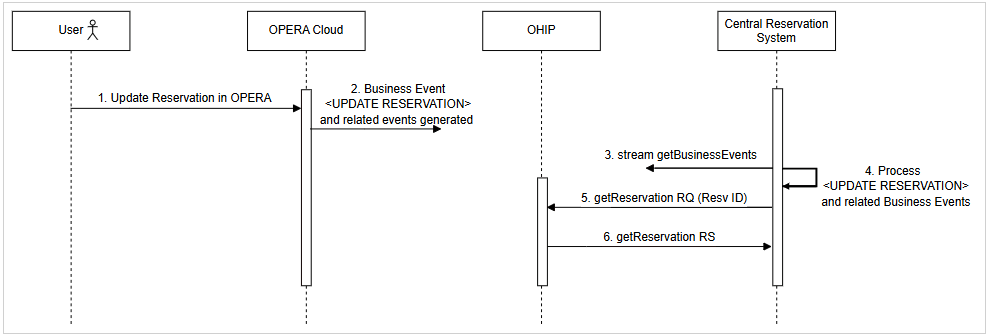
The diagram and detailed steps below illustrate the end-to-end update reservation flow from OPERA Cloud to the Central Reservation System.
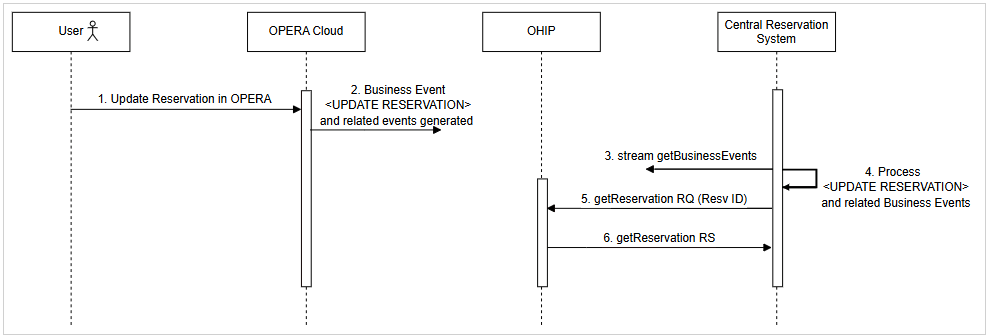
- User modifies a reservation in OPERA Cloud.
- OPERA Cloud generates an UPDATE RESERVATION Business Event along with related Business Events (CHECK IN, CHECK OUT, REVERSE CHECK IN, REVERSE CHECK OUT).
- CRS can stream the generated Business Events from OPERA Cloud using getBusinessEvents.
- CRS identifies and processes the UPDATE RESERVATION and related Business events (CHECK IN, CHECK OUT, REVERSE CHECK IN, REVERSE CHECK OUT).
- CRS sends a
getReservationrequest to OPERA Cloud. - OPERA Cloud responds with the full reservation details.
Parent topic: Workflows
Reservation Marked as Canceled or No-Show in OPERA Cloud
When a reservation is either canceled or marked as a no-show in OPERA Cloud - whether manually by front desk staff or automatically through system processes - a Business Event is generated and made available to the Central Reservation System (CRS). This event ensures that the CRS is notified of the change in reservation status, allowing it to update its records, release inventory, and reflect accurate availability across connected booking channels.
The diagram and detailed steps below illustrate the end-to-end cancel/no show reservation flow from OPERA Cloud to the Central Reservation System.
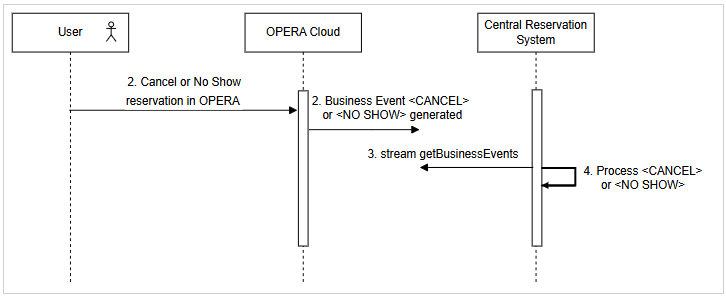
- User cancels or marks a reservation as no-show in OPERA Cloud.
- OPERA Cloud generates a CANCEL or NO SHOW Business Event.
- CRS can stream the generated Business Events from OPERA Cloud using getBusinessEvents.
- CRS identifies and processes the CANCEL or NO SHOW event.
Parent topic: Workflows
Reinstate Cancelled or No-Show Reservations in OPERA Cloud
When a previously canceled or no-show reservation is reinstated in OPERA Cloud - typically by front desk staff or through a connected system - a Business Event is triggered and made available to the Central Reservation System (CRS). This ensures the CRS is informed of the reinstatement, allowing it to restore the reservation, adjust inventory, and maintain accurate availability and booking records across all integrated distribution channels.
The diagram and detailed steps below illustrate the end-to-end reinstate reservation flow from OPERA Cloud to the Central Reservation System.
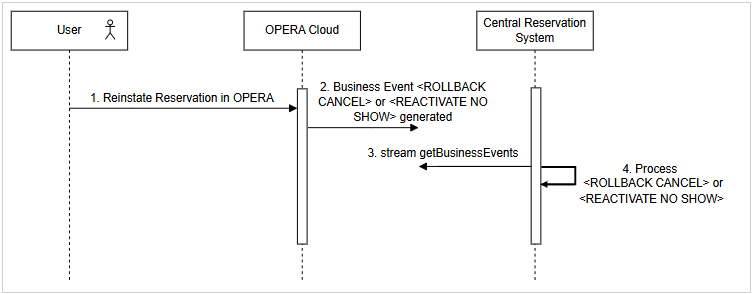
- User reinstates a cancelled or no-show reservation in OPERA Cloud.
- OPERA Cloud generates a Business Event: ROLLBACK CANCEL or REACTIVATE NO SHOW.
- CRS can stream the generated Business Events from OPERA Cloud using getBusinessEvents.
- CRS identifies and processes the ROLLBACK CANCEL or REACTIVATE NO SHOW event.
Parent topic: Workflows
Create Shared Reservations in OPERA Cloud
A Shared Reservation involves multiple guests staying in the same room, each with an individual reservation record. When a shared reservation is created in OPERA Cloud, a Business Event is triggered for each individual reservation in the share group. These events are then made available to the Central Reservation System (CRS), allowing it to accurately capture and process all related reservations.
The diagram and detailed steps below illustrate the end-to-end create shared reservation
flow from OPERA Cloud to the Central Reservation System.
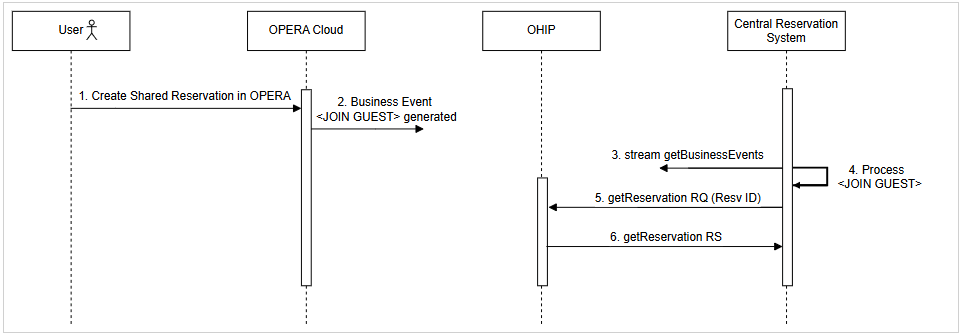
- User creates a shared reservation in OPERA Cloud.
- OPERA Cloud generates a JOIN GUEST Business Event.
- CRS can stream the generated Business Events from OPERA Cloud using getBusinessEvents.
- CRS identifies and processes the JOIN GUEST event.
- CRS sends a getReservation request to OHIP.
- OHIP responds with the full reservation details.
Parent topic: Workflows
Unlink Shared Reservations in OPERA Cloud
When a shared reservation is unlinked (broken) in OPERA Cloud, a Business Event is triggered for each affected reservation. This event is made available to the Central Reservation System (CRS), ensuring that the CRS can update its records to reflect the change. By processing the share break event, the CRS can reassign room occupancy, adjust guest details, and maintain accurate inventory and reservation status across all channels.
The diagram and detailed steps below illustrate the end-to-end break shared reservation flow from OPERA Cloud to the Central Reservation System.
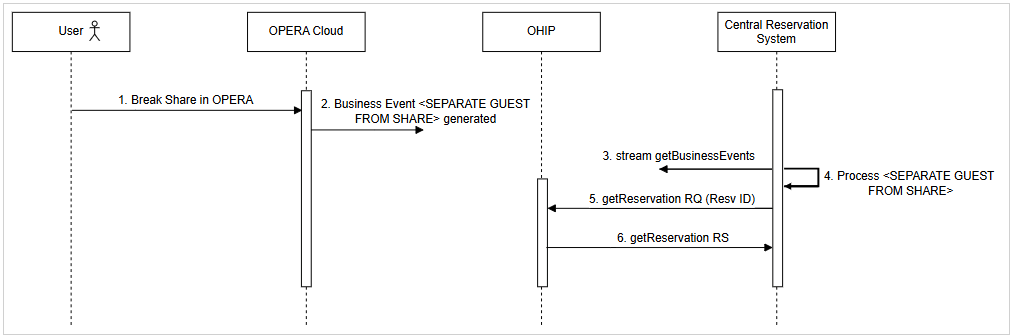
- User breaks a shared reservation in OPERA Cloud.
- OPERA Cloud generates a SEPARATE GUEST FROM SHARE Business Event.
- CRS can stream the generated Business Events from OPERA Cloud using getBusinessEvents.
- CRS identifies and processes the SEPARATE GUEST FROM SHARE event.
- CRS sends a getReservation request to OHIP.
- OHIP responds with the full reservation details.
Parent topic: Workflows