Central Reservation System to OPERA Cloud
The CRS communicates reservation details to OPERA Cloud whenever a booking is made through external sources, ensuring real-time updates at the property level.
Parent topic: Reservation Management
APIs
Following are the most commonly used REST APIs for sending reservation data from a CRS to OPERA Cloud:
| API Name | Data Direction | Description |
| postReservation | CRS to OPERA Cloud | Create Reservation |
| putReservation | CRS to OPERA Cloud | Update Reservation |
| postCancelReservation | CRS to OPERA Cloud | Cancel Reservation |
| postCombineShareReservations | CRS to OPERA Cloud | Share Reservations |
| deleteShareReservation | CRS to OPERA Cloud | Break Share Reservations |
| deleteReservationPackage | CRS to OPERA Cloud | Remove Packages from a Reservation |
| postReservationLinks | CRS to OPERA Cloud | Link Reservations |
| deleteReservationLinks | CRS to OPERA Cloud | Break Linked Reservations |
Parent topic: Central Reservation System to OPERA Cloud
Noteworthy Business Logic
| Business Data | Comments |
| Default Values |
The postReservation message includes a data element called reservationNotification
|
| Reservation Status |
CRS must align with statuses supported by OPERA Cloud:
Please note that invalid statuses may cause rejection. |
| CRS Confirmation Number | This is a unique identifier assigned by the CRS. If sent, the CRS Confirmation Number will be stored in OPERA Cloud. |
| OTA/PNR Reservation ID | External identifiers (such as OTA confirmation numbers) can be included but should be passed in the appropriate field for cross-referencing. |
| Profile Matching |
|
| Travel Agent Profile | CRS supports up to two travel agents per reservation, a primary and a secondary. OPERA Cloud allows only one travel agent profile; the secondary agent from CRS is mapped as the source profile. |
| Loyalty Data | Includes membership program code, ID, and level. Please note that the data is stored at the reservation level as opposed to storing at profile level. |
| Guest Count by Type | CRS must align with OPERA’s support for only two guest types: Adult and Child. Please note that this must be mapped correctly in CRS as there is no default conversion logic. |
| Ages of Guests | If sent, age information will be stored in OPERA Cloud. |
| Non-Room Products | Non-room products in OPERA Cloud refer to items or services sold alongside a room reservation but not part of the physical room itself. These are supported as part of packaged rate or as add-ons. Product codes must match between CRS and OPERA Cloud. Please note that no defaults are applicable. |
| Special Request Codes | The special request codes must be mapped correctly between CRS and OPERA. |
| Day Use Reservations | Reservations with same-day arrival and departure are flagged appropriately. CRS stores the reservation with the departure date set to one day after the arrival date and marks it with a day-use flag. |
| Cancellation Reason Code |
Applied when a reservation is canceled. Note: The Cancellation Reason Code is mandatory in OPERA Cloud, but optional in CRS. |
| Multiple Rooms of Same Type | CRS supports booking multiple rooms of the same type under one reservation. |
| Multi-Rate Plan Bookings | A reservation may include multiple transient rate plans. However, they are supported and processed as part of a single booking flow. |
| Room Type Code | Room type codes in CRS must match OPERA Cloud configuration. Default values should be defined in OPERA Controls to ensure consistency. |
| Room Number | Room inventory in CRS must align with the room unit configuration defined in OPERA Cloud. Once a guest has checked in, CRS will not update or change the assigned room number. |
| Rate Plan Code |
Used to determine pricing, availability, and package inclusions. Must match OPERA Cloud configuration. Note: A default rate plan should be configured in OPERA to prevent reservation failures if not provided. |
| Comments & Comment Types | Comments should be structured to preserve important data if overwritten. Comments in modifications will overwrite previous comments. |
| Link Types (Share with / Joint) | Both “Share with” and “Joint (Travel With)" link types are supported by OPERA Cloud. Please ensure correct formatting in payload. |
| Non-Guaranteed Reservations | Supported by OPERA Cloud and can be communicated through CRS. Appropriate configuration is required in both systems. |
| Reinstating Reservations | Only reservations canceled or marked as no-show within one day after arrival can be reinstated by CRS. |
| Payment Sub-Type | To be mapped using a specific UDF (such as UDF#XX). Please note that the mapping logic must be predefined. |
| Redemption Transaction ID | Award number can be passed to OPERA Cloud as a form of payment or loyalty redemption. |
| Payment / Credit Card Info |
CRS sends only tokenized payment information. OPERA Cloud enforces high security standards by preventing the storage or transmission of clear text credit card data. Note: A default payment method should be configured in OPERA to minimize processing failures when tokens are missing. |
Parent topic: Central Reservation System to OPERA Cloud
Workflows
- Create Reservation in CRS
- Update Reservation in CRS
- Cancel Reservation in CRS
- Create Linked Reservation in CRS
- Create Joint Reservation in CRS
- Break Linked Reservations in CRS
- Break Shared Reservations in CRS
- Break Joint Reservations in CRS
Parent topic: Central Reservation System to OPERA Cloud
Create Reservation in CRS
Creating a reservation in CRS triggers the transfer of booking data to OPERA Cloud. This ensures that the property has visibility into the upcoming stay, allowing teams to prepare for arrival and allocate resources accordingly.
The diagram and detailed steps below illustrate the end-to-end create reservation flow from Central Reservation System to OPERA Cloud.
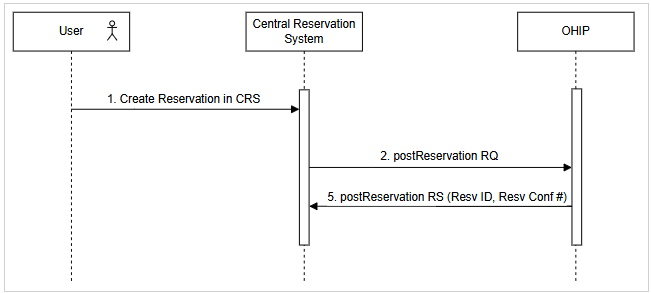
- User creates a reservation in the CRS.
- CRS sends a postReservation request to OHIP containing the full reservation data.
- OHIP returns a successful 201 response with a Reservation ID and Reservation Confirmation Number, which are then stored in CRS. OHIP automatically creates profiles in OPERA Cloud based on guest, company, or travel agent details provided in the reservation.
Parent topic: Workflows
Update Reservation in CRS
Any reservation changes made in CRS, whether minor or major, are reflected in OPERA Cloud in near real time. This ensures the front desk always has up-to-date information for guest service, inventory planning, and reporting.
The diagram and detailed steps below illustrate the end-to-end update reservation flow from Central Reservation System to OPERA Cloud.
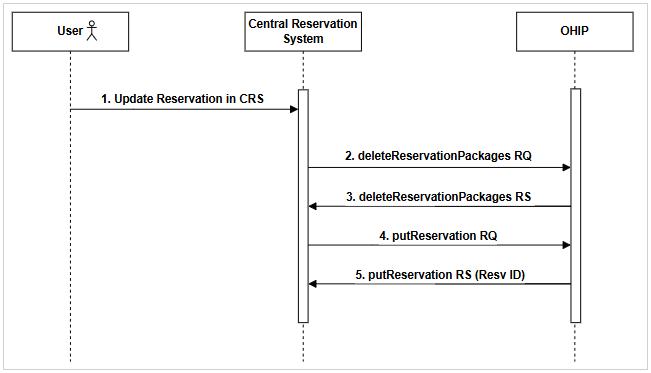
- User updates a reservation in the CRS.
- Non-room products (included as packaged rates or add-ons) are deleted and re-added during reservation modifications. CRS sends a deleteReservationPackages request to OHIP to remove any package related information.
- OHIP returns a 201 response to indicate successful deletion of the packages.
- CRS sends a putReservation request to OHIP containing the reservation updates.
- OHIP returns a successful 201 response with the Reservation ID of the updated reservation. OHIP automatically creates profiles in OPERA Cloud based on guest, company, or travel agent details provided in the reservation.
Parent topic: Workflows
Cancel Reservation in CRS
When a reservation is canceled in the CRS, the update is immediately reflected in OPERA Cloud. This ensures that room availability is released and the property's systems remain accurate for planning, reporting, and guest communication.
The diagram and detailed steps below illustrate the end-to-end cancel reservation flow from Central Reservation System to OPERA Cloud.
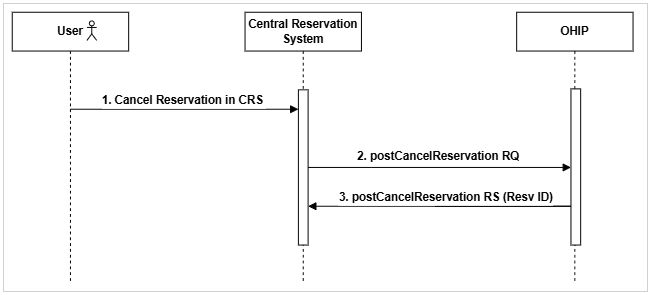
- User cancels a reservation in CRS.
- CRS sends a postCancelReservation request to OHIP for the reservation cancelation.
- OHIP returns a 201 response with a Reservation ID to indicate successful cancelation of the reservation.
Parent topic: Workflows
Create Linked Reservation in CRS
A linked reservation can be of two types:
- Shared Reservation: Multiple guests sharing the same room, each with their own reservation record.
- Joint Reservation: Separate reservations linked for guests traveling together but staying in different rooms.
When linked reservations - such as shared or joint - are created in the CRS, each related booking is sent to OPERA Cloud with the appropriate linkage details. This ensures the property can manage room assignments, billing preferences, and guest expectations for connected reservations seamlessly.
4.1. Create Shared Reservation in CRS
The diagram and detailed steps below illustrate the end-to-end create shared reservation flow from Central Reservation System to OPERA Cloud.
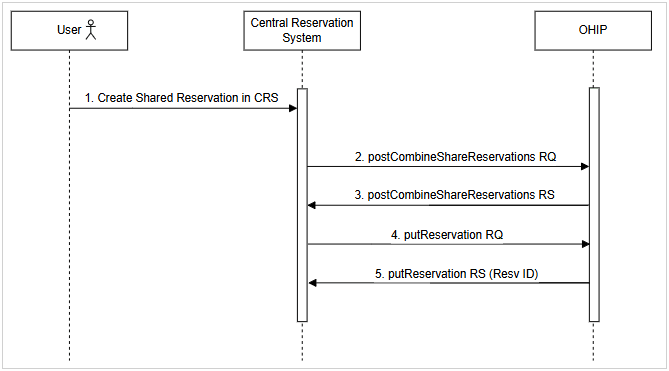
- User creates a shared reservation in CRS.
- CRS sends a postCombineShareReservations request to OHIP.
- OHIP returns a 201 response to indicate successful creation of a shared reservation.
- CRS sends a putReservation request to OHIP containing the reservation share updates.
- OHIP returns a successful 201 response with the Reservation ID of the updated reservation.
Parent topic: Workflows
Create Joint Reservation in CRS
The diagram and detailed steps below illustrate the end-to-end create joint reservation flow from Central Reservation System to OPERA Cloud.
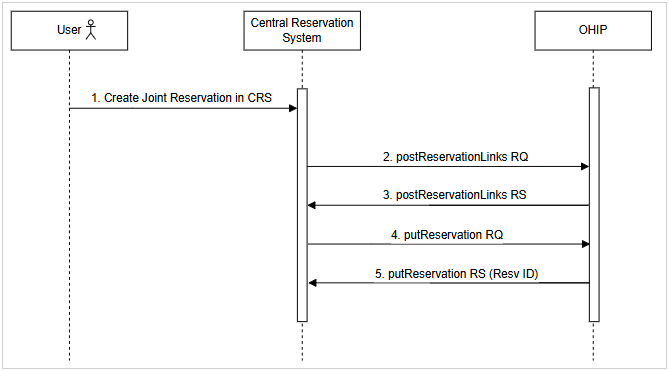
- User creates a joint reservation in CRS.
- CRS sends a postReservationLinks request to OHIP.
- OHIP returns a 201 response to indicate successful creation of a joint reservation.
- CRS sends a putReservation request to OHIP containing the joint reservation updates.
- OHIP returns a successful 201 response with the Reservation ID of the updated reservation.
Parent topic: Workflows
Break Linked Reservations in CRS
When linked reservations are unlinked (broken) in the CRS, the update is reflected in OPERA Cloud to remove the association between the bookings. This ensures that the property's systems reflect accurate room assignments and guest relationships, allowing for independent check-in, billing, and stay management. Similar to the creation of a linked reservation, you can unlink both shared and joint reservations in CRS.
Parent topic: Workflows
Break Shared Reservations in CRS
The diagram and detailed steps below illustrate the end-to-end unlink shared reservation flow from Central Reservation System to OPERA Cloud.
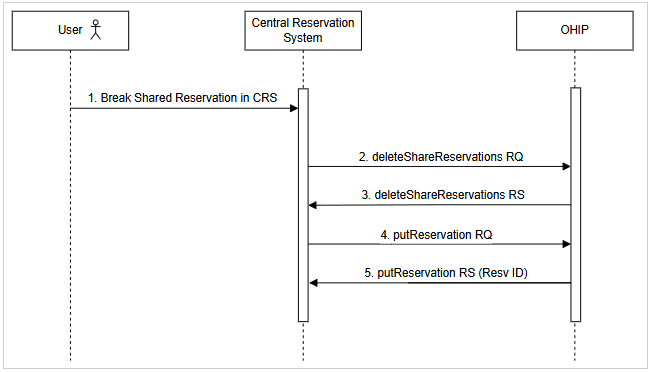
- User breaks a shared reservation in CRS.
- CRS sends a deleteShareReservations request to OHIP.
- OHIP returns a 201 response to indicate successful unlinking of a shared reservation.
- CRS sends a putReservation request to OHIP containing the shared reservation unlinking updates.
- OHIP returns a successful 201 response with the Reservation ID of the updated reservation.
Parent topic: Workflows
Break Joint Reservations in CRS
The diagram and detailed steps below illustrate the end-to-end unlink joint reservation flow from Central Reservation System to OPERA Cloud.
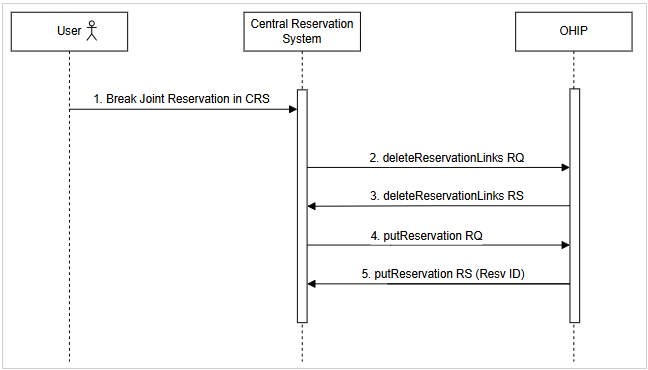
- User breaks a joint reservation in CRS.
- CRS sends a deleteReservationLinks request to OHIP.
- OHIP returns a 201 response to indicate successful unlinking of a joint reservation.
- CRS sends a putReservation request to OHIP containing the joint reservation unlinking updates.
- OHIP returns a successful 201 response with the Reservation ID of the updated reservation.
Parent topic: Workflows