5 Group Management
A group block is an allocation of rooms for multiple room types, reserved for a specific date period, that does not require you to create individually named reservations. Group Management CRS integrations typically involve sending and receiving group information from OPERA Cloud. This ensures that group data remains synchronized across systems, allowing real-time updates for room allocations, modifications, and cancelations.
OPERA Cloud to Central Reservation System
When group blocks are created, modified, or cancelled in OPERA Cloud, updates are sent to the CRS to ensure group details and room assignments remain consistent across all connected channels.
Parent topic: Group Management
REST APIs
Following are the most commonly used REST APIs for retrieving group block data from OPERA Cloud to CRS:
| API Name | Data Direction | Description |
| getChangesByDateTime | OPERA Cloud to CRS | Retrieve list of updated blocks. |
| getBlock | OPERA Cloud to CRS | Retrieve the details of a specific block. |
| putBlock | CRS to OPERA Cloud | Update Reservation: CRS confirmation number will be sent back to OPERA through the group block modification call. |
Parent topic: OPERA Cloud to Central Reservation System
Noteworthy Business Logic
| Business Data | Comments |
| Group Status |
CRS must align with statuses supported by OPERA Cloud:
Please note that invalid statuses may cause rejection. |
| Group Deletions | Group block deletions are handled as group cancelations. |
| Elasticity of Blocks | You can set an Elastic flag in the Central Reservation System to indicate flexibility in block booking dates. Consequently, when a booking is made outside of the core group dates, the auto-extend functionality will be automatically triggered from OPERA Cloud. |
| Per Product pricing | With Per Product pricing, the flat price per room type is communicated as a single-person rate. |
Parent topic: OPERA Cloud to Central Reservation System
Workflows
Parent topic: OPERA Cloud to Central Reservation System
Create Group Blocks in OPERA Cloud/OHIP
When a group block is created directly in OPERA Cloud or OHIP - either by front desk staff, through a direct channel, or through another integrated system - the block data can be published to the CRS. This ensures that group blocks remain synchronized between the CRS and OPERA Cloud.
The diagram and detailed steps below illustrate the end-to-end create group block flow from OPERA Cloud to the Central Reservation System.
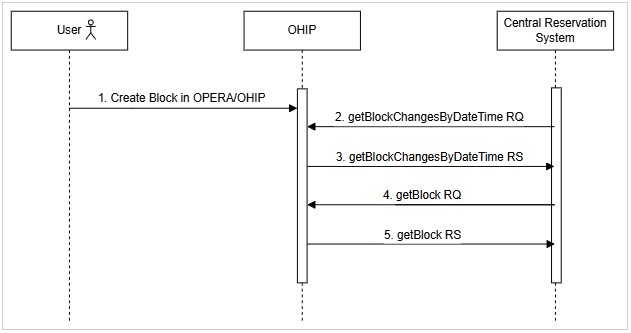
- User creates a block directly within the OPERA Cloud User Interface or through OHIP.
- CRS sends a getBlockChangesByDateTime request to OHIP to retrieve updates.
- OHIP responds with a list of changed blocks based on the requested time window.
- CRS sends a getBlock request to OHIP to retrieve the full block details.
- OHIP responds with the complete block data.
Parent topic: Workflows
Update Group Blocks in OPERA Cloud/OHIP
When a group block is modified directly in OPERA Cloud or OHIP, the block data can be published to the CRS. This ensures that group blocks remain synchronized between the CRS and OPERA Cloud.
The diagram and detailed steps below illustrate the end-to-end modify group block flow from OPERA Cloud to the Central Reservation System.
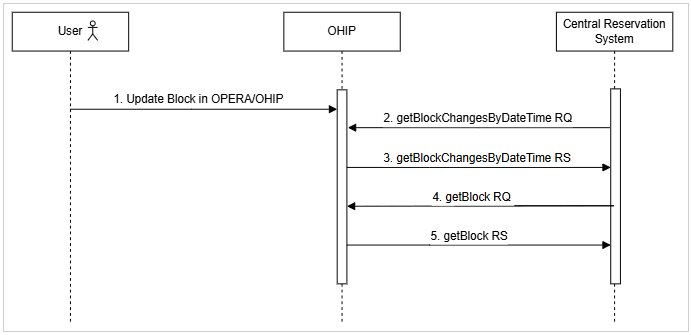
- User updates a block directly within the OPERA Cloud User Interface or through OHIP.
- CRS sends a getBlockChangesByDateTime request to OHIP to retrieve updates.
- OHIP responds with a list of changed blocks based on the requested time window.
- CRS sends a getBlock request to OHIP to retrieve the full block details.
- OHIP responds with the complete block data.
Parent topic: Workflows
Central Reservation System to OPERA Cloud
The CRS sends updates to OPERA Cloud whenever group bookings are created, modified, or canceled, ensuring that group information remains accurate and consistent across all connected systems.
Parent topic: Group Management
REST APIs
Following are the most commonly used REST APIs for retrieving group block data from CRS to OPERA Cloud:
| API Name | Data Direction | Description |
| postBlock | CRS to OPERA Cloud | Create a new group block. |
| putBlock | CRS to OPERA Cloud | Update an existing group block. |
| postBlockRestrictions | CRS to OPERA Cloud | Apply restrictions to a group block. |
| getBlockStatusCodes | CRS to OPERA Cloud | Retrieve list of status codes for group block. |
| putBlockStatusCode | CRS to OPERA Cloud | Update status of a group block. |
| putBlockAllocationRange | CRS to OPERA Cloud |
Update allocation records of an existing group block across multiple dates and room types. |
| putBlockAllocation | CRS to OPERA Cloud | Update room type allocations and rates for a specific block for a shorter date range. |
|
startBlockAllocationProcess getBlockAllocationProcessStatus getBlockAllocationProcessInfo |
CRS to OPERA Cloud | Asynchronous workflow to add block room type allocations and rates for a specified block, typically across a large date range. |
Parent topic: Central Reservation System to OPERA Cloud
Noteworthy Business Logic
| Business Data | Comments |
| Group Status |
CRS must align with statuses supported by OPERA Cloud:
Please note that invalid statuses may cause rejection. |
| Group Deletions | Group block deletions are handled as group cancelations. |
| Elasticity of Blocks | You can set an Elastic flag in the Central Reservation System to indicate flexibility in block booking dates. Consequently, when a booking is made outside of the core group dates, the auto-extend functionality will be automatically triggered from OPERA Cloud. |
| Per Product pricing | With Per Product pricing, the flat price per room type is communicated as a single-person rate. |
| Contracted Rooms | Contracted Rooms are supported in OPERA Cloud. This represents the total number of rooms that have been agreed upon and guaranteed in the group contract. This is the committed room block, regardless of whether individual reservations have been picked up yet. |
| Deducted Rooms | Contracted Rooms are supported in OPERA Cloud. This represents the number of rooms that are deducted from general inventory when the group block is created. These rooms are held exclusively for the group and are not available for general sale unless released. |
| Occupancy pricing | The OPERA Control "OCCUPANCY SPLIT PER ROOM TYPE" must be turned off for counters to be communicated from CRS to OPERA Cloud. |
Parent topic: Central Reservation System to OPERA Cloud
Workflows
- Create Group Blocks (short duration) in CRS
- Update Group Blocks (short duration) in CRS
- Create Group Blocks (longer duration) in CRS
- Update Group Blocks (longer duration) in CRS
Parent topic: Central Reservation System to OPERA Cloud
Create Group Blocks (short duration) in CRS
Creating a short-term group block (typically less than a week) in the CRS updates OPERA Cloud through OHIP, ensuring the property can manage group inventory, room allocations, and operational planning in real time.
The diagram and detailed steps below illustrate the end-to-end create group block flow from the Central Reservation System to OHIP.
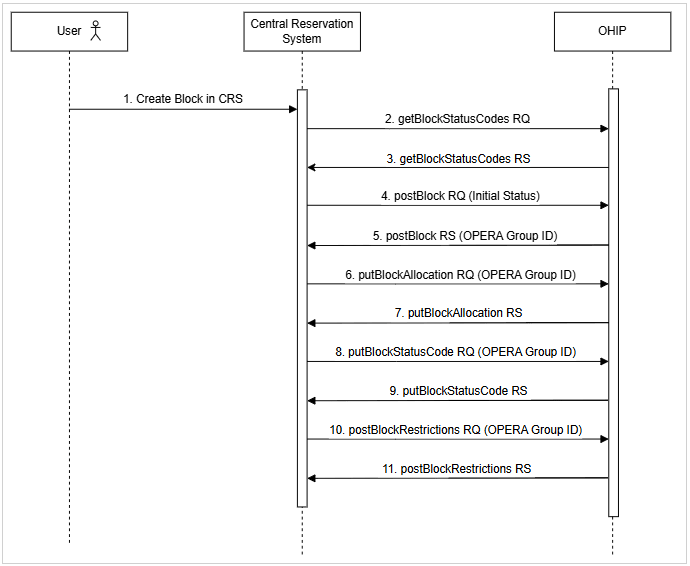
- User creates a short-term (less than a week) block in the CRS.
- CRS sends a getBlockStatusCodes request to OHIP to retrieve the initial block status and available status workflow.
- OHIP responds with a list of available block status codes.
- CRS sends a postBlock request to OHIP to create the block with the initial status configured in OPERA Cloud.
- OHIP returns a successful 201 response containing the OPERA Group ID. This ID will be used for all future group block communications with OPERA Cloud.
- CRS defines room type allocations by sending a putBlockAllocation request for each inventory type and date range, using the values set at the group level.
- OHIP returns a success message upon assigning the room type allocations.
- CRS sends a putBlockStatusCode request to OHIP to update the block's status until it aligns with the current status in CRS.
- OHIP returns a successful 201 response to indicate successful updates of the block status.
- CRS sends a postBlockRestrictions request to OHIP to apply any necessary restrictions (e.g., minimum stay).
- OHIP returns a 201 success response indicating that the restrictions have been applied.
Parent topic: Workflows
Update Group Blocks (short duration) in CRS
Modifying a short-term group block (typically less than a week) in the CRS triggers an update to OPERA Cloud through OHIP, providing real-time visibility into group changes.
The diagram and detailed steps below illustrate the end-to-end update group block flow from the Central Reservation System to OHIP.
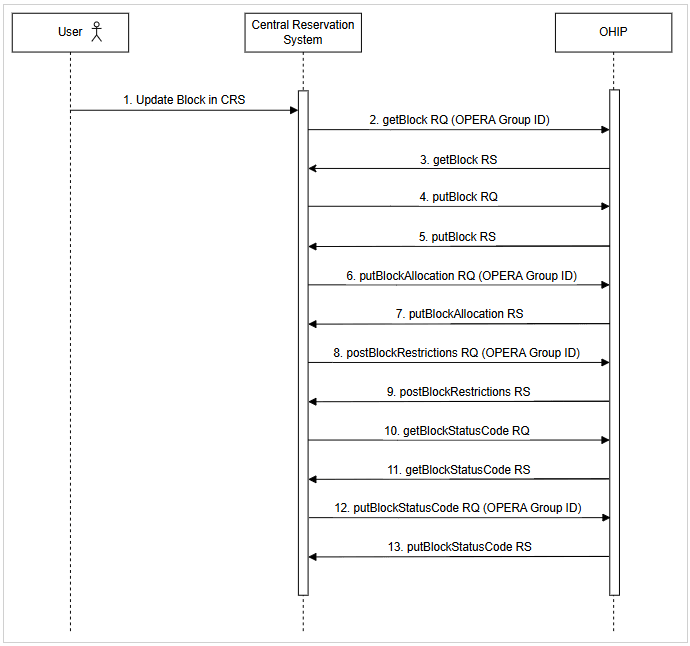
- User updates a short-duration block (less than a week) in the CRS.
- CRS sends a getBlock request to OHIP using the OPERA Group ID to retrieve the current block details.
- OHIP responds with the full block information.
- CRS sends a putBlock request to OHIP to update the block header details.
- OHIP returns a successful 201 response confirming the block header update.
- CRS sends a putBlockAllocation request to OHIP to update the room type allocations for the block.
- OHIP responds with a successful 201 response confirming the room type allocations update.
- CRS sends a postBlockRestrictions request to OHIP to apply or update any group block restrictions (such as minimum stay requirements).
- OHIP responds with a successful 201 response confirming the application of the restrictions.
- CRS sends a getBlockStatusCode request to OHIP to retrieve the current block status codes.
- OHIP responds with a list of valid block status codes.
- CRS sends a putBlockStatusCode request to OHIP to update the block status until it aligns with the current status in CRS.
- OHIP returns a successful 201 response confirming the block status update.
Parent topic: Workflows
Create Group Blocks (longer duration) in CRS
Creating a long-term (typically more than a week) group block in the CRS updates OPERA Cloud through OHIP, enabling the property to manage extended bookings and forecast inventory needs accurately.
The diagram and detailed steps below illustrate the end-to-end update group block flow from Central Reservation System to OHIP.
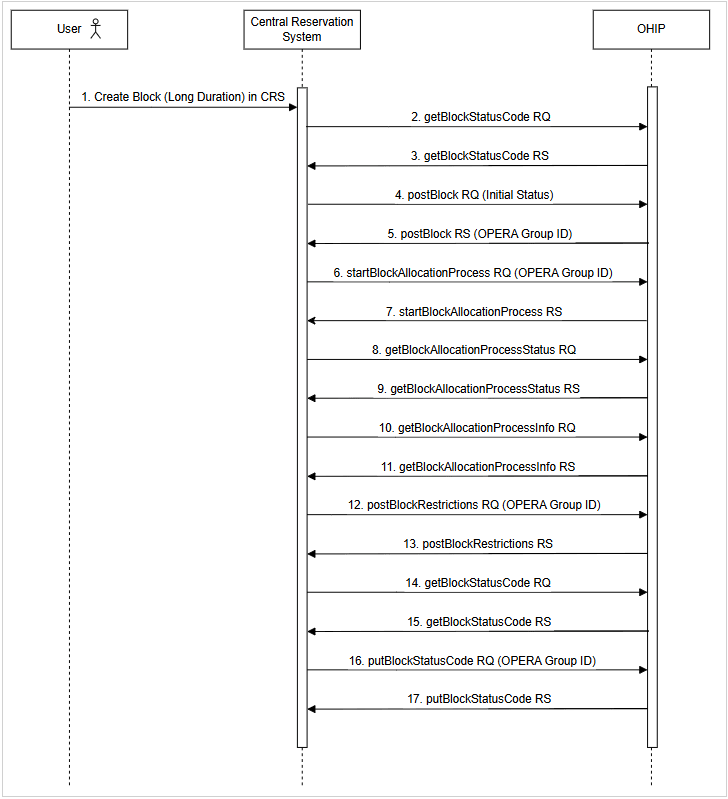
- User creates a long-duration (more than a week) block in the CRS.
- CRS sends a getBlockStatusCode request to OHIP to retrieve the initial block status and available status workflow.
- OHIP responds with a list of available block status codes.
- CRS sends a postBlock request to OHIP to create the block with the initial status configured in OPERA Cloud.
- OHIP returns a successful 201 response with the OPERA Group ID. This ID will be used for all future group block communications with OPERA Cloud.
- CRS sends a startBlockAllocationProcess request to OHIP using the OPERA Group ID to initiate the asynchronous update of block room type allocations and rates to a specified Block.
- OHIP responds with a process ID indicating that the allocation process has started.
- CRS sends a getBlockAllocationProcessStatus request to OHIP to check the progress of the allocation process.
- OHIP responds with the current status of the block allocation process.
- CRS sends a getBlockAllocationProcessInfo request to OHIP to retrieve the final status of the asynchronous update initiated in step 6 above.
- OHIP responds with the final status of the allocation process, confirming whether the block allocations were successfully completed or if further action is required.
- CRS sends a postBlockRestrictions request to OHIP using the OPERA Group ID to apply any applicable group restrictions (such as minimum stay).
- OHIP returns a 201 success response confirming that restrictions have been applied.
- CRS sends a getBlockStatusCode request to OHIP to recheck the current available block status codes.
- OHIP responds with the updated list of status codes.
- CRS sends a putBlockStatusCode request to OHIP to update the block's status until it aligns with the current status in CRS.
- OHIP returns a successful 201 response to indicate successful updates of the block status.
Parent topic: Workflows
Update Group Blocks (longer duration) in CRS
Updating a long-term (typically more than a week) group block in the CRS updates OPERA Cloud through OHIP, enabling the property to manage extended bookings and forecast inventory needs accurately.
The diagram and detailed steps below illustrate the end-to-end update group block flow from the Central Reservation System to OHIP.
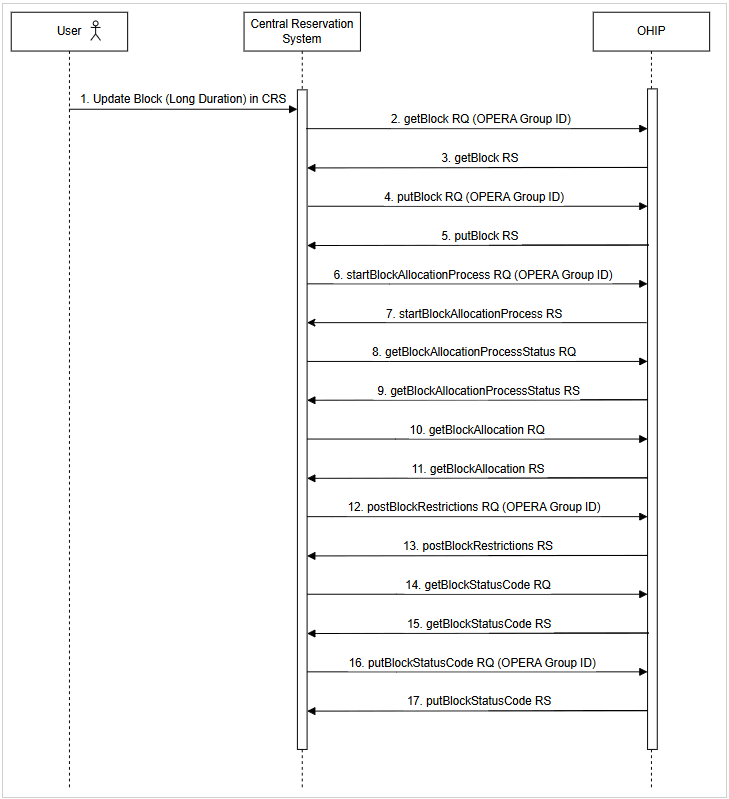
- User updates a long-duration (more than a week) block in the CRS.
- CRS sends a getBlock request to OHIP using the OPERA Group ID to retrieve the current block details.
- OHIP responds with the full block information.
- CRS sends a putBlock request to OHIP to update the block header details.
- OHIP returns a successful 201 response confirming the block header update.
- CRS sends a startBlockAllocationProcess request to OHIP using the OPERA Group ID to initiate the asynchronous update of block room type allocations and rates to a specified Block.
- OHIP responds with a process ID indicating that the allocation process has started.
- CRS sends a getBlockAllocationProcessStatus request to OHIP to check the progress of the allocation process.
- OHIP responds with the current status of the block allocation process.
- CRS sends a getBlockAllocationProcessInfo request to OHIP to retrieve the final status of the asynchronous update initiated in step 6 above.
- OHIP responds with the final status of the allocation process, confirming whether the block allocations were successfully completed or if further action is required.
- CRS sends a postBlockRestrictions request to OHIP using the OPERA Group ID to apply any applicable group restrictions (such as minimum stay).
- OHIP returns a 201 success response confirming that restrictions have been applied.
- CRS sends a getBlockStatusCode request to OHIP to recheck the current available block status codes.
- OHIP responds with the updated list of status codes.
- CRS sends a putBlockStatusCode request to OHIP to update the block's status until it aligns with the current status in CRS.
- OHIP returns a successful 201 response to indicate successful updates of the block status.
Parent topic: Workflows