6 Availability Management
Availability enables you to manage your room inventory by providing a detailed view of all available and sold rooms at your hotel. Some of the tasks you can perform include defining conditions for stay restrictions, setting room sell limits, and searching for and viewing room availability.
Availability Management in CRS integration allows OPERA Cloud to reflect real-time room availability, restrictions, and sell limits across all connected channels. It enables the property to control how and when rooms can be sold by defining rules such as minimum/maximum stay, closed-to-arrival, and overbooking thresholds.
OPERA Cloud to Central Reservation System
Restrictions are rules that control rate and room availability based on specific conditions such as stay dates, length of stay, or arrival patterns.
Availability is primarily used to communicate stay restrictions between OPERA Cloud and the CRS. When restrictions such as minimum stay, closed-to-arrival, or closed-to-departure are configured in OPERA Cloud, they are published to the CRS to ensure consistent booking rules across all sales channels.
Business Events
Business Events
| Module | Business Event | Data Elements | Description |
| RATE | RATE RESTRICTIONS | Select only the primary key and minimal required fields | Triggered when stay restrictions are updated for a rate plan in OPERA Cloud. |
Parent topic: OPERA Cloud to Central Reservation System
Noteworthy Business Logic
| Business Data | Comments |
| Configuration in CRS | Rate Buckets, Room Buckets, and Inventory Types in CRS must match their corresponding OPERA Cloud configurations, or message processing will fail. |
| Advance Booking | Supported across all levels (house, room type, room bucket, rate plan, rate category). |
| Closed | Can be configured at any level; indicates room or rate is not available for sale. |
| Open | Used to explicitly override Closed restrictions at any level. |
| Closed to Arrival | This prevents arrivals on specific dates while allowing stay-throughs. Please note that this is supported at all levels. |
| Open to Arrival | Overrides Closed to Arrival settings to allow arrivals on specific dates. |
| Closed to Departure | Prevents departures on selected dates. Please note that this is supported at all levels. |
| Open to Departure | Allows departures when Closed To Departure is otherwise configured |
| Minimum / Maximum Length of Stay | Defines how long guests must stay (minimum) or can stay (maximum). Please note that this is supported at all levels. |
| Minimum / Maximum Stay Through | Controls length of total stay across a date range. Please note that this is supported at all levels. |
Parent topic: OPERA Cloud to Central Reservation System
Workflows
Create Restrictions in OPERA Cloud
When new stay restrictions are configured in OPERA Cloud, they are published to the CRS through Business Events. This ensures that selling conditions remain consistent across all distribution channels, preventing invalid bookings and supporting accurate availability control.
The diagram and detailed steps below illustrate the end-to-end set Restrictions flow from OPERA Cloud to CRS.
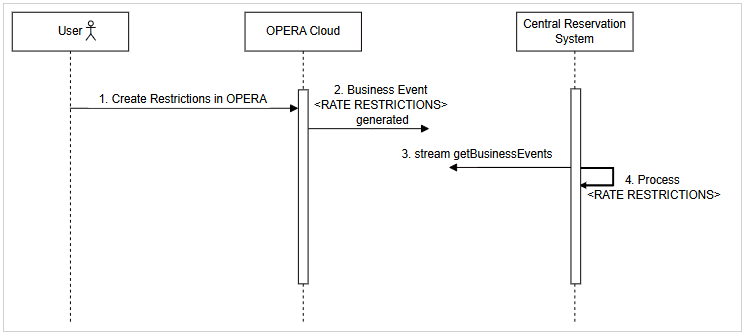
- User sets restrictions in OPERA Cloud.
- OPERA Cloud generates a RATE RESTRICTIONS Business Event.
- CRS can stream the generated Business Events from OPERA Cloud using getBusinessEvents.
- CRS identifies and processes the RATE RESTRICTIONS Business Event.
Parent topic: Workflows
Central Reservation System to OPERA Cloud
When restrictions, oversell limits, or hurdle rates are configured in the CRS - either manually or through an integrated RMS - they are communicated to OPERA Cloud using designated APIs. This ensures that OPERA Cloud reflects the most current availability controls, supporting consistent booking rules and optimized revenue strategies across all channels.
Parent topic: Availability Management
REST APIs
Following are the most commonly used REST APIs for retrieving restrictions from CRS to OPERA Cloud:
| API Name | Data Direction | Description |
| putSellLimitsByDateRange | CRS to OPERA Cloud | Create sell limits by date range |
| postRestriction | CRS to OPERA Cloud | Create stay restrictions on various levels |
| postHurdleRates | CRS to OPERA Cloud | Create hurdle rates |
| putHurdleRates | CRS to OPERA Cloud | Update existing hurdle rate |
Parent topic: Central Reservation System to OPERA Cloud
Noteworthy Business Logic
| Business Data | Comments |
| Configuration in CRS | Rate Buckets, Room Buckets, and Inventory Types in CRS must match their corresponding OPERA Cloud configurations, or message processing will fail. |
| Advance Booking | Supported across all levels (house, room type, room bucket, rate plan, rate category). |
| Closed | Can be configured at any level; indicates room or rate is not available for sale. |
| Open | Used to explicitly override Closed restrictions at any level. |
| Closed to Arrival | This prevents arrivals on specific dates while allowing stay-throughs. Please note that this is supported at all levels. |
| Open to Arrival | Overrides Closed to Arrival settings to allow arrivals on specific dates. |
| Closed to Departure | Prevents departures on selected dates. Please note that this is supported at all levels. |
| Open to Departure | Allows departures when Closed To Departure is otherwise configured. |
| Minimum / Maximum Length of Stay | Defines how long guests must stay (minimum) or can stay (maximum). Please note that this is supported at all levels. |
| Minimum / Maximum Stay Through | Controls length of total stay across a date range. Please note that this is supported at all levels. |
| Date-based Hurdle Point for a Yield Class | Supported. Please note that the yield Class in CRS must match the Yield Category in OPERA Cloud for message processing. |
| Dynamic Date-based Hurdle Point for a Yield Class | Supported. Please note that the yield Class in CRS must match the Yield Category in OPERA Cloud for message processing. |
Parent topic: Central Reservation System to OPERA Cloud
Workflows
Parent topic: Central Reservation System to OPERA Cloud
Create Restrictions in CRS
Restrictions are rules that control rate and room availability based on specific conditions such as stay dates, length of stay, or arrival patterns. When stay restrictions are created in the CRS, they are sent to OPERA Cloud through OHIP APIs.
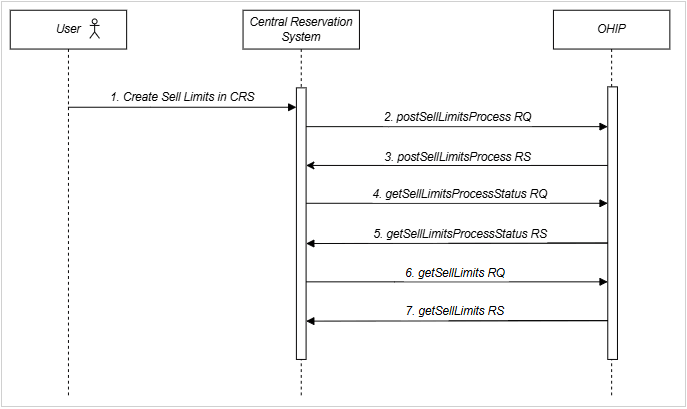
The diagram and detailed steps below illustrate the end-to-end create restriction flow from Central Reservation System to OPERA Cloud.
- User configures stay restrictions in the CRS.
- CRS sends a postRestriction request to OHIP with the applicable restriction details.
- OHIP responds with a 201 status, confirming the stay restrictions were successfully applied.
Parent topic: Workflows
Create Sell Limits in CRS
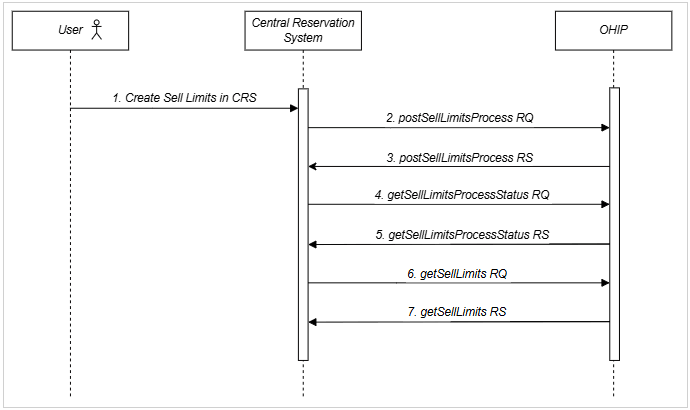
Sell Limits control how many rooms can be sold beyond or below actual physical inventory. Positive values allow overbooking to account for cancelations, while negative values restrict availability to hold back rooms. When sell limits are created in the CRS, they are sent to OPERA Cloud through OHIP to keep availability aligned across systems.
The diagram and detailed steps below illustrate the end-to-end create sell limits flow from Central Reservation System to OPERA Cloud.
- User creates Sell Limits in the CRS.
- CRS sends a postSellLimitsProcess request to OHIP to initiate the asynchronous sell limits update process.
- OHIP responds with a process ID confirming the initiation of the sell limits creation process.
- CRS sends a getSellLimitsProcessStatus request to OHIP to check the progress of the sell limits update process.
- OHIP responds with the current status of the sell limits processing request.
- CRS sends a getSellLimits request to OHIP to retrieve the final status of the asynchronous sell limits creation initiated in step 2 above.
- OHIP responds with the final status, confirming successful creation and processing of the sell limits.
Parent topic: Workflows
Create Hurdles in CRS
Hurdle Rates represent the minimum acceptable price, calculated by the revenue management system based on data from OPERA Cloud. A rate code and room type combination will only be shown in OPERA Cloud if it meets or exceeds this hurdle value. When hurdle rates are created or updated in the CRS, they are sent to OPERA Cloud via OHIP to enforce dynamic availability controls.
The diagram and detailed steps below illustrate the end-to-end create hurdles flow from Central Reservation System to OPERA Cloud.
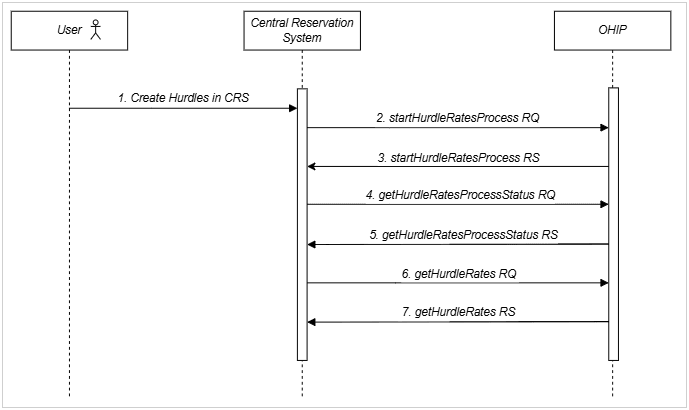
- User creates hurdle rates in the CRS.
- CRS sends a startHurdleRatesProcess request to OHIP to initiate the asynchronous creation of hurdle rates.
- OHIP responds with a process ID confirming that the hurdle rates creation process has started.
- CRS sends a getHurdleRatesProcessStatus request to OHIP to check the progress of the hurdle rates processing.
- OHIP responds with the current status of the hurdle rates creation process.
- CRS sends a getHurdleRates request to OHIP to retrieve the final status of the asynchronous hurdle creation initiated in step 2 above.
- OHIP responds with the final status, confirming successful creation of the hurdle values.
Parent topic: Workflows