7 Rate Management
Rate plans and pricing information are managed in the Central Reservation System and pushed to OPERA Cloud. CRS serves as the system of record for all rate plans and is responsible for receiving pricing updates from a Revenue Management System (RMS) or through manual entry in the CRS user interface.
In OPERA Cloud, rates consist of two main components:
- Rate Header – Contains high-level configuration details such as rate plan code, market code, and booking rules.
- Rate Details – Include date-specific pricing, occupancy-based rates, and additional charges.
Both components must be sent to OPERA Cloud to successfully create or modify a rate plan. Separate integration flows are required to manage the header and detail sections, and each must be completed to ensure the rate is fully configured in OPERA Cloud.
Rate Plan configuration of Rate Details includes the following pricing strategies:
- Flat Pricing: Setting fixed rates for specific dates or seasons.
- Derived Pricing: Creating rate plans that derive their pricing from a base rate, allowing for dynamic adjustments.
Please refer to our user guide on Rate Code Configuration for additional details.
Central Reservation System to OPERA Cloud
When rate plans are created or updated in the CRS - either manually or through RMS - the rate configuration is sent to OPERA Cloud. This ensures that pricing and rate availability remain synchronized between CRS and OPERA Cloud, allowing the property to offer consistent rates across all booking channels.
Parent topic: Rate Management
REST APIs
Following are the most commonly used REST APIs for updating rate data from CRS to OPERA Cloud:
| API Name | Data Direction | Description |
| postRatePlan | CRS to OPERA Cloud | Create new rate headers |
| putRatePlan | CRS to OPERA Cloud | Update existing rate header |
| setDailyRatePlanScheduleRange | CRS to OPERA Cloud | Set daily rate plan schedule range |
| postRatePlanSchedules | CRS to OPERA Cloud | Create Rate Plan pricing schedule |
| getRatePlanSchedules | CRS to OPERA Cloud | Retrieve Rate Plan schedules |
| deleteRatePlanSchedules | CRS to OPERA Cloud | Delete Rate Plan schedules |
|
startSetDailyRatePlanSchedulesProcess getSetDailyRatePlanSchedulesProcessStatus getDailyRatePlanSchedules |
CRS to OPERA Cloud | Create and update Daily Rate Plan Schedules at scale |
Parent topic: Central Reservation System to OPERA Cloud
Noteworthy Business Logic
| Business Data | Comments |
| Rate Categories | A Rate Category is mandatory in OPERA, and the corresponding rate buckets must be set up in CRS to avoid message failures. |
| Room Types | The room type codes in CRS must correspond to those configured in OPERA. |
| Minimum/Maximum Length of Stay | Date-based minimum and maximum length of stay settings are not supported at the rate plan level. Please use restrictions to configure them instead. |
| Minimum/Maximum Advanced Booking | Date based minimum and maximum advanced booking is not supported on the rate plan. Please use restrictions to configure them instead. |
| Non-Room products included in rate | Non-room products in OPERA Cloud refer to items or services sold alongside a room reservation but not part of the physical room itself. These must already be configured as a Package code in OPERA prior to Rate Creation/Update |
| Yield Options | Yield options can be based on the same rate or a different rate. |
| Commission Amount | Commission can be defined as either a flat amount or a percentage. |
| Rate Details- Per Product pricing | CRS will define the price for the first adult. |
| Rate Details - Extra Person Charge | CRS supports a single extra person charge applicable across all guest types. This value will be applied as both the adult and child extra person charge in OPERA. |
Parent topic: Central Reservation System to OPERA Cloud
Workflows
- Create Rate Header in CRS
- Update Rate Header in CRS
- Create Rate Details (Flat Pricing) in CRS (short duration)
- Update Rate Details (Flat Pricing) in CRS (short duration)
- Create Rate Details (Flat Pricing) in CRS (longer duration)
- Update Rate Details (Flat Pricing) in CRS (longer duration)
- Create Rate Details (Derived Pricing) in CRS
- Update Rate Details (Derived Pricing) in CRS
Parent topic: Central Reservation System to OPERA Cloud
Create Rate Header in CRS
When a new rate plan header is created in the CRS - either through the user interface or by an integrated RMS - the rate data is sent to OPERA Cloud through OHIP using designated APIs. This ensures that OPERA Cloud reflects the latest rate offerings, allowing accurate quoting, availability checks, and booking across all distribution channels.
The diagram and detailed steps below illustrate the end-to-end create rate header flow from CRS to OPERA Cloud.
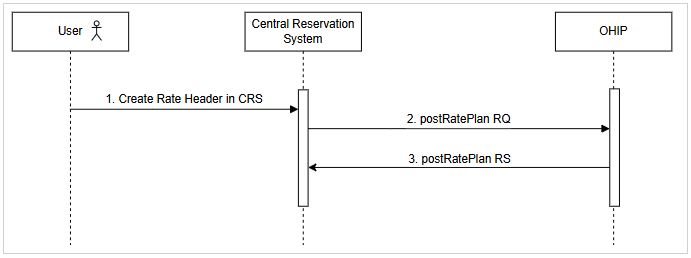
- User creates a rate header in the CRS.
- CRS sends a postRatePlan request to OHIP to create Rate Plans for a given property.
- OHIP returns a successful 201 response confirming the rate header creation.
Parent topic: Workflows
Update Rate Header in CRS
Similar to the creation of rate headers, you can also update a rate plan header in CRS, the rate data is sent to OPERA Cloud through OHIP using designated APIs.
The diagram and detailed steps below illustrate the end-to-end update rate header flow from CRS to OPERA Cloud.
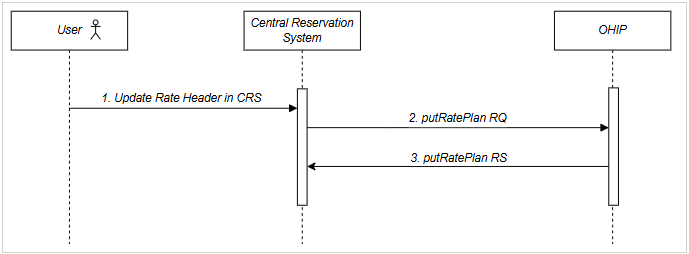
- User updates a rate header in the CRS.
- CRS sends a putRatePlan request to OHIP to update Rate Plans for a given property.
- OHIP returns a successful 201 response confirming the rate header update.
Parent topic: Workflows
Create Rate Details (Flat Pricing) in CRS (short duration)
The diagram and detailed steps below illustrate the end-to-end create rate details for short duration flow from CRS to OPERA Cloud.
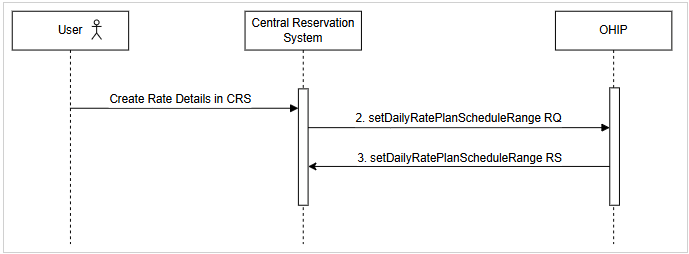
- User creates rate details (flat pricing) in the CRS for a short duration (2 weeks or less).
- CRS sends a setDailyRatePlanScheduleRange request to OHIP to create rate details for a given property.
- OHIP returns a successful 201 response confirming the rate details creation.
Parent topic: Workflows
Update Rate Details (Flat Pricing) in CRS (short duration)
The diagram and detailed steps below illustrate the end-to-end update rate details
for short duration flow from CRS to OPERA Cloud.
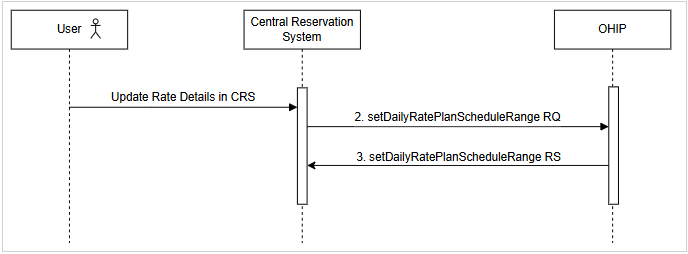
- User creates rate details in the CRS for a short duration (2 weeks or less).
- CRS sends a setDailyRatePlanScheduleRange request to OHIP to update rate details for the property.
- OHIP returns a successful 201 response confirming the rate details update.
Parent topic: Workflows
Create Rate Details (Flat Pricing) in CRS (longer duration)
The diagram and detailed steps below illustrate the end-to-end create rate details for long duration flow from CRS to OPERA Cloud.
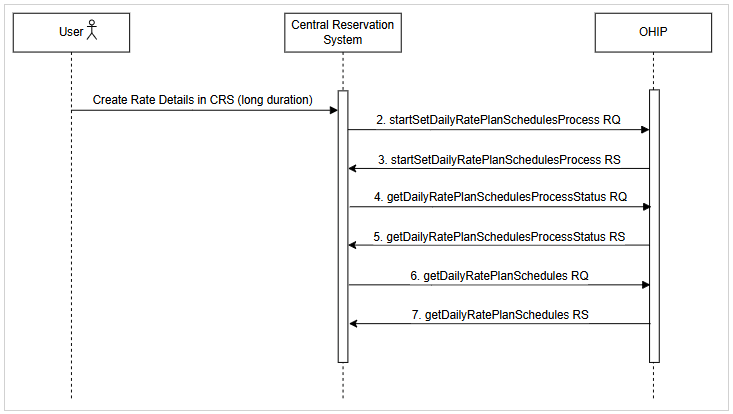
- User creates rate details (flat pricing) in the CRS for a longer duration (more than 2 weeks).
- CRS sends a startSetDailyRatePlanSchedulesProcess request to initiate the asynchronous creation of rate details for a given property.
- OHIP responds with a process ID confirming the initiation of the rate details creation process.
- CRS sends a getSetDailyRatePlanSchedulesProcessStatus request to OHIP to check the progress of the rate details creation process.
- OHIP responds with the current status of the rate plan schedules creation process.
- CRS sends a getDailyRatePlanSchedules request to OHIP to retrieve the final status of the asynchronous creation of rate details initiated in step 2 above.
- OHIP responds with the final status, confirming successful creation of rate details for the given duration.
Parent topic: Workflows
Update Rate Details (Flat Pricing) in CRS (longer duration)
The diagram and detailed steps below illustrate the end-to-end update rate details for long duration flow from CRS to OPERA Cloud.
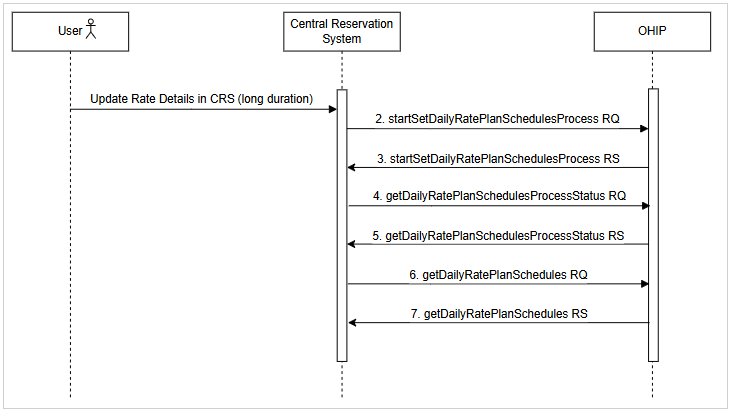
- User updates rate details (flat pricing) in the CRS for a longer duration (more than 2 weeks).
- CRS sends a startSetDailyRatePlanSchedulesProcess request to initiate the asynchronous update of rate details for a given property.
- OHIP responds with a process ID confirming the initiation of the rate details update process.
- CRS sends a getSetDailyRatePlanSchedulesProcessStatus request to OHIP to check the progress of the rate details update process.
- OHIP responds with the current status of the rate plan schedules update process.
- CRS sends a getDailyRatePlanSchedules request to OHIP to retrieve the final status of the asynchronous update of rate details initiated in step 2 above.
- OHIP responds with the final status, confirming successful update of rate details for the given duration.
Parent topic: Workflows
Create Rate Details (Derived Pricing) in CRS
The diagram and detailed steps below illustrate the end-to-end create rate details (derived pricing) from CRS to OPERA Cloud.
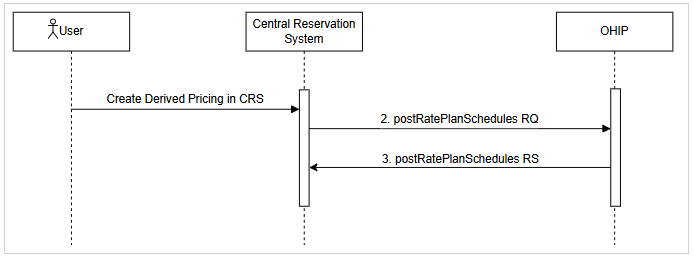
- User creates rate details (derived pricing) in the CRS.
- CRS sends a postRatePlanSchedules request to OHIP to create rate details pricing schedules.
- OHIP responds with a 201 confirming the successful creation of rate details pricing schedules.
Parent topic: Workflows
Update Rate Details (Derived Pricing) in CRS
The diagram and detailed steps below illustrate the end-to-end update rate details (derived pricing) from CRS to OPERA Cloud.
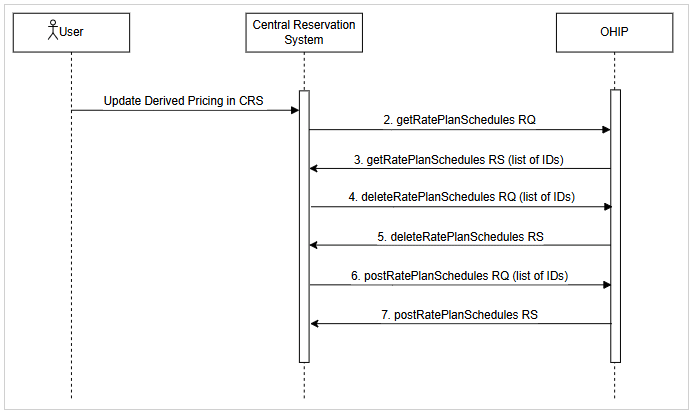
Season IDs in OPERA Cloud are PMS-specific constructs used to group date ranges for rate management (e.g., high, low, shoulder seasons). CRS does not manage Season IDs because they are property-specific configurations in OPERA Cloud, and rate updates from CRS are typically applied using explicit date ranges rather than season-based groupings.
- User updates rate details (derived pricing) in the CRS. When modifying derived pricing, the season IDs in OPERA Cloud are deleted and reinserted via OHIP to manage rate details.
- CRS sends a getRatePlanSchedules request to OHIP to retrieve the list of rate plan schedules of derived pricing rules.
- OHIP responds with a successful 200 response with a list of rate plan schedules that were updated.
- CRS sends a deleteRatePlanSchedules request to OHIP to delete the above list of rate plan schedules in OPERA Cloud through OHIP.
- OHIP responds with a 200 confirming the successful deletion of the rate plan schedules under consideration.
- CRS sends a postRatePlanSchedules request to OHIP with the updated rate plan schedules to insert them in OPERA Cloud through OHIP.
- OHIP responds with a successful 201 response confirming the insertion of the updated rate plan schedule records in OPERA Cloud through OHIP.
Parent topic: Workflows