4 Learn More about Nor1 Connectivity
Introduction
This chapter addresses the GET and POST data needed to dynamically create upgrade offers based on the booking data of each unique reservation provided to Nor1.
The Oracle Hospitality Nor1 Cloud Services solutions provide hotels with the opportunity to create additional revenue from post-booking, standby, and confirmed upgrades. Nor1 receives the booking data from the Learn More Image (LMI) web service. The LMI is a call-to-action for a guest to click through and view the dynamic upgrade offers.
The Nor1 integration partner passes the booking data to Nor1 in the LMI request. Nor1 returns an image or JSON to embed the LMI on the partner’s Internet Booking Engine (IBE) and transaction emails, such as, the confirmation or pre-arrival email.
Nor1 manages the guest eligibility for standby or confirmed upgrades in the LMI web service. Eligibility is determined by business rule filters and upgrade availability. If a guest who is represented by the booking data in the LMI request is ineligible, then the response is a 1x1 transparent pixel image, or success is a false flag in the JSON payload.
The following is an example of embedding the LMI on the IBE confirmation
page: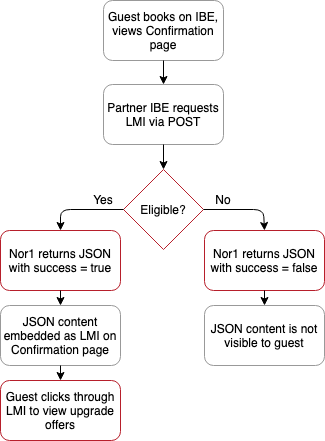
Parent topic: Learn More about Nor1 Connectivity
Implementation
The Learn More Image (LMI) web service is implemented as a REST API. The web service supports the following HTTP methods:
-
GET – response is an image
-
POST – response is JSON
The GET use case is for quickly embedding the Nor1 dynamically generated image on a web page or in an email body. The POST use case is for an integration partner to take the content response from Nor1 to customize the look and feel of the LMI on a web page or in an email body.
The URL for the LMI web service is the same for the GET and POST methods. Nor1 provides a Staging and Production URL. The Staging URL should be used for implementation and integration QA. The Staging environment contains the latest hotel content. Nor1 can set up a test hotel upon request. Switch to the Production URL when you are ready to go live.
The LMI web service supports http and https. Nor1 highly recommends using secure https for the LMI request.
Parent topic: Learn More about Nor1 Connectivity
LMI Web Service URLs
| URL Name | URL |
|---|---|
|
Staging URL |
https://www.oci.nor1uat.com/dynLink/? |
|
Production URL |
https://www.nor1upgrades.com/dynLink/ |
Note:
The URLs in the table provide a presentation only if valid parameters are passed into them.Parent topic: Implementation
Request Data
The booking data provided in the LMI request is the same for GET and POST. Mandatory parameters are required to generate upgrade offers. Recommended parameters improve the likelihood of offer conversion. Optional parameters either replace static content or link to other data sources. The booking parameters are defined in the following table.
Booking Data for GET / POST
| Field | Description | Priority | Example | Type (Limit) |
|---|---|---|---|---|
|
PCD |
Hotel / Property Code |
Mandatory |
SJCHOTEL |
char(20) |
|
EBC |
Booking Code / Reservation number |
Mandatory |
MYP12346A |
char(40) |
|
RCC |
Room Category Code |
Mandatory |
KIRRC |
char(20) |
|
GAD |
Arrival Date |
Mandatory |
YYYYMMDD |
date |
|
NMN |
Number of Nights |
Mandatory |
2 |
int(2) |
|
TBP |
Total booking price |
Recommended |
256.43 |
float(10,2) |
|
GEM |
Guest email |
Mandatory |
guest@gmail.com |
char(100) |
|
GLN |
Guest last name |
Mandatory |
Doe |
char(100) |
|
GFN |
Guest first name |
Mandatory |
John |
char(100) |
|
PID |
Provider ID |
Mandatory |
Nor1 to provide |
char (4) |
|
PET |
Provider Entry Type |
Mandatory |
IBE = WEB, Confirmation email = CONF, Pre-arrival email = PREA |
char(5) |
|
PRL |
Rate Level (if applicable) |
Recommended |
LV1 |
char(12) |
|
PRC |
Rate Code |
Recommended |
BAR |
char(12) |
|
SRP |
Group Code |
Recommended |
G1234 |
char(12) |
|
NOA |
Number of adults |
Recommended |
1 (default) |
int(2) |
|
NOC |
Number of children |
Recommended |
0 (default) |
int(2) |
|
GNR |
Number of Rooms |
Mandatory |
1 (default) |
int(3) |
|
LNG |
Language (ISO 639-1 compliant) |
Recommended |
EN (default) |
char(2) |
|
PCH |
Property Chain Code |
Recommended |
Nor1 to Provide |
char(3) |
|
PLC |
Loyalty Code |
Recommended |
D |
char(3) |
|
GPC |
Guest Postal Code |
Recommended |
95054 |
char(50) |
|
GAR |
Guest Address |
Recommended |
1 Upgrade Drive |
char(125) |
|
GCT |
Guest City |
Recommended |
Santa Clara |
char(150) |
|
GST |
Guest State |
Recommended |
California |
char(100) |
|
GCC |
Guest Country Code (ISO 3166-1-alpha-2 code) |
Recommended |
US |
char(2) |
|
GPN |
Guest Phone Number |
Recommended |
14088509937 |
char(50) |
|
PTS |
Timestamp of Booking |
Recommended |
YYYY-MM-DD H:MM:SS |
date and time |
|
PRT |
Rate Tier* |
Recommended |
TIER |
char(12) |
|
PSC |
Market Segment Code* |
Recommended |
AAA |
char(12) |
|
PCC |
Channel Code* |
Recommended |
VOICE |
char(12) |
|
PCN |
Room Name |
Optional |
King Std |
char(255) |
|
CUR |
Currency Code |
Optional |
USD |
char(3) |
|
GEN |
Guest gender (‘M’, ’F’) |
Recommended |
F |
enum(‘M’,’F’) |
|
GSL |
Guest salutation |
Recommended |
Mr |
char(50) |
|
RTP |
Record Type (N = New, M=Modify, or C=Cancel) |
Optional |
N |
enum(‘N’,’M’,’C’) |
|
GDD |
Departure Date |
Optional |
YYYYMMDD |
date |
|
PLN |
Loyalty Program Number (member id) |
Optional |
NH0004 |
char(16) |
Note:
* Only two of the three fields marked with asterisks can be used; advise which will be used.Parent topic: Request Data
POST Implementation
The booking parameters, defined above, are structured as JSON objects in the body of the POST request. The LMI response will be JSON. The following is an example request. Note this is not a real hotel and the response will not be eligible for upgrade offers:
POST Request Example
| POST Request Header | Content-Type = application/JSON |
|---|---|
|
POST Request Body |
{ "PID" : "NOR1", "PCD" : "SCWA", "EBC" : “123456789”, "RCC" : "STDK", "GAD" : “20150317”, "NMN" : 3, "NOA" : 1, "NOC" : 0, "LNG" : "EN", "TBP" : 500, "GEM" : "guest@gmail.com", "GEN" : “M”, "GSL" : “Mr", "GLN" : "Doe", "GFN" : "John", "GCC" : “US”, "GST" : “California", "GCT" : “Santa Clara”, "GPC" : “95054”, "GAR" : “3945 Freedom Circle” "GPN" : “14089237”, "PLC" : "D", "GNR" : 1, "PET" : "WEB", "PRC" : "BAR", "PRT" : “TIER1”, "PCC" : “VOICE”, "PCH" : "NOR1” } |
The POST response informs the partner if the guest is eligible for an upgrade offer. If the success field in the response is true, then the guest is eligible and an LMI can be rendered on the web page or in the email body. The call-to-action of the LMI is a click through URL to view the upgrade offers. The Offer Link field in the response contains the click through URL.
If eligible, then the JSON response will be similar to the following: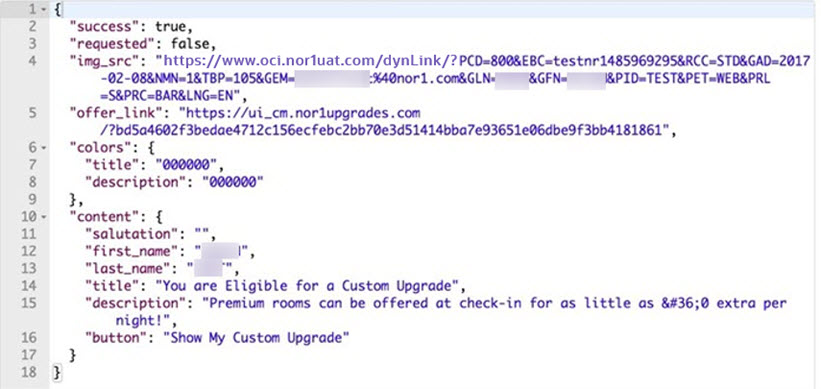
If ineligible, then the JSON response will be similar to the following:
Parent topic: POST Implementation
Post Response JSON Fields
| Field | Description |
|---|---|
|
success |
If true, the guest is eligible for an upgrade; otherwise, false. |
|
requested |
If true, guest committed to at least one offer; otherwise, false. |
|
error |
Reason for no upgrades. |
|
img_src |
Image source URL for the LMI; equivalent to GET request. |
|
offer_link |
Click through URL for the guest to view the upgrade offers. |
|
colors |
Branded font colors for the title and description body of the LMI. The font colors are typically set by the Brand style guidelines. |
|
content |
Recommend content to create the LMI on the web page or in the body of the email if the img_src is not used. |
Parent topic: POST Implementation
GET Implementation
The booking parameters, defined above, are implemented as a query string in the URL for the GET request. The LMI response is an image. The LMI web service supports the parameters as key-value pairs in the query string.
Two URLs are implemented on the web page or in the email body for the GET request. One URL is the image source to get the LMI. The other is the click through URL to view the upgrade offers. The URLs share the same query string and domain name. The difference is the dynLink path for the LMI request.
GET Request URLs
| URL Name | URL |
|---|---|
|
Staging Image Source URL |
https://www.oci.nor1uat.com/dynLink/? |
|
Staging Click Through URL |
https://ui.oci.nor1uat.com/? |
|
Production Image Source URL |
https://www.nor1upgrades.com/dynLink/? |
|
Production Click Through URL |
https://ui.nor1upgrades.com/? |
The LMI request and click through URL are typically implemented using an HTML anchor tag. The click through URL is the href tag and the LMI request is the image source. The following is an example HTML snippet. Note, the query parameters were truncated to fit the page in the following example and therefore are not valid URLs.
Parent topic: GET Implementation
GET Request Anchor Tag Example
<a href="https://www.oci.nor1uat.com/?PID=TEST&PCD=SCWA&EBC=abcde1555376023&RCC=DLXK1&GAD=20150705&NMN=1&NOA=1&TBP=500&GEM=guest%40gmail.com&GEN=M&GSL=Mr.&GLN=Last&GFN=First&GNR=1&PET=WEB">
<img src="https://www.oci.nor1uat.com/dynLink/?PID=TEST&PCD=LBBB&EBC=abcde1555376023&RCC=DLXK1&GAD=20150705&NMN=1&NOA=1&TBP=500&GEM=guest%40gmail.com&GEN=M&GSL=Mr.&GLN=Last&GFN=First&GNR=1&PET=WEB">
</a>
The image source URL returns an LMI as an image if the guest is eligible for an upgrade. A 1x1 pixel is returned if no upgrades are available. The 1x1 pixel avoids the broken image icon on the web page or in the email body. In the event a guest manages to click through the 1x1 pixel, the guest is informed that no offers are available at this time.
Parent topic: GET Implementation