Sort Component
Sort controls the order in which results are displayed.
The sort component has the following structure:
{
    "sort": {
        "criteria": {
            "properties": [
                {
                    "name": "name of the property",
                    "sequence": 1
                },
                {
                    "name": "name of the property",
                    "sequence": 2
                }
            ]
        },
        "default": [
            {
                "sortOrder": "desc",
                "sequence": 1,
                "properties": [
                    {
                        "name": "name of the property",
                        "sequence": 1
                    }
                ]
            },
            {
                "sortOrder": "asc",
                "sequence": 2,
                "properties": [
                    {
                        "name": "name of the property",
                        "sequence": 1
                    }
                ]
            }
        ]
    }
}
Default Sort Behavior
If you configure a default sort, the list resource is sorted by the specified properties and order:
-
The
sequenceproperty of each default criterion determines the order in which properties are applied to sort. -
Set
sortOrdertoasc(ascending) ordesc(descending). -
For sorting in
ascorder, nulls first is applied, and for sorting indescorder, nulls last is applied.
Criteria
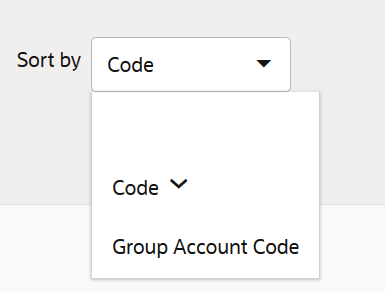
The available criteria appear in a drop-down list; by default, no property is selected as the first pick. When a user selects a criterion, results are first sorted by that criterion in ascending order. The selected criterion overrides the default sort criteria, and the results are ordered only based on the sort criterion. When a user selects the same criterion again (which is then shown with an arrow pointing in the opposite direction in the drop-down), the results are sorted in descending order. This behavior keeps toggling for the criterion. Nulls first is applied with the ascending sort order, and nulls last is applied with the descending sort order.
Up and down arrows next to the criterion indicate whether the results are sorted in ascending or descending order.
Configuration Guidelines
Specify at least one valid property (when a specified property does not exist, the system ignores that property); if no property is specified, the component is not shown in the UI.
If you sort (default or criteria) by multiple nested properties of a reference, configure each nested property as a separate element. When the criteria sort includes nested properties, provide custom labels to identify those properties on the page.