API integration
The Artifact Attachment APIs support two new attributes, Event Messages Retry PUT includes new time ranges, and Phlex eTMF integration has multiple enhancements.
Artifacts Attachment API
You can now include document_date and a new complete_open_activity attribute in the Artifacts Attachment POST and PUT APIs, with complete_open_activity defaulting to false. When the attribute is set to true: if the artifact has only one activity, the artifact lifecycle completes; if there are multiple activities, only the open or current activity is completed, and the artifact progresses to the next activity as usual.
The API will return error messages if the open activity has a decision option, is the final activity and is missing required fields, or if the activity does not accept uploads. These rules make it easier for you to update artifact status through the API while ensuring key requirements are met.
Event messages
Event Messages Retry PUT now includes two additional time ranges: twoWeeks and month.
Manage publish endpoints
The 25.1 release enhances several fields on the Manage publish endpoints page to align user interface character restrictions with database character limits. This change affects the maximum allowed characters for following fields:
- Token: Limit increased from 128 to 256 characters
- custom_token_name: Limit increased from 128 to 256 characters
- Username: Limit decreased from 128 to 64 characters
- auth_url: Limit increased from 128 to 1024 characters
- auth_type: Limit decreased from 128 to 32 characters
- auth_domain: Limit decreased from 128 to 32 characters
- auth_exp_freq: Limit increased from 128 to 1024 characters
- base_url: Limit increased from 128 to 1024 characters
- study_sites_url: Limit increased from 128 to 1024 characters
- staff_url: Limit increased from 128 to 1024 characters
- get_exp_freq: Limit increased from 128 to 1024 characters
- site_pi_connector: Limit decreased from 128 to 1 character
- default_transmitter_email: Limit increased from 128 to 512 characters
- url: Limit increased from 128 to 1024 characters
eTMF Publish messages
Any customers currently using effective date in eTMF publish messages (actually populated by expiry date) should update their integrations. There will now be an expiry date (all documents) and an effective date (applicable contracts only) in eTMF publish messages.
Phlex eTMF integration - Configuration
Site Personnel Surname and Expiry date
We added a new configuration option labeled “Requires Site Personnel Surname for Phlex integration” to Configuration Designer and the internal item configuration area in Oracle Site Activate. When checked, it flags the item for inclusion of Site Personnel Surname metadata in Phlex eTMF messages.
We also added a flag for items that should include the Document Expiry date in Phlex Integration eTMF message. The new check box settings that enable this functionality have been added to Configuration Designer and the internal item configuration area in Oracle Site Activate. If a user populates the Expiration Date field for an item in Oracle Site Activate, the eTMF message will include an "Expiry Date" attribute. If the Expiration Date field is available on the item but is not populated, the eTMF message includes the field with a null value.
Item Effective date
eTMF messages will now include Effective date when this option is enabled at the account level. If the field is not populated in the item in Oracle Site Activate, the eTMF message will send a null value with the Effective date attribute. Please contact your Oracle services representative to discuss enabling this option for your account.
Note:
Any customers currently using effective date in eTMF publish messages (actually populated by expiry date) should update their integrations. There will now be an expiry date (all documents) and an effective date (applicable contracts only) in eTMF publish messages.
Attribute ID
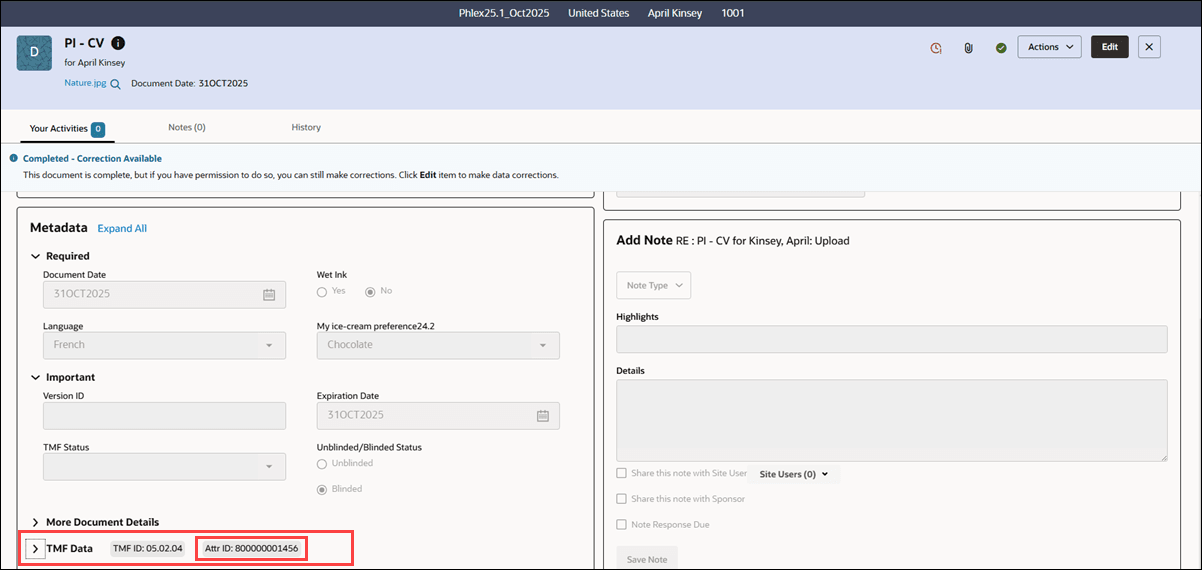
With this release, “Reference Code” is now updated to “Attribute ID” to reflect use of the Phlex Attribute ID in eTMF integrations. An Oracle representative, or a customer resource with permission to access Configuration Designer, will populate the customer-provided Attribute ID to the appropriate artifacts in Configuration Designer and publish the configuration to Oracle Site Activate.
In Oracle Site Activate, the Attribute ID appears in the internal artifact configuration area, the user interface, and the eTMF message when the Vendor type is “Phlex.” In the Oracle Site Activate user interface, the item drawer will label the Attribute ID as “Attr ID” in the TMF Data section, and in the new Ad Hoc document page, the field is labeled "Attribute ID." eTMF messages will include the Attribute ID field as attribute_id.
Phlex eTMF Integration - Supported file types and languages
Supported file types
Development for this release included testing the Phlex eTMF integration to ensure it supports the following file types: .pdf, .doc, .docx, .xls, .xlsx, .jpg, .jpeg, .tif, .tiff, .zip, .png, .gif, .odt, .rar, .tar, .bmp, .msg, .ppt, .pptx, .eml, and .xml.
Note:
Oracle Site Activate allows upload of the following additional file types; however, they are not supported in Phlex eTMF integration: xlsm, gzip, gz, 7z, 7zip, bz2, rtf, txt, csv, tab, pps, pot, pptm, potx, potm, xlw, xlt, psd, sxw, stw, sxc, stc, sxi, sti, key, pages, and numbers.
Default and supported languages
We enhanced Phlex eTMF integration to default to English when a document’s language field does not have any value (null). When generating an eTMF message for Phlex, if a document in Oracle Site Activate doesn’t specify a language, the “Language” attribute in the Transformed Message section will default to “English-American (Default).”
For reference, the Phlex eTMF integration supports the languages listed in the table below.
| Language | Language code |
|---|---|
| Dutch | nl |
| English | en |
| French | fr |
| German | de |
| Hebrew | he |
| Hungarian | hu |
| Italian | it |
| Lithuanian | lt |
| Polish | pl |
| Slovak | sk |
| Spanish | es |
Phlex eTMF Integration - API enhancements
As part of this release, we made the following updates to eTMF messages to support our Oracle Site Activate-Phlex eTMF integration. They are visible when an endpoint has vendor = Phlex.
- reference_code has been updated to attribute_id
- pi_last_name has been updated to person_full_name, and the format is lastname, firstname
- phlex_requires_sps field is added when configured on an artifact in Oracle Site Activate, and indicates that artifact requires the site personnel surname
- phlex_requires_expirydate field is added when configured on an artifact in Oracle Site Activate, and indicates that artifact requires the document expiry date
- phlex_requires_iprelease is added when configured at the account level and is set to True for all artifacts
Note:
For customers that want to include the Phlex IP Release attribute in eTMF messages, please talk to your Oracle team to enable this account level setting.
Additionally, for all eTMF messages:
- expiry_date is added when configured on an artifact in Oracle Site Activate
- effective_date is added when configured at the Account level
We've updated our API documentation to reflect these changes.