Datasources
Standard and custom columns now indicate if they're scorable.
Delete account datasource
With release 25.1.1, we returned the ability to delete an account datasource. Please note that this enhancement changes the required permission from Data Source Management to Edit a datasource record. If you only have the Data Source Management permission, you will no longer see the option to delete a datasource on the account datasource list page. However, if you have the Edit a datasource record permission, you can see and use the "Delete datasource" button on the Records tab of the datasource's detail page.
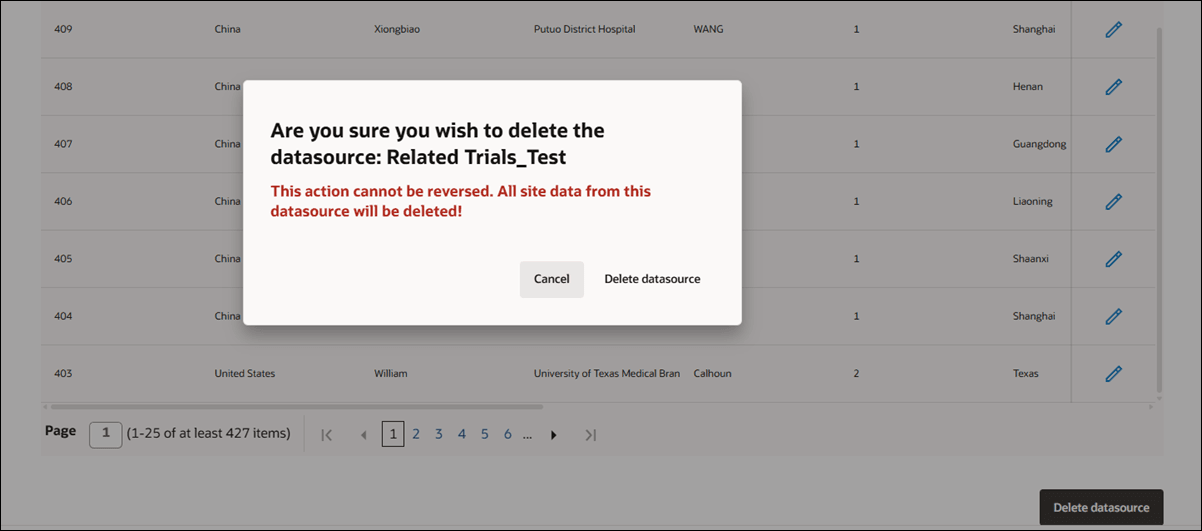
When you click the "Delete datasource" button, the button will be disabled to prevent multiple submissions, and a confirmation dialog displays. The dialog will warn you that the action is irreversible and all site data from the datasource will be deleted, and you will need to choose either to cancel or confirm the deletion. If you proceed, you will be redirected to the datasource list page, where you will see a notification that the delete process has started. The delete button remains disabled after a failed attempt until the page is refreshed, and a successful deletion updates the datasource list to remove the datasource and returns you to the summary list page.
While deletion is in progress, the affected datasource’s list item will not have actionable links, and the datasource detail counts will display as zero. You will find the "Delete datasource" button at the bottom of the Records data grid on the details page, and its color will be gray. After the deletion attempt, a status message will inform you whether the deletion succeeded or failed.
Scorable column
We added a new indicator to the datasource mapping page that lets you easily identify which columns are scoreable when creating or mapping columns for a new datasource. Both standard and custom scoreable columns will have "Scored" appended to their information in the list of Oracle Site Select columns.
Parent topic: What's new