Users and Access in Oracle Payment Cloud Service
Managing users in Oracle Payment Cloud Service involves two connected systems:
- OCI Identity and Access Management (OCI IAM) – where users are created and groups assigned.
- Oracle Payment Cloud Service – controls location and account structure access.
What is OCI IAM?
OCI IAM is Oracle’s system for managing users and access.
In simple terms:
- It is where users are created
- It is where groups are assigned
- It controls who can access Oracle Payment Cloud Service
How user access works
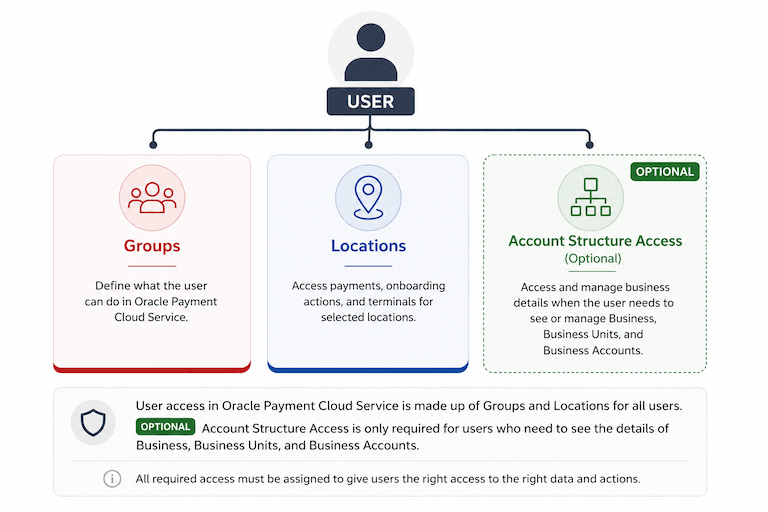
Description of the illustration user_dimensions.png
Getting started
After subscribing to Oracle Payment Cloud Service and following your account activation email
- Look for the Welcome to Oracle Payments email
- This contains
- Access to OCI IAM (to manage users and groups)
- Access to Oracle Payment Cloud Service (to manage location access, complete onboarding and view reporting)
Create the first Payment Administrator
If you are the contact email on the order for Oracle Payment Cloud Service you will be an OCI IAM administrator, but you must assign yourself the Payment Administrator group.
To do this
- Open OCI IAM using the Oracle Identity URL in your Welcome to Oracle Payments email.
-
Go to User Management and click your user account.

-
Click on the Groups tab and Assign user to group.
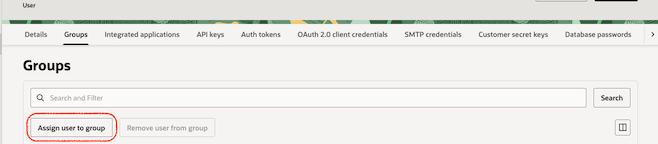
-
Select the checkbox against the Payment Administrator group. You can use the search to help find the group.
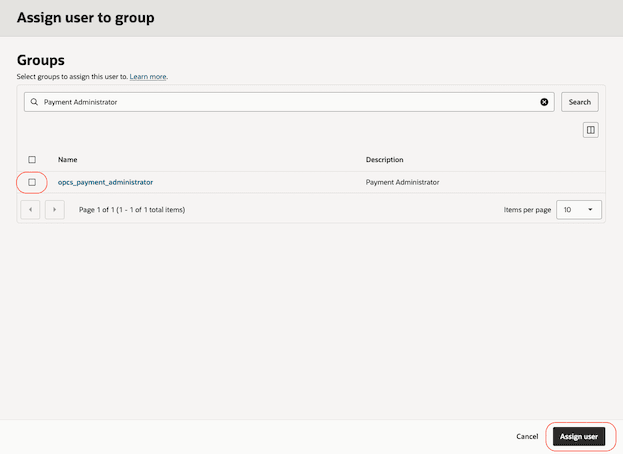
- Click on Assign user.
What’s next?
- Sign in via the link for the portal in the Welcome to Oracle Payments email and onboard your Business.
- Set up other new users, continue to Add Users
or
- Add Oracle Payment Cloud Service access to existing users, continue to Manage Group Assignments
Note: We recommend assigning at least two Payment Administrators.
Parent topic: Getting Started