Onboard your Business
From the Home with Ask Oracle page, click Onboard a new Business. The onboarding steps appear and guide you through the process of onboarding a new business. It usually takes more than one sitting to complete the steps, see Continue onboarding your Business
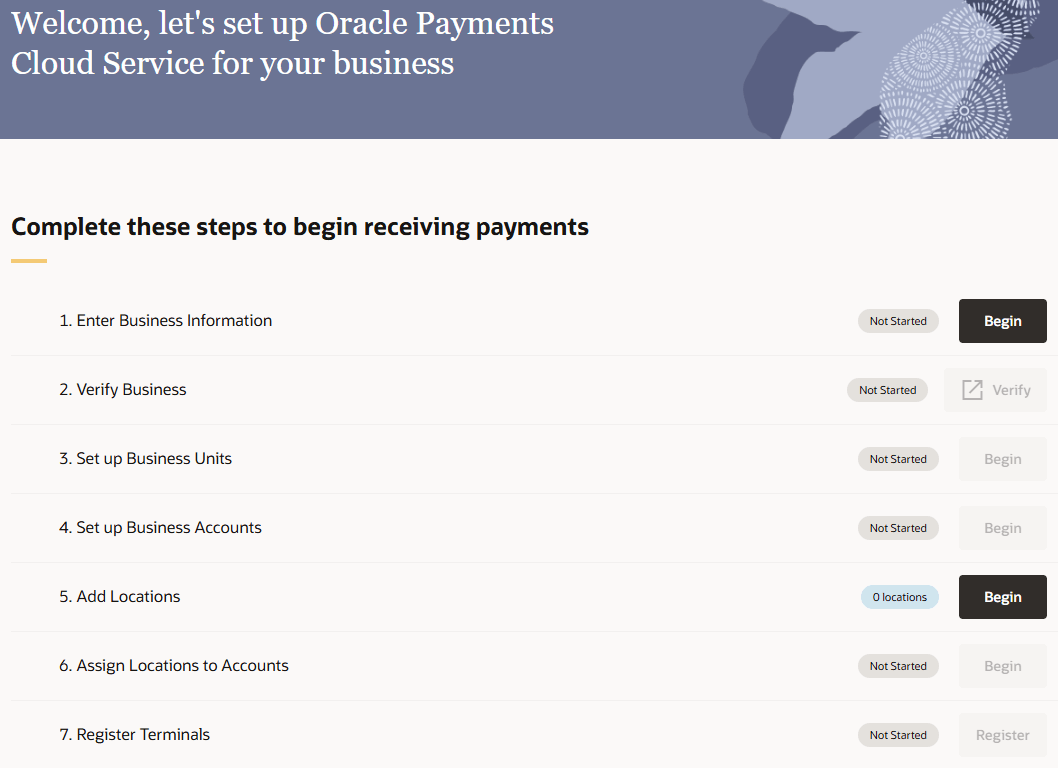
As you finish each step, its status is updated so you can move on to the next step. Once all steps are completed you’ll see a confirmation message.
To set up your business in your organization:
-
Enter business information. This is your Legal Entity within Oracle Payments. Click Begin and follow Add a Business.
-
Verify business. This is a compliance process to verify the business and identities. Click Verify and follow Complete Business Verification.
-
Set up business units. This is a subdivision within a Business, one is automatically created for each industry in the Business. Click Set Up and follow Set Up Business Units.
-
Set up business accounts. This is where you will link your verified bank account. Click Begin and follow Add a Business Account.
-
Add locations. Location represent the physical place where your transactions originate, click Add. Locations can be added at any time, see Add a Location for more details. If you do not have the correct permissions, you will only see the number of locations you have access to and will not be able to add new ones. Locations can be added before or after this step in the checklist, there is no strict order for adding a location.
-
Assign locations to accounts. This determines which bank account your transactions will be deposited in. Click Begin and follow Assign Locations to a Business Account.
-
Register terminals. This is for linking your payment devices to locations. Click Begin and follow Register the Terminal. This is optional if payment devices are not used to process in-person payments.
When you create the first business in your organization, Oracle Payments automatically creates a business day. Review its start time, end time, time zone, and transaction grouping setting, and update them if needed. See Review a Business Day
How to continue onboarding your Business
- If you do not complete all steps in one session you can pick up where you left off,
- After signing in, go to Business Management,
- This can also be accessed by clicking the home icon on any page
 in the bottom right
corner of the screen.
in the bottom right
corner of the screen.
- This can also be accessed by clicking the home icon on any page
- Your Business will be listed with a status of Onboarding,
- Click your Business and you’ll return to the onboarding steps.
The following image shows the checklist steps.
Description of the illustration checklist.png
Parent topic: Getting Started