Add Users
User setup spans two systems:
- OCI IAM → Create users and assign groups
- Oracle Payment Cloud Service → Assign locations and account structure access
This page covers creating users in OCI IAM.
Step 1 Access OCI IAM from Oracle Payment Cloud Service
You do not need to remember separate access links. To open OCI IAM:
- In Oracle Payment Cloud Service, go to User Management click the home icon
 in the bottom right. You must be a Payment Administrator to access User Management.
 - Click Manage Users (top right), OCI IAM will open. You must be an OIC IAM Administrator to access this.
Step 2: Create a user and assign groups
- In OCI IAM, go to the User Management tab
- Select Create
-
Enter:
- First Name
- Last Name
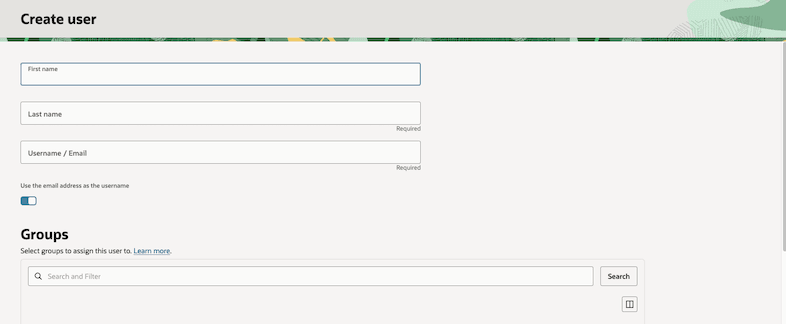
-
In the Groups section, check only those the user will need. Groups define what the user can do in Oracle Payment Cloud Service. Users should only have permission they need to for their role.
Tip: To understand which groups to assign, see: Predefined Payment Groups or follow the User Set up Decision Guide
- Click Create
What’s next?
- The user receives an email and they set their password
- Continue to: Assign Location Access
Note: Creating a user does not give them complete access yet. You must complete by assigning location access and optionally, account structure access, via Oracle Payment Cloud Service.
Parent topic: Users and Access