5 Rules and Strategies
Pricing rules and strategies are the foundation of Rules Based Regular Pricing. Every price recommendation generated by Rules Based Regular Pricing is the direct result of applying a defined set of N/F rules. Understanding how rules are constructed, how strategies combine rules, and how conflicts between rules are resolved is essential for configuring Rules Based Regular Pricing effectively and interpreting its recommendations.
You create rules and strategies for LPO from the Control and Tactical Center in the Oracle Retail AI Foundation Cloud Service. For further details, see the "Control and Tactical Center" chapter in the Oracle Retail AI Foundation Cloud Service User Guide.
What is a Pricing Rules?
A pricing rule is a specific business constraint or condition that LPO must respect when determining a recommended regular price. Each rule defines one constraint, for example, "the item's list margin must not fall below 25%" or "the item's price must be within $2 of the competitor's price."
Rules are built from two components:
-
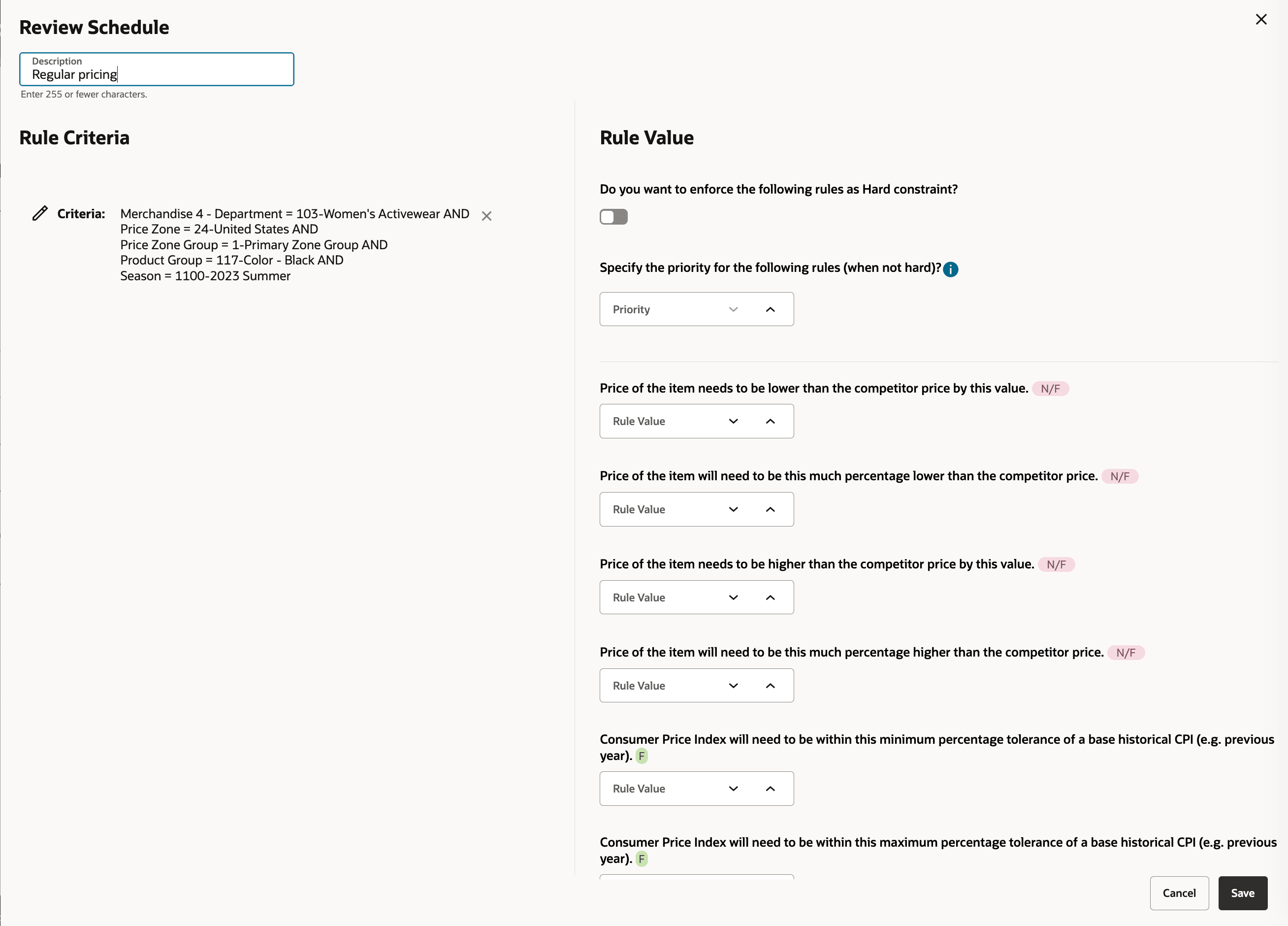
Rule Criteria define the scope of the rule: which items, locations, seasons, or pricing groups it applies to.
-
Rule Values define the target or threshold the rule enforces, including numeric values, percentages, or reference prices.
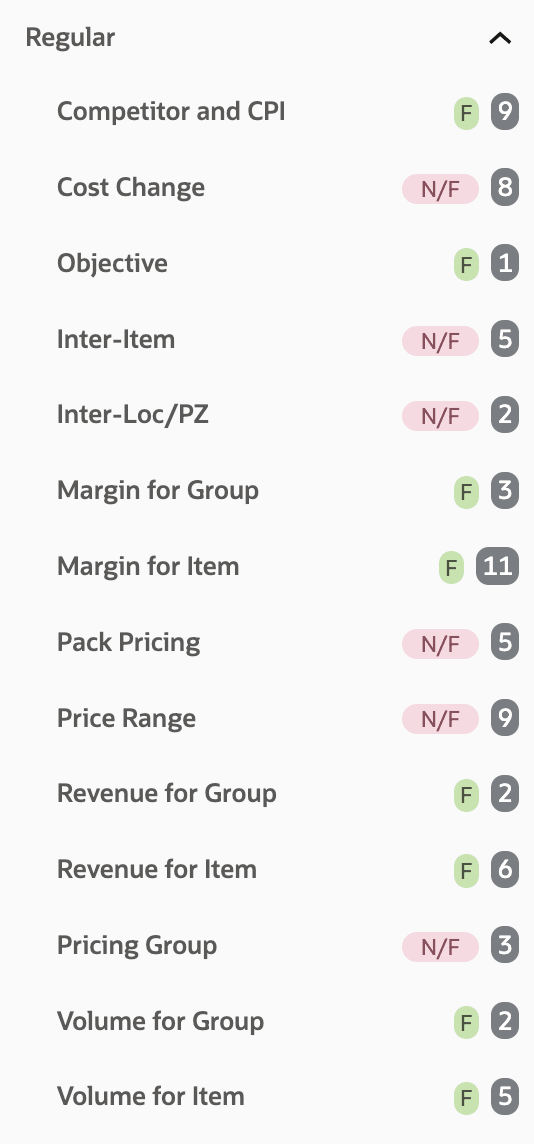
Each rule value in the Control and Tactical Center is labeled F (Forecast-based) or N/F (Non-Forecast-based). Only N/F rules are used in Rules Based Regular Pricing. F rules in a strategy are automatically ignored during a Rules Based run.
For the complete list of Regular Pricing rules and strategies, see Appendix: Regular - Pricing Optimization Rules.
Figure 5-1 Control and Tactical Center - Regular Rules Categories - Forecast (F) or Non/ Forecast (NF)
Rule Criteria
Rule criteria define where and under what conditions a rule is enforced. You can scope a rule by one or more of the following dimensions:
Table 5-1 Criteria Type - Description
| Criteria Type | Description |
|---|---|
| Merchandise | The product hierarchy node, for example Department, Class, Subclass, or Style, to which the rule applies. |
| Price Zone | The price zone or group of locations to which the rule applies. To display Price Zones while creating business rule criteria, ensure that RSE_CONFIG.PRO_RULES_STRATEGY_LOC_SCOPE_LVL is set to PriceZoneGroup. |
| Season | The retail season that scopes the rule. Rules can be restricted to specific seasonal periods. |
| Pricing Groups | Named groups of items or locations used for cross-item or cross-location consistency rules. Required for Inter-Item and Inter-Location rule types. |
Not all rule categories support all criteria types. Inter-Item rules require two item sets (Set A and Set B). Inter-Location rules require two location sets. Refer to Appendix A for supported criteria per rule subcategory.
Rule Value
A rule value defines the target, threshold, or limit that a Non-Forecast rule enforces. Rule values are entered based on the selected rule type and can represent an amount, percentage, price point, margin threshold, competitor price relationship, or item/location price relationship.
Example rule values:
-
Minimum list margin of 30%
-
Maximum price increase of 5%
-
Match competitor price within 2%
-
Minimum price difference of $1.00 between two item groups
-
Maximum price difference of $0.50 for the same item across two price zones
Rules Based Regular Pricing uses Non-Forecast (N/F) rule values only. Forecast-based (F) rule values are not used when generating Rules Based Regular Pricing recommendations.
Figure 5-2 Rules Criteria and Value
Pricing Strategy
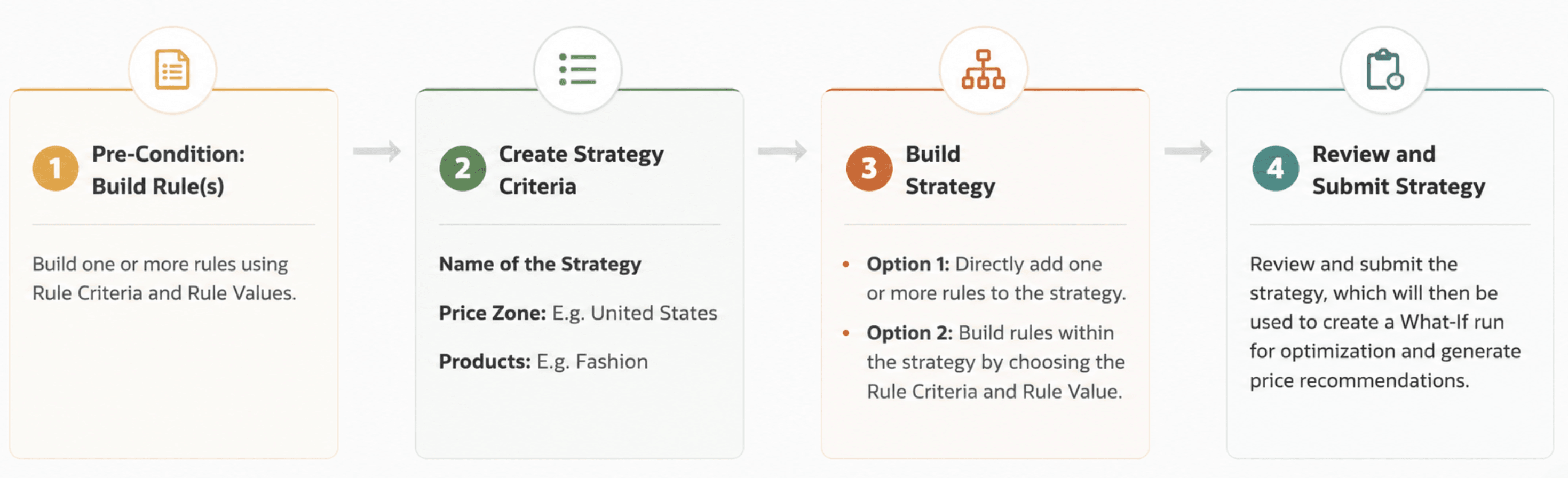
A pricing strategy is a set of one or more rules applied at the merchandise and location level to achieve a specific pricing objective. LPO enables retailers to define and apply tailored pricing strategies, ensuring that all relevant rules work together to generate regular price recommendations that align with the configured pricing strategy.
For example, a regular pricing strategy may combine:
- A competitor match rule (ensuring prices align with key competitors).
- A margin floor rule (preventing price reductions that affect profitability).
- A rounding rule (ensuring customer-friendly pricing).
Default Strategy
The default strategy, identified as DEFAULT_SET, is a baseline pricing framework created during initial LPO setup. It is applied automatically in all scheduled batch runs. Every LPO instance must have a default strategy configured before batch optimization can execute. Changes to the default strategy take effect in the next scheduled batch run.
What-If Strategy
A What-If strategy is a custom strategy created by a Pricing Analyst or Manager to test alternate pricing approaches, used in What-If runs. What-If runs allow you to:
- Test the impact of adding or removing a rule before updating the default strategy.
- Compare recommended prices from two different rule configurations side by side.
- Evaluate whether relaxing a hard constraint would result in materially better recommendations.
Once a What-If run is optimized and results are satisfactory, the Pricing Manager can finalize it. Finalizing promotes the What-If run's recommendations to replace the current active batch run recommendations.
Figure 5-3 Creating a Pricing Strategy
Creating a Pricing Optimization Rules For LPO
-
Navigate to the Control and Tactical Center in the AIF application.
-
Select Regular Pricing from the rule category list. When PRO_LPO_REGULAR_LITE_ENABLED_FLG is enabled, Rules Based Regular Pricing evaluates only Non-Forecast (N/F) rules. Forecast (F) rules are ignored during optimization.
-
Select the rule subcategory, for example Competitor and CPI or Margin for Item, then select the specific rule code.
-
Define Rule Criteria: Specify the Merchandise, Price Zone, Season, and/or Pricing Groups.
-
Define Rule Values: Enter the numeric target or threshold. Set the Hard Constraint flag and Priority (1 to 100) as required.
-
Associate the rule with a strategy: Add it to DEFAULT_SET or to a new custom strategy.
-
Save and validate. The rule is applied in the next optimization run using this strategy.
Managing Conflicting Rules
Multiple N/F rules will often apply to the same item, location, and period simultaneously. LPO uses a structured framework to resolve conflicts and arrive at the best feasible recommendation.
Hard and Soft Constraints
-
Hard Rules: Strict, non-negotiable constraint. LPO always enforces hard rules regardless of any other rule. A price recommendation that would violate a hard constraint is rejected or adjusted. Example: a minimum margin floor of 10% set as Hard means LPO will never recommend a price below this margin, even to match a competitor price..
-
Soft Rules: Flexible guideline. LPO tries to satisfy soft rules but can override them when necessary to meet a higher-priority constraint. Example: a competitor match rule suggests lowering a price, but if it conflicts with a Hard margin floor, LPO keeps the price above the margin threshold.
Rules Priority
When multiple soft rules conflict, LPO uses a numeric priority (1 = lowest, 100 = highest) to determine which rule takes precedence. Higher-priority rules are enforced first; lower-priority rules are relaxed as needed. Example: if margin protection is more critical than competitor alignment, assign the margin floor rule priority 90 and the competitor match rule priority 60.
Best Feasible Solution
When the optimization engine cannot satisfy all soft rules even after priority ranking, it returns the best feasible price: the price that minimizes the aggregate weighted violation across all soft rules. This ensures every item receives a recommendation. Violations are visible on the Results screen for analyst review.
Conflict Resolution Strategy
Table 5-2 5-2 Step - Action
| Step | Action |
|---|---|
| 1 | LPO identifies all N/F rules in the selected strategy applicable to the item, location, and period in scope. |
| 2 | Hard rules are evaluated first. Any price violating a hard constraint is excluded from consideration. |
| 3 | LPO evaluates all soft rules weighted by priority. The price satisfying the most soft rules is selected. |
| 4 | If no price satisfies all constraints, Best Feasible Solution returns the price with the lowest weighted violation. |
| 5 | Violated rules are recorded and displayed on the Results screen for analyst review and action. |
Note:
Rule conflicts are expected in many pricing scenarios. A conflict does not indicate an error. The optimization engine automatically evaluates hard constraints, soft constraints, and rule priorities to determine the Best Feasible Solution.