4 Users, Roles and Privileges
LPO enforces two independent layers of access control: role-based security, which governs what actions a user can perform, and data-level security, which governs which merchandise and location data a user can see and act on. Both must be configured correctly before a user can work with Rules Based Regular Pricing runs and recommendations.
Role-Based Security
Role-based security in LPO is managed through Oracle Identity Cloud Service (IDCS) role assignments. Each LPO role grants a defined set of privileges: the actions a user is permitted to perform within the application. A user may hold multiple roles simultaneously, and their effective privileges are the union of all privileges across their assigned roles. Role assignments are managed by the Pricing Administrator.
Data-Level Security
Data-level security restricts which merchandise hierarchy nodes and locations a user can view and act on, independent of role-based privileges. For example, a Pricing Analyst may have the privilege to accept recommendations but can only accept recommendations for the departments and zones assigned to them in data-level security. Data-level security is configured per user by the Pricing Administrator.
End-to-End Workflow and Role Context
Rules Based Regular Pricing follows a six-stage workflow. Understanding this flow helps users see where their role, privileges, and responsibilities fit in the overall pricing process.
Figure 4-1 Workflow Stages
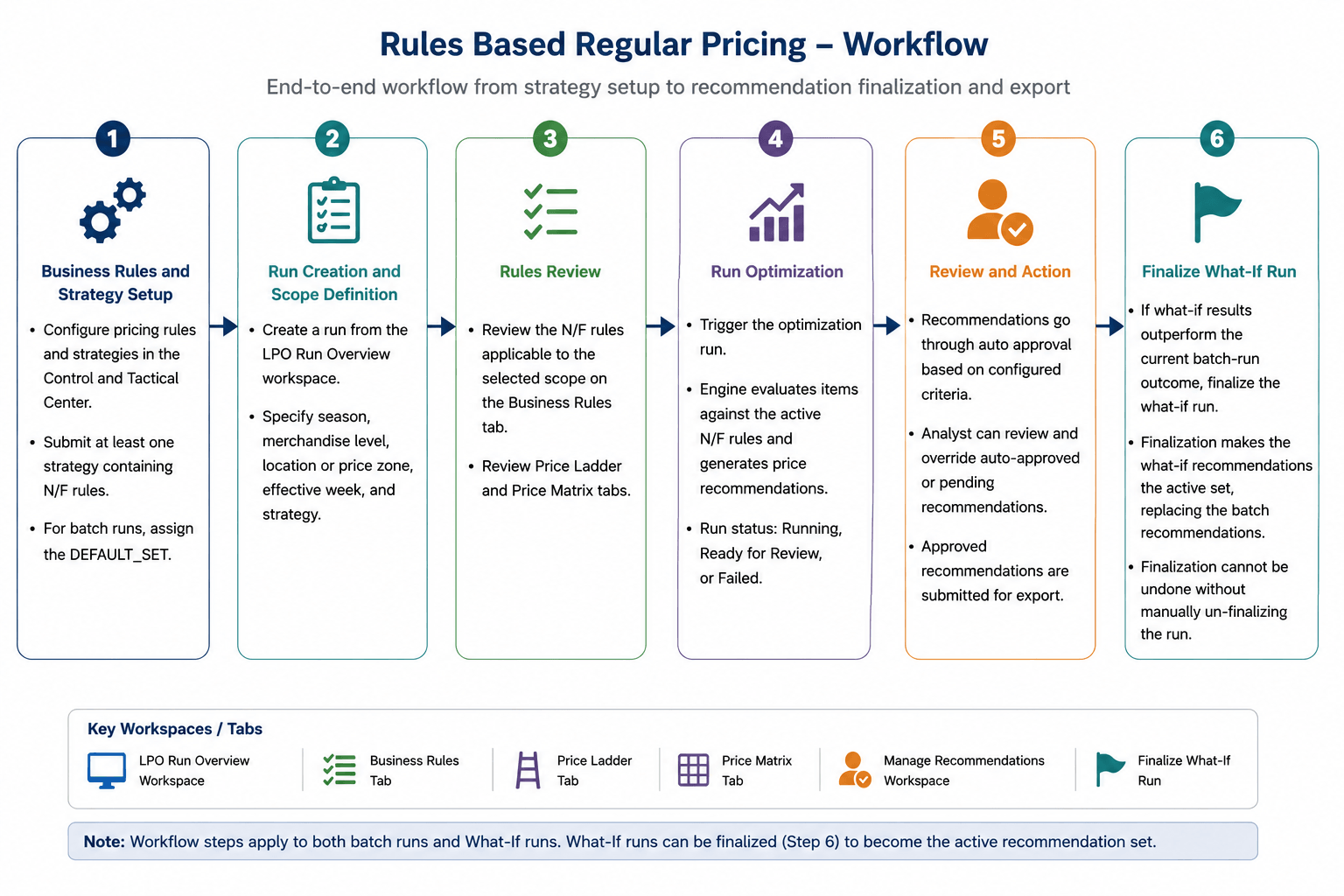
User Roles and Responsibilities
For Rules Based Regular Pricing, the following roles are typically involved.
Table 4-1 User Login Roles
| Role | IDCS Role | Responsibility |
|---|---|---|
| Pricing Analyst | PRICING_ANALYST_JOB PRICING_ANALYST_JOB_PREPROD | Primary day-to-day user. Creates ad hoc runs, runs the recommendation process, reviews recommendations, and accepts, rejects, or overrides prices on the Manage Recommendations workspace. |
| Regular Price User | REGULAR_PRICE_JOBREGULAR_PRICE_JOB_PREPROD | Application role required to access and manage Rules Based Regular Pricing recommendations. This role is typically assigned together with the Pricing Analyst or Pricing Manager role. |
| Pricing Manager(Analytical Super User) | PRICING_MANAGER_JOB PRICING_MANAGER_JOB_PREPROD | Configures and maintains N/F rules and strategies in the Control and Tactical Center. Reviews run diagnostics. Creates and evaluates What-If runs to test alternate rule configurations. |
| Buyer | BUYER_JOB BUYER_JOB_PREPROD | Owns merchandise departments. Takes final action on reviewed recommendations: Submit or Approve. Both actions trigger export to downstream systems. Can also reject recommendations. |
| Pricing Administrator | ADMINISTRATOR_JOB ADMINISTRATOR_JOB_PREPROD | Manages application configuration including Rules Based Regular Pricing enablement using PRO_LPO_REGULAR_LITE_ENABLED_FLG flag, auto-approval criteria, and export frequency rules. |
Run and Recommendation Privileges
LPO privileges govern what actions each role can perform on runs and recommendations. The tables below define each privilege and show which roles hold them.
Table 4-2 Privileges on LPO Runs and Recommendations
| Privilege | Description |
|---|---|
| Create new LPO run | Set up and execute optimization runs, including copying existing runs. |
| View existing LPO run | View run data at each stage. Can search and filter but cannot edit. |
| Optimize a LPO run | Trigger optimization or re-optimization, including for failed runs. |
| Modify recommendations | Accept, reject, or override regular price recommendations. |
| Review / Undo Review | Transition recommendations to Reviewed status, a prerequisite for Submit or Approve. |
| Submit recommendations | Send final recommendations to the export interface for execution by the downstream system. |
| Approve recommendations | Approve recommendations for export. May bypass the Submit step depending on configuration. |
| Finalize What-If run | Promote a finalized What-If run result to replace the current batch recommendations. |
| Delete a run | Remove a run and its recommendations, subject to status restrictions. |
Role Based Privileges
Table 4-3 Privileges Based on Data Access and User Role
| Privilege | Data Scope | Pricing Analyst / Regular Price User | Pricing Manager | Buyer | Pricing Administrator |
|---|---|---|---|---|---|
| Create/Copy Run | All runs | ✕ | ✓ | ✕ | ✕ |
| View Run | All runs | ✓ | ✓ | ✓ | ✕ |
| Modify Run | Runs owned by user | ✓ | ✓ | ✕ | ✕ |
| Run / Re-run | Runs owned by user | ✓ | ✓ | ✕ | ✕ |
| Delete saved LPO run | Runs owned by user | ✓ | ✓ | ✕ | ✕ |
| Modify recommendations | Runs owned / batch | ✓ | ✓ | ✓ | ✕ |
| Recalculate recommendations | Runs owned / batch | ✓ | ✓ | ✕ | ✕ |
| Review recommendations | Runs owned / batch | ✓ | ✓ | ✓ | ✕ |
| Submit recommendations | All runs | ✕ | ✕ | ✓ | ✕ |
| Approve recommendations | All runs | ✕ | ✕ | ✓ | ✕ |
| Optimize all technical failures | All runs with technical failures | ✕ | ✕ | ✓ | ✓ |
Action Restrictions By Status
Table 4-4 Action Restrictions by Status
| Who | Object |
|---|---|
| Auto Approved | Cannot be selected for price override, date override, accept/reject, review/submit/approve, undo review, or undo approve actions. These recommendations are processed automatically by the export workflow and cannot be modified manually. |
| Export Success | Must not be pushed again to the downstream pricing system. |
| Export Failed | Can be picked up again by the batch or ad hoc integration push process after the failure is investigated. |
| Rejected | Excluded from downstream export. |