1 Feature Summary
The enhancements below are included in this release.
Column Definitions
| Small: These UI or process-based features are typically comprised of minor field, validation, or program changes. Therefore, the potential impact to users is minimal. |
| Larger: These UI or process-based features have more complex designs. Therefore, the potential impact to users is higher. |
| Customer Action Required: Indicates if you must take action before these features can be used. These features are delivered disabled and you choose if and when to enable them. |
|
|
|
|
Customer |
|
|---|---|---|---|---|
| Retail Order Management Suite Cloud Service | ||||
| Single Suite Announcement |
smaller |
None |
||
| Order Administration New and Updated Options | ||||
| Oracle Redwood Colors in Classic View |
Order Administration |
smaller |
None |
|
| Oracle Retail EFTConnect |
Order Administration |
larger |
See enhancement description for details |
|
| Payment Token API |
Order Administration |
smaller |
None |
|
| Oracle Retail Promotion Engine (ORPE) Integration |
Order Administration |
larger |
See enhancement description for details |
|
| Ship Via Override in Modern View Order Summary |
Order Administration |
smaller |
None |
|
| Customer Memberships in Modern View |
Order Administration |
smaller |
None |
|
| Order Maintenance REST Web Services |
Order Administration |
smaller |
None |
|
| Cloud Architecture Enhancements |
Order Administration |
smaller |
None |
|
| Tax Interface Configuration Changes |
Order Administration |
smaller |
Confirm correct setting of Use Generic XML Tax Interface (J10) system control value |
|
| Externalize File Movement |
Order Administration |
smaller |
None |
|
| Timeout Property |
Order Administration |
smaller |
Optionally, reset the timeout property |
|
| New Online Help Format |
Order Administration |
smaller |
None |
|
| Updated Reporting Guide |
Order Administration |
smaller |
Consult updated reporting guide on My Oracle Support |
|
| Retail Data Store Availability |
Order Administration |
smaller |
None |
|
| Technical Changes and Removed Features |
Order Administration |
larger |
None |
|
| Order Orchestration New and Updated Options | ||||
| Oracle Redwood Colors in Classic View |
Order Orchestration |
smaller |
None |
|
|
Order Orchestration |
larger |
Confirm configuration and assignment of roles in Modern View |
||
| Users in Modern View |
Order Orchestration |
smaller |
None |
|
| External Services Enhancements |
Order Orchestration |
larger |
Confirm configuration of external services in Modern View; then assign services at the System screen in Classic View |
|
| Same-Day Delivery |
Order Orchestration |
smaller |
None |
|
| View Printed Pack Slip Page Count |
Order Orchestration |
smaller |
None |
|
| Attribute Definition APIs |
Order Orchestration |
smaller |
None |
|
Retail Order Management Suite Cloud Service Announcement
Oracle Retail Order Management Suite enables a retailer’s order anywhere, fulfill anywhere strategy, and is supported by separate modules.
With this update, Oracle has announced a single Retail Order Management Suite Cloud Service made up of the following cloud services modules:
Oracle Retail Order Management Foundation Cloud Service This cloud service is a required module that maintains and serves all Order Management Suite related information. In addition to managing order and inventory data, the service includes support for execution strategies that are based on omnichannel Order Orchestration and Administration.
Oracle Retail Order Administration Cloud Service (formerly known as Order Management System Cloud Service) This cloud service manages direct-to-consumer orders, whether they are taken on the website, contact center, or in the retail store. Order Administration provides visibility into the entire order process, and allows customer service representatives (CSR) to manage the exceptions. From creation to shipment, Order Administration helps the business save time, increases efficiency, and meets the customer’s brand expectations.
Oracle Retail Order Orchestration Cloud Service (formerly known as Order Broker Cloud Service) This cloud service provides a view of inventory across the enterprise for the rules-based brokering engine to determine the optimal fulfillment location. With real-time visibility into inventory and order status, businesses can make informed decisions, avoid stockouts or delays, and maximize margins.
Oracle Retail EFTConnect Cloud Service Oracle Retail EFTConnect is a product that enables Oracle to remove Order Administration Cloud Service from the costly and frequently changing Payment Application Data Security Standard (PA-DSS). The solution has been adopted as the strategic approach for the Order Management Suite and enables the rapid support of payment solutions by working with payment providers who are local, and/or offer an extensive international network. EFTConnect uses an industry-standard interface to the Order Administration Cloud Service and then translates the messages to the relevant format, enabling the Order Administration Cloud Service to be outside of the payment scope.
Order Administration: Oracle Redwood Colors in Classic View
With this update, the Classic View user interface has been updated with Oracle Redwood colors to align with the Modern View user interface.
Order Administration: Oracle Retail EFTConnect
With this update, EFTConnect will be leveraged for communication between Order Administration and Payment Service Providers (PSP) for card-based payment processing indicated below.
Payment processes performed will include authorization, capture, authorization + immediate capture, refund, and void transactions.
The following account providers and methods will be supported:
-
CyberSource for credit cards, debit cards and Apple Pay wallets through EFTConnect
-
Adyen for credit cards, debit cards, Apple Pay and Google Pay wallets through EFTConnect
-
Custom Payment Services for credit cards, debit cards and wallets through EFTConnect’s Oracle Payment Interface
-
PayPal Direct Connection Integration through Order Administration
-
Customer Engagement (ORCE) Stored Value Cards through Order Administration
-
Custom Payment Services for gift cards through Order Administration’s External Payment Service
All credit and debit cards must already be tokenized when passed from a calling Merchant Application (i.e., Ecommerce) into Order Administration. Order Administration will not accept plain text credit or debit card numbers. Also, when payments are authorized prior to submitting a new order to Order Administration, additional attributes are now required for the authorization like authorization number, authorization date and authorization amount. See the Web Services Guide on My Oracle Support (ID 2149144.1) for more information on required attributes to include for payment and payment authorization details.
Payment Configurations
All account providers and methods supported through EFTConnect will be managed through a new Payment Configurations screen suite in Modern View. These will not be created or edited through the Work with Authorization Service (WASV) or Work with Pay Type (WPAY) options in Classic View. However, you do need to use the WASV menu option in Classic View to define hold reason codes or pop-up message text for the vendor responses, as well as any currency or country code cross-references.
Note:
Cash/Check, PayPal, ORCE and External Payment Service accounts will still be managed through WASV and WPAY.This new Payment Configuration suite is assigned the fast path of WPMT and is included in the Accounting Setup (ACCTGSETUP) menu by default. It is available in Modern View by advancing through the Accounting > Accounting Setup menu for user’s with ALLOW authority to the WPMT (Payment Configurations) menu option. If you have DISPLAY authority, you cannot advance to this page.
Merchant account setup options: At this time, CyberSource and Adyen are available as base delivered account providers with EFTConnect. Each account provides different options for configuration, such as different authentication options. You can also flag the provider as live or test and set up additional flags that were previously configured in WASV, such as those related to voiding authorizations at deposit, authorization resubmission, reversals, and deferred or installment billing.
Oracle Payment Interface (OPI) Custom Payment Service can be configured via Manage Payment Services option in Payment Configurations. This function allows the retailer to provide details about the Payment Service Provider (PSP), payment methods and other configuration properties. The Payment Services entered here are not company specific. Enter them once, and they are available for selection when creating Merchant Accounts for all companies.
Note:
It is the responsibility of the retailer to obtain account credentials from the payment service provider.Payment method setup options: You can define one or more payment methods for each merchant account. Many of the payment settings are the same as those that were available in the Work with Pay Type (WPAY) option in Classic View. It is no longer necessary to define certain characteristics for each pay type, such as card number formats or modulus checks.
Additional options at the Payment Configurations page: In addition to creating, editing, or deleting merchant accounts and payment methods, you can also test the connection for a merchant account and restrict payment methods, so they are not eligible to be added to a new or existing order.
EFTConnect Setup Requirements
Before configuring merchants and payment methods through the Payment Configurations page, the following configuration is required in Classic View:
-
Set up the following properties in Work with Admin Properties (CPRP) using the values provided by your Oracle representative:
-
ELO_CONFIG_URL: Used to establish a connection with EFTConnect when you use the Payment Configurations page.
-
ELO_IDCS_ENDPOINT_URL: Defines the URL to use when requesting the token for OAuth authentication for the integration with EFTConnect.
-
ELO_PAYMENT_URL: Defines the URL to use for any transactional communication with EFTConnect, such as obtaining a form token, authorization, or deposit. Required for use of the Payment Configurations page in Modern View.
-
ELO_THRESHOLD_TIME: Used for logging purposes. Compares the elapsed time of the web service with the ELO_THRESHOLD_TIME. If the elapsed time exceeds the threshold, a message is logged.
-
ELO_TIMEOUT: Defines the number of milliseconds to wait before requests from Order Administration to EFTConnect time out.
-
ELO_POLL_COUNT_THRESHOLD: Determines whether the transaction should be updated as unconfirmed. It has a default threshold of 3, but this setting may need to be changed by the retailer. This value indicates the number of times that Order Administration calls EFTConnect to check if it has the status of the transaction (Capture, Refund, or Auth+Capture) from the payment provider. If the poll count is equal to or exceeds this setting, the status is changed to Unconfirmed. The deposit will need to be managed in Manage Rejected Deposits in Modern View.
-
-
Authentication configuration: Set up outbound authentication for EFTConnect in Work with Web Service Authentication (WWSA). OAuth is required. Note that this authentication is company-specific; for example, if you use company 1 and company 2, you need to configure authentication in both companies. The retailer needs to copy the client secret from IDCS or OCI IAM and paste it in as the Client Secret for the EFTConnect record in Work with Web Service Authentication.
-
Required system control value settings:
-
Use Auto Authorization Interface (C14) must be selected.
-
Selecting On-Line Authorizations (B89) is optional.
-
Modern View Order Entry Payment Enhancements
To support the new payments with EFTConnect, both the Add Payment and Edit Payment flow is updated.
Add Payment
A new Split Payment option will now need to be selected when you enter the first payment method on the order, and also want to specify the Amount to Charge.
Note:
The Allow Multi Pay Types (A74) system control value controls whether you can define multiple payment methods for an order.The Use Auto Authorization Interface (C14) system control value defines whether to hide EFTConnect payment methods so they are not shown on the Payment Method drop down list and hence cannot be selected for payment.
If there are any credit or debit card pay types on the order, one must be designated as the catch-all payment method, with no Amount to Charge specified, before you can submit the order. The system uses this card to charge the total balance remaining on the order after any other payment method has been charged. Select Split Payment when adding a payment method to the order to indicate that there will be additional payment methods. Otherwise, the order balance defaults as the amount to charge.
At the Add Payment step, select Add Payment to open the Add Payment window. You can select a payment method from the Payment Method drop down box.
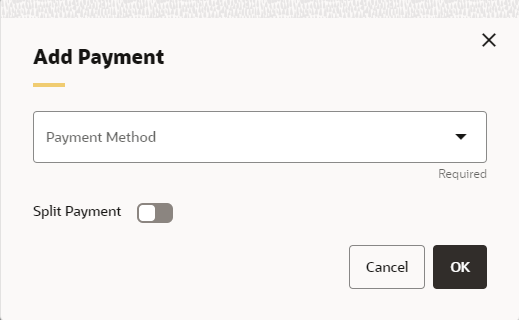
For a credit card or debit card payment method, a form will be displayed from the provider where card data including the credit card number, expiry month, expiry year and security code can be entered. The card data will be validated by the provider and a temporary form token will be returned to Order Administration.
After payment entry is completed at the Add Payment to Order step and select Submit Order, for credit card and debit card payments, an authorization request is submitted automatically to EFTConnect and if successful the card token will be returned.
Edit Payment
After payment has been added to an order in order entry, certain actions are available for each payment method on the Payment screen. Actions include view details, edit, and delete. The deactivate option is displayed if the user selects to reject the order from the authorization response window.
Select Edit from the Actions menu
( ) for a payment method to open the Edit Payment window.
Here you can update a cash or check payment on the order.
) for a payment method to open the Edit Payment window.
Here you can update a cash or check payment on the order.
An Edit option is also available from the Add Payment window when you are first entering the payment method. Selecting the Edit option from this window clears any entries you have made in the window. You return to the initial view of the Add Payment window, with just the Payment Method and Amount to Charge retained.
Modern View Order Summary Payment Enhancements
To support the new payments with EFTConnect, both the Add Payment and Edit Payment flow is updated.
Add Payment
In the Payment Information Panel, select the Add Payment option to lock the order and advance to the Add Payment window. You can select a payment method from the Payment Method drop down box.
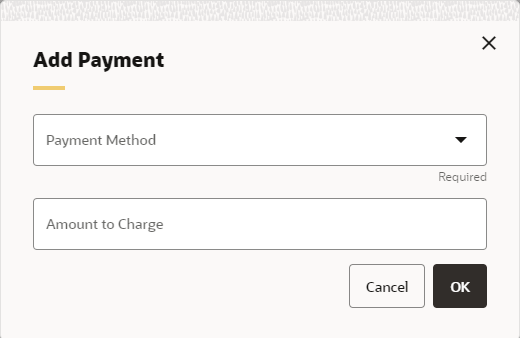
For a credit card or debit card payment method, a form will be displayed from the provider where card data including the credit card number, expiry month, expiry year and security code can be entered. The card data will be validated by the provider and a temporary form token will be returned to Order Administration.
After payment entry is completed, for credit card and debit card payments, an authorization request is submitted automatically to EFTConnect and if successful the card token will be returned.
Edit Payment
In the Payment Information Panel, from the Actions menu (), the
Edit option is only available for a cash or check payment method.
The system locks the order and advances you to the Edit Payment window.
Here you can update a cash or check payment on the order.
To change a credit card or debit card payment, deactivate or delete and then add a new payment.
Pending Transactions
Use the EFTSTA periodic function (PfrEFTStatus) to request payment status updates for pending transactions in EFTConnect. This function checks the status in EFTConnect of each order payment transaction record that is currently in SENT status, as this status indicates that Order Administration previously received a PENDING result code from EFTConnect for the transaction. Some Payment Providers process some messages asynchronously (typically can be Captures, Refunds, Voids) and will return initial result as “PENDING”, and at a later point will notify EFTConnect with the final result of the transaction. This requires Order Administration to periodically request status updates for the transactions in this status.
This function uses the new ELO_POLL_COUNT_THRESHOLD property in CPRP to determine whether the transaction should be updated as unconfirmed. It has a default threshold of 3, but this setting may need to be changed by the retailer. This value indicates the number of times that OMS calls EFTConnect to check if it has the status of the transaction (Capture, Refund, or Auth+Capture) from the payment provider. If the poll count is equal to or exceeds this setting, the status is changed to Unconfirmed. The deposit will need to be managed in Manage Rejected Deposits.
You should schedule this job to run at least a half hour after running deposits to allow time for processing of the requests. The exact interval to allow between running deposits and this job depends on the quantity of requests you are processing.
Fraud Processing
When Use Fraud Checking is enabled on the Payment Configurations Merchant Account screen, the first authorization sent for each order payment method will request that the payment processor perform fraud checking. With CyberSource, fraud checking will be performed through Decision Manager. Additional configuration within Order Administration is no longer required.
When an authorization is under review, the order will be placed on a header system level hold of FS (Fraud Scoring Hold) and a pay type system level hold of PF (Payment Fraud Scoring Hold).
Note:
If the PF hold reason code is already in use, the description will be updated to Payment Fraud Scoring Hold and you should consider creating a different code for other user hold processes.Use the EFTFRA periodic function (PfrEFTFraud) to request payment status updates for authorization transactions under REVIEW in EFTConnect.
-
If result is REVIEW, no changes will be made, and the status will be checked next time the job is run.
-
If result is REJECT, the order is canceled using the reason code in the Fraud Score Cancel Reason Code (M14) system control value.
-
If result is ACCEPT, the order and pay type holds will be released and the order can now follow normal processing.
Authorization Reversals
When Send Authorization Reversal is enabled on the Payment Configurations Merchant Account screen, the REVERSE periodic function now applies only to all open (Status is A or O) Authorization History records whose authorization service is eligible for authorization reversal.
Note:
This periodic function no longer uses Send Reversal on the Work with Pay Type (WPAY) record or a restriction of not more than 72 hours old.This periodic function applies only to credit cards that are configured through the Payment Configurations option in Modern View. It does not apply to ORCE Stored Value Cards, External Payment Service Gift Cards or to PayPal.
EFTConnect Data Storage
Requests are sent to EFTConnect when an order purge occurs to confirm the purge of payment-related data. You can purge orders through Purge Orders (MPOR), Purge Orders by Order Number (MORP), or the PURGEOR periodic function.
New Web Service Message Versions
The following new message versions no longer include tags that pass the credit card number for an order and instead include tags that pass the card token. These changes were made because in 23.2.301.0 or higher, the message includes only an already tokenized card number.
Note:
The previous versions of these messages are no longer available. You need to use the new message versions listed below.-
CWEmailOut: New version 13.0 no longer includes the opm_credit_card tag and includes instead the card_token tag.
-
CWInvoiceOut: New version 7.0 no longer includes the ipm_credit_card_nbr and instead includes the card_token tag.
-
CWOrderIn: New version 12.0 no longer includes the cc_number or already_tokenized tags, but instead includes the new card_token, psp_payment_scheme, and psp_customer_token tags.
-
CWOrderOut: New version 12.0 no longer includes the credit_card_nbr tag, but instead includes the new card_token tag.
Payment Processing Features Removed
Order Administration Payment Processing:
The following payment processing options are no longer supported. See Features Deprecated and Removed in this Release for more information. The EFTConnect module can be used instead.
-
CyberSource Point-to-Point integration and Decision Manager Update through Order Administration
-
Custom Payment Services for credit card and debit cards through Order Administration’s External Payment Service
Web Service Messages:
-
Authorization Request XML Message (CWAuthorizationRequest)
-
Authorization Response XML Message (CWAuthorizationResponse)
-
Deposit Request XML Message (CWDepositRequest)
-
Deposit Response XML Message (CWDepositResponse)
Integration Layer Communication Type: The only available Communication Type at the second Create or Change Authorization Service (WASV) screen is now Payment Link. Payment processing through an Integration Layer is no longer supported.
Displaying Credit Card Numbers: Storing credit card numbers are no longer supported. Instead, the Credit Card Last 4 or the Card Token will be displayed on all Classic View screens or reports where previously the credit card number would have displayed. Additionally, all Classic View screen labels have been updated to say Card instead of Credit Card.
Search by Credit Card Number: The Credit card # field is no longer available at the Classic View Order Inquiry scan screen, so that you can no longer advance to the Scan by Credit Card screen.
Order Administration: Payment Token API
With this update, a new Payment Token service is available for an external merchant application to request a list of qualifying payment tokens and supporting authorization and capture details in order to allow a refund to be processed against the original transaction. For example, a return is sent back to a store location and the store location would like to process the refund against the original form of payment.
Only order payment tokens that are active and associated to an EFTConnect card-based payment method will be returned.
Note:
Evaluation will need to be performed to determine if this is viable option based on Payment Service Providers in card present and card not present applications.Order Administration: Oracle Retail Promotion Engine Integration
With this update, Order Administration is now integrated to the Oracle Retail Promotion Engine Cloud Service (ORPE). When configured, Order Administration will bypass some of the inherent promotional pricing options during order entry, making a REST call to provide the order (cart) details for evaluation by ORPE. The promotion engine performs a comprehensive evaluation of the cart, identifies the applicable offers, and responds with the discounted price applied for qualifying merchandise lines. If shipping rewards are included in the response, Order Administration performs additional validation and calculations before they are applied to the order.
Retailers define deals and promotions using Customer Engagement and then automatically propagate the promotion data to ORPE. This allows the retailers to submit orders (carts) from various external systems (ecommerce, point of sale, order management, and so on) to be centrally evaluated against a single source of promotion data.
The following features in Order Administration will communicate with ORPE for applying promotions:
-
Modern View Order Entry
-
Classic View Order Entry when editing / accepting a batch of orders in error
-
CWOrderIn version 12.0 when it indicates discounts are not already applied
-
Customer Membership Child Order Generation (EGMO)
The following features will not communicate with ORPE: Order Maintenance, OB Fulfillment Order Creation, and ChannelAdvisor.
Note:
Order Administration Modern View Order Summary does NOT communicate with ORPE when an existing order is maintained. If a new line is added in maintenance, it will be priced based on the Order Administration price method hierarchy. If an existing line quantity is changed in maintenance, the price will remain unchanged. The line will not be re-evaluated by Order Administration, and it will not be sent to ORPE for evaluation.Order Administration Classic View does not allow the reprice function with ORPE enabled, nor does it call ORPE during interactive order entry or order maintenance. However the Edit/Accept batch process triggered from Classic View does call ORPE to evaluate orders which have corrected within the Error Batch.
All promotion details successfully applied by ORPE are stored for display within the Modern View user interface (UI) and incorporated into various outbound API’s and integration files including:
-
Modern View Order Summary and Invoice tabs
-
CWInvoiceOut version 7.0
-
CWOrderOut version 12.0
-
CWEmailOut version13.0
-
ReSA RTLog Output File
-
ORCE POSLog Output File
ORPE Setup Requirements
Required properties: The following new properties are available to configure the integration with ORPE:
-
oms.promotion.engine.service.url (PROP): The full URL for the promotion engine service. Provided by your Oracle representative. Defaults to blank.
-
oms.promotion.engine.service.timeout (CPRP): The number of seconds to wait before deal requests from Order Administration to the ORPE Promotion time out. Defaults to 500 seconds.
-
oms.promotion.engine.service.token.url (CPRP): The URL to use when requesting a token for Oauth authentication. Provided by your Oracle representative. Defaults to blank.
-
orce.coupon.service.url.suffix (PROP): The suffix to append to the ORCE_CUSTOMER_SERVICE_PREFIX for Serialized ORCE Coupon Service for validation and redemption of a serialized coupon.
Note:
When calling the ORCE Coupon Service, Order Administration builds the URL using the ORCE_CUSTOMER_SERVICE_PREFIX, SCV L50 and the newly created orce.coupon.service.url.suffix value.Authentication configuration: To configure the promotion engine integration, use the new ORPE Promotion and ORCE Coupon Service at the Work with Outbound Web Service Authentication screen (WWSA). Only OAuth authentication is supported. Client ID and Client Secret will be delivered blank by default for each company.
Required system control value settings: Use the following new system control values to enable use of ORPE:
-
Use ORPE Promotion Engine (M77): Select this system control value to enable use of ORPE for a specific company. Required for ORPE Integration.
-
Price Override Reason for ORPE Discounts (M78): Set the price override reason code to apply to order lines that are discounted through use of the Promotion Engine. Required for ORPE Integration.
-
Use ORCE Serialized Coupons (M79): Select this system control value to use Serialized Coupons with ORPE.
-
ORCE Serialized Coupon Prefix Length (M80): This system control value stores the Serialized coupon codes prefix length value. It must match the value defined in Property Configuration Promotion Coupon Length within ORCE.
Also, the following existing system control values are used:
-
Allow Manual Entry of Promotion Code (I63): Must be selected to see the new Coupons section within the Order Summary panel.
-
ORCE Integration Item ID (L38): Required for ORPE Integration.
-
ORCE Organization Descriptor (L50): Required for Serialized Coupons with ORPE.
-
Default Location for ORCE Integration (K69): Required for integration with ORCE and ORPE.
Deal Types and Promotions
The Order Administration integration now supports the ORPE deal types included below. These deal types are configured in Customer Engagement.
-
BOGO: Buy X Get X and Buy X Get Y
-
LINE ITEM: Line Item Discount
-
GROUP PRICE: Kit
-
SUBTOTAL: Transaction Discount
For each supported deal type, the ORCE configuration can also include shipping awards to optionally apply an Override Shipping Method (Ship Via) and/or the ability to define a discount from the following options:
-
an Override Price (flat shipping fee),
-
an Amount Off (Order Administration deducts the value from the shipping calculation) or
-
a Percent Off (Order Administration calculates the discount percentage amount then deducts the value from the shipping calculation)
Note:
All Shipping Award discount options are applied within Order Administration as a shipping override.The Order Administration integration currently supports product and coupon promotion types (both single-use and multi-use coupons) and incorporates cart data for evaluation of location qualifiers and promotion audience rules (exclusive and non-exclusive).
Note:
Coupon Codes are not supported through the Order API. They are only supported when entered through Modern View Order Entry.Coupons: the integration with ORPE supports two options for coupon promotions, (Serialized and Non-Serialized).
-
A Serialized Coupon allows the retailer to generate coupons, each with a unique serial number, generally for a one-time use. Depending on user authority, a contact center agent may have the ability to allow a previously redeemed serialized coupon to be submitted to ORPE. In this situation, ORPE will apply the coupon discount as long as the cart meets the coupon requirements.
-
If the Contact Center user has authority to the Allow Redeemed ORCE Serialized Coupon to be Overridden secured feature, they can submit a previously redeemed serialized coupon to ORPE by clicking a new attempt Reuse button. For example: If the coupon represented a 10% discount on handbags, it would be automatically applied as long as the cart included a handbag.
-
-
A Non-Serialized Coupon allows a retailer to define a coupon code for the promotion which can be used multiple times. For example, the coupon code ‘SHOE20’ may represent a coupon code that a customer can use multiple times to receive a 20% discount on a shoe purchase.
Targeted Customer Promotions: The integration with ORPE supports applying customer targeted promotions tied to a customer in ORCE. These promotions are set up as Audience Rules within the promotion in ORCE.
-
Exclusive Audience: When the retailer defines the promotion audience as Exclusive, this means that only the customers identified in the target group (segment) are eligible to receive the promotion.
-
Non-Exclusive Audience: When the retailer defines the promotion audience as Non-Exclusive, this means that all customers are eligible to receive the promotion.
During Modern View Order Entry, if the customer exists in ORCE and qualifies for an Exclusive Promotion, that will automatically be passed into ORPE as additional qualifiers in the cart and the respective discounts are applied to the order.
Order Entry Changes in Modern View
Modern View Order Entry has been changed when SCV Use ORPE Promotion Engine (M77) is enabled to support the deal types and promotions. The following now occurs:
-
The Promotion Code and the Discount Percent fields are hidden from view.
-
When SCV Allow Manual Entry of Promotion Code (I63) is enabled the new Coupons section is displayed in the Order Summary panel.
-
When using a source code with price method Reg Plus Reprice and the Add Coupon Code button is selected from the Coupons section of the Order Summary panel, a modal window opens so that the user can enter coupon codes. Entered coupons are evaluated during order review, rather than immediately upon closing the modal window, since additional order changes may be incorporated.
-
If the source code used at order entry has price method other than Reg Plus Reprice, a warning message is displayed within the Coupons section advising Source code does not support Coupons and the Add Coupon Code button is not displayed.
-
-
At the Review step, or after Refresh Order if changes were added, the Coupons section may display a message indicating that Codes were not applied; this occurs if any serialized coupons were previously redeemed, or coupons were submitted for evaluation but were not applied.
-
At the Final Submit step a System Update entry is written in the Order Activity tab when:
-
a coupon code is entered but not successfully applied by ORPE.
-
a serialized coupon is successfully applied by ORPE and it is successfully redeemed or not.
-
Discount Display in Modern View Order Entry and Summary
Item Level Discounts
When the offer price is greater than the unit price, the system now displays the offer price with a strike through before the discounted Unit Price. This is controlled by Display Order Line Discount Messages (F01) system control value.
Additionally, hovering over a new icon will display the discount details for each promotion applied, including the unit discount amount and the associated deal description. If the promotion was triggered by a coupon, the coupon code is included in parenthesis following the deal description.
Order Level Discounts
The Order Total section now displays an icon in front of each of the labels that include an ORPE discount (Merchandise and/or Shipping). This is controlled by Display Discount On Order Recap Screen (D38) system control value.
Additionally, an informational message will display below the totals for each ORPE discount type (Merchandise and/or Shipping) showing the total promotion discounts for the order.
Note:
The calculated Merchandise Discounts and Shipping Discounts are limited to discounts applied by ORPE. If additional discounts were applied based on price methods, manual price overrides, and so on, those discounts would not be reflected in the Merchandise Discounts or Shipping Discounts.When no ORPE promotion discounts have been applied to the order, but there is a delta between the offer price and the actual selling price (due to price method discount, price overrides, and so on) an Order Discount informational message will display below the totals. The Order Discount value is a calculation of the sum of the extended offer prices for all lines, minus the total extended selling price for all lines.
Promotion Details
For orders including promotional discounts applied by ORPE (or submitted through the Order API with the already_eval_by_promo_engine attribute set to Y and containing reward data) a Promotion Details button will display within the Ship To section of Modern View Order Summary. When selected, summary level promotion details per ship-to will be displayed in this panel.
From the Invoices tab, once an invoice has been selected the same item level and order level promotion discount data is available, however the discounts displayed will be limited to those included on that specific invoice.
Order API Enhancements
The Order API (CWOrderIn version 12.0) now allows the ability to indicate the order should be sent to ORPE for promotions to be applied. Additionally, it now includes new attributes to allow an external merchant application to pass discount details already applied by ORPE externally. The changes include:
-
The already_eval_by_promote attribute was renamed to already_eval_by_promo_engine.
-
A new repeating element (Shipping_Rewards) was added within the ship to element, allowing retailers to include shipping award details that were already applied by an external system.
-
A new repeating element (Discount_Rewards) was added within the item element, allowing retailers to include order line discount details that were already applied by an external system.
Note:
The Order API does not currently support ORCE coupon codes or targeted customer promotions when passed in from an external merchant application. See the Web Services Guide on My Oracle Support (ID 2149144.1) for more information.Order Administration: Ship Via Override in Modern View Order Summary
With this update, Ship Via Override functionality is now available in MV Order Summary when doing an Add Item for an existing order. A Ship Via Override can be used to assign a different ship via to a particular item that you are adding to an order. For example, you might perform an express bill if the customer already has the item.
When adding the item, toggle Ship Via Override, then Add to Order.
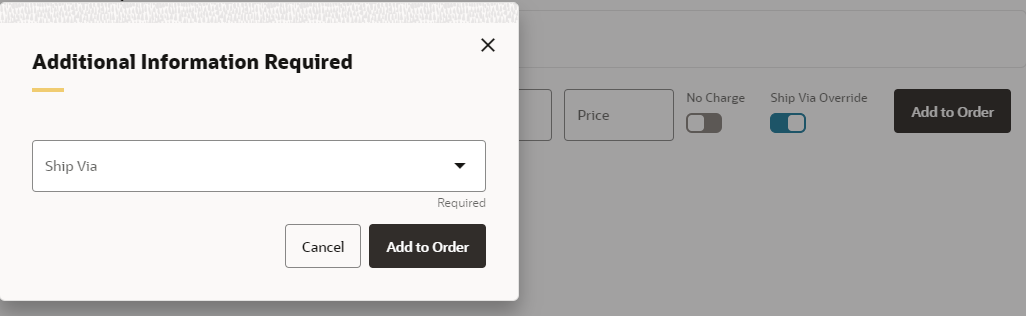
In the Additional Information Required window, select the Ship Via to use from the drop down field. Select Add to Order. The list of ship via values in the drop down is based on the following:
-
Overrides: If there are one or more Ship via overrides set-up for the item (in MITM), the Ship Via drop down lists only those Ship Via values. If there are no overrides set, the Ship Via drop down displays all the ship via values from the Ship Via table.
-
SCF: Only ship vias eligible for the ship to address SCF display.
-
Quotes: If the order is a quote, the Ship Via field does not include ship vias with a billing code of Express Bill (E).
Order Administration: Customer Memberships in Modern View
With this update, a new Memberships tab at the Customer List screen now displays any existing membership programs for the customer. Information displayed includes:
-
membership program name and code
-
customer membership program status
-
next release date when a new membership order is eligible for generation
-
most recent date when a membership order was generated
-
name of the membership recipient
-
current shipping address for the membership
Available options: You can replace the credit or debit card payment method for an active membership program or edit the expiration date.
Order Administration: Order Maintenance REST Web Services
With this update, the use of /apiToken when calling the Order Maintenance Web Services has been discontinued, instead a new /apiLogin endpoint is used.
-
The OMS_API user profile is still required.
-
After the initial /apiLogin call is successful, any subsequent requests must include the “osessionid” cookie with the value of the returned session id
Note:
All web service calls still need the same OAuth authentication and authorization.Order Administration: Cloud Architecture Enhancements
To support advances in cloud architecture, Order Administration, with this update, has made enhancements to job, file and property management.
Pause Jobs to Switch Servers
Order Administration now puts running jobs in a paused status when needed, in order to transfer processing to another server without error. Once the transfer is complete, the job resumes processing in an active status. A job remains paused only briefly until it moves to the new server.
Except for certain longer-running jobs that may occasionally go briefly into paused status as described above, the process of switching jobs to another server is transparent. Shorter-running jobs halt at an appropriate, defined stopping point, and then automatically resume once the switch to the new server is complete.
When Order Administration needs to switch to a different server, it first stops any new jobs from starting, and then waits for any currently running jobs to end.
Because certain jobs, such as the async jobs, do not shut down within the defined timeout interval, they now check periodically to see if they need to pause. If so, they pause and then restart on the new server. A pause status may be indicated briefly.
Screen changes related to changing hosts for running jobs: Because the system may move running jobs to a different host after they initially start, and continue running on the new host, the Display Job History (DJHY) screen no longer displays the App Server Name. The Hostname field at the Display Job History (DJHY) screen and at the Display Active Batch Jobs (DABJ) screen identifies the host where the job is currently running, as this information can be helpful to Oracle staff for troubleshooting purposes.
Additional things to note:
-
The start date and time displayed on screens, including Background Job Control (MBJC), Integration Layer Job Control (IJCT), Display Active Batch Jobs (DABJ) and on the Job Management (My Jobs), Display Job History (DJHY), Work with Drop Ship Background Jobs (WPBJ), are from when the job originally started, even if it was on a different host.
-
The job number displayed in Display Active Batch Jobs (DABJ) and on the Job Management (My Jobs) screen changes when the job switches to a different host.
Support notification email change: The subject line for the Support Notification Email now indicates OMS Support Notification, followed by the hostname.
Change to shipment confirmation generation
The shipment confirmation job, submitted through the Send Internet Order Ship Confirmation (ESCF) menu option as well as the ECSHCNF periodic function, now starts a new SHIP_CONFS job to generate the confirmations.
When you submit the periodic function through a periodic process, the ECSHCNF function generates the SHIP_CONFS job after any prior periodic functions in the periodic process have run; however, even if the generation of the SHIP_CONFS job precedes other functions in the periodic process, the SHIP_CONFS job does not actually begin processing until all other periodic functions in the process have completed.
If you submit the job through the ProcessIn or CWProcessIn message, a wait_for_completion setting of Y indicates to send the response when the ECSHCNF function itself has ended, rather than when the SHIP_CONFS job has run.
Unique billing async job names If the Number of Billing Async Jobs to Start (F08) is set to more than 1 and Delay Billing Updates (K85) is selected, each submitted BILL_ASYNC job is now assigned a unique name. The first is always named BILL_ASYNC, the second is named BILL_ASYNC_02, and so on.
Property Enhancements
Changes you make to the following properties (PROP) now take place immediately:
-
Order Orchestration drop ship properties including:
-
OROB_PURCHASING_SERVICES_MAX_UPDATES
-
OROB_PURCHASING_SERVICES_MESSAGE_VERSION
-
-
Customer Engagement properties including:
-
ORCE_ALT_ID_OROMS
Important: Consult your Oracle representative before you change the setting of this property if you have already enabled the customer integration between Order Administration and Customer Engagement, as previously assigned alternate keys in Customer Engagement will not match up when searching for customers.
-
ORCE_ALT_ID_WEB
-
ORCE_LOYALTY_PROMPT_ATTRIBUTE
-
From Email Alias replaces From Email Address
In order to ensure uninterrupted email generation, emails generated by Oracle omnichannel products, including Order Broker, now use a single email "from" address, such as no-reply-omni@oracledomain.com. The "from" email address is defined by Oracle and cannot be changed. You can now specify an alias to display with the "from" address for the email, for example, My Email Alias <no-reply-omni@oracledomain.com>.
Changed property: The mail.from property has been changed to oms.email.default.from.alias and is used as described below.
You can specify the From email alias for the order type and entity, entity, or company level. The system uses the following hierarchy in selecting the “from” email alias:
-
Order Type/Entity: If a From email alias is specified at the Create Entity Order Type Template Screen or Change Entity Order Type Template Screen in Work with Entities (WENT), use this alias; otherwise,
-
Entity: If a From email alias is specified at the Work with Entity Email Overrides screen (WENT) for the email notification type, use this alias; otherwise,
-
Company: If a From email alias is specified at the Change Company screen (WCMP), use this alias; otherwise,
-
Property: If an oms.email.default.from.alias is specified in Work with Admin Properties (CPRP), use this alias; otherwise,
-
Display just the actual email address of no-reply@omni.retail.oraclecloud.com without including an alias
Job monitor emails: You can also define a from email alias to use with the actualemail address of no-reply@omni.retail.oraclecloud.com for mails generated by the job monitor (WJMO).
Threshold monitor emails: The threshold monitory (WTHR) uses the from email alias, if any, specified for the company.
Order Administration: Tax Interface Configuration Changes
With this update, how the tax interface is enabled and configured has changed. The Use Generic XML Tax Interface (J10) system control value now defines the tax interface to use and is no longer a Yes/No field. Possible settings are:
-
AVATAX: Use the Avalara AvaTax interface.
-
VERTEX: Use the Vertex interface. The version is also displayed depending on the TAX_INT IJCT setting.
-
NONE: Do not use a tax interface. If NONE is selected, a warning message is displayed: Tax Interface is not enabled. Contact your System Administrator.
Note:
The webservicemapping.properties file that was previously used to define the tax integration is no longer used and has been removed.Required properties: The following new properties are required when integrating to Avatax.
The oms.integration.avatax.environment (CPRP): Defines if calling a Sandbox or Production environment for AvaTax. Defaults to blank.
Tax Files Upload
With this update, a new Tax Files Upload screen suite in Modern View allows users to Review, Upload (new and modified), Download and Delete Tax properties configuration files. Files are no longer stored directly on the server however the formats of the files have not changed. Files will not automatically be moved, they will need to be manually uploaded after the update.
Note:
ALLOW authority to the TAXU menu option is required for access to this page.Required properties: The following new properties are required to configure the Tax File Upload:
-
oms.cloud.file.transfer.url (CPRP): The full URL for file transfer service.
-
oms.cloud.file.transfer.bucket (CPRP): The bucket for file transfers.
-
oms.cloud.file.transfer.version (CPRP): The version of the file transfer service.
-
oms.cloud.file.transfer.timeout (CPRP): The timeout for the file transfer service.
Note:
File Transfer Service properties will default to blank. Contact your Oracle representative for setup.Order Administration: Externalize File Movement
The file storage API, rather than secure FTP, is now used for all file imports and exports. The following changes have been made because secure FTP is no longer supported.
-
Removed properties: The following properties have been removed from the properties screens (CPRP or PROP).
-
FILE_STORAGE_IMPORTS_ENABLED: File storage imports are always enabled.
-
FILE_STORAGE_EXPORTS_ENABLED: File storage exports are always enabled.
-
OROB_IMPORTS_ENABLED: Imports are always enabled. If the OROB_IMPORTS_ENABLED setting in Working with Customer Properties (PROP) is set to true, the system uses the Order Orchestration Import RESTful web service to automatically upload product, product location, and incremental inventory files from the OROB_DIRECTORY_PATH to the OROB-Imports location in Order Orchestration.
-
ORCE_CUSTOMER_WITHOUT_ORCE_ID_DIRECTORY_PATH: The RLTNOID function is no longer supported.
-
MASS_CUSTDWNLD_DOWNLOAD_DIRECTORY
Note:
In this update, the Mass Customer Download is not currently implemented. The Generic Customer Download API can be used instead. See the Web Services Guide on My Oracle Support (ID 2149144.1) for more information.
-
XLINK_DIRECTORY_ARCHIVE_PATH: No longer needed since file storage exports are always enabled.
-
-
Display-only properties: The following properties are now set to default values and are all now display-only in CPRP.
-
ASSOCIATE_FILE_PATH
-
CA_INVENTORY_FILE_LOCAL_FOLDER
-
CWDIRECTCP_FTP_FOLDER
-
CWDIRECTCP_UPLOAD_DIRECTORY
-
CWDIRECTCP_USPS_UPLOAD_FILE
-
ECOMMERCE_DIRECTORY_PATH
-
ORCE_CUSTOMER_ID_DIRECTORY_PATH
-
ORCE_DIRECTORY_PATH
-
OROB_DIRECTORY_PATH
-
STORE_FILE_PATH (Note: The store upload is now available only through WUPL.)
-
XLINK_DIRECTORY_PATH
-
Also in this update:
-
The RTLOG periodic function runs successfully only if the Sales Audit File Service URL (M64), Sales Audit Import Folder Path (M65), IDCS Enterprise Endpoint Scope (OAUTH) (M66), and IDCS Enterprise Endpoint URL (OAUTH) (M67) system control values are populated correctly.
-
The ORCE File Service URL (M62) and ORCE Import Folder Path (M63) system control values must be specified for the company in order for the Customer Engagement Sales Feed (RLTSLSF periodic function) or the Customer Upload to Customer Engagement (RLTCSUP periodic function) to run.
-
The Local Price Folder setting in Work with ChannelAdvisor Accounts (WCAA) is set automatically and cannot be changed.
Order Administration: Timeout Property
With this update, a new oms.ui.session.timeout property (PROP) enables you to define the number of minutes before a user session times out due to inactivity. Your entry can be a whole number from 15 to 1440. Defaults to 30 minutes.
Order Administration: New Online Help Format
With this update, the online help uses a new format that is fully accessible.
Order Administration: Updated Reporting Guide
With this update, a new Order Management Administration Cloud Service Reporting Guide is available on My Oracle support. See the guide at My Oracle Support (Doc ID: 2149144.1) for instructions on required configuration, creating custom reports, and generating and scheduling reports.
Order Administration: Retail Data Store Availability
Oracle Retail Data Store (RDS) enables retailers to unlock the value of their data through a comprehensive set of tools, enabling virtually unlimited extensibility while abstracting those workloads from those of the original Oracle Retail cloud services. This toolset allows the retailer to create a wide variety of functionality that they can tailor specifically to their own business processes. Examples include custom web services to expose specific data elements, custom integration (inbound and outbound), reporting and analytics, and custom user interfaces for the capture of retailer-specific data.
The Retail Data Store provides a low-cost, low-code environment that enables you to extend the capabilities of Order Administration. See https://www.oracle.com/a/ocom/docs/industries/retail/retail-data-store-ds.pdf for background.
A separate subscription different from Order Administration Cloud Service is required for Retail Data Store, which is composed of two parts:
-
Oracle Retail Data Compute Cloud Service – this portion of the subscription covers compute resources available to the cloud service and allows a retailer to add compute to their solution as necessary for their extensions.
-
Oracle Retail Data Storage Cloud Service – this portion of the subscription covers data storage resources available to the cloud service and allows a retailer to add storage to their solution as necessary for these extensions.
For more information about Retail Data Store, see its documentation set on the Oracle Help Center (https://docs.oracle.com/en/industries/retail/). Also, see the Order Administration Retail Data Store (RDS) Data Model on My Oracle Support (ID 2910995.1).
Order Administration: Technical Changes and Removed Features
With this update, unused features and technical configurations have been removed from Order Administration.
Order Administration: Application Groups
The following application groups have been removed:
-
O/E application area: A/R, CUP, DEF, GP1, PRC, SCR.
-
ALL application area: EDC, LTR, O/E.
-
INV application area: P/E, O/M, O/E.
-
C/S application area: F/M.
-
P/O application area: POE.
Order Administration: Encryption
The OMS Base and OMS Key Management (OKM) Encryption methods have been removed. They are no longer required since Credit Card PANS are not stored in the database.
Order Administration: Integration Layer Processes
The following integration layer processes were no longer used and have been removed, and any related queues were also removed:
-
EC_ITEMAVL
-
EMAIL
-
PERDEP
-
PMD_ONLINE
-
PMT_BTCH
-
PMT_ONL
-
SVC_AUTH
-
SVC_BALANC
-
SVC_OUT
-
TRIGGER_DL
The following integration layer processes have been removed because processing authorizations or deposits through an integration layer has been deprecated; see the Deprecation Advisory:
-
CCAUTH_BTH
-
CCAUTH_ONL
-
DEPOSITS
Updated Descriptions: The following integration layer processes (IJCT) or their queues have been renamed:
-
ORDER_IN: changed description of the queue to Order Inbound.
-
SVC_REVRSL: changed description of the queue to Stored Value Card Reversal.
Interactive Updates: The following integration layer processes (IJCT) have been updated to be interactive:
-
CUST_HIST
-
CUST_SRCH
-
CUSTOMR_IN
-
INV_INQURY
-
ORDER_IN
-
RETURN_IN
-
WORKFLOW
Each of the above jobs can be used interactively. Note that the ORDER_IN job supports the CWOrderIn message, while the other jobs support the CWMessageIn message.
Removed the following queues related to the above jobs:
-
CUST_HIST_IN
-
CUST_HIST_OUT
-
CUST_SRCH_IN
-
CUST_SRCH_OUT
-
CUSTOMR_IN_IN
-
CUSTOMR_IN_OUT
-
INV_INQURY_IN
-
INV_INQURY_OUT
-
ORDER_IN_IN
-
ORDER_IN_OUT
-
RETURN_IN_IN
-
RETURN_OUT_OUT
-
WORKFLOW_OUT
Removed the periodic functions to start or stop the above jobs:
-
CUST_HIST: STRCHST, ILSTRCSTHT, ENDCHST, ILENDCSTHT
-
CUST_SRCH: STRCSRC, ILSTRCSTSR, ENDCSRC, ILENDCSTSR
-
ORDER_IN: STRORDR, ILSTRORDIN, ENDORDR, ILENDORDIN
-
RETURN_IN: STRRTIN, ILStrRtnIn, ENDRTIN, ILEndRtnIn
-
WORKFLOW: STRWRKF, ILStrWrkFl, ILENDWRKFL, ILEndWrkFl
Additional integration layer process updates:
-
Reset the Active Session(s) setting to 0 for all integration layer processes.
-
Set the Inbound XML Msg/WSDL Doc Name for the TAX_INT job to CalculateTax90.wsdl.
-
All integration layer process queues are now delivered with the Enabled flag unselected. You can enable each queue after configuration.
-
Changed the Seq number for the Customer Inbound queue (CUSTOMER_IN) to 1. All other queues are delivered with a sequence number of 0.
-
Removed the Outbound Queue Manager and Outbound Queue for the ITEM_OUT process queue, as they are no longer used.
-
The INV_INQUIRY process is now an interactive job, and you can no longer start it from the Work with Integration Layer Process screen. A CWMessageIn request with a target of CWINVINQRY.
Order Administration: Menu Options
The following menu options are no longer delivered with Order Management Suite:
-
CCRH: Convert Catalog Request History
-
DICR: Display Invoice Cross Reference
-
ERMV: Remove Offers and Items from Download
-
IITC: Initialize Item Control
-
MAPG: Maintain Application Areas
-
MSCC: Update Standard Cost. Note: The UPD_STD periodic function to update standard cost is also no longer implemented.
-
MSCV: Maintain System Control Values. Note that Work with System Values/Features (WSYS) is still enabled.
-
MWUT: Print Warehouse Utilization Report
-
PFCA: Print FIFO Activity Report
-
PINC: Print Inventory Control Report
-
PIRE: Print Inventory Receipt Exception Report
-
PIVR: Print Inventory Valuation Report
-
PWFR: Print Warranty Freight Report
-
WAIT: Work with Automated Inventory Transactions
-
WCON: Work with Contributions
Note:
The Display Contributions option has not been removed from order inquiry; however, it is no longer implemented. -
WCSE: Work with Customer Service Email Template
-
WECH: Work with E-Commerce Holidays
-
WFCF: Work with FIFO Cost File
-
WFCV: Work with FIFO Cost Conversion
-
WLDP: LDAP and Domain Configuration (Note: This menu option was available in Modern View only.)
-
WLSR: Work with List Source Codes
-
WPFX: Work with Prefix Codes
-
WPTW: Work with Price Tickets
-
WRCC: Work with Recency Codes
-
WRPT: Work with Report Control
-
WUEP: Work with User Exit Point
-
WWOB: Work with Order Broker. Note that Work with Order Broker (WOBR) is still enabled.
In addition, menu options with Fast Path codes that start with U or T, which have not been documented, have been removed:
-
TEML: Test Email
-
TENT: Work with Entities. Note that Work with Entities (WENT) is still supported.
-
TLWS: Test Locate Web Service
-
TQPM: Work with Quantity Price Matrix. Note that Work with Quantity Price Matrix (WQPM is still supported.
-
UCAN: Cancel
-
UCST: Test New Customer Scan
-
UQAS: Test QAS
-
ULOG: Test Serenade Logs
-
USXM: Generate Sample XML
Removed or disabled fields from menu options: The following additional options are removed or disabled.
-
In Work with Source Codes (WSRC): The List Source and Recency fields are still displayed but are no longer implemented.
-
In Order Inquiry (OIOM):
-
The FIFO Cost History option at the Display Invoice Detail screen is no longer enabled.
-
The Credit card # field is no longer available at the Order Inquiry scan screen, so that you can no longer advance to the Scan by Credit Card screen.
-
-
In Work with Inventory Transaction Errors (WITE): The FIFO Cost History option is no longer enabled.
-
Retail Integration Item Upload (RIIU): The Average Cost, FIFO Cost, and LIFO Cost fields are no longer used.
Also, the gender profile code of 1 and the profile data of M and F are no longer delivered (WPFL).
Order Administration: Menus
The following menus are no longer delivered with a new installation of Order Administration:
-
ACCOUNTB
-
ACCTSETUPB
-
BUYERB
-
CSSETUPB
-
CUSTOMERB
-
CUSTSERVB
-
FIFO
-
FULFILLB
-
FULFILSETB
-
HELDORDERB
-
HOMEB
-
INVSETUPB
-
INVTRANB
-
ITEMCOPYB
-
ITEMSKUB
-
ITEMSUPPTB
-
MARKETINGB
-
MERCHB
-
MERCHRPTB
-
NEWHOME
-
OFFERSETB
-
OIOMENUB
-
OPERATIONB
-
PICKB
-
PRICINGB
-
RECEIVERB
-
REFUNDSB
-
UTILITIESB
-
WAREHOUSEB
-
WHSMGMTB
-
ZONE
Order Administration: Periodic Functions
The following periodic functions have been removed and are no longer supported:
|
Program Name |
Default Function Name |
Function Description |
|
CVRPROP |
CONPRP |
Convert Properties |
|
ECR0417 |
PECLOGF |
Purge ECLOGF Records |
|
ILENDCCBTH |
AUTHEND |
CC AUTH_BTH PERIODIC END |
|
ILENDCCONL |
AUTHONE |
CCAUTH_ONL END |
|
ILENDDEPST |
ENDCCDP |
End DEPOSITS |
|
ILENDPMD |
ENDPMD |
End the PMD_ONLINE IJCT Job |
|
ILENDSVCBL |
SVCBALE |
End the SVC_BALANC IJCT Job |
|
ILSTRCCBTH |
AUTHSTR |
CCAUTH_BTH START |
|
ILSTRCCONL |
AUTHONS |
CCAUTH_ONL START |
|
ILSTRDEPST |
STRCCDP |
Start DEPOSITS |
|
ILSTRPMD |
STRPMD |
Start PMD_ONLINE IJCT Job |
|
ILSTRSVCBL |
SVCBALS |
Start SVC_BALANC IJCT Job |
|
INR1229 |
GGERSDN |
Generate GERS Item Download |
|
MSR0463 |
LETTER |
CS Letter Reqs |
|
PFCYBDMUP |
CYBDMUP |
CyberSource Decision Manager Update |
|
PFINPLAY |
INPLAY |
In Play Report |
|
PFR0036 |
MEMBER |
Generate Membership Orders |
|
PFR0055 |
GOCCIIF |
Generate OCC Item Interface |
|
PFR0087 |
SECRISK |
Purge Security Risk Info |
|
PFR0121 |
DLTACPR |
Delete Stranded Active Procedures |
|
PFR0204 |
PREORDER |
Submit Active PO Order Lines to Order Broker and Generate RSB Backorder Message |
|
PFRCIU |
RLTCSID |
Update Customer with Relate ID |
|
PFRCNI |
RLTNOID |
Report Customer with no Relate ID See Externalize File Movement for more information. |
|
PFRRMS |
RMSZIP |
RMFCS and RPCS Import |
|
PHR0116 |
RADSALE |
RA DOS Sales Upload |
The following updates have been made to periodic functions:
-
The COPYCMP periodic function no longer includes the owner of the database as a parameter. For example, to copy company 1 to company 2 and delete company 1, your parameter entry is now 1 2 Y.
-
Although the BYORDER (PFR0107) periodic function is no longer delivered, you can create a periodic function for PFR0107 by selecting Create Periodic Function in Streamlined Pick Slip Generation (WSPS).
-
The Customer Download (CSTDWNL, PFRCSTDNLD) periodic function is not currently supported.
-
The RESET periodic function has been renamed from Daily Reset to Inventory Quantity Reset.
Order Administration: Properties
Admin Properties: Removed the following properties from Work with Admin Properties (CPRP), since they are no longer used. The list of removed properties includes properties that were used to define logging settings, since Oracle staff now define logging settings through a central control option, as well as properties related to FTP, since FTP is no longer supported.
-
ALERT_LOG_LEVEL
-
ALERT_MAXBACKUP_DAYS
-
APP_LOG_LEVEL
-
APP_MAXBACKUP_DAYS
-
CC_TOKENIZATION_CLASS
-
CC_TOKENIZATION_CLASS_PROPERTIES
-
CW_JDBC_PROVIDER
-
CW_LOG_BACKUP_PATTERN
-
CW_LOG_DATAQ
-
CW_LOG_DATE_PATTERN
-
CW_LOG_DIR
-
CW_LOG_PATTERN
-
CW_PATH1
-
CW_PATH2
-
CW_SECURITY_LEVEL
-
CWDIRECTCP_ALLOW_PASSWORD_REUSE
-
CWDIRECTCP_LR_JOB_ MONITOR_ALERT_AFTER_X_MINUTES_DEFAULT
-
CWDIRECTCP_LR_JOB_ MONITOR_ALERT_AFTER_X_MINUTES_OVERRIDE
-
CWDIRECTCP_LR_JOB_ MONITOR_ALERT_FROM_EMAIL_ADDRESS
-
CWDIRECTCP_LR_JOB_ MONITOR_ALERT_TO_ EMAIL_ADDRESS
-
CWDIRECTCP_LR_JOB_ MONITOR_CONTROLLER
-
CWDIRECTCP_LR_JOB_ MONITOR_EXCLUDE_JOBS
-
CWDIRECTCP_LR_JOB_ MONITOR_REPEAT_ALERT_AFTER_X_CYCLES
-
CWDIRECTCP_LR_JOB_ MONITOR_RUNS_EVERY_X_MINUTES
-
CWDIRECTCP_MAXIMUM_PASSWORD_LENGTH
-
CWDIRECTCP_MINIMUM_PASSWORD_LENGTH
-
CWDIRECTCP_PASSWORD_EXPIRATION_DAYS
-
CWDIRECTCP_REPORTS_DIRECTORY
-
CWDIRECTCP_REQUIRE_DIGIT_IN_PASSWORD
-
CWDIRECTCP_REQUIRE_SPECIAL_CHAR_IN_PASSWORD
-
CWDIRECTCP_REQUIRE_UPPERCASE_CHAR_IN_PASSWORD
-
CWDIRECTCP_SERVER_NAME
-
CWDIRECTCP_VERSION
-
CWMQ_JNDI_LOOKUP_NAME
-
CWMQ_JNDI_PROVIDER_URL
-
CWMQ_JNDI_INITIAL_CONTEXT_FACTORY
-
CYB_PAY_LINK_SERVICE
-
CYB_PAY_LINK_SERVICE_ENABLE_LOG
-
CYB_PAY_LINK_SERVICE_LOG_DIRECTORY
-
CYB_PAY_LINK_SERVICE_SEND_TO_PRODUCTION
-
CYB_PAY_LINK_SERVICE_KEY_DIRECTORY
-
CYB_PAY_LINK_DECISION_MANAGER_ENABLED
-
CYB_PAY_LINK_DECISION_MANAGER_KEY
-
CYB_PAY_LINK_DECISION_MANAGER_SECRET_KEY
-
CYB_PAY_LINK_DECISION_MANAGER_MERCHANT_ID_OVERRIDE
-
CYB_PAY_LINK_DECISION_MANAGER_SEND_TO_PRODUCTION
-
GWT_RESOURCE_URI
-
INTEGRATIONORDER_LOG_LEVEL
-
INTEGRATIONORDER_MAXBACKUP_DAYS
-
JOB_LOG_LEVEL
-
JOB_MAXBACKUP_DAYS
-
mail.debug
-
mail.host
-
mail.password
-
mail.smtp.auth
-
mail.user
-
MANIFEST_LOG_LEVEL
-
MANIFEST_MAXBACKUP_DAYS
-
MQ_LOG_LEVEL
-
MQ_MAXBACKUP_DAYS
-
NARVAR_LOG_LEVEL
-
NARVAR_MAXBACKUP_DAYS
-
OCDS_LOG_LEVEL
-
OCDS_MAXBACKUP_DAYS
-
OKM_ACCESS_ALIAS
-
OKM_ACCESS_ALIAS_SWITCH
-
OKM_ACCESS_PASSWORD
-
OKM_ENABLED
-
OKM_KEY_SWITCH_TYPE
-
OKM_PATH_1
-
OKM_PATH_2
-
OMSPAYMENT_LOG_LEVEL
-
OMSPAYMENT_MAXBACKUP_DAYS
-
ON_PREMISE_ENABLED
-
ORCE_ALT_ID_POS
-
ORCE_LOG_LEVEL
-
ORCE_MAXBACKUP_DAYS
-
ORDER_LOG_LEVEL
-
ORDER_MAXBACKUP_DAYS
-
OROB_LOG_LEVEL
-
OROB_MAXBACKUP_DAYS
-
OROMS_DATA_ACCESS_PATH
-
PAYPAL_LOG_LEVEL
-
PAYPAL_MAXBACKUP_DAYS
-
PROXY_HOST
-
PROXY_PORT
-
RESP_LOG_LEVEL
-
RESP_MAXBACKUP_DAYS
-
RICS_LOG_LEVEL
-
RICS_MAXBACKUP_DAYS
-
STARTUP_COMPANY_TO_RUN_PERIODIC_PROCESS
-
STARTUP_NBR_MINUTES_TO_WAIT_BEFORE_ RUNNING_PERIODIC_ PROCESS
-
STARTUP_PERIODIC_PROCESS_TO_RUN
-
STARTUP_USER_TO _RUN_PERIODIC_PROCESS
-
TRACE_LOG_LEVEL
-
TRACE_MAXBACKUP_DAYS
Customer Properties: Removed the following properties from Work with Customer Properties (PROP), as they are no longer used:
-
CWDIRECTCP_ALLOW_SCHEDULING_ON_THIS_SERVER
-
CW_FTP_POS_LOG_FILE
-
https.protocols
Long-running job monitor: The long-running job monitor has been removed, as well as the notification email for long-running jobs. All related properties have also been removed.
Additional Removed and Replaced Properties
The following properties have been removed from the properties file on the server and replaced by a system control value or property managed through the user interface:
-
ADD_INT: This property in the web service mapping file previously controlled whether the Experian Data Quality (EDQ) address validation interface was enabled to validate addresses. Now the Use QAS Address Interface (I67) system control value defines whether the interface is enabled. See Experian Data Quality (EDQ) Address Validate API, including EDQ Setup, in the online help for more information on enabling the interface.
-
log.query.time.limit: This property has been replaced with the oms.db.query.log.threshold property in Work with Admin Properties (CPRP). Oracle staff can use this property to control when to log longer-running queries: queries that run for longer than the number of milliseconds defined in this property now create log entries. The new property defaults to 4000 milliseconds.
-
webservicemapping.properties file and TAX_INT property has been removed and is no longer used to indicate the enabled tax integration. The Use Generic XML Tax Interface (J10) system control value now defines the tax interface to use.
See Externalize File Movement for additional removed properties.
Also, removed the following properties from properties files:
-
CWDIRECTCP_ALLOW_SCHEDULING_ON_THIS_SERVER: No longer used.
-
CWDIRECTCP_LR_RUN_JOB_MONITOR_ON_THIS_SERVER: No longer used.
-
CWDIRECTCP_RESET_JOBS_ON_STARTUP: No longer used.
-
ENABLE_EXTERNAL_PAYMENT_SERVICE: No longer used.
-
JMS_SCHEMA: No longer used.
-
USE_OLD_JOBCLN_FUNCTION: No longer used.
Renamed Properties: Renamed the following properties. Some support configuration options for Oracle staff and may not be visible within Order Administration:
-
ACTIVE_PROCEDURES: Renamed oms.reports.service.active.procedures. Used to filter data on the Managed Services report.
-
ALERT_EMAILS: Renamed oms.reports.service.email.to. The email addresses that receive Managed Services reports.
-
CWEmailOutQueueName: Renamed oms.email.job.queue.output.name. Defines the output queue to use for emails.
-
INTEGRATION_PROCESS: Renamed oms.reports.service.processes. Used to filter data on the Managed Services report.
-
MAIN_XSL_FILE: Renamed oms.ui.classic.xsl
-
program.messagequeue.implementation: Renamed oms.program.messagequeue.name. This is the primary name of the queue to send program messages to.
-
QINTER: Renamed oms.job.queue.interactive. Defines the interactive job queue name.
-
SBMJOB.DEFAULT.OUTQ: Renamed oms.job.queue.output. This is the job outqueue to use, and can be set to *CURRENT, *USRPRF, or *JOBD (default).
-
SUBJECT_LINE: Renamed oms.reports.service.email.subject. The text displayed in a Managed Services email.
-
SUPPORT_EMAILS: Renamed oms.email.support.to. Defines the list of email addresses to receive the Support Notification email when a job is placed in MSG status because an error has occurred, or System Alert email for other errors such as inconsistent system control value setup across companies.
-
SUPPRESS_EMAIL: Renamed oms.reports.service.email.disabled. Defines whether a Managed Services email is generated.
-
WRITER: Renamed report.legacy.writer. Can be set to XML or TEXT.
-
XML_CONVERSION: Renamed oms.ui.classic.transform. Set to FORCE_SERVER in order to force the XML transform using the main.xsl.file.
-
XML_CONVERSION_ADMIN: Renamed oms.ui.classic.admin.transform. Set to FORCE_SERVER in order to force the XML transform using the main.xsl.file.
-
xml.encoding: Renamed oms.xml.encoding. Defines the XML encoding to use for XML produced by screen output (pre XSLT).
These properties are not displayed on any Order Administration screens.
Changed default property settings (PROP):
The BI_REST_REPORTS_FOLDER property (CPRP) now needs to be set to OMSCS/Reports/.
Order Administration: Reports
The following reports are no longer available to be generated:
-
FIFO Cost Layer Listing
-
Inventory Control Report
-
Inventory Reconciliation Report
-
Inventory Valuation Report
-
Standard Cost Updates Report
-
Warranty Freight Report
Order Administration: Secured Features
The following secured features have been removed:
-
A26: A/R Order Access
-
A27: Batch Total Access
-
A35: Create/Change Letters
-
A41: Convert Contribution Authority
-
A78: Delete Customer Call Log Records
-
A88: Restrict Access to Credit Card Numbers in OI and OM
-
A99: Maintain Check Interface Download Date
-
B14: Display Full Credit Card Number
Also, changed the default value of the Change Associate Customer Flag (B10) secured feature to ALLOW.
Order Administration: System Control Values
Removed System Control Values
The following system control values are no longer used and have been removed.
-
A25: Costing Method. Only standard costing is supported.
-
A38: Default OUTQ
-
A39: Default # Copies
-
A40: Hold Listing Default
-
A41: Save Listing Default
-
C74: Default Male/Female Profile Code
-
D69: Default Country for International Address Format
-
D70: Method for Processing Overpayments in Order Entry
-
E62: External Postal Code Validation
-
E64: External Validation for Phone Number
-
E99: Sub Page Entry
-
F22: Display Basic Install Values Only
-
F46: Price Ticket Print Program
-
G26: Check Interface Payment Type
-
G27: Check Interface Additional Charge Code
-
G40: Item Number Cross Reference Program
-
G63: Pickable Setting for Analyzing Replenishment Locations
-
G64: Type of Location to Search First in Warehouse Replenishment
-
G65: Type of Location to Search Second in Warehouse Replenishment (G65)
-
G66: Type of Location to Search Third in Warehouse Replenishment (G66)
-
I12: Send Data for Level II Discounting
-
I77: Generate Price Tickets During Pick Slip Generation
-
I97: Enable Encryption
-
K65: Credit Card Retention Days
-
K84: Second Compatibility Code used to Trigger SKU Blocking
-
L18: Use Credit Card Tokenization
-
L40: Require Token
-
L83: Evaluate Pending Deposits and Refunds for Credit Card Purge
Additional System Control Value Updates
-
Renamed system control value: The name of the L38 system control value has been changed from MICROS Integration Item ID to ORCE Integration Item ID.
-
Changed the narrative displayed for some system control values.
-
Hid Use Credit Card Level III Discounting (L47). Level III discounting is not supported with EFTConnect.
Order Orchestration: Oracle Redwood Colors in Classic View
With this update, the Classic View user interface has been updated with Oracle Redwood colors to align with the Modern View user interface.
Order Orchestration: Roles in Modern View
With this update, the Roles, Role Wizard, and Browse Roles screens have been removed from Classic View and are replaced by a new Roles suite in Modern View.
Migration of existing roles: Any existing roles that were created in a previous release will now be available through the Roles screen in Modern View. The new Roles screen now displays a Role Code for each role, and existing roles are assigned role codes sequentially, such as ROLE1 and ROLE2. Optionally, you can delete a migrated record in order to assign a different code, since the role code itself cannot be changed.
The options available at the Roles screen in Modern View are similar to the ones that were previously available in Classic View, enabling you to create, change, view, or delete roles. The total number of menu options or features assigned through each role is indicated under the Menu Authorities at the Roles screen, for example: 39 Allowed.
The screens you use to create or update roles in Modern View are broken out by tab:
-
The Role Details tab enables you to define or review basic information about the role, including its name and code. Also, you can use this tab to identify a vendor role, and optionally flag it as the default role to apply when creating vendor users.
-
The Menu Authority tab enables you to define the menu or feature authority provided by the role. The entries vary depending on whether the role is for retailers or vendors. The menu option or feature authority has a new organization in this release, and retailer options are broken out into Inquiry, Foundation Data, Locations, Products, Reports, and Systems categories. You can assign all menu options or features in a category to the role or assign individually.
-
The Assigned Users tab enables you to assign or remove retailer users to the role. Note that this option is not currently available for vendor users.
Order Orchestration: Users in Modern View
With this update, the User Profiles and Store Connect User Profiles screens listed below have been removed from Classic View and are replaced by a new Users suite in Modern View. This consolidated Users screen suite provides the ability to work with users regardless of whether they have access to Order Orchestration, Store Connect, or both.
Screens removed from Classic View:
-
User Profiles
-
User Profile Configuration
-
Browse User Profile
-
-
Store Associate User Profiles
-
Edit Store Associate User Profile
-
Browse Store Associate User Profile
-
Note:
The Vendor User Profile screens remain in Classic View only, and you must continue to use the Classic View screens to work with vendor users.The options available at the Users screen in Modern View are similar to the ones that were previously available in Classic View, enabling you to change, view, or delete users. The screen indicates whether the user has access to Order Orchestration, Store Connect, both, or neither.
Note:
Users are combined from User Profiles and Store Associate User Profiles into a single view based on their IDCS/OCI IAM User Identifier.The screens you use to review or update users in Modern View are broken out by tabs:
-
The User Details tab enables you to review or update basic information about users, including their names, locales, email addresses, and whether they are active.
-
The Roles tab enables you to assign Retailer roles to Order Orchestration users or remove roles. If the user is configured only for Store Connect access and not for Order Orchestration, it is not necessary to assign any roles.
-
The Organizations tab enables you to assign or remove organizations for the user, and to flag the default organization for the user.
-
The Store Connect tab enables you to review or update the store locations where the user has access. Note:
-
The locations listed are filtered based on a selected organization. If you change the selected organization, all previously assigned locations are removed.
-
If a user did not previously have any locations assigned, and you now assign one or more locations, the Users screen now displays the user as having Store Connect access.
-
User Organization Changes
Order Orchestration users can now be assigned to one or more organizations to control access in the user interface.
As part of the update process, all existing users will be:
-
assigned to all organizations
-
assigned a default organization using the user’s Default Shipping System
The default organization specified through the Users screen controls the default display of data in Classic View and Modern View, such as orders. The default system selected for the organization at the System screen controls the display of system product codes.
IDCS or OCI IAM Synchronization
As existing users are updated with another role either within the Users screen, or within IDCS or OCI IAM, that role will be reflected in the other application. For example, if a Store Connect user now needs access to Order Orchestration, that additional role can be assigned through IDCS or OCI IAM or through the Users screen in Modern View, and updates will be sent to synchronize roles in both places.
Order Orchestration: External Services Enhancements
New external service types: With this release, you can edit additional types of external services through the External Services screen in Modern View, where formerly only shipping services were available for update and review. The External Services screen now displays the following External Service Types, and the Add, Edit, and View External Service windows now include options for each that were previously available at the related tabs of the System screen:
-
Foundation Data: Provides options that were previously available at the OCDS Integration Import tab of the System screen, including URLs and active flags for store location, warehouse location, product, product barcode, product image, store inventory, and warehouse inventory, as well as configuration settings (request size, connection (request) timeout, authentication type, and authentication-related settings, including Application OAuth).
About Application OAuth: When you select Application OAuth, the client ID from the Tenant-Admin screen defaults, and you do not enter any additional information supporting authentication information except the Scope, which is optional.
-
Inventory: Includes options that were previously available at the Inventory tab of the System screen, including endpoint URL, connection timeout, failed request threshold, failed request wait time, authentication type, and authentication settings, including Application OAuth.
-
Orders: Includes options that were previously available at the RICS Integration tab of the System screen, including endpoint URL, connection timeout, authentication type, and authentication settings. The available authentication settings vary depending on the type of authentication selected (Basic, OAuth, or Application OAuth).
Removed from System screen tabs: Each field that is now available at the Add or Edit External Service windows has been removed from the related tab on the System screen. Instead, you now use the System screen to select an existing external service that you have configured through the Add or Edit External Service windows:
-
Inventory tab: The Inventory Service drop-down, where you select an inventory service configured through the External Services screen, replaces the Connect Type field.
-
RICS Integration tab: The Orders Service drop-down, where you select an orders service configured through the External Services screen, replaces the Outbound Orders Service fields.
-
OCDS Integration Import tab: The Foundation Data Service drop-down, where you select a foundation data service configured through the External Services screen, replaces all fields at the tab except the Default Store Location Type and Default Warehouse Location Type fields, which have been renamed.
Migration of existing data: Any existing data that was specified at the above-listed tabs at the System screen in a previous update will now be available through the External Services screen in Modern View, mapped as follows:
-
Inventory services: Set to the previous settings from the Inventory tab at the System screen with the following exceptions:
-
External service code: Set to INVENTORY, appended with an incremental number, such as INVENTORY1 and INVENTORY2.
-
External service type: Set to Inventory.
-
Inventory service: Set to SIOCS Integration if the Connection Type was set to SIM; otherwise, set to Standard Inventory Service if the Connection Type was set to URL.
-
Description: Set to SIOCS Integration or StandardInventoryService for SYS-Description, based on the selected Connection Type, where SYS is the system code and Description is the system description.
Note:
The 23.2.301.0 release of Order Administration (formerly Order Management System) does not support basic authentication for inbound messages. OAuth is required. -
-
Foundation data services: Set to the previous settings from the OCDS Integration Import tab at the System screen, with the following exceptions:
-
External service code: Set to OCDS, appended with an incremental number, such as OCDS1 and OCDS2.
-
External service type: Set to Foundation Data.
-
Description: Set to FOUNDATION DATA for SYS -SYS DESCRIPTION, where SYS is the system code and DESCRIPTION is the description of the system.
Note that existing OCDS records are migrated only if they have URLs defined.
-
-
Orders services: Set to the previous settings from the RICS Integration tab at the System screen, with the following exceptions:
-
External service code: Set to RICS, appended with an incremental number, such as RICS1 and RICS2.
-
External service type: Set to Orders.
-
Description: Set to RICS Orders Service for SYS-SYS DESCRIPTION, where SYS is the system code, and SYS DESCRIPTION is the description of the system.
Note that existing RICS records are migrated only if they have URLs defined.
-
Note:
-
Optionally, you can delete a migrated record in order to assign a different code, since the external service code itself cannot be changed.
-
After using the External Services screen and windows to review and verify each migrated service, you need to use the System screen in Classic View to update the external services at the related tabs and verify that the information displayed there is also correct.
External services API: You can also now use the existing foundation data API to work with the external services that are available at the External Services screen. Available options are:
-
Getting a list of records
-
Adding a new record
-
Getting a count of existing records
-
Getting the information on a single record
-
Updating a single record
-
Deleting a record
-
Confirming whether a record exists
See the Web Services Guide on My Oracle Support (ID 2149144.1) for more information on the inventory, orders, and foundation_data service types that are now supported through the foundation data APIs.
Order Orchestration: Same-Day Delivery
With this update, new attributes have been added to the order-related APIs within Order Orchestration to better support fulfilling same-day-delivery orders.
Delivery Service Level: The delivery service level is an identifier that is included in the following response messages when a version of 23.2 is specified in the request:
-
Requests and responses for existing orders: A delivery_service_level of “SAME_DAY” is returned for an existing order when the order type is DELIVERY and the submit order request message creating the order included a ship via code matching the Carrier for Turn-by-Turn Distance Evaluation preference setting for the organization.
-
Fulfillments Response
-
Order Inquiry Status Response
-
Order Status List Response
-
Order Search Response
-
-
Product Availability Response: Included in the response when a fulfillment type of DELIVERY and ship via code that matches the Carrier for Turn-by-Turn Distance Evaluation preference setting for the organization are specified in the request.
The delivery_service_level attribute will be available only when a version of 23.2 is specified in the request.
Delivery ID: The delivery_id is a unique identifier generated by the originating application that requests to book a courier for a same-day delivery order, and will be passed in a fulfilled status update request message. This attribute will be available in the following version 23.2 messages:
-
Status Update request
-
Order Inquiry Status response
-
Order Status List response
-
Order Search response