Modern View Enhancements
The following miscellaneous enhancements were made for Modern View:
-
Added the ability to edit the Attention field at the Edit Order Ship-To Address drawer.
-
Added the ability to automatically create a customer membership in Contact Center Order Entry by completing an order that includes a membership item.
Note:
In order to create the customer membership program, the item code on the order needs to be identical to an active membership program. For example, to create a customer membership for membership program MEMB01, the item on the order needs to be MEMB01, where MEMB01 is a valid item code flagged as a membership item. -
Changed the Edit Order Line drawer to display ship vias only if they are valid for the SCF of the shipping address and for the item.
-
Updated the store pickup (
 ) and ship for pickup (
 ) icons at the Shipping and Review steps in Contact Center Order Entry to more clearly differentiate
the two different types of orders.
) icons at the Shipping and Review steps in Contact Center Order Entry to more clearly differentiate
the two different types of orders.
-
Changed the Review (Verify Order Information) step of Contact Center Order Entry to display an error if the Tax Code at the Shipping step (under Additional Order Details) is set to Exempt, and the customer’s Tax Identification code has expired. You cannot advance to entering payment information and accepting the order unless you either change the Tax Code or enter a different Tax Identification code, then select Refresh Order at the Shipping step.
-
Enhanced item search in the Add Item window from the Order Summary page and at the Add items to order step in Contact Center Order Entry to retrieve search results that match any of the entered words. For example, if the search is for CURRY SPICE the results include any items whose names or descriptions include the words “CURRY” or “SPICE.”
The search will continue to first look for an exact match on item ID and if not found, it will then search for a partial match by item ID, description or keyword and return all distinct match in the list.
-
Changes related to the display of Order Line Details from the Order Summary page:
-
The item description is now included on the page header, for example: Order 1234 | Ship-To 1 | Line 1 | ITEM DESCRIPTION (ITEM_CODE).

-
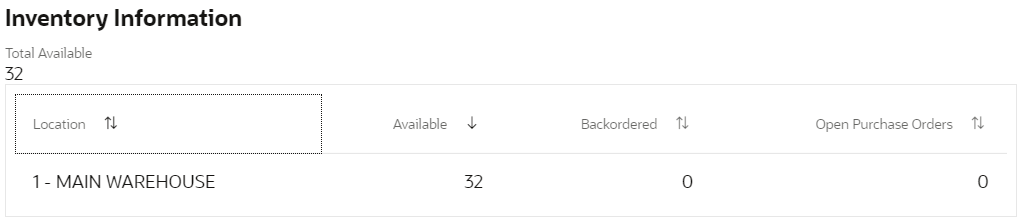
The Item Availability link in the At A Glance menu is now labeled Inventory Information, and the table that it links to is also now labeled Inventory Information.
-
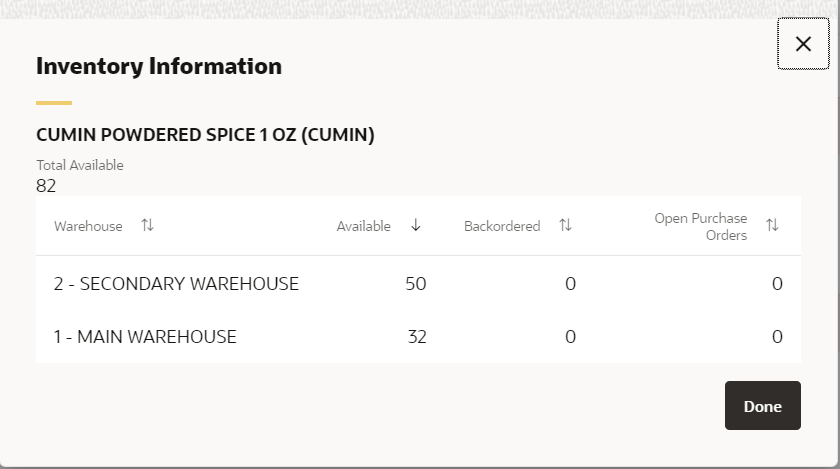
The Item Availability window has been renamed the Inventory Information window. This window is available through the Check Item Availability link for an order detail line.
-
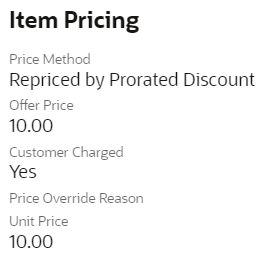
The values displayed for the Customer Charged field in the Item Pricing section have changed to Yes or No.
-
Held Order Summary: Also in Modern View, changed the way information is displayed in the graph view at the Held Order Summary. The decimals are now included, and the amounts in the y-axis are now listed in full.