13 Integrations
This chapter describes the integration setup within EICS to Integrate with other systems.
For completed integration interfaces, see Oracle® Retail Enterprise Inventory Cloud Service Inbound and Outbound Integration Guide.
Pricing Integration with Oracle Retail Pricing Cloud Service
Clearance Transaction Import
See Oracle® Retail Enterprise Inventory Cloud Service Administration Guide Batch Chapter: Clearance Transaction Import
Price Change Transaction Import
See Oracle® Retail Enterprise Inventory Cloud Service Administration Guide Batch Chapter: Price Change Transaction Import
Promotion Offer Import (N/A): Requires Field Enabled Integration
SIOCS does not integrate promotions via Oracle Retail Pricing Cloud Service; it requires a field-enabled integration. However, SIOCS provides a generic promotion interface that retailers can use to load promotional prices.
Stock Count Export Integration with MFCS
Stock Count Export
When a Unit Amount stock count is authorized, a Unit and Amount Stock Counts Export file is generated.
See Oracle® Retail Enterprise Inventory Cloud Service Administration Guide Appendix: Unit and Amount Stock Counts Export.
Sales Data Integration with POS and ReSA
Pos Transaction Import Batch (Integrate sales from Point of Sale)
Retail Sale Audit Import Batch
Processing
-
The basic form and structure of the POS transaction is validated. If this fails, the entire service call is rejected. *** please see validation checks for this step #1 below.
-
The transactions are broken up into items. Each item is then categorized as associated to order or not associated to order.
-
All records are written into POS_TRANSACTION table to be processed later.
-
MPS processing sub-queue is notified with a request number to process a group of transaction records.
-
MPS processes records in bulk groups by type for efficiency.
-
Items that succeed are processed.
-
Items that fail are written back to POS_TRANSACTION table with failed status and a record is written to POS_TRANSACTION_LOG to capture the failure
*** please see error handling for this step #5 below.
-
Error Handling During Processing Step 1
If any error occurs in the first step, the entire web service call is failed and rejected.
The following errors can occur in Step 1.
-
If sale upload is configured to GMT and a non-GMT date is sent.
-
If more than one store is found on the input.
-
If the single store found in the input is not an existing store.
-
If the maximum number of (configured) total items is exceeded.
-
If duplicate records are found in the input itself.
-
If duplicate records are found in already existing data.
Error Handling During Step 5
If an unexpected or system error occurs, the entire request will fail, and all records associated to the request will not process.
If an expected or business error occurs, it is handled, and the specific item only is failed, and processing continues until the request is complete.
Failed items with business errors can be dealt with in SIOCS POS administration screen.
Note:
If a sales audit process is used, depending on the type of failure, the audit change process could send an audited file back to SIOCS, which means it may not be required to fix the error in SIOCS since it will be overlaid by the transaction coming from the sales audit application.
For details see Oracle® Retail Enterprise Inventory Cloud Service Inbound and Outbound Integration Guide.
Web Service: Integration with Manifest System
SIOCS is not a package shipping management system. It calls an external shipment manifest system that acts as a broker for multiple courier entities such as FedEx, UPS, DHL, national mail carriers and so on.
Web Service URL
The System Integrator provides the external Web Service URL. This URL is taken as input by the EICS installer to update the system configuration entry in the database.
The URL can also be updated via EICS External Service Administration UI within Technical Maintenance.
- Web Service: Manifest Web Service
Credentials can be updated via the EICS Credentials Administration UI.
- Web Service User Alias: manifest-user
See Oracle® Retail Enterprise Inventory Cloud Service Administration Guide - Chapter 6 for more details on how to use this screen.
You will need to submit a service request to allow-list the server URL that you specify.
Web Service
The external system must implement a REST interface to receive the manifesting information. The specifications of the REST Manifesting web service can be found in the Oracle® Retail Enterprise Inventory Cloud Service Inbound and Outbound Integration Guide - Chapter 6.
Web Service: Integration with External System for Ticket Printing
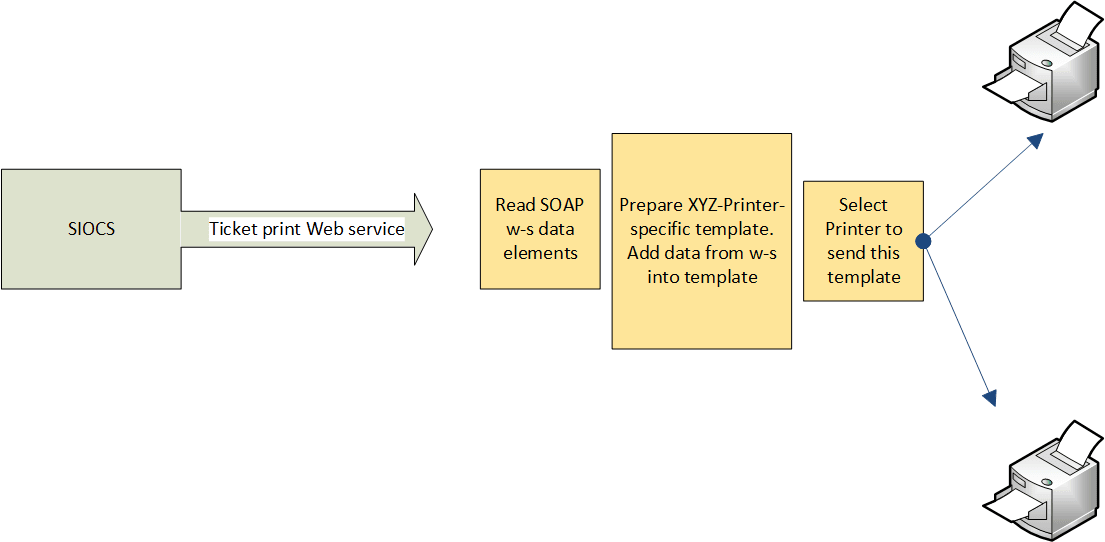
SIOCS is not a printing system that manages printers and formats. Tickets are sent to an external web service endpoint that must be implemented by any system that needs to receive the tickets. The external system is responsible for managing printing.
Communication To External Printer
The communication to the external printers can follow three different routes.
- Bluetooth or WiFi Printing. This method connects the mobile client directly to the printer. There is no need to leverage a print server. Depending on the implementation, SIOCS will send the ZPL and all relevant data directly to the connected printer.
- Third-Party Printing Through MPS. This method uses predefined ticket-printing web service endpoints to send print requests to a network-connected printer through a customer-maintained print server. The process is asynchronous: MPS stages the print request before sending it to the external system. This route is used when the number of tickets exceeds the configured “Maximum Number of Tickets to Use Synchronous Call” setting.
- Third Party Printing Direct. This method uses predefined ticket-printing web service endpoints to send print requests directly to a network-connected printer through a customer-maintained print server. The process is synchronous and therefore provides faster communication with the print service. This route is used when the number of tickets does not exceed the configured “Maximum Number of Tickets to Use Synchronous Call” setting. This method should be reserved for small print quantities and avoided for bulk printing.
MPS Work Type
If Third Party printing is to be used, then DpsTicketPrint outbound MPS work type needs to be enabled in the MPS Work Type Screen within Technical Maintenance. Please refer to the Oracle® Retail Enterprise Inventory Cloud Service Administration Guide for details on MPS Work Type Screen.
Web Service URL
The System Integrator provides the external Web Service URL. This URL is taken as input by the EICS installer to update the system configuration entry in the database.
The URL can also be updated via EICS External Service Administration UI within Technical Maintenance.
- Web Service: Ticket Printing Web Service
Credentials can be updated via the EICS Credentials Administration UI.
- Web Service User Alias: ticket-user
See Oracle® Retail Enterprise Inventory Cloud Service Administration Guide - Chapter 6 for more details on how to use this screen.
You will need to submit a service request to allow-list the server URL that you specify.
Web Service
The external system must implement a REST interface to receive the ticket information. The specifications of the REST Ticket Printing web service can be found in the Oracle® Retail Enterprise Inventory Cloud Service Inbound and Outbound Integration Guide - Chapter 6.
ZPL
-
ZPL is a proprietary ticket formatting language used for printing to Zebra printers.
-
ZPL is not entirely an ASCII format and is not readable without tools.
-
If not using ZPL ticket printing on Zebra printers, then usage of ZPL is not recommended.
-
If using ZPL with ZPL printers, SIOCS allows for the placement of tags within the ZPL design (managed by ZPL tools).
-
SIOCS will then replace those tags with the correct data before sending the ticket information to the web service endpoint.
-
ZPL files and formats are created and managed by tools and software outside of SIOCS. Files are uploaded into SIOCS.
Non-ZPL Printing
-
Information captured in printer administration is sent with the ticket information, such as printer name and address.
-
The custom development of the printing system (or middleware system designed to speak to a printing solution) must use the printer and ticket information to determine how to print.
-
Ticket information can be used to determine format of ticket to print, but such tasks as matching the ticket type information to a template managed by the implementing system.
-
Once a template in the middleware system is identified, the middleware system should use ticket information to populate the template and print the ticket. SIOCS does not manage printing templates.
-
Printer information can be used to determine which printer it should be sent to.
-
Printing templates are created and manages by tools and software outside of SIOCS as part of a custom or middleware product.
Figure 13-1 Ticket Printing
RIB Integration Guidance (From SIOCS Perspective)
Overview
The Oracle Retail Integration Bus (RIB) is a fully distributed integration infrastructure that implements messaging using Asynchronous JMS Publish/Subscribe Fire-and-Forget model.
The concept of message-bus is that one product broadcasts information and each product or cloud service only subscribes to those message families/payloads that they are interested in. Everything else is ignored.
To process all messages intended for ordering systems, pricing systems, or any other external systems would require massive processing of mapping, then writing to the database, and then reading messages that are not intended for processing in our system to discard them.
To avoid all the processing and overhead, messages not intended for SIOCS are simply dropped at the point of receiving them from the RIB.
Unsupported Messages and Payloads
When an entire family or message type is not used or desired in SIOCS, then it is not subscribing to and does not arrive at SIOCS.
The message type and payload have no injector that places the RIB payload into the MPS staged message processing workflow in SIOCS.
Unsupported Data within Messages and Payloads
In the case of some message families or types, a brief look at the internal information of the message may also determine, it is not meant for SIOCS.
-
SIOCS does not process non-stockholding stores (stores with no inventory). So, if a payload arrives for a message family and type we support, but the payload contains an internal attribute, usually labeled "stockholding_ind" that is set to "N", the payload is dropped as it is not intended for the SIOCS system.
-
SIOCS does not process virtual stores so limited itself by store type. If the payload contains a store type attribute, then SIOCS only processes COMPANY ("C") stores and FRANCHISE ("F") stores.
-
When dealing with quantities, a quantity of 0 primarily means a cancellation or removal of that item or detail from a transaction, and so it is deleted. There may be exception to this in certain circumstances.
Errors
Errors that occur within the RIB through injection in MPS are logged and managed within the RIB.
Errors that occur within MPS staged messages within SIOCS are logged and can be seen and managed with MPS management workflow.
Messages that are successfully processed, including successfully being ignored as not relevant to the store, do not log any information.
Modify/Delete
In the case of transaction data, in some cases if the transaction is actively being processed by a user or business functionality in the store, it may have already passed a state where it can be modified or canceled.
Message Family/Type
The following table contains a list of message families and types that SIOCS subscribes to (incoming) or broadcasts (publishes out) to other systems.
It indicates the family name, message type, payloads used within the family, whether SIOCS publishes or subscribes to it, and whether it is part of the initial data seeding.
Message type suffixes indicates intent of the payload: Cre means create information, Mod means modify information, and Del means cancel or delete information.
Table 13-1 Message Family/Type
| Message Family | Message Type | Payload | Publish/ Subscribe | Seeded | SIOCS Data |
|---|---|---|---|---|---|
|
ASNIn |
ASNInCre ASNInMod |
ASNInDesc |
Subscribe |
No |
Store Delivery |
|
ASNOut |
ASNOutCre |
ASNOutDesc |
Publish |
No |
Store Shipment |
|
ClrPrcChg |
ClrPrcChgCre ClrPrcChgMod ClrPrcChgDel |
ClrPrcChgDesc ClrPrcChgRef ClrPrcChgDtlRef |
Subscribe |
No |
Clearance Price Change |
|
CoInvAvail |
COInvAvailMod |
COInvAvailDesc |
Publish |
No |
Customer Order Store Inventory Shift Notification |
|
Diffs |
DiffCre DiffDel DiffMod |
DiffDesc DiffRef |
Subscribe |
Yes |
Differentiators |
|
DSDReceipt |
DSDReceiptCre DSDReceiptMod |
DSDReceiptDesc |
Publish |
No |
Non-PO DSD Receipt |
|
FulfilOrd |
FulfilOrdStDlvCre FulfilOrdReqDel FulfilOrdApprDel |
FulfilOrdDesc |
Subscribe |
No |
Fulfillment Orders |
|
FulfilOrdCfm |
FulfilOrdCfmCre |
FulfilOrdCfmDesc |
Publish |
No |
Fulfillment Order Confirm |
|
FulfilOrdCfmCnc |
FulfilOrdCfmCncCre |
FulfilOrdRef |
Publish |
No |
Fulfillment Order Cancel |
|
InvAdjust |
InvAdjustCre |
InvAdjustDesc |
Publish, Subscribe |
No |
Stock Movement Notification |
|
InvReq |
InvReqCre |
InvReqDesc |
Publish |
No |
Store Order/Item Request |
|
ItemLoc |
ItemLocCre ItemLocDel ItemLocMod ItemLocReplMod |
ItemLocDesc |
Subscribe |
Yes |
Item Location Item Replenishment |
|
Items |
ItemBOMCre ItemBOMDel ItemBOMMod ItemCre ItemDel ItemHdrMod ItemImageCre ItemImageMod ItemImageDel ItemUPCCre ItemUPCDel ItemUPCMod |
ItemBOMDesc ItemDesc ItemHdrDesc ISCDimDesc ItemImageDesc ItemTcktDesc ItemUPCDesc |
Subscribe |
Yes |
Item Item Details Item UPC Item Image |
|
Items |
RelItemHeadCre RelItemHeadMod RelItemHeadDel RelItemDetCre RelItemDetDel RelItemDetMod |
RelatedItemDesc |
Subscribe |
Yes |
Related Items |
|
Items |
ItemSupCre ItemSupDel ItemSupMod ItemSupCtyCre ItemSupCtyDel ItemSupCtyMod ISCDimCre ISCDimMod ISCDimDel ISCMfrCre ISCMfrDel ISCMfrMod |
ItemSupCtyDesc ItemSupCtyMfrDesc ItemSupDesc |
Subscribe |
Yes |
Supplier Items Supplier Manufacturer Supplier Country |
|
Items |
ItemUDALOVCre ItemUDALOVMod ItemUDALOVDel ItemUDAFFCre ItemUDAFFMod ItemUDAFFDel ItemUDADateCre ItemUDADateMod ItemUDADateDel |
ItemUDADateDesc ItemUDAFFDesc ItemUDALOVDesc |
Subscribe |
Yes |
Item User Defined Attributes |
|
MerchHier |
ClassCre ClassMod ClassDel DeptCre DeptMod DeptDel SubclassCre SubclassMod SubclassDel |
MrchHrClsDesc MrchHrDeptDesc MrchHrSclsDesc |
Subscribe |
Yes |
Department Class Subclass |
|
Order |
POCre PODel PODtlCre PODtlDel PODtlMod POHdrMod |
PODesc PORef |
Subscribe |
No |
Purchase Order |
|
Partner |
PartnerCre PartnerDel PartnerMod PartnerDtlCre PartnerDtlDel PartnerDtlMod |
PartnerDesc PartnerOUDesc PartnerRef |
Subscribe |
Yes |
Finishers |
|
PrmPrcChg |
MultiBuyPromoCre MultiBuyPromoMod MultiBuyPromoDel PrmCnlItemLocCre |
PromotionDesc |
Subscribe |
No |
Promotions |
|
RcvUnitAdj |
RcvUnitAdjCre RcvUnitAdjMod |
RcvUnitAdjDesc |
Subscribe |
No |
Adjusts Supplier Deliveries |
|
Receiving |
ReceiptCre ReceiptOrdCre |
ReceiptDesc |
Publish |
No |
Transfer Receipt, Purchase Order Receipt, Receipt with Customer Order |
|
RegPrcChg |
RegPrcChgCre RegPrcChgMod RegPrcChgDel |
RegPrcChgDesc RegPrcChgDtl |
Subscribe |
No |
Regular Price Change |
|
RTV |
RTVCre |
RTVDesc |
Publish, Subscribe |
No |
Warehouse Return |
|
RTVReq |
RTVReqCre RTVReqMod RTVReqDel RTVReqDtlCre RTVReqDtlDel RTVReqDtlMod |
RTVReqDesc RTVReqRef |
Subscribe |
No |
Supplier Return |
|
SeedData |
DiffTypeCre DiffTypeDel DiffTypeMod |
DiffTypeDesc DiffTypeRef |
Subscribe |
Yes |
Differentiator Types |
|
ShipInfo |
ShipInfoCre |
ShipInfoDesc |
Publish |
No |
Pre-Shipment Notification |
|
SOStatus |
SOStatusCre |
SOStatusDesc |
Publish, Subscribe |
No |
Transfers Shipments |
|
StkCountSch |
StkCountSchCre StkCountSchMod StkCountSchDel StkCountSchDtlDel |
StkCountSchDesc |
Publish |
No |
Stock Count Schedule |
|
StockOrder |
SOCre SODtlCre SODtlDel SODtlMod SOHdrDel SOHdrMod |
SODesc SORef |
Subscribe |
No |
Transfer Allocation |
|
Stores |
StoreCre StoreDel StoreMod StoreDtlCre StoreDtlDel StoreDtlMod |
StoreDesc StoreRef |
Subscribe |
Yes |
Store |
|
UDAs |
UDAHdrCre UDAHdrMod UDAHdrDel UDAValCre UDAValMod UDAValDel |
UDADesc UDARef UDAValDesc UDAValRef |
Subscribe |
No |
User Defined Attributes |
|
Vendor |
VendorAddrCre VendorAddrDel VendorAddrMod VendorCre VendorDel VendorHdrMod VendorOUCre VendorOUDel |
VendorAddrDesc VendorAddrRef VendorDesc VendorRef |
Subscribe |
Yes |
Suppliers |
|
WH |
WHCre WHDel WHMod |
WHDesc WHRef |
Subscribe |
Yes |
Warehouse |
Other Integration Interfaces
See Oracle® Retail Enterprise Inventory Cloud Service Inbound and Outbound Integration Guide.
Hybrid Deployment
SIOCS has enabled this hybrid integration capability to support integration with other Merchandising Systems (on-premises/GBUCS/third party); however, field enablement will be required. Please refer below for the supported deployment models.
Note:
Starting from version 25.1.301.0, SIOCS to MFCS direct database integration method will be enabled by default for newly provisioned environments.
Customers should submit a Service Request (SR) on My Oracle Support to disable direct database configuration for SIOCS if they choose to adopt the hybrid integration model.
Integration with on-premise RMS/RIB
SIOCS has enabled this integration option in order to integrate with on-premises Oracle Retail Merchandising System; field enablement would be required.
As noted in the Oracle SIOCS Implementation Overview chapter, File Transfer Wrapper Service would play a key role in enabling this integration.
Depending on the version of Retail Merchandising System (RMS), RIB payloads may differ as well. Solution Implementers will have to perform additional analysis on changes and implement custom integration methods as needed. If the integrating RMS/RIB version is v19.x or v16.x, the payloads would be much more compatible in terms of required attributes than dealing with older versions of RMS/RIB.
Oracle Retail Integration bus (RIB) would always be deployed along with RMS; hence RIB-on-premises would integrate with SIOCS.
At high level, field enablement would be needed for the following:
-
Foundation Data seeding and pricing integration
For file layout and more detail, please see the Standalone Data Seeding section in the Oracle Retail Enterprise Inventory Cloud Service Administration Guide.
-
File movement between SIOCS and RMS
-
ReSA file (SIMT) import into SIOCS
-
Stock Count export from SIOCS to RMS
-
-
In order to publish messages to RIB located on-premises from SIOCS, RIB endpoint needs to be allow listed. You must submit a service request on My Oracle Support to allow list the on-premises rib server url and port.
-
Once allow listed, SIOCS to RMS communication via RIB can commence through standard RIB- SOAP services.
-
Similarly on-premise RMS would use RIB-SOAP-injector service to communicate with SIOCS.
-
Integration with MFCS/RICS GBUCS
SIOCS has enabled this integration option to integrate with MFCS/RICS v19.x deployed in GBUCS. In this integration method, the following entities are configured upon request. You must submit a service request on My Oracle Support to get this configured.
-
ReSA files (SIMT) — from MFCS to SIOCS
-
MFCS invokes SIOCS FTS end points to push files from sFTP
-
Retail Sale Audit Import Batch consumes the SIMT file into SIOCS from the FTS/Imports object storage prefix.
-
-
Pricing files - Regular and Clearance Price Event files are pushed from Oracle Retail Pricing Cloud Service (RPCS) into SIOCS object storage (FTS) via Oracle Retail Integration Cloud Service (Bulk Data Integration (BDI) File Creator Jobs).
-
PriceChange_Tx_fileCreator_ProcessFlow_From_RMS and Clearance_Tx_fileCreator_ProcessFlow_From_RMS extract price changes and clearances from RPCS and transfer them to the SIOCS FTS/Imports Object Storage prefix.
-
Regular Price Change File Import Batch and Clearance File Import Batch programs process the .csv files and populate the ITEM_PRICE table in SIOCS.
-
-
Stock Count Results – After completion of Stock Count in SIOCS, the results file is automatically exported from SIOCS server’s file system to the MFCS sFTP server and transferred into the MFCS server’s file system. For further details on how the STK_* files are processed within MFCS, refer to the Merchandising Batch Operations Guide.
-
MFCS will continue to send inventory transactions via Oracle Retail Integration Cloud Service (RIB) to SIOCS
-
** SIOCS end points are publicly exposed and not required to be allowlisted from the RICS server.
-
-
SIOCS will continue to send inventory transactions via Oracle Retail Integration Cloud Service (RIB) to MFCS
-
** RIB Publisher url will be allowlisted and configured in SIOCS by Oracle.
-
Integration with Third Party Merch
SIOCS has enabled this integration option to integrate with any third party Merchandizing System. In this integration method, the following entities are configured upon request. You must submit a service request on My Oracle Support to get this configured.
Solution Implementers will have to perform additional analysis on changes and implement custom integration methods as needed.
At high level, field enablement would be needed for the following:
-
Foundation Data seeding and pricing integration
For file layout and more detail, please see the Standalone Data Seeding section in the Oracle Retail Enterprise Inventory Cloud Service Administration Guide.
-
File movement between SIOCS and Merch
-
-
ReSA file (SIMT) import into SIOCS
-
Stock Count export from SIOCS to Merch
-
-
Please consult with Oracle on any custom integration you plan to implement for all inbound and outbound transaction flows to/from SIOCS.
Direct Database Integration with Retail Merchandising Suite Cloud Services
See Oracle® Retail Merchandising-SIOCS Implementation Guide for details.
Starting from version 25.1.301.0, direct database access will be enabled by default for newly provisioned environments, provided that MFCS is deployed on the next-gen cloud.