Customer and Device Enrollment Journey
The following diagram illustrates the end-to-end process journey for enrolling customers and registering devices in the Oracle Utilities Grid Edge Distributed Energy Resources Management System platform. It highlights the various enrollment channels, system interactions, and key steps involved from initiation through completion.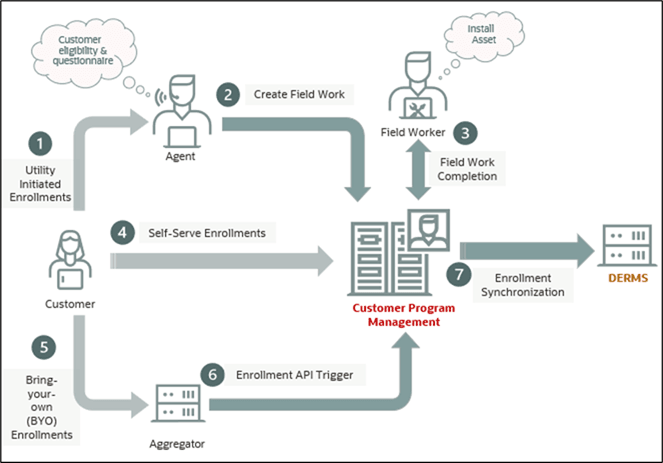
Customers can be enrolled and their devices registered on the Oracle Utilities Grid Edge Distributed Energy Resources Management System platform through multiple channels. These include contacting a utility agent (1), using the utility self-service portal (4), or working with an aggregator (5) to initiate enrollment through either the application portal or the enrollment API (6).
Regardless of the enrollment channel, all requests are routed to Customer Program Management, where validations—such as program eligibility checks—are performed. Upon successful validation, the customer and device are associated with the appropriate program.
For utility-owned or utility-managed DER devices, the process may also involve creating a field work order (2) and completing a site visit (3) to install the device.
Once enrollment is complete, a synchronization message (7) is sent to Oracle Utilities Grid Edge Distributed Energy Resources Management System, enabling the device to be modeled and managed as an operational grid resource.
This section includes the following:
• Actors
Actors
The following actors are involved in the customer enrollment and device registration process:
• Utility Customer: Initiates enrollment through self-service channels or participates in programs offered by the utility.
• External Application (for example, headend systems or aggregators): Integrates with the system to submit enrollment requests, typically through APIs, for customer-owned or managed devices.
• Utility Agent or Customer Service Representative (CSR): Assists customers with enrollment, collects required information, and initiates the process on behalf of the customer.
Prerequisites
Before initiating the customer enrollment and device registration process, ensure the following prerequisites are met:
• Customer Data Synchronization: Customer information from the CIS application must be synchronized with Oracle Utilities Customer Program Management Cloud Service and Oracle Utilities Grid Edge Distributed Energy Resources Management System.
• Oracle Utilities Customer Program Management Cloud Service Configuration: The required configurations must be completed in Oracle Utilities Customer Program Management Cloud Service, including (but not limited to):
• Controllable Asset Type
• Head-End System
• Specification
• Program Type and Program(s)
• Device Location Type
• Program Subscription Type
• Service Task Type
• Master Configuration for Customer Program Management Integration
• External System
• Message Senders
• Web Service Catalog
For more information, refer to Chapter 3: Configuring Oracle Utilities Customer Program Management Cloud Service in the Oracle Utilities Customer Program Management Cloud Service Integration to Oracle Utilities Edge DERMS Configuration Guide.
Refer to the latest Oracle Utilities Customer Program Management Cloud Service documentation on Oracle Help Center.
• Oracle Utilities Grid Edge Distributed Energy Resources Management System Configuration: The required configurations must be completed in Oracle Utilities Grid Edge Distributed Energy Resources Management System, including (but not limited to):
• DERMS Configuration Parameters
• Head-End System setup in the DER Aggregator page
For more information, refer to Chapter 4: Configuring Oracle Utilities Edge Distributed Energy Resources Management System in the Oracle Utilities Customer Program Management Cloud Service Integration to Oracle Utilities Edge DERMS Configuration Guide. For latest documentation, visit the Oracle Utilities Integrations page on Oracle Help Center.
• Integration Setup: Ensure that the Oracle Utilities Customer Program Management Cloud Service to Oracle Utilities Grid Edge Distributed Energy Resources Management System integration flows are properly configured and activated.
Use Cases
This section describes the key use cases supported by the application, outlining how users and systems interact to accomplish specific tasks.
Customer enrollment for Bring Your Own (BYO) device(s) to a program
1. Initiate an enrollment request. For details, refer to Customer-Initiated Program Enrollment and Unenrollment.
2. Process the enrollment using the Enrollment process flow. Refer to Enrolling Using the Process Flow for details.
a. Run the NMS Digital Asset Customer Sync Initial Load (X1-NMSDA) batch to process pending enrollments.
3. Send the completed enrollment information to Oracle Utilities Grid Edge Distributed Energy Resources Management System. Refer to Send Completed Enrollments/Unenrollments/Device Replacements to Oracle Utilities Grid Edge Distributed Energy Resources Management System for details.
4. Oracle Utilities Grid Edge Distributed Energy Resources Management System updates the program subscription and device enrollment records. Refer to Verify in Oracle Utilities Grid Edge Distributed Energy Resources Management System.
5. Oracle Utilities Grid Edge Distributed Energy Resources Management System sends a positive or negative acknowledgement back to Oracle Utilities Customer Program Management Cloud Service.
6. In Oracle Utilities Customer Program Management Cloud Service, the synchronization request record status changed to synchronized or error.
Customer enrollment for Utility Owned device(s) to a program
1. Initiate an enrollment request. For details, refer to Customer-Initiated Program Enrollment and Unenrollment.
2. Process the enrollment using the Enrollment process flow. Refer to Enrolling Using the Process Flow for details.
3. Send the completed enrollment information to Oracle Utilities Grid Edge Distributed Energy Resources Management System. Refer to Send Completed Enrollments/Unenrollments/Device Replacements to Oracle Utilities Grid Edge Distributed Energy Resources Management System for details.
4. Oracle Utilities Grid Edge Distributed Energy Resources Management System updates the program subscription and device enrollment records. Refer to Verify in Oracle Utilities Grid Edge Distributed Energy Resources Management System.
5. Oracle Utilities Grid Edge Distributed Energy Resources Management System sends a positive or negative acknowledgement back to Oracle Utilities Customer Program Management Cloud Service.
6. In Oracle Utilities Customer Program Management Cloud Service, the synchronization request record status changed to synchronized or error.
Customer Replace a Device
1. Initiate the troubleshooting process using the Service Call. For details, refer to Troubleshooting Leading to Device Replacement Using the Process Flow.
2. Device Replacement:
a. Using the Program Service Call process flow, initiate a field work leading to replacement of the controllable device.
b. Run the NMS Digital Asset Customer Sync Initial Load (X1-NMSDA) batch to process the unenrollment of the removed device and set up the replaced device.
3. Send the details to Oracle Utilities Grid Edge Distributed Energy Resources Management System. Refer to Send Completed Enrollments/Unenrollments/Device Replacements to Oracle Utilities Grid Edge Distributed Energy Resources Management System for more details.
4. Oracle Utilities Grid Edge Distributed Energy Resources Management System updates the program subscription and device enrollment records. Refer to Verify in Oracle Utilities Grid Edge Distributed Energy Resources Management System
5. Oracle Utilities Grid Edge Distributed Energy Resources Management System sends a positive or negative acknowledgement back to Oracle Utilities Customer Program Management Cloud Service.
6. In Oracle Utilities Customer Program Management Cloud Service, the synchronization request record status changed to synchronized or error.
Customer Unenroll from Program
1. Initiate an unenrollment request. For details refer to Customer-Initiated Program Enrollment and Unenrollment.
2. Process the unenrollment. Refer to the Unenrolling Using the Process Flow section for more details.
3. Send the completed unenrollments information to Oracle Utilities Grid Edge Distributed Energy Resources Management System. Refer to Send Completed Enrollments/Unenrollments/Device Replacements to Oracle Utilities Grid Edge Distributed Energy Resources Management System for details.
4. Oracle Utilities Grid Edge Distributed Energy Resources Management System updates the program subscription and device enrollment records. Refer to Verify in Oracle Utilities Grid Edge Distributed Energy Resources Management System.
5. Oracle Utilities Grid Edge Distributed Energy Resources Management System sends a positive or negative acknowledgement back to Oracle Utilities Customer Program Management Cloud Service.
6. In Oracle Utilities Customer Program Management Cloud Service, the synchronization request record status changed to synchronized or error.
Common User Tasks
This section describes the following common tasks and procedures that users may perform using the integration:
Customer-Initiated Program Enrollment and Unenrollment
Customers can initiate enrollment or unenrollment of their Bring Your Own (BYO) controllable devices in a program using one of the following methods:
• Through an aggregator, vendor, or external application.
Example: A customer may use the device vendor’s application to enroll their device in a utility program. These enrollment or unenrollment requests are then sent periodically to Oracle Utilities Customer Program Management Cloud Service through file transfers or by invoking the Program Enrollments REST API.
• Through a utility Customer Service Representative. Customers can also contact the utility’s Customer Service Representative to request program enrollment or unenrollment on their behalf.
Enrolling Using the Process Flow
To enroll using the process flow:
1. Login to Oracle Utilities Customer Program Management Cloud Service.
2. Search for the customer.
3. Navigate to the Customer Program Summary portal > Eligible Programs zone. Check for the eligible programs the customer can enroll into.
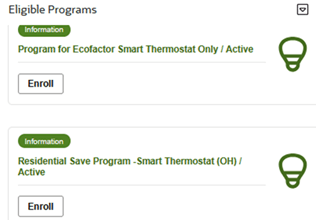
4. Identify the program to enroll into and click Enroll. You will be navigated to the Program Enrollment Process process flow.
5. Go through the process flow, enter the necessary information, and click Next.
6. Click Save to save your progress and settings.
7. On the Device Setup page:
a. In the Asset Information section:
a. From the Installation Method drop-down list, select Bring Your Own.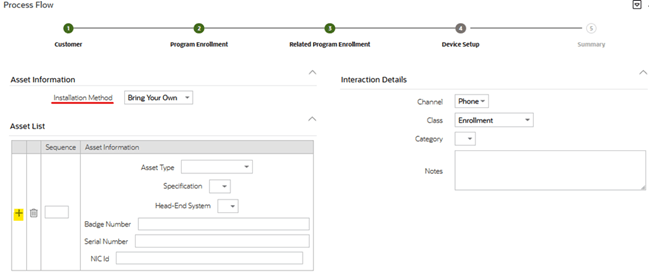
b. Enter the details of each device to enroll in the program and click Next.
c. From the Installation Method drop-down list, select Utility Installation.
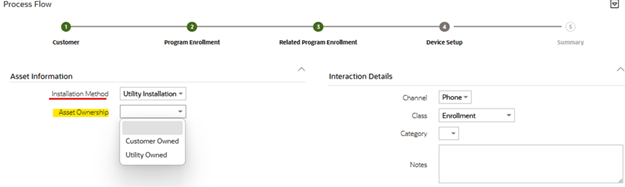
d. From the Asset Ownership drop-down list, select Customer Owned and click Next.
If you select Utility Owned, populate the work order activities information and click Next.
Note: The process flow panels are dependent on the Service Task Type configuration.
8. Verify all the information in the Summary panel and click Finish to mark the process flow as Closed and the enrollment completed.
For more information, refer to the latest Oracle Utilities Customer Program Management Cloud Service documentation on Oracle Help Center.
Unenrolling Using the Process Flow
To enroll using the process flow:
1. Login to Oracle Utilities Customer Program Management Cloud Service.
2. Search for the enrolled customer.
3. Navigate to the Customer Program Summary portal > Current Enrollment zone. Find the program the customer wants to unenroll from. You will be navigated to the Program Enrollment Process process flow.
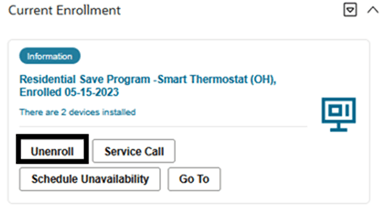
4. Go through the process flow, enter the necessary information, and click Next.
5. Click Save to save your progress and settings.
6. In the Program Unenrollment section, verify the program and the devices to unenroll. Provide the unenrollment reason, if applicable.
7. On the Device Setup section, select the removal method.
• If Keep is selected, click Next.
• If Utility Removal is selected, populate the work order activities information and click Next.
Note: The process flow panels are dependent on the Service Task Type configuration.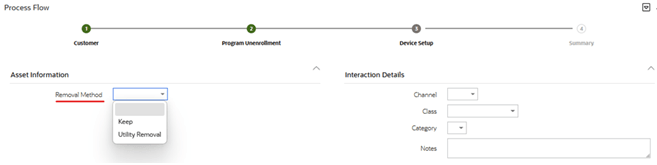
8. Verify all the information in the Summary panel and click Finish to mark the process flow as Closed and the enrollment completed.
For more information, refer to the latest Oracle Utilities Customer Program Management Cloud Service documentation on Oracle Help Center.
Troubleshooting Leading to Device Replacement Using the Process Flow
To enroll using the process flow:
1. Login to Oracle Utilities Customer Program Management Cloud Service.
2. Search for the enrolled customer.
3. Navigate to the Customer Program Summary portal > Current Enrollment zone. Find the program associated with the device for which the customer is facing an issue. You will be navigated to the Program Enrollment Process process flow.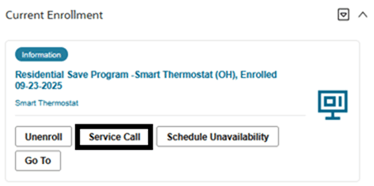
4. Click Service Call to initiate troubleshooting using the Program Service Call process flow.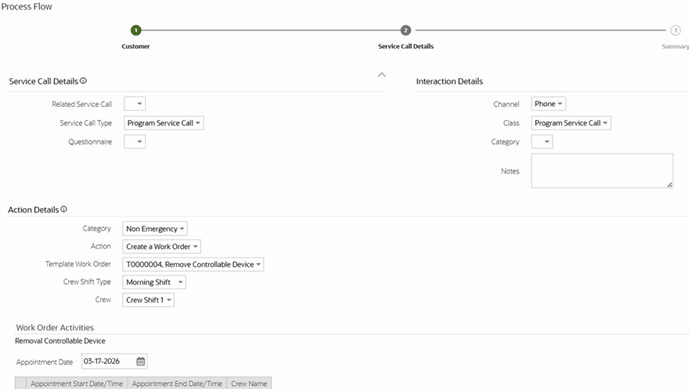
5. Go through the process flow, enter the necessary information, and click Next.
6. Click Save to save your progress and settings.
7. In the Service Call Details section, select the configured values listed in the fields within the Service Call Details zone and the necessary action related values on the Action Details zone.
8. For utility owned devices, you can create a work request to initiate a field visit for a troubleshooting work to be dispatched to a technician. As part of the site visit, if the field technician finds a faulty controllable device, they can replace it with a new device. The activity completion should handle the device replacement within the application.
Note: The process flow panels are dependent on the Service Task Type configuration.
Send Completed Enrollments/Unenrollments/Device Replacements to Oracle Utilities Grid Edge Distributed Energy Resources Management System
1. Login to Oracle Utilities Customer Program Management Cloud Service.
2. Navigate to Batch Job Submission.
3. Run the Sync Request Monitor (Batch Control : F1-SYNRQ) batch to send completed enrollments to Oracle Utilities Grid Edge Distributed Energy Resources Management System.
Verify in Oracle Utilities Grid Edge Distributed Energy Resources Management System
1. Login to Oracle Utilities Grid Edge Distributed Energy Resources Management System.
2. Navigate to the Oracle Utilities Grid Edge Distributed Energy Resources Management System DER Search.