GoldenGate Administration Service Configuration
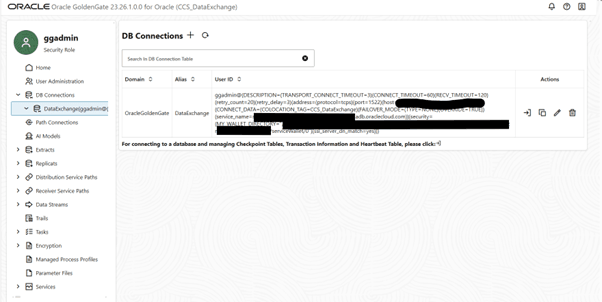
Verify that a DB Connection has been set up to your target database.
Figure 17-8 DB Connections
Create the GGNET User
Create a GGNET user with the information securely provided by Oracle. This should be of the Operator role, and authenticated by a password.
Create a Target-Initiated Receiver Path
Add a Target-Initiated Path as follows
Path Information:
- Path Name: as required
- Description: as required
Source Options:
- Source Protocol: wss
- Reverse Proxy: DISABLED
- Source Host: as provided by Oracle, such as asdfasdfasdfasdf.deployment.goldengate.us-ashburn-1.oci.oraclecloud.com
- Port Number: 443
- Trail Name: as provided by Oracle, such as TT
- Subdirectory: as provided by Oracle, usually empty
- Encryption Profile: empty
- Source Authentication Method: UserID Alias
- Domain: Network
- Alias: your GoldenGate deployment source connection
- Begin: Position in Log
- Source Log: Sequence Number 0, RBA Offset 0
Target Options:
- Trail Name: LT (this is the name of your local trail file)
- Subdirectory: as required
- Encryption Algorithm: NONE (or as required/specified by Oracle)
- Target Type: GGFormat
Advanced Options:
None – use defaults
Filtering Options:
None – use defaults, although this can be used to filter incoming change data before hitting the replicats.
Managed Options:
None
Note:
Use Create Path rather than Create and Run to ensure that your configuration is correct before proceeding.You should then see the Receiver Service Path created with Path Information similar to the following:
Basic InformationStatus: Stopped
Processing Lag: 0 seconds reported 0 seconds ago
Source: wss://asdfasdfasdf.deployment.goldengate.us-ashburn-1.oci.oraclecloud.com:443/services/v2/sources?trail=TT
Target: trail://localhost/services/v2/targets?trail=LT
Source Authentication Method: Path Connection Network: GGNET
Source DB Name: G3A6AF48942AD9D_IAD2260OUA208
Extract: CCSDEXG
Trail Name: DE
Source Trail File: TT000000000
Source Sequence Number: 0
Source RBA Offset: 0
Target Encryption Algorithm: NONE
Trail Size (MB): 500 MB
Critical: No
Auto Restart: Restart after 2 minutes delay with maximum 10 retries
Filter RulesNo rules to display
EncryptionDefault Local Wallet
Advanced OptionsEnable Network Compression: No
EOF Delay (centiseconds): 10
Checkpoint Frequency: 10
App OptionsTCP Flush Bytes: OS default
TCP Flush Seconds: OS default
TCP OptionsDSCP: DEFAULT
TOS: DEFAULT
TCP_NODELAY: Yes
Quick ACK: No
TCP_CORK: No
System Send Buffer Size: OS default
System Receive Buffer Size: OS default
Keep Alive: OS default
Note:
It is important to use the Fully Qualified Domain Names (FQDNs) for everything vs using IP addresses, as certificate resolution may fail (for instance if certificates are not set up for IP addresses).Once all configuration is validated, you can Start the Target-Initiated Path.
Configuring the Replicats
Generally speaking, multiple replicats should be defined for parallelism, improved performance and the ability to prioritize certain change data for certain tables over others.
This example shows one main replicat (RMAIN), but you are encouraged to group replicats based on your specific requirements.
Example groupings are included in the OUCS_GoldenGate_Tables.xlsx file.
For this specific use case, Oracle recommends using Parallel, Nonintegrated replicats.
Configure the replicat(s) as follows:
Replicat Information
- Replicat Type: Parallel Replicat
- Parallel Replicat Type: Nonintegrated
- Process Name: as required
- Description: as required
Replicat Options
- Replicat Trail: the local trail file in the Receiver Service Path (e.g. LT)
- Encryption Profile: as required
- Target Credentials:
- Domain/Alias: as configured in the GoldenGate Deployment
- Checkpoint Table: as configured previously
- Begin: Position in Trail
- Trail Position:
- Sequence Number: 0
- RBA Offset: 0
Managed Options
None – use defaults
Parameter File
The details of the parameter files should be based on your specific requirements. Here is an example parameter file which maps all tables, and applies a number of recommended DDL exclusions. Please refer to the GoldenGate service documentation for more information.
REPERROR (DEFAULT, DISCARD)
--THIS IS WHERE YOU CONTROL WHAT THIS REPLICAT PROCESSES AS NEEDED.
-- PLEASE REFER TO DOCUMENTATION
MAP CISADM.*, TARGET <YOUR TARGET OWNER>.*;

DDL INCLUDE MAPPED &
  EXCLUDE INSTR 'CREATE USER' &
  EXCLUDE INSTR 'GRANT' &
  EXCLUDE OBJTYPE 'TRIGGER' &
  EXCLUDE OBJTYPE 'SEQUENCE' &
  EXCLUDE OBJTYPE 'SYNONYM'
DDLOPTIONS REPORT
ALLOWNOOPUPDATES
DDLERROR 14327 IGNORE
DDLERROR 14080 IGNORE
DDLERROR 1435 IGNORE INCLUDE OPTYPE ALTER OBJTYPE SESSION
DDLERROR 1926 IGNORE
DDLERROR 1927 IGNORE
--PARAMETERS CCS UPGRADES
DDLERROR 2441 IGNORE
DDLERROR 955 IGNORE
--REPORTCOUNT EVERY 50000 RECORDS, RATE
REPORTCOUNT EVERY 10 MINUTES, RATE
DECRYPTTRAIL
MAP_PARALLELISM 4
MIN_APPLY_PARALLELISM 4
MAX_APPLY_PARALLELISM 8
SPLIT_TRANS_RECS 10000
Note:
Use Create Path rather than Create and Run to ensure that your configuration is correct before proceeding.
The following parameters may be useful if you get into a situation where you have data conflicts/collisions. These should not be used unless needed, but can help resolve data issues. Please research and understand these options before using them.
--DBOPTIONS DEFERREFCONST
--HANDLECOLLISIONS
--INSERTMISSINGUPDATES
Starting the Replicat(s)
When your Replicat configuration is correct, start the Replicat(s) using the CSN provided by Oracle as follows:
Replicat “…” menu (under Actions) / Start with Options
Figure 17-9 Replicats
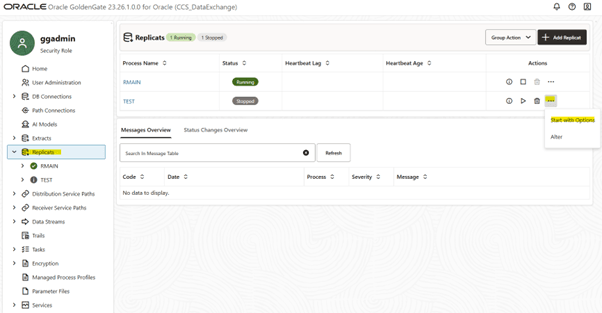
You will receive a CSN from Oracle (a synchronization number, which is taken during the export process), and you should use this as follows:
- Start Point: After CSN (not At CSN – please be careful of this point)
- CSN: the provided CSN number (such as 46411763106725)
- Threads: as required (although as parallelism is defined in the parameter file, you usually set 1 here)