4 Oracle Utilities Break Glass
Oracle Utilities Break Glass provides customers with transparency and control in terms of Oracle's access to data stored within Break Glass eligible Oracle Utilities Cloud Services, whether at rest or in use. This chapter provides guidelines for using Break Glass functionality, including:
- Overview
- Pre-Requisites for using Break Glass
- Establishing a Break Glass Event
- Canceling a Break Glass Event
- Approving a Break Glass Event
- Reviewing the Results of Break Glass Actions
- Committing or Rolling Back Break Glass Activity
- Accessing Break Glass Audit Logs
- Important Break Glass Considerations
Overview
Oracle Utilities Break Glass provides a means for customers (specifically, Customer administrators) to have direct control and approval authority over the process for requesting and granting temporary access to customer data by Oracle personnel.
Under normal circumstances, Oracle personnel are typically able to administer Oracle Utilities cloud service instances without access to customer data. In some cases, however, Oracle requires access to customer data to be able to perform certain important actions including (but not limited to): troubleshooting customer issues, applying certain categories of bug fixes, performing certain application upgrade steps or executing customer requested data correction activities.
For Oracle Utilities cloud service deployments that do not leverage Break Glass, Oracle personnel are granted temporary access to customer data via comprehensive internal controls and approvals based on SOC 1 and 2 principles. Oracle Utilities Break Glass plugs customer administrators into this process and gives them visibility and approval authority over all requests for access to customer data (by Oracle personnel).
A Break Glass event defines a scheduled, time boxed process during which Customers provide approval for Oracle personnel to temporarily access their customer data to perform the requested actions on a specific tenancy and environment. Time boxing, in this context, means that Customers provide Oracle with access to their customer data for a limited period of time (defined in the Break Glass event) after which Oracle access is automatically revoked. The Break Glass event includes the following information:
- Customer, tenancy and environment (domain information)
- When the event should occur (scheduling), including planned start time and planned end time
- How long access to customer data is to be provided (time boxing)
- Which actions are required to be performed (by Oracle personnel) on customer data
- Description of what constitutes a successful outcome of the proposed actions
- Who requested the event
- Customer approvals
- Event and action statuses
- Audit log information
The following flow diagram outlines the general Break Glass work flow:
Figure 4-1 Break Glass Overview
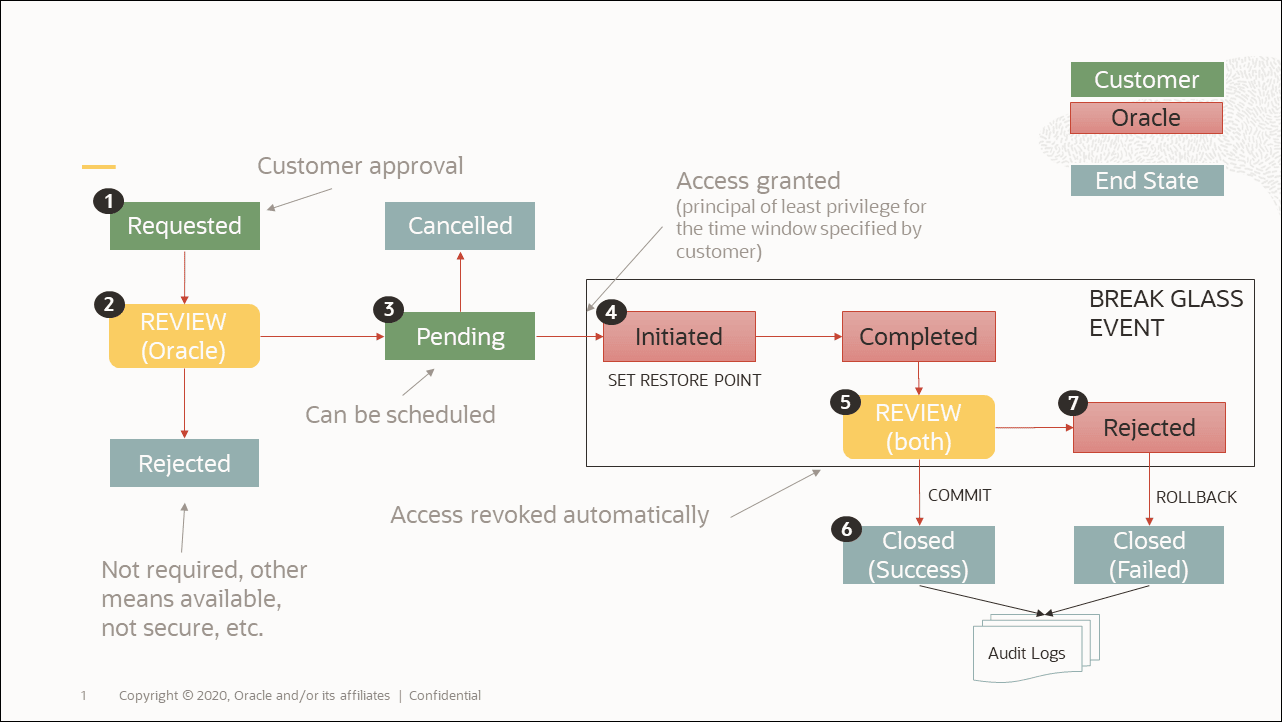
- Either Oracle or the customer requests a break glass event and includes details of schedule, duration (for example 24-96 hours) and detailed explanation of the activities to be performed by Oracle. The request process includes a customer approval workflow ensuring all requests will be reviewed/approved by customer representatives authorized to approve break glass activities.
- Oracle reviews the request. Oracle may reject the request if, for example, Break Glass is not required (for example if other means of performing the activity are available) or if the request would pose a security risk (for example unsupported /destructive actions are requested)
- Oracle schedules the request which awaits initiation in a pending status. Pending requests can be canceled.
- Once Oracle has received and confirmed all required approvals are in place, Oracle initiates an automated process to provide the designated Oracle personnel with the minimum access credentials required to perform the task. These access credentials are provided for the time window established as part of the Break Glass Event. Oracle sets a restore point (to allow rollback to a safe/supported known state) and initiates the requested activities.
- Once the requested activities are complete, both the customer and Oracle review the outcome, and determine if the activities were successful or otherwise.
- Successful completion results in the changes being committed to the database
- Failed completion results in the changes being rolled back to the established restore point
Upon closure of the Break Glass Event, the temporary access granted to Oracle is revoked and the audit logs are made available to the customer.
All communications relating to Break Glass Events are managed via My Oracle Support to ensure proper handling of potentially sensitive information.
Pre-Requisites for using Break Glass
The pre-requisites to using Oracle Utilities Break Glass functionality are as follows:
- Customers must be subscribed to a Break Glass eligible Oracle Utilities cloud service. Break Glass eligibility is explicitly specified in the service descriptions, and is currently available for the following Oracle Utilities Cloud services:
- Oracle Utilities Billing Cloud Service
- Oracle Utilities Customer Care and Billing Cloud Service
- Oracle Utilities Customer Cloud Service
- Oracle Utilities Customer Program Management Cloud Service
- Oracle Utilities Market Settlements Management Cloud Service
- Oracle Utilities Meter Solution Cloud Service
- Oracle Utilities Rate Cloud Service
- Oracle Utilities Work and Asset Cloud Service
- Customers must subscribe to the Break Glass cloud service add-on for each (eligible) Oracle Utilities Cloud Service for which they wish to use the Break Glass features. Oracle Utilities Break Glass is a fee-based service. Please contact your Sales representative to order this add-on service.
- Once subscribed, Customers may be required to raise a technical Service Request via My Oracle Support to enable Break Glass for a specific tenancy or environment. Please contact your Customer Success Manager for more information.
Establishing a Break Glass Event
Break Glass events are established by Oracle, but may be requested either by Oracle or by the Customer. For example:
- Oracle may identify a bug fix, upgrade step or troubleshooting activity which requires access to customer data. In this case, Oracle will establish the Break Glass event, specify the rational, propose an expected execution duration (i.e. the time box) and request that the Customer reviews/approves the requested access
- The customer may request that Oracle assist with troubleshooting an issue. In this case, the Customer would raise a Service Request (via My Oracle Support) to establish the Break Glass event. Please see the Oracle Utilities Cloud Services Cloud Operations Guide for details on how to raise this Service Request.
Break Glass events may be scheduled to happen as soon as possible, or they may be scheduled in the future.
Canceling a Break Glass Event
Any Break Glass event that has not yet been initiated may be canceled by Oracle or by the Customer. Break Glass events that have been initiated may not be canceled as Oracle must to ensure that the cloud service is returned to a valid state. Customers may, however, request that any activities performed as part of the initiated Break Glass event (that have not already been committed) be rolled back, and this will be accommodated by Oracle where possible.
Approving a Break Glass Event
Customers must approve Break Glass events via My Oracle Support. This approval needs to be included in a Break Glass related Service Request, and must be made by a Customer administrator.
Reviewing the Results of Break Glass Actions
The results of actions performed during a Break Glass Event will be shared with the Customer to allow for review (together with Oracle).
The exact means by which the results will be shared (and discussed) will depend on the nature of the actions performed, and should be agreed to as acceptable by both Oracle and a Customer Administrator.
As review of Break Glass actions will occur during an initiated Break Glass event, Customer administrators (and any other required Customer personnel) must be available to review/respond in a timely manner as the tenancy environment in question will be under scheduled downtime.
Please Note: the Customer administrator must ensure that all Customer personnel involved in the review of Break Glass action results are authorized to view those results, as the results may contain sensitive data.
Committing or Rolling Back Break Glass Activity
Once Oracle and the Customer have reviewed the results of the Break Glass activities, the changes must either be committed (perpetuated in the database) or rolled back (discarded).
While both Oracle and Customer personnel will be involved in reviewing the results of Break Glass activities, and while Oracle will work to provide relevant technical advice, it is the responsibility of a Customer administrator to make the decision to either commit or rollback any Break Glass actions performed.
Accessing Break Glass Audit Logs
Once a Break Glass Event is complete (either committed or rolled back), Oracle will provide an Audit Log of all activity performed by Oracle personnel on customer data as part of the Break Glass Event.
The audit log will be provided via a Service Request, will related to a specific Break Glass event, and will include details of any of the following Break Glass actions performed on customer data:
- Creation of any new customer data
- Reads of any customer data
- Updates to any customer data (including old and new values)
- Deletion of any existing customer data
Important Break Glass Considerations
- All Break Glass events will constitute scheduled downtime from the time the Break Glass event is initiated to when the actions performed are either rolled back or committed. Therefore:
- Customer administrators must ensure timely response to all Oracle requests and timely involvement of customer personnel in reviewing Break Glass actions for the period of an initiated Break Glass event.
- The System Availability SLO (Service Level Objective) does not apply during an initiated Break Glass event.
- Uncommitted Break Glass actions may not be applied in the secondary instance in the event of a DR (Disaster Recovery) event occurring during a Break Glass event.
- Only customer administrators are able to approve or reject Break Glass events and related actions (for the customer).
- All approvals and sensitive data regarding Break Glass events must be provided to Oracle via My Oracle Support.
- Customer administrators are responsible for:
- Ensuring that any non-Oracle personnel participating in Break Glass events or activity reviews are authorized to view customer data.
- All decisions made regarding the committing or rolling back of Break Glass actions.
- For all customer initiated Break Glass events, the Customer is responsible for verifying the correctness of any requested changes.