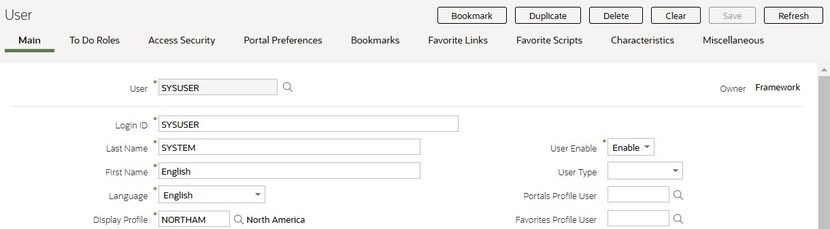
When a page in the application includes a lot of information, the
page may be implemented with vertical scrolling to allow the user
to view all the information. Or alternatively, the page may be implemented
with several tabs, allowing the user to navigate between tabs to view
or update information. The following image is a section of the User
page showing the multiple tabs.
Figure 1. Multiple Tabs Example
The names of the tabs describe the type of information that will
be displayed in the page when the tab is clicked. For example, if
you click on the Favorite Links tab, the contents of the page show the favorite links configured
for the user.
Figure 2. Multiple Tabs Example (After Favorite Links Tab Is Clicked)
Note:Hot key options. Rather than clicking on a tab, you
can click Alt+F2 or Alt+Shift+F2 to scroll through the tabs. F2 moves you
through the tabs from left to right. Shift+F2 moves you through the tabs from right to left.
Note:Hot key options. Use Alt+ a number
to navigate to the tab page whose relative position corresponds with
the number. For example, if you press Alt+6 on the above page, the Favorite Links tab will be displayed. Alt+0 may be used to navigate to the tenth tab. If there
are more than 10 tabs on a page, you must use the mouse or F2 / Shift+F2 to display additional
tabs. Note that the numeric keypad on your keyboard cannot be used
to implement this function.
Note:Returning to a page that contains multiple tabs. If you return to a page (by clicking
the Back arrow, the page will be positioned on the last tab that was
opened.
Note:Page versus Tab nomenclature. The documentation frequently
refers to the contents of a given tab as a page. However, the page
actually comprises the entire collection of tabs.
Scoreboard Configuration
The product provides the ability for Dashboard portals to use the tab area to display a
"scoreboard", where each tab includes its own specific information, called a "scorecard". A
scorecard may contain any of the following information: additional text, a metric, trend
information, a graph and information configured as a badge.