Demand View
The Demand view allows customers to monitor household electricity demand over time alongside weather data. It shows electricity usage at specific intervals and identifies when demand is highest. Customers can view demand data by day to understand usage patterns and how weather affects demand.
Requirements
Utility Requirements
Same as listed in Data Browser. Additionally, the Advanced Rates Engagement Cloud Service is required if the utility chooses to restrict the Demand view to customers who are on a demand rate.
Customer Requirements
| Category | Description |
|---|---|
| Billing Frequency | Same as listed in Data Browser. |
| Data Delivery Frequency | Same as listed in Data Browser. |
| Data Requirements |
Billing Data: Billing data is required to display demand data in the Year view. The billed usage data must include an indication of the demand per bill period. Interval and Demand Data: Electric interval (AMI) data in kilowatt (kW) or kilowatt-hour (kWh) units is required for the Bill and Day views. (If kWh data is sent, it is used to calculate demand data in kW units.) For information on providing this data, see the Oracle Utilities Opower Interval Data Transfer specification. Premise Data: Premise data is required. See the Oracle Utilities Opower Premise Data Transfer specification for more information. Rates Metadata (Advanced Rating): Rates metadata (Advanced Rating) can be used to identify residential customers who are on a demand rate. When configured, this data determines whether the Demand view is shown, ensuring it is displayed only to customers who are eligible based on their rate plan. This metadata is optional and is only required if the utility chooses to restrict the Demand view to customers on demand rates. It is available when the utility has purchased the Advanced Rates Engagement Cloud Service and uses the advanced Rate Engine to model demand rates. |
| Data History | Same as listed in Data Browser. |
| Data Coverage | Same as listed in Data Browser. |
| Supported Fuels | Electricity and dual fuel. Demand data for gas cannot be shown. |
Limitations
Peak Demand Icon: The Highest Demand Interval shown in the Demand view may not match the interval used to calculate peak demand charges on a customer’s bill. For example, the Demand view may highlight an hourly interval as the highest demand period, while the customer’s bill may be based on 30-minute intervals, resulting in different peak usage values.
User Experience
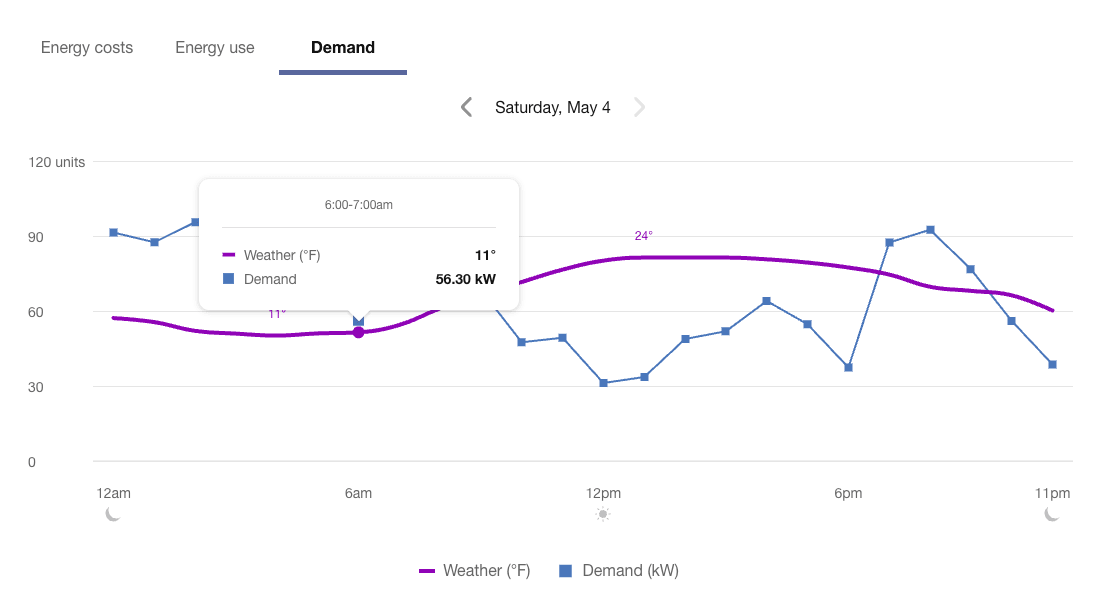
The Demand view displays a customer's demand for a given time period, with Energy Tooltips providing the exact values for each data point. The image below shows an example of the Demand view for a single day. If the required data is available, the Demand view can show data by bill period and by year.
Fuel Menu
Only electricity data can be shown in the Demand view. If the customer also receives gas from their utility, then a gas menu may be displayed but it will be grayed out in the Demand view so it cannot be selected.
Time Menu
In the Demand view, the Day is shown by default. The backward and forward buttons can be used to view data for one 24-hour period at a time.
A menu containing options for the Bill view and Year view can be made available as well, depending on the available data and configuration. See the Customer Requirements for details.
Line Graph
In all time resolutions of the Demand view, there is a line graph which uses a horizontal axis (X-axis) to show time intervals and a vertical axis (Y-axis) to show weather and demand data. Data points are displayed only if the corresponding data is available. The Y-axis label shows a generic "Units" label, since the different data types use different units of measure.
In the Day view only, customers can view demand weather data to better understand the energy being used at any given moment.
On desktop displays, each data type has a different color-coded shape or icon so it is more easily distinguishable and accessible. On mobile displays, the icons are hidden and color-coded toggles are shown instead.
Demand
Demand refers to the rate at which a household consumes electricity, not the actual amount that is consumed. Demand is expressed in kilowatts (kW) rather than kilowatt-hours (kWh). This information allows customers to see the point in time when they draw the most energy from the grid, identify irregularities, and consider how to lower their usage during those times in the future.
Weather
Weather data shows the temperature for a given interval in the Demand view. Customers can use this data to infer how weather impacts their energy demand measurements. See Weather Data for more information about how weather data is obtained.
Highest Demand Interval
An icon is displayed over the highest demand interval in the Day View and over the day with the highest demand in Bill View to indicate when the demand for energy was at its peak. This icon is also shown in the bill and day views of the Energy Use View, where customers can quickly determine which day in a bill period or which interval in a day contained the highest demand. The customer can then view that day in the Demand view to see the exact hour when demand was highest.
Because demand refers to the rate at which a household consumes electricity, not the actual amount consumed, the interval with the peak demand icon may not always be the same as the interval with the highest amount of energy use. See Demand Versus Energy Use below for more information.
The peak demand icon is not shown for days in the bill period that did not include the highest demand interval. There are cases when multiple peak demand icons can display within a day. See Multiple Peak Demand Icons below for details.
Tooltips
Tooltips are displayed when customers interact with a data point on the graph. At the day level of the Demand view, the tooltip provides the specific units of measure for each type of power.
See Energy Tooltips for details on what the tooltips may include in other views of the Data Browser.
Disclaimer
Disclaimer messages can be added to the Demand view that are specific to the view. For example, a disclaimer message can explain demand charges. The disclaimer messages can also include links to resources where customers can find more information.
Demand Versus Energy Use
Energy use is expressed in kilowatt-hours (kWh), and demand is expressed in kilowatts (kW). Demand can be thought of as the rate at which energy is drawn from the grid, rather than how much energy was consumed.
Demand can be compared to the rate at which water flows through a pipe, while energy use represents the total volume of water over time. The pipe itself can only let so much water through at a time. The pipe is like "demand": its size determines how fast the water flows through to meet the need for water.
Consider two customers:
- Mary’s usage is measured hourly. From 4–5 p.m., she uses 100 kWh. Her demand during that hour is 100 kW.
- Bob’s usage is measured every 30 minutes. From 4:00–4:30 p.m., he uses 100 kWh, and from 4:30–5:00 p.m., he uses none. His peak demand is 200 kW, even though his total energy use for the hour is also 100 kWh.
This example shows that two customers can use the same total energy but have different demand values depending on how that energy use is distributed over time.
User Experience Variations
Multiple Peak Demand Icons
If the demand values for two or more intervals are the same, and these values technically represent the highest demand of the bill period, then multiple peak demand icons are displayed within the same day in the Demand view.
This may be the case, for example, at households where a specific set of high-power machinery or equipment needs to be turned on at regular points in time, resulting in a demand spike that consistently reaches the same amount multiple times in a day, or on multiple days in a bill period.
This behavior can also occur in the Energy Use view. See Energy Use View - Multiple Peak Demand Icons for details.