Home Profile
The Home Profile highlights the customer's progress in completing the Home Energy Analysis survey and reinforces the benefits of finishing it. The module includes a summary of known and unknown home attributes, a completion percentage indicator, and a link to access the Home Energy Analysis.
Appears in: Progress Report, Welcome Report
Requirements
There are no utility or customer-specific requirements to display this module. Results from the status of the survey are used to determine what is shown in the module.
Limitations
The Home Profile module can only be used in the Welcome Report and Progress Report. It can also be used as a replacement for the Mini Home Energy Analysis in the Welcome Report.
User Experience
The image below is an example of the user experience for a customer who has not yet completed their Home Energy Analysis survey.
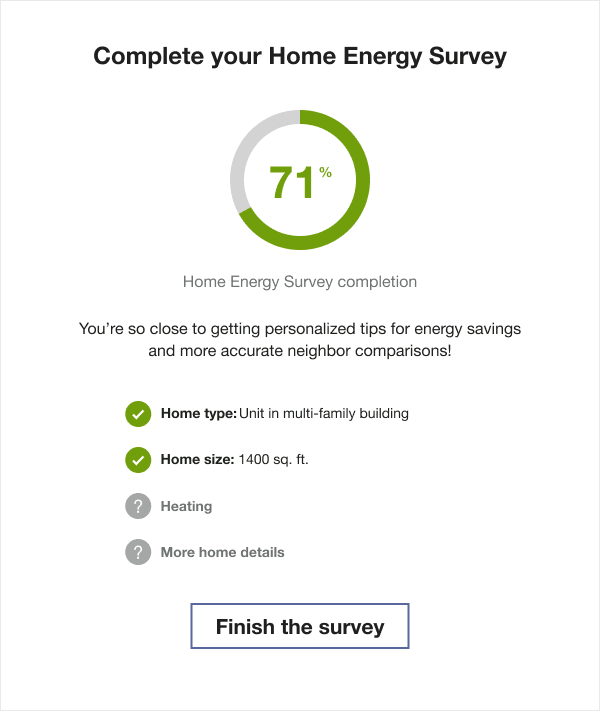
Title: Reminds the customer of their current survey completion status.
Percent Complete Wheel:Displays the percentage of the Home Energy Analysis survey the customer has completed. For example, if 50% is complete, half of the wheel is filled, with "50%" shown at the center.
Explanation: Encourages the customer to complete the survey to receive more accurate insights in their report.
List of Attributes: Shows four home attributes. Known attributes are marked with a green check, while unknown attributes are indicated with a gray question mark.
Button Provides quick access to the Home Energy Analysis directly from the report, without requiring the customer to log in.
User Experience Variations
The user experience may vary for customers and utilities based on factors such as service type, available data, costs, locale, and other considerations.
Home Energy Analysis Not Attempted
If the customer has not yet begun their Home Energy Analysis, the module displays a zero percentage and encourages them to start their survey so that their report includes more accurate insights.
Title: Prompts the customer to start the survey.
Percent Complete Wheel: Displays zero percent completion.
Explanation: Encourages the customer to take action and update their home profile.
List of Attributes: Shows four home attributes, each marked with a gray question mark to indicate unknown information.
Button: Provides quick access to the survey without requiring login, with messaging that reinforces starting theHome Energy Analysis.
Home Energy Analysis Recently Completed
If the customer has recently completed the survey, the module reinforces their progress and highlights the accuracy of their insights.
Title: Congratulates the customer on completing the survey.
Percent Complete Wheel: Displays 100 percent completion.
Explanation: Confirms that their personalized tips and comparisons are accurate and encourages updates if anything changes.
List of Attributes: Shows four home attributes, each marked with a green check to indicate known information.
Button: Provides quick access to the survey, inviting the customer to view their Home Energy Analysis from the report without having to log in to their account. The title of the button invites the customer to use the QR code to view their Home Energy Analysis.
Home Energy Analysis Completed
If the survey was completed previously but not updated recently, the module encourages the customer to review and update their information.
Title: Asks whether the customer has made any changes to their home.
Computer Icon: Replaces the percent complete wheel with a computer icon.
Explanation: Encourages the customer to update their survey to ensure accurate tips and insights.
List of Attributes: Shows four home attributes, each marked with a green check to indicate known information.
Button: Provides quick access to the Home Energy Analysis, with messaging that encourages reviewing and updating their responses.