Home Energy Analysis
Home Energy Analysis modules engage customers with questions about their home characteristics, energy usage, and habits to deliver more personalized energy insights and recommendations. Depending on the report experience, customers may be prompted to answer a short set of questions within the report, complete the full Home Energy Analysis in Digital Self Service, or respond to targeted survey questions embedded directly in the report to help utilities collect customer insights while maintaining a seamless user experience.
Mini Home Energy Analysis: Prompts customers to answer a short set of questions directly within the report. See the Mini Home Energy Analysis for more information.
Seasonal Home Energy Analysis: Encourages customers to complete the full Home Energy Analysis to improve their seasonal report experience. It includes a call-to-action button that directs customers to the survey in Digital Self Service - Energy Management where they can complete the full survey. See the Seasonal Home Energy Analysis for more information.
Home Energy Analysis for Infinite Survey Optimization: Allows utilities to collect targeted customer insights while maintaining a seamless user experience with survey questions to be embedded directly into the report. See the Home Energy Analysis Completion for more information.
Mini Home Energy Analysis
The Mini Home Energy Analysis module prompts customers to answer simple questions about their home characteristics and energy habits directly within the Email Home Energy Report. It provides an additional opportunity for customers to share information that can be used to enhance their report experience, even if they do not complete the full Home Energy Analysis survey online.
Appears in: Progress Report, Welcome Report, Limited Income Report, Time of Use Report
Requirements
No customer or utility data is required to generate the Mini Home Energy Analysis module. The only requirement is that the utility must work with Oracle Utilities Opower to launch the Home Energy Analysis survey online so customers can be redirected to it.
User Experience
The image below is an example of one of the questions in the Mini Home Energy Analysis module.
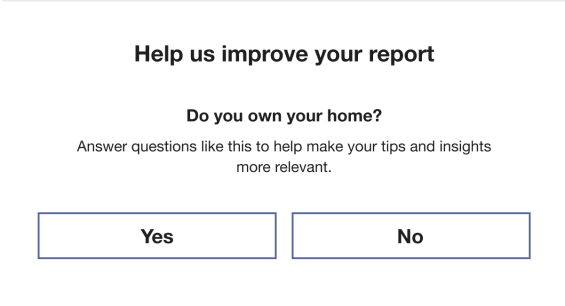
Header: Informs the customer that the Mini Home Energy Analysis provides an opportunity to improve their report experience.
Question: Presents simple yes-or-no questions that the customer has not yet answered in the full Home Energy Analysis survey online.
Benefit Text: Highlights that responding to the questions helps improve the accuracy of the report and its recommendations.
Response Option Buttons: Allow the customer to answer "Yes" or "No." Selecting a response redirects them to the appropriate follow-up experience. in the full Home Energy Analysis survey where they can respond to additional questions.
User Experience Variations
The user experience may vary depending on which questions are included and the order in which they are presented. The available options include:
Default behavior: Questions are selected from a predefined list, with the first unanswered question shown first.
Customized question list: The utility can work with Oracle Utilities Opower to reorder or remove questions. The first unanswered question from the updated list is then presented.
Confirmation experience: The module can be configured to ask a single binary question to confirm specific information about the customer's home (for example, whether they use a heat pump). There are two approaches to configuring a confirmation experience:
- Multiple questions: The sequence is adjusted to begin with a confirmation question. After it is answered, additional questions from the list may appear in future reports. Once all questions are answered, the module no longer appears.
- Single-question list: The module includes only one confirmation question. After it is answered, the module is removed from future reports.
Seasonal Home Energy Analysis
The Seasonal Home Energy Analysis module encourages customers to complete the Home Energy Analysis survey in order to improve their Seasonal Report insights. The module creates an additional opportunity for customers to provide information that can improve the information they receive.
Appears in: Seasonal Report
Requirements
No customer or utility data is required to generate the Seasonal Home Energy Analysis module. The only requirement is that the utility must work with Oracle Utilities Opower to launch the Home Energy Analysis survey online so customers can be redirected to it.
User Experience
This image shows an example of the Seasonal Home Energy Analysis module.
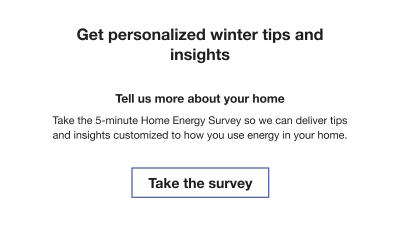
Header: Dynamically adjusts based on the season.
Subheader: Emphasizes the action the customer should take to receive more accurate tips and insights.
Body Text: Encourages the customer to complete the survey to improve the quality of their report.
Call to Action: Includes a button that directs the customer to the Home Energy Analysis survey online.
Home Energy Analysis Completion
The Home Energy Analysis Completion module allows survey questions to be embedded directly into Email Home Energy Reports. These survey questions help utilities collect targeted customer insights while maintaining a seamless user experience. After submitting a response, customers are redirected to a configured web response experience that confirms their response and provides opportunities for further engagement with the utility.
The Home Energy Analysis Completion module supports both general survey questions and Home Energy Assessment workflows through configurable survey experiences.
Appears in: Progress Report, Welcome Report, Limited Income Report, Time of Use Report
Requirements
The Home Energy Analysis Completion module does not require customer or utility data for implementation. However, the utility must work with Oracle Utilities Opower to configure the web response experiences that customers are redirected to after submitting a survey response.
User Experience
The Home Energy Analysis Completion module consists of an embedded survey question that collects the customer's response within the report, followed by a configurable web response experience that is displayed after the response is submitted. Module has two modes:
- Mini Mode: Includes a call to action that allows customers to answer a specific question directly from the Home Energy Report and then presents a configurable follow-up experience.
- Full Mode:Displays a call to action that directs customers to continue and complete the full Home Energy Assessment.
Survey Questions - Mini Mode
The following image is an example of an Home Energy Analysis Completion module question in Mini Mode with four possible answers.

Question:: A short question that is the primary prompt in the survey.
Explainer Copy: Provides additional context to help users understand the question and make an informed response.
Survey Inputs: Allows users to select a single response. After a response is selected, the user is redirected to a web page and the selected response is recorded.
Illustration: Provides the customer with a visual thematically related to the survey question and serves a decorative purpose without conveying critical information.
Completion Web Response - Mini mode: After submitting a survey response, users are redirected to a completion web response. Mini mode includes a call to action that allows customers to answer a specific question directly from the Home Energy Report and then presents a configurable follow-up experience. Mini mode completion response options include:
- Thank You Message
- Follow-up Question to gather additional insights
- Targeted Offer or Recommendation based on the customer's response
See User Experience Variations for more information about the available web response variations.
Survey Questions - Full Mode
The following image is an example of an Home Energy Analysis Completion module question in Full Mode with a call to action that redirects customers to the full Home Energy Analysis survey.

Question:: A short question that is the primary prompt in the survey.
Explainer Copy: Provides additional context to help users understand the question and make an informed response.
Call to Action Response: Provides customers with fast access to the full Home Energy Analysis.
Illustration: Provides the customer with a visual thematically related to the survey question and serves a decorative purpose without conveying critical information.
Completion Web Response - Full mode: Customers are redirected to the full Home Energy Analysis.
See User Experience Variations for more information about the web response variations.
User Experience Variations
The Home Energy Analysis Completion module user experience may vary depending on the type of question and the response collected, and configured web response.
- Even number of inputs: When there are an even number of response options, the inputs may be displayed in a grid layout.
- Odd number of inputs: When there are an odd number of response options, the inputs are displayed in a single column centered within the container.
Possible Web Responses:
- Thank You Message: Thanks the user for their response and confirms that it has been received. This is the default web response experience for general survey questions. See User Experience.
-
Link to Full Survey Response: Displays a confirmation message and prompts users to continue to the full Home Energy Assessment to complete additional questions. This is the default web response experience for Home Energy Assessment inputs.
-
Targeted Offer Response: Displays a confirmation message after a response is submitted and presents a targeted promotion or recommendation based on the user's selected answer. This web response experience supports both general survey questions and Home Energy Assessment inputs.
- Follow-up Question Response: Displays a confirmation page with a follow up question based on the user's initial response. After the follow up response is submitted, users receive a confirmation message and are prompted to continue to the full Home Energy Assessment survey. This web response experience is designed for Home Energy Assessment inputs.
See the Digital Self Service - Energy Management Overview Guide to learn more about confirmation experiences in the web portal.
Customer completes all questions: After the customer answers all questions, the module is no longer displayed in future reports.