Energy Use Benchmark
The Energy Use Benchmark module provides a personalized, at-a-glance visualization of the customer's energy use. It consists of three sections of a gauge to indicate the customer's overall status as it relates to their energy use: Fair, Good, and Great. The customer's status on the gauge is determined by their performance relative to both comparison points in the Normative Comparisons.
Note:
he Energy Use Benchmark module must be used in context with the Normative ComparisonsAppears in: Progress Report, Welcome Report, Limited Income Report, Annual Report, Time of Use Report, Solar Report, Usage Lookback Report
Requirements
| Category | Description |
|---|---|
| Billing Frequency | Monthly, bi-monthly, or quarterly. |
| Data Delivery Frequency | Monthly, bi-monthly, or quarterly. |
| Data Requirements | Billed usage data from the utility. |
| Data History | A minimum of one historical bill. |
| Data Coverage | Not applicable. |
| Supported Fuels | Electricity, gas, and dual fuel. |
User Experience
The Energy Use Benchmark module provides a personalized, at-a-glance view of the customer's energy usage. It features a three-tier gauge that indicates the customer's overall status: Fair, Good, or Great.
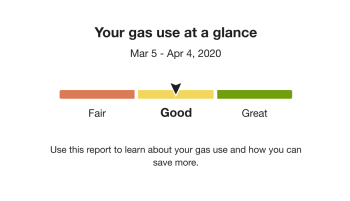
Heading: Informs the customer that the benchmark provides an at-a-glance view of their energy use. The wording varies based on the customer's fuel type.
Energy Use Benchmark: Displays a three-segment gauge—Fair, Good, and Great—showing the customer's performance relative to comparison points (similar homes and the efficiency zone). An arrow indicates the customer's position within the appropriate segment. Each segment is color-coded:
- Orange (Fair): Usage is higher than both similar homes and the efficiency zone (efficient homes).
- Yellow (Good): Usage is lower than similar homes but higher than the efficiency zone.
- Green (Great): Usage is lower than the efficiency zone threshold.
Benchmark Copy: Provides contextual messaging based on the customer's current status and any changes since their last report. It may offer guidance on how to improve or reinforce positive performance, and in some cases, reiterates the customer's fuel type.
User Experience Variations
The user experience varies for customers depending upon their service types, available data, costs, and locale. Note that the following list indicates the primary user experience variations, not all possible variations.
Usage Lookback Report Variation
The Benchmark module in Usage Lookback Report provides an at-a-glance rating of the customer's gas use from all available bill periods over the previous gas season.
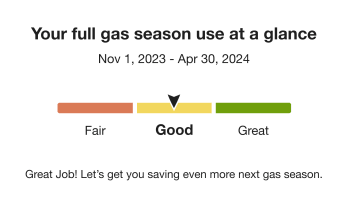
The benchmark module used in the Usage Lookback Report varies from the standard Progress Report in several ways:
- Heading: Reinforces that the report reflects the full gas and heating season, rather than a single billing period.
- Time Period: Aggregates the customer's energy usage across all available billing periods during the gas and heating season to provide an overall rating.
- Benchmark Copy: Acknowledges past gas usage while encouraging actions to improve future performance.
- Benchmark States: See Energy Use Benchmark States.
Energy Use Benchmark States
The copy below the gauge changes depending on the customer's current state and any differences since their last report.
States for the Progress, Welcome, Limited Income, and Time of Use Reports
- Good State: Explains how to use the report.
- Low to Higher Use State: Helps the customer consider what may have changed.
- High to Lower Use State: Congratulates the customer for lowering their use compared to neighbors.
- Great State: Congratulates the customer for being efficient
- Fair State: Explains how to use the report
- Fuel Type The customer's fuel type is displayed in the header and benchmark copy, "Your <fuel variation> use at a glance."
- Dual Fuel: The benchmark header uses the term 'energy.'
- Electric-Only: The benchmark header uses the term 'electricity' and the benchmark copy uses the term 'energy.'
- Gas-Only: The benchmark header uses the term 'gas.'
States for the Annual Report
The Benchmark module in Annual Reportcollates the customer's energy usage data from all available bill periods over the previous calendar year to provide an at-a-glance rating of their usage.
- Heading: The heading identifies the year being reported. For example, "Your 2021 energy use at a glance."
- Benchmark Copy: The text below the benchmark has an annual focus that introduces the customer to the goals of the report by acknowledging past and future actions. For example, "Thanks for tracking your energy use with us. Let's get you saving this year!"
States for the Solar Report
The Benchmark module in the Solar Report includes unique copy and logic for net negative energy states experienced by solar customers. There are four energy states:
- Fair: Net energy was positive and more than similar homes.
- Good: Net energy was positive and less than similar homes, net energy was negative and more than similar homes, or net energy was negative and more than efficient homes, but less than similar homes.
- Great: Net energy was positive or negative and an efficient home.
- State Change (Higher Use to Lower Use): Benchmark state has changed from Fair to Good or Good to Great since the last report.
States for the Usage Lookback Report
The benchmark copy in Usage Lookback Report below the gauge changes depending on the customer's current state. Possible states include:
- Fair: Thanks for tracking your gas use with us. Let's get you saving for next gas season!
- Good: Great Job! Let's get you saving even more next gas season.
- Great: Great job being efficient! Let's see how low your gas use can go next gas season.
Dog-Ears
For customers on the legacy version of email Home Energy Reports, a dog-ear visual element corresponding to the "energy use at a glance" bullet of the Welcome module appears in the upper right corner of the Energy Use Benchmark module. This can only appear in the Welcome Report and Limited Income Report.