Welcome
The Welcome module introduces both new and returning customers to the Email Home Energy Report experience. For customers who have received earlier versions, it highlights how the report has evolved. For first-time recipients, it provides an overview of the insights included in the report.
Appears in: Welcome Report, Limited Income Report, Time of Use Report, Solar Report, Peak Focused Report.
Requirements
User Experience
This section describes the user experience for a new customer in the Welcome Report.
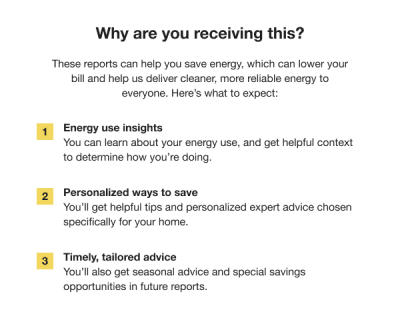
Heading: The heading draws the customer's attention to the purpose of the report.
Introduction Text (New Customer Only): The introduction text explains that the purpose of the report is to help them save energy, which can lower their bill.
Welcome Highlights: A list of three features explains how the report will help the customer save energy and lower their bill. The listed highlights focus on broad benefits instead of specific features, including energy use insights, personalized ways to save, and timely, tailored advice.
User Experience Variations
The user experience of the feature may vary for customers and utilities depending on their service types (gas, electricity, dual fuel, and so on), available data, costs, locale, and other factors. For more information, see the Welcome module description in the Oracle Utilities Opower Energy Efficiency Cloud Service Overview and go to the User Experience Variations section.
Welcome Report - Legacy Customers
The Welcome module in the Welcome Report varies for legacy customers in the following ways:
- Heading: The heading draws the customer's attention to what has changed in their report.
- Introduction text: Not applicable.
- Welcome highlights: The welcome highlights list how the report changes improve their report experience to help them save energy and lower their bills. The number next to each highlight corresponds to the related module:
- Energy use insights: This highlight refers to the Energy Use Benchmark.
- Personalized Ways to Save: This highlight refers to the Normative Comparisons.
- Better tips and insights: This highlight refers to the Tip Modules.
Limited Income Welcome Report - New Customers
The module language acknowledges aspects of the report experience that are beneficial to limited-income customers, while primarily focusing on energy efficiency and introducing the report.
The module varies for new limited income customers in the following ways:
- Introduction text: The introduction text frames the report as a tool to educate and reduce stress about the customer's energy bills.
- Welcome highlights: The welcome highlights list how the report changes improve their report experience to help them save energy and lower their bills:
- Energy use insights: This highlight refers to the Energy Use Benchmark.
- Personalized ways to save: This highlight refers to the Normative Comparisons.
- Savings and assistance programs: This highlight refers to the Limited Income Report Tips with special focus on savings and assistance programs for limited income customers.
Limited Income Welcome Report - Legacy Customers
The module varies for legacy limited income customers in the following way:
- Introduction text: Not applicable.
- Welcome highlights: The welcome highlights list how the report changes improve their report experience to help them save energy and lower their bills.
- Energy use insights: This highlight refers to the Energy Use Benchmark.
- Personalized ways to save: This highlight refers to the Normative Comparisons.
- Better tips and insights: This highlight refers to the Limited Income Report Tips with special focus on potential savings.
Time of Use Welcome Report - Legacy Customer
This module varies for legacy customers on a time of use plan in the following ways:
- Introduction text: Not applicable.
- Welcome highlights: The Time of Use Report welcome highlights for legacy customers include:
- Energy use insights: This highlight refers to the Energy Use Benchmark.
- Personalized ways to save: This highlight refers to the Normative Comparisons.
- Better tips and insights: This highlight refers to the Time of Use 101 module.
Time of Use Welcome Report - New Customer
This module varies for new customers on a time of use plan in the following ways:
- Introduction text:The introduction text explains that the purpose of the report is to help them save energy, which can lower their bill.
- Welcome highlights: The Time of Use Report welcome highlights for new customers include:
- Energy use insights: This highlight refers to the Energy Use Benchmark.
- Personalized ways to save: This highlight refers to the Normative Comparisons.
- Timely, tailored advice: This highlight refers to the Time of Use 101 module.
Solar Report - All Customers
All solar customers, regardless of new customer or legacy customer type, receive the same Welcome module in their first report. The module varies for solar customers in several ways:
- Heading: Why are you receiving this?
- Introduction text:The introduction text explains that the purpose of the report is to help them save energy, which can lower their bill.
- Welcome highlights: The Time of Use Report welcome highlights for new customers include:
- Energy use insights: This highlight refers to the Energy Use Benchmark.
- Personalized ways to save: This highlight refers to the Normative Comparisons.
- Timely, tailored advice: This highlight refers to the Solar Report Tips.
Peak Focused Report - New Customers
The new customer version of the module for the Peak Focused report includes:
-
Heading: Why are you receiving this?
Introduction text: The introduction text explains that the purpose of the report is to help them save energy, which can lower their bill, and that it takes the customer's Time of Use plan into account to provide them with the best information.
- Welcome highlights: A list of three features explains how the report will help the customer save energy and lower their bill:
- Your on-peak energy use compared to others: This insight refers to the Mini Time of Use Reminder.
- Personalized ways to save: This insight refers to the Peak Focused Normative Comparison.
- Timely, tailored advice: This insight refers to the Energy Literacy and Tip.
Peak Focused Report - Legacy Customers
The legacy customer version of the module for the Peak Focused report includes:
Heading: What's new in your report
Highlights: A list of three features explains how the report will help the customer save energy and lower their bill:
- Time-of-Use rate reminder: This insight refers to the Mini Time of Use Reminder.
- Updated comparison graph: This insight refers to the Peak Focused Normative Comparison.
- Better tips and insights: This insight refers to the Energy Literacy and Tip.
Peak Focused - Legacy Customer with Demand Charges
The Peak Focused Report supports demand charges. The Welcome module for legacy customers with demand charges includes:
- Heading: What's new in your report
- Welcome highlights: A list of three features explains how the report will help the customer save energy and lower their bill:
- Time-of-Use with demand charge rate reminder: This insight refers to the Mini Time of Use Reminder.
- Updated comparison graph: This insight refers to the Peak Focused Normative Comparison.
-
Better tips and insights: This insight refers to Energy Literacy and Tip.