Time of Use 101
The Time of Use 101 module helps customers understand when electricity is most expensive based on their Time of Use rate plan. It explains key details such as whether prices differ between weekdays and weekends, how peak pricing compares to off-peak rates, and the specific hours when electricity costs are highest. A visual timeline highlights off-peak, partial-peak, and peak periods.
The module serves two purposes: it provides customers with information specific to their rate plan at the time the report is generated, and it explains why reducing usage during peak periods is especially important.
Appears in: Time of Use Report
Requirements
Utility Requirements
| Category | Description |
|---|---|
| Required Cloud Service | Oracle Utilities Opower Energy Efficiency Cloud Service |
| Scale | Not applicable. |
Customer Requirements
| Category | Description |
|---|---|
| Billing Frequency | Monthly or bi-monthly. |
| Data Delivery Frequency | Monthly, bi-monthly, or quarterly. |
| Data Requirements | The Time of Use rate plan. Information from the plan is needed to identify peak time periods and other basic rate details such as peak hours and any applicable peak time changes throughout the year. |
| Data History | Not applicable. |
| Data Coverage | Not applicable. |
| Supported Fuels |
Time of Use Report: Electricity-only, gas-only, or dual fuel. Peak Focused Report: Electricity-only. |
Limitations
- Number of Rates: Up to three rate types can be displayed at once . For example, peak, mid-peak, and off-peak, or super peak, peak, and off-peak.
- Off-Peak Hours (Welcome version of the Time of Use Report only): Super off-peak and super saver rates are combined into a single off-peak category. For example, if a customer has multiple off-peak periods, they are all represented as one unified off-peak segment on the timeline.
User Experience
This section describes the user experience for the Time of Use 101 module for a customer with a single weekday peak, no weekend peak hours, and a seasonal variation.
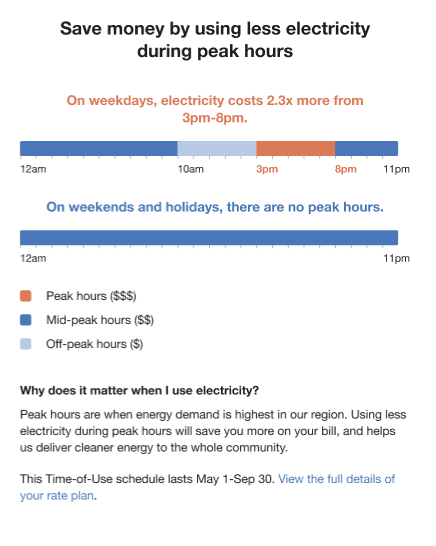
Heading: Informs the customer that they can save money by reducing energy use during peak hours.
Weekday Subheading and Graph: The weekday subheading varies by rate plan and explains how much more energy costs during peak hours. The graph highlights the price ratio and applicable peak times.
- Weekday Price Ratio: Dynamically compares the highest and lowest weekday rates based on the customer's plan.
- Weekday Peak Hours: Displays the most expensive time period during weekdays.
Weekend Subheading and Graph: Indicates whether peak pricing applies on weekends.
- Weekend Price Ratio: If applicable, dynamically compares the highest and lowest weekend rates.
- Weekend Peak Hours: If applicable, shows the most expensive time period during weekends.
Graph labels: Identify which time periods correspond to peak, mid-peak, and off-peak hours.
- Peak Hours: Indicate the most expensive time range, dynamically based on the customer's rate plan.
- Mid-Peak Hours: Represent the intermediate cost period, neither highest nor lowest, and are dynamically defined by the rate plan.
- Off-Peak Hours: Show the least expensive time range, also dynamically based on the rate plan.
Explainer: Describes why the timing of energy use matters..
Seasonal Details: Specifies the dates that apply to the Time of Use schedule if the rate plan includes seasonal variations (for example, "This Time-of-Use schedule applies from May 1 to September 30"). If there are no seasonal variations, this section is omitted.
Call to Action: Invites the customer to view full rate plan details and provides a link to the utility's rate plan page.
User Experience Variations
The user experience of the feature may vary for customers and utilities depending on their service types, available data, costs, locale, and other factors.
Timeline Subheading Text
The timeline subheading text varies based on the customer's rate plan and the type of days displayed in the sliding scale. The following table shows examples of the insight statement variations for different rate plans and day scenarios.
| Peak Type | Peak Period | Timeline Subheading |
|---|---|---|
| Single Peak | Daily | Every day, electricity costs X from [X am/pm] - [X am/pm]. |
| Single Peak | Week day | On weekdays, electricity costs X from [X am/pm] - [X am/pm]. |
| Single Peak | Weekend | On weekends, electricity costs X from [X am/pm] - [X am/pm]. |
| Double Peak | Daily | Every day, electricity costs X from [X am/pm] - [X am/pm] and [X am/pm] - [X am/pm]. |
| Double Peak | Week day | On weekdays, electricity costs X from [X am/pm] - [X am/pm] and [X am/pm] - [X am/pm]. |
| Double Peak | Weekend | On weekends, electricity costs X from [X am/pm] - [X am/pm] and [X am/pm] - [X am/pm]. |
| No Peak | Weekend - Same All Day | On weekends, there are no peak hours. |
| No Peak | Weekend - Multiple Off-Peak Rates | On weekends, there are no peak hours. |