Time of Day Hourly Insight
The Time of Day Hourly Insight provides customers with detailed information about when they use electricity and how their usage compares to a relevant comparison group. The module displays average weekday hourly usage, distinguishing between peak (highest-cost) and non-peak periods. It also highlights the specific peak hour during which the customer consumes the most energy. A call-to-action button directs customers to learn more about their Time of Day rate plan.
Appears in: Peak Focused Report
Requirements
Utility Requirements
| Category | Description |
|---|---|
| Required Cloud Service | Oracle Utilities Opower Energy Efficiency Cloud Service |
| Scale | Maximum of 300,000 a week. |
Customer Requirements
| Category | Description |
|---|---|
| Billing Frequency | Monthly, bi-monthly, quarterly. |
| Data Delivery Frequency | Monthly, bi-monthly, quarterly. |
| Data Requirements |
|
| Data History | A minimum of one historical bill. |
| Data Coverage | Not applicable. |
| Supported Fuels | Electricity only. |
Limitations
- Peak Focused Report: This module is only available as part of the Peak Focused Report. A "no rates" variation of this module may be included in other report types. See No Rates Data.
- Time of Use Rate Plan: This module is only available to customers on Time of Use rate plans.
User Experience
This section describes the user experience for a customer with two peak periods.
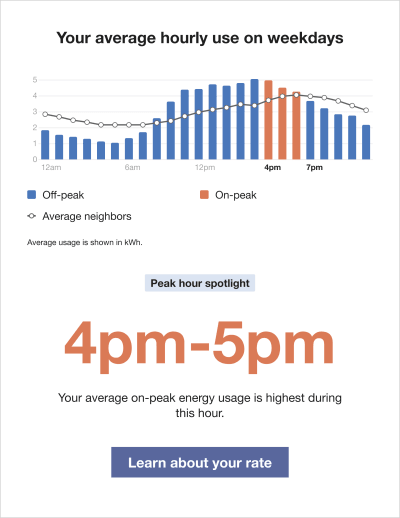
Time of Day Graph: Highlights the customer's average weekday energy use in kilowatt-hours, with an emphasis on peak (highest-cost) hours.
- Cost Period Labels: Provide a key to help customers distinguish between off-peak and on-peak periods, as well as how their usage compares to average neighbors.
- Hourly Bar Graph: Shows the customer's average hourly energy use across off-peak and on-peak periods.
- Comparison Group Usage Line: This line indicates the comparison group's average hourly usage so that customers have an idea of how they are doing.
Insight Heading: Reinforces the module's focus on peak-hour energy usage.
Highest Consumption Hour: Identifies the hour during which the customer's average on-peak energy use is highest. This varies based on the customer's rate plan.
Insight Description:Explains that the highlighted hour represents the customer's highest average on-peak energy usage.
Call to Action: Includes a button that directs the customer to a webpage where they can learn more about their peak rates.
User Experience Variations
The user experience of the feature may vary for customers and utilities depending on their rate plan, available data, costs, locale, and other factors.
Three Peak Periods
If there are three peak periods, these periods are highlighted in the graph and identified in the cost period labels.
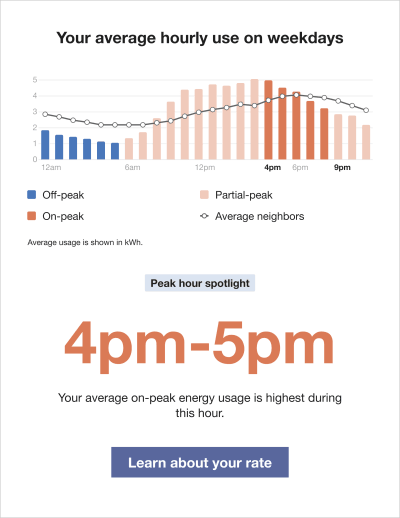
The graph displays the customer's high ("on-peak"), medium ("partial-peak"), and low ("off-peak") cost periods. Distinct colors are used to clearly differentiate each period, with labels beneath the graph explaining their meaning.
Comparison Group Usage Line Data
The data used for the comparison line on the chart varies based on the customer's usage state:
- If the customer's usage is Fair, the line reflects the average usage of neighbors.
- If the customer's usage is Good or Great, the line reflects the usage of efficient homes and is displayed in green.
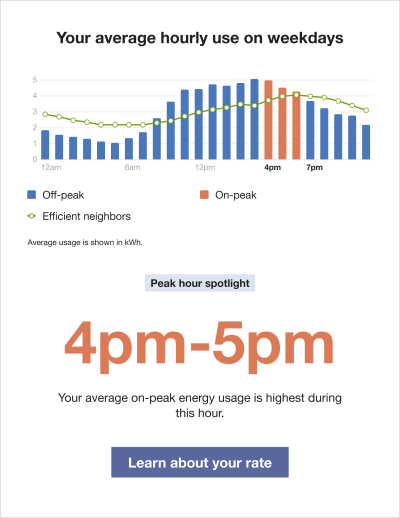
The labels beneath the graph adjust to indicate which line data is used (either "Efficient neighbors" or "Average neighbors").
Demand Charge
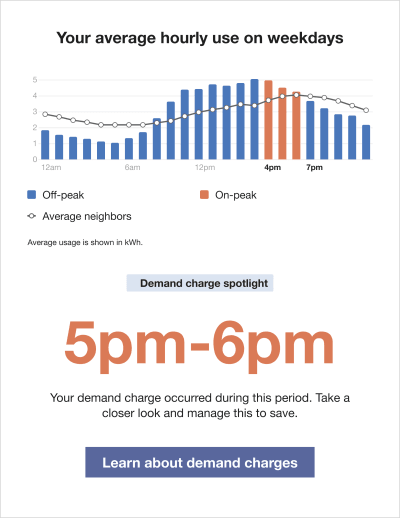
If the customer has demand charges, the module is adjusted as follows:
- Demand Charge Icon: A dollar icon appears at the hour of maximum usage during the on-peak period. The chart reflects average hourly usage, so the maximum usage hour may differ from the highest average hour shown in the bars.
- Insight Heading: Emphasizes the module's focus on demand charge usage.
- Highest Consumption Time Period: Identifies when the demand charge occurred within the billing period. This varies based on the customer's rate plan.
- Insight Description: Explains when the demand charge occurred and encourages the customer to learn how to reduce it.
- Learn More Button: Directs the customer to a web page with additional information about demand charges.
No Rates Data
When there is no available rate data, or if the module is used in another report besides the Peak Focused Report, the module shows an hourly normative comparison and emphasizes the highest average usage hour.
Note:
This "no rates" version of the Time of Day Hourly Insight module may be included in other report types for utilities that meet additional data requirements. 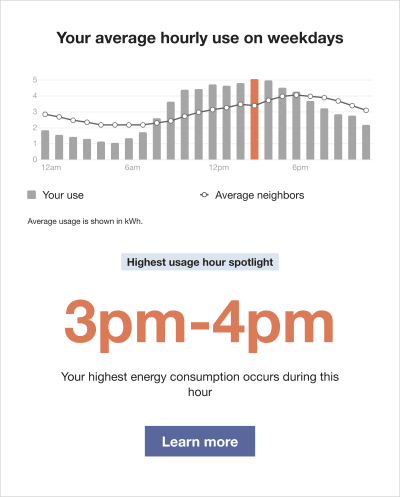
The module varies in the following ways:
Time of Day Graph: Highlights the customer's average weekday energy use to help identify key opportunities for savings. Peak hours are not shown.
- Cost Period Labels: Provide a simplified key to the graph, including only "Your use" and "Average Neighbors."
- Hourly Bar Graph: Displays the customer's hourly energy usage. The highest-use hour is highlighted using the same color as the High Consumption Time Period. The x-axis typically shows 12 AM, 6 AM, 12 PM, and 6 PM.
- Comparison Group Usage Line: IShows the average hourly usage of the comparison group. The data used for this line varies based on the customer's usage state.
- Cost Period Start Times: Indicate the hourly intervals represented in the bar graph.
- Usage Measurement: Specifies the unit of measurement used in the graph.
Insight Heading: Reinforces the module's focus on the customer's energy usage.
- Highest Consumption Time Period: Identifies when the customer's energy use was highest. This varies based on the customer's rate plan.
- Insight Description: Explains that the customer's highest energy use occurred during the identified period.
- Learn More Button: Redirects the customer to the web portal where they can learn more about their peak rates.
Missing or No Data
If data is missing or unavailable, the module highlights the time periods where data is incomplete or absent. The following image shows an example of the Time of Day Hourly Insight module for a demand charge customer with missing data.
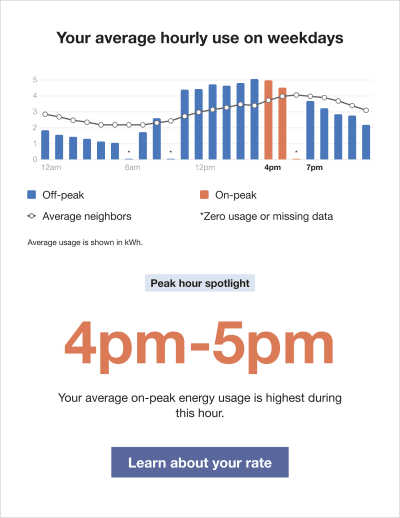
The module varies in the following ways:
- Asterisk: Appears above time periods with no available data.
- Cost Period Labels: Include a label explaining that the asterisk indicates zero usage or missing data.