Mini Time of Use Reminder
Positioned in the top right of the progress version of the Peak Focused Report, the Mini Time of Use Reminder module serves as the customer's first point of reference for understanding peak electricity cost periods within their Time of Use plan. It clearly displays the cost multiplier for high-cost periods and their corresponding time windows, and includes a color-coded timeline for easy identification of peak hours. The module can also adapt to different utility peak schedules and billing structures, such as demand charges.
Appears in: Peak Focused Report
Requirements
Limitations
- Peak Focused Report only: This module is only available as part of the Peak Focused Report.
- Time of Use Rate Plan: This module is only available to customers on Time of Use rate plans.
- Demand Charge: This module supports customers on Time of Use plans with demand charges.
User Experience
This section describes the user experience for a customer with two peak periods.
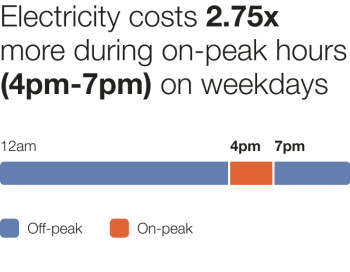
Header: Informs customers of the cost multiplier during peak periods and the corresponding time range.
- Weekday Price Ratio: Displays the cost multiplier applied during the peak period.
- High Cost Period Label: Shows the rate plan–specific name for the high-cost perio. For example, "peak" or "on-peak".
- Weekday High Cost Period Start Time: Indicates when the peak period begins. For example, 4pm.
- Weekday High Cost Period End Time: Indicates when the peak period ends. For example, 7pm.
Cost Period Bar: Provides a visual timeline of high- and low-cost periods.
- High Cost Period Color: Uses a warning color to highlight peak times. In the example image, the "on-peak" period is indicated by a dark orange warning color.
- Low Cost Period Color: Uses a warning color to highlight peak times. In the example image, "off-peak" is indicated by a cool blue color.
- High Cost Start and End Times: Displays the start and end times of the peak period directly on the timeline.
Cost Period Legend: Explains the color coding used in the cost period bar.
User Experience Variations
Three Peak Periods
This image is an example of the Mini Time of Use Reminder module for a customer with three peak periods.
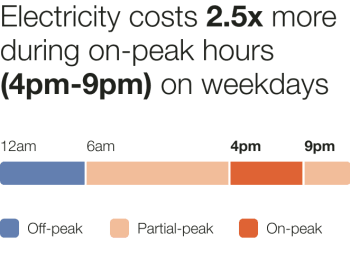
If the customer has three cost periods, the user experience is adjusted as follows:
Cost Period Bar: Displays a visual timeline of low-, medium-, and high-cost periods.
- High Cost Period Color: Highlighted with a warning color to signal peak pricing. In the example image, the "on-peak" period is indicated by a dark orange warning color.
- Medium Cost Period Color: Represented with a secondary color to indicate mid-tier pricing. In the example image, the "partial-peak" period is indicated by a light orange color that is lighter than the high cost period warning color.
- Low Cost Period Color: Shown with a cool, light color to indicate off-peak pricing. In the example image, "off-peak" is indicated by the blue color.
- Cost Start and End Times: Start and end times for each cost period are labeled directly on the bar.
Cost Period Legend: Explains the color coding used in the timeline. If multiple segments share the same color, they are represented by a single legend item.
Demand Charge
This image is an example of the Mini Time of Use Reminder module for a customer with demand charge rate in addition to the Time of Use plan.
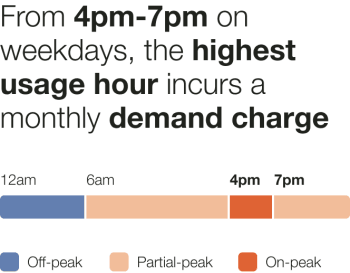
If the customer is on a demand charge plan, the user experience is adjusted as follows:
Header: Indicates when the demand charge period occurs.
Weekday High Cost Period Start Time: Shows when the peak (demand charge) period begins. For example, 4pm.
- Weekday High Cost Period End Time: Shows when the peak period ends. For example, 9pm.
- Cost Period Bar: Provides a visual timeline of cost periods, emphasizing when demand charges apply.
Cost Period Colors: Use color cues to highlight the most important times to reduce energy usage.
- High Cost Period Color: A warning color indicates the peak period when demand charges apply. For example, dark orange.
- Medium Cost Period Color: A secondary color (for example, light orange) represents mid-tier pricing periods. For example, light orange.
- Low Cost Period Color: A cool color indicates the lowest-cost, off-peak periods.. For example, cool blue.
Cost Period Legend: Explains the color coding used in the cost period bar.