What Uses Most
The What Uses Most module educates customers about the top three energy uses in their home for the report period. One of the customer's top energy uses is highlighted at the top of the module and is followed by a related energy-saving tip. Highlighted energy uses must meet one of the following criteria:
- It is the customer's highest energy use.
- It is the customer's second-highest energy use.
- The energy use for that category is significantly above the regional average.
Appears in: Limited Income Report, Electric Vehicle Report
Note:
While this module was designed for the limited-income customer experience, it can be used for other audience segments as well.Requirements
Utility Requirements
| Category | Description |
|---|---|
| Required Cloud Service | Oracle Utilities Opower Energy Efficiency Cloud Service |
| Scale | Not applicable. |
Customer Requirements
| Category | Description |
|---|---|
| Billing Frequency | Monthly, bi-monthly, or quarterly. |
| Data Delivery Frequency | Monthly, bi-monthly, or quarterly. |
| Data Requirements |
|
| Data History | A minimum of six bills is required for non-AMI customers. A minimum of 60 days of AMI reads for AMI customers. |
| Data Coverage | Not applicable. |
| Supported Fuels | Electricity-only, gas-only, dual fuel. |
User Experience
This section describes the user experience for the What Uses Most module. The module varies by usage factors. The image below is an example of the module for a customer with heating as the highest energy use in the billing period.
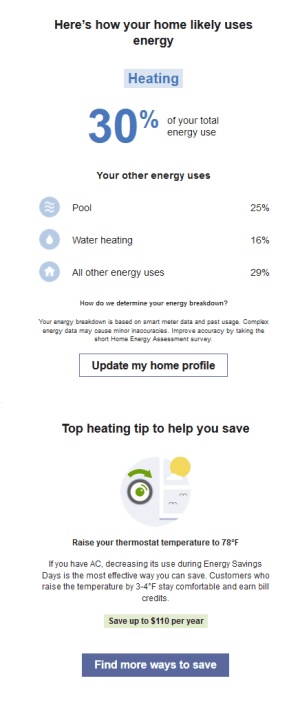
What Uses Most: The top section of the module highlights the four largest sources of energy use in the customer's home during the report period. Each value is an estimate based on past energy use, weather patterns, and home characteristics.
-
Heading: Indicates the energy usage level of the highlighted category and notes that the value is an estimate.
- Usage Categories: Dynamic categories based on the customer's past energy use, weather patterns, home characteristics, and available smart meter data. These help customers identify where to focus their savings.
- Highlighted Category: Selected by rotating algorithms to feature one of the customer's top energy uses in each report. It appears in a blue box at the top of the module, along with the percentage of total energy it represents..
- Energy Breakdown Subheader: Introduces the remaining top energy use categories.
- Additional Usage Categories: Lists two more categories with their respective percentages, ordered from highest to lowest. A final "All other energy uses" category shows the remaining share of consumption and is represented by a home icon.
-
Disaggregation Header and Explainer and Text: Provides a note explaining that the energy use breakdown is based on data science estimates and encourages customers to improve accuracy by completing the Home Energy Analysis.
-
Update Home Profile Button: Directs customers to the Home Energy Analysis, where they can provide additional details about their home to enhance report accuracy.
Paired Tip:An energy-saving tip follows the module, tailored to the highlighted energy use. For example, if cooling is a top category and the customer uses a heat pump, a relevant heat pump or cooling tip is shown. This ensures the recommendation aligns with the customer's specific usage. See Paired Tips.
User Experience Variations
The user experience of the feature may vary for customers and utilities depending on their service types, available data, costs, locale, and other factors.
Highlighted Usage Category
The highlighted usage category heading varies depending on the highlighted category and module state (highest energy use, second highest energy use, most above regional average). The following table includes examples of the possible heading variations for heating as the highlighted category.
| Highlighted category | Module State - Highest energy use | Module State - Second highest energy use | Module State - Most above regional average |
|---|---|---|---|
| Heating | Here's how your home likely uses energy | Your heating was likely a top energy use | Your heating use was likely above the regional average |
Electric Vehicle Report
Electric Vehicle Charging
Electric Vehicle Charging is one of the possible energy use categories for electric vehicle customers. If Electric Vehicle Charging is the customer's top energy category, a green leaf icon appears next to the top use category heading with a encouraging "smart, green choice" message below. The message is designed to positively reinforce the customer's decision, and ensure that they feel good about their environmentally friendly choices even when it may take up a significant portion of their energy use.
Heat Pump Usage
If the customer has reported using a heat pump for heating or cooling in the Home Energy Analysis, the module is adjusted as follows:
Top Use Category: If a heat pump is the customer's largest energy use, it is labeled as "Heat Pump." A green leaf icon appears alongside the heading, accompanied by a positive message (for example, "smart, green choice") to reinforce the customer's environmentally friendly decision.
Usage Categories: If a heat pump appears in the list of energy use categories, it is labeled as "Heat Pump" and displayed with a corresponding icon.
Calculations
Energy Use Categories
The energy use category calculation varies depending on whether or not the customer has a smart meter.
Customer without a smart meter (or without reliable smart meter data)
Categories are estimated using a combination of weather data, historical energy usage, and responses from the Home Energy Analysis. These inputs allow data science models to generate an estimated breakdown of energy use by category or appliance, helping customers understand where they can focus their savings.
Customer has a smart meter
Smart meter data, which captures energy use throughout the day, is used to identify patterns associated with specific appliances. For example, refrigerators often cycle on and off every 15–20 minutes to maintain temperature. Data science models detect patterns like these to infer when and how certain appliances are used. This enables an estimated breakdown of energy use by appliance, helping customers better understand their consumption and identify opportunities to save.