Peak Focused Normative Comparison
The Peak Focused Normative Comparison module helps educate customers about their energy use during on-peak periods by comparing it to that of similar homes. The module compares the customer ("You") to two groups: "Efficient Neighbors" and "Average Neighbors," and assigns a comparison state such as Fair, Good, or Great to indicate how their electricity use compares. Results are displayed in a horizontal bar graph, along with total electricity usage values to help customers understand how their on-peak usage relates to their overall consumption during the billing period. An informational section below the graph explains that "Efficient Homes" represent the 20% of similar homes in the comparison group that used the least energy during the billing period, and provides additional context on how to interpret the graph. Based on the customer's comparison state, the insight statement below the graph either encourages additional savings opportunities or highlights that the customer is outperforming their neighbors in energy efficiency.
Requirements
Utility Requirements
| Category | Description |
|---|---|
| Required Cloud Service | Energy Efficiency Cloud Service |
| Scale | Not applicable. |
Customer Requirements
| Category | Description |
|---|---|
| Billing Frequency | Monthly, bi-monthly, or quarterly. |
| Data Delivery Frequency | Monthly, bi-monthly, or quarterly. |
| Data Requirements |
|
| Data History | A minimum of one historical bill. |
| Data Coverage | AMI data for on-peak periods must have 100% of available reads for the customer. |
| Supported Fuels | Electric-only. |
Limitations
- Peak Focused Report: This modules is only available as part of the Peak Focused Report.
-
Time of Use Rate Plan: This module is only available to customers with a Time of Use rate plans.
User Experience
This section describes the user experience for a customer with a good data state.
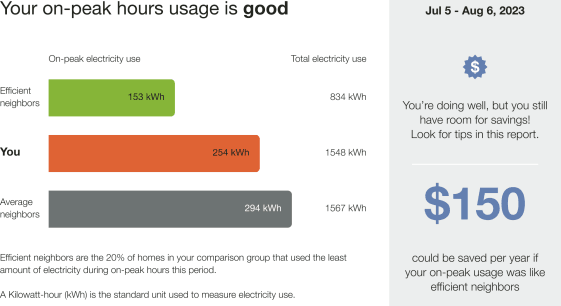
Heading: Notifies the customer that the normative provides them with a comparison of their on-peak hours usage to their neighbors.
Bar Chart: Displays how much energy each group in the comparison used. Typically, the bar with the smallest value is on top and the bar with the largest value is on the bottom.
- You: Indicates how the customer is doing. This is often a color that corresponds to the utility brand color.
- Average Neighbors: Indicates how all the customer's neighbors are doing. It is usually a gray or neutral color. The energy use data that is shown is the mean energy use value.
- Efficient Neighbors: Displays a usage value for the most efficient 20% of the customer's neighbors. It is usually colored green because green is commonly associated with energy efficiency. Note that the efficient homes value that appears in the module is not an average of the top 20% of similar homes. A threshold value—the 20th percentile of similar homes—is used to determine the efficient homes value. Efficient homes are not chosen in advance.
Explainer Text: Includes an efficient homes description that defines efficient neighbors that the customer is being compared to as the 20% of similar homes in their comparison group that used the least energy. The fuel units used in the comparison are defined below the efficient neighbors description.
Insight Statement: Appears to the right of the bar chart and explains why the chart is displayed as it is. Each data state includes a unique top and bottom insight.
- Billing Period: The report billing period is located at the top of the insight statement.
- Top Insight:Displays either a percentage or a message telling the customer how much more or less energy they used compared to their most relevant comparison group. The percentage color changes depending on whether the customer's usage is "great" "good" or "fair". The color of the insight changes based on the customer's usage to their most relevant comparison group."
- Bottom Insight: Provides feedback indicating either a potential financial savings or a percentage insight to help interpret the impacts of current on-peak energy use. The financial version uses the customer's Time of Use rate to calculate an approximate annualized cost of the energy use gap between the recipient and their most relevant comparison group. For example, "$150 could be saved per year if your on-peak usage was like efficient homes." The percentage indicates how much more or less energy the customer has used compared to their most relevant comparison group. See User Experience Variations for more information.
User Experience Variations
Insight Statement Variables
The insights included in the module are determined by the customer's usage state (Fair, Good, Great), threshold state (monetary, fallback, or alternative), and whether the program uses neighbors or similar homes language.
Usage States
Possible customer usage states include the following:
- Fair
- Good
- Near, but MORE than average neighbors
- Near, but LESS than average neighbors
- Near Similar Homes by +/- .5%
- Great
- Near Efficient Homes by + .5%
- Near Efficient Homes by -.5% Zero Usage
Insight Statement States
The insights vary slightly depending on the relationship of the customer's cost or savings to the cost or saving threshold. The threshold is conferrable.
- Monetary: The monetary state is used when the cost or savings values are greater than the cost/savings threshold.
- Fallback: The fallback state is used when the cost or savings are not greater than the threshold.
- Alternative: The alternative state is used when the fallback state is enabled and the usage percentage is greater than 99%.
Neighbors and Similar Homes Language
Utilities can configure the normative comparison to use either "similar homes" or "neighbors" language. This flexibility allows utilities to present the data in a way that best resonates with their customers. For example, in rural areas where homes are far apart, or in urban settings where "neighbors" may include a wide range of apartment types, the term "neighbors" may be unclear or misleading. While the choice of language does not affect the comparison group itself, it does slightly change how insights are phrased.
Insight Statement Variations
The table below captures the possible insight statement variations.
| Usage State | Insight Statement State | Header | Top Insight - Neighbors Language | Top Insight - Similar Homes Language | Bottom Insight - Neighbors Language | Bottom Insight - Similar Homes Language |
|---|---|---|---|---|---|---|
| Fair | Monetary | Your on-peak hours usage is fair | You have room for savings! Look for tips in this report | $ could be saved per year if your on-peak usage was like average neighbors | $ could be saved per year if your on-peak usage was like similar home | |
| Fallback | Your electricity use during on-peak hours was higher than average neighbors by X% | Your electricity use during on-peak hours was higher than similar homes by X% | You used more electricity during on-peak hours than efficient neighbors | You used more electricity during on-peak hours than efficient homes | ||
| Alternative | Your electricity use during on-peak hours was higher than average neighbors | Your electricity use during on-peak hours was higher than similar homes | Your used more electricity during on-peak hours than efficient neighbors | You used more electricity during on-peak hours than efficient homes | ||
| Good | Monetary | Your on-peak hours usage is good | You're doing well, but you still have room for savings! Look for tips in this report. | $ could be saved per year if your on-peak usage was like efficient neighbors | $ could be saved per year if your on-peak usage was like efficient homes | |
| Good - Fallback when the monetary savings insights cannot be used | Fallback | Your electricity use during on-peak hours was higher than efficient neighbors by X% | Your electricity use during on-peak hours was higher than efficient homes by X% | You used less electricity during on-peak hours than average neighbors | You used less electricity during on-peak hours than similar homes | |
| Alternative | Your electricity use during on-peak hours was higher than efficient neighbors | Your electricity use during on-peak hours was higher than efficient homes | You used less electricity during on-peak hours than average neighbors | You used less electricity during on-peak hours than similar homes | ||
| Good (near, but MORE than average neighbors) | Monetary | Your on-peak hours usage is good | You're doing well, but you still have room for savings! Look for tips in this report. | $ could be saved per year if your on-peak usage was like efficient neighbors | $ could be saved per year if your on-peak usage was like efficient homes | $ You used less electricity during on-peak hours than similar homes |
| Fallback | Your electricity use during on-peak hours was higher than efficient neighbors by | Your electricity use during on-peak hours was higher than efficient homes by X% | You used about the same electricity during on-peak hours as average neighbors | You used about the same electricity during on-peak hours as similar homes | ||
| Good (near, but LESS than average neighbors) | Monetary | You're doing well, but you still have room for savings! Look for tips in this report. | $ could be saved per year if your on-peak usage was like efficient neighbors | $ could be saved per year if your on-peak usage was like efficient homes | $ could be saved per year if your on-peak usage was like efficient homes | |
| Fallback | Your electricity use during on-peak hours was higher than efficient neighbors by X% | Your electricity use during on-peak hours was higher than efficient homes by X% | You used about the same electricity during on-peak hours as average neighbors | You used about the same electricity during on-peak hours as similar homes | ||
| Good (Near by +/- .5%) | Alternative | Your electricity use during on-peak hours was higher than efficient neighbors | Your electricity use during on-peak hours was higher than efficient homes | You used about the same electricity during on-peak hours as average neighbors | You used about the same electricity during on-peak hours as similar homes | |
| Great | Monetary | Your on-peak hours usage is great | Nice! Your on-peak electricity use was lower than efficient neighbors by X% | Nice! Your on-peak electricity use was lower than efficient homes by X% | You used less electricity during on-peak hours than average neighbors | You used less electricity during on-peak hours than similar homes |
| Great (Near, but MORE than efficient homes) | Fallback | Nice! You used about the same as efficient homes/neighbors. You're in the most efficient X% | Nice! You used about the same as efficient homes/neighbors. You're in the most efficient X% | You used less electricity during on-peak hours than average neighbors | You used less electricity during on-peak hours than similar homes | |
| Great (Near, but LESS than efficient neighbors) | Nice work! Compared to average neighbors, you were in the most efficient X% | Nice work! Compared to similar homes, you were in the most efficient X% | You used less electricity during on-peak hours than average neighbors | You used less electricity during on-peak hours than similar homes | ||
| Great Near Efficient Homes by + .5% | Alternative | Nice! You used about the same as efficient neighbors. You're in the most efficient X% | Nice! You used about the same as efficient homes. You're in the most efficient X% | You used less energy than average neighbors | You used less energy than similar homes | |
| Great Near Efficient Homes by -.5% | ||||||
| Zero Usage | Monetary | Your on-peak hours usage is fair | You have room for savings! Look for tips in this report! | $ could be saved per year if your on-peak usage was like average neighbors | $ could be saved per year if your on-peak usage was like similar homes | |
Bottom Insight - Financial vs. Percentage Insight
The financial version of the bottom insight is enabled by default. If the percentage version of the insight is enabled, then the bottom insight indicates how much more or less energy the customer has used compared to their neighbors.
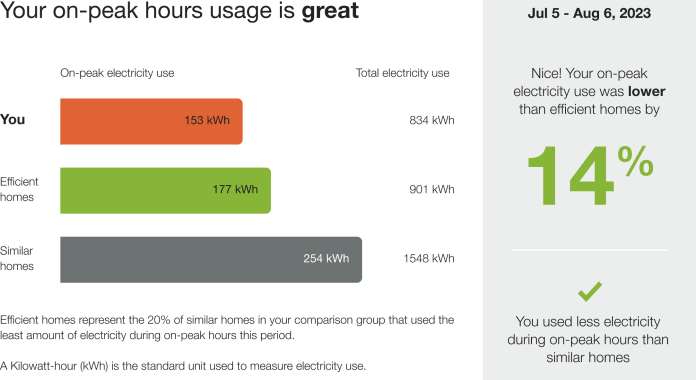
Data States with Icon Sets
Utilities have the option of including an icon set displayed beside the main insight heading. Each icon set has a unique display for Fair, Good, and Great states. The state of the icon set in the report matches the state of the normative comparison. Icon set options include:
- No icons (Off)
- Smiley icons: Neutral or thinking
- Leaf icons
- Medal icons
The following images is an example of the Peak Focused Normative Comparison module with smiley icons enabled.
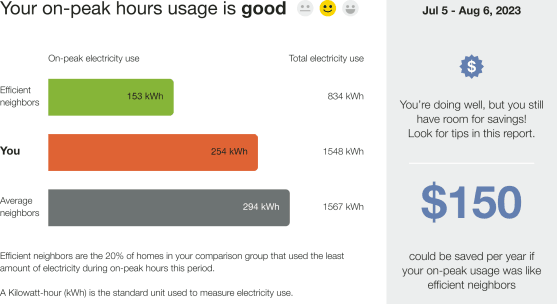
The following image is an example of the thinking comprehension-focus smiley icons in a fair usage state.

The following image is an example of the environmental-focus leaf icons for a good usage state.

The following image is an example of the competitive-focus medal icons for a great usage state.