Time of Use 101
The Time of Use 101 module helps customers understand when electricity is most expensive based on their time of use rate plan. It provides key information, including whether prices differ on weekdays and weekends, how peak prices compare to off peak prices, the hours when electricity is most expensive, and a visual timeline showing off peak, partial peak, and peak periods. The version of the module a customer receives depends on their rate plan and the type of report:
Time of Use 101 for Welcome Reports: This version introduces customers to their specific rate plan at the time the report is generated and explains why reducing usage during peak hours is important. It may also include an example, such as avoiding high energy appliances like a dryer during peak times, to show how behavior changes can impact their bill. The content varies based on whether the customer has a simple or complex rate plan and whether they are known to have a clothes dryer.
Time of Use 101 for Progress Reports: This version both reinforces understanding of the customer's rate plan and highlights the importance of saving during peak periods. It typically includes a heading, weekday and weekend graphs, an explainer, a call to action, and seasonal details when applicable.
Appears in: Time of Use 101,Peak Focused Report
Requirements
Utility Requirements
| Category | Description |
|---|---|
| Required Cloud Service | Energy Efficiency Cloud Service |
| Scale | Not applicable. |
Customer Requirements
| Category | Description |
|---|---|
| Billing Frequency | Monthly or bi-monthly. |
| Data Delivery Frequency | Monthly, bi-monthly, or quarterly. |
| Data Requirements | The Time of Use rate plan. Information from the plan is needed to identify peak time periods and other basic rate details such as peak hours and any applicable peak time changes throughout the year. |
| Data History | Not applicable |
| Data Coverage | Not applicable. |
| Supported Fuels |
|
Limitations
- Number of Rates: A maximum of three rate types can be displayed at one time, such as peak, mid peak, and off peak, or super peak, peak, and off peak.
- (Off Peak Hours (Welcome version only): For this report, super off peak and super saver rates are grouped into a single off peak category. For example, customers with multiple off peak or on peak periods will see all off peak times combined into one category on the timeline.
- Peak Focused Report: This report is only available for the electric fuel type.
- Time of Use Rate Plan and Demand Charge: The demand charge version of the module is available only to customers who have demand charges in addition to a time of use rate plan.
User Experience
Welcome Report
This section describes the user experience for a customer with the welcome version of the module, a weekly peak period, and no weekend or holiday peak periods.
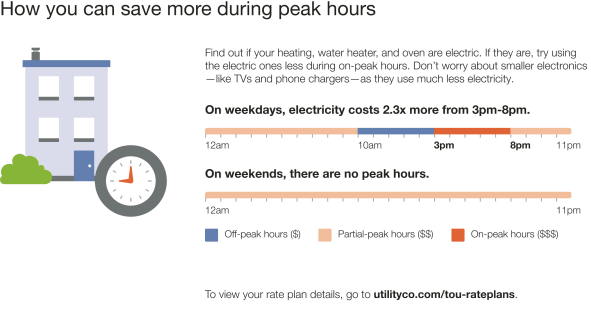
Heading: Encourages customers to take simple steps to save energy during peak hours.
Image: A visual featuring a clock with peak hours highlighted to clearly communicate high-cost times.
Body Text: Identifies the dryer as one of the largest energy using appliances in the home and, therefore, costs a lot to run during peak hours.
Weekday Subheading and Graph: A dynamic, rate plan–specific graph showing how much energy costs increase during weekday peak hours. Includes:
- Weekday Price Ratio: Compares the highest and lowest energy rates (varies by plan).
- Weekday Peak Hours: Highlights the most expensive time period during weekdays.
Weekend Subheading and Graph: A dynamic, rate plan–specific graph indicating whether peak hours apply on weekends and holidays. Includes:
- Weekend Price Ratio: (If applicable) Compares the highest and lowest rates based on the plan.
- Weekend Peak Hours: (If applicable) Displays the most expensive time period on weekends.
Graph Labels: Clearly identify peak, mid-peak, and off-peak periods within the graphs.
Cost Period Indicators:
- High Cost Period: Warning color highlights the most expensive time range (e.g., "On-peak hours ($$$)"), based on the customer's rate plan.
- Medium Cost Period: Warm color indicates mid-range pricing (e.g., "Partial-peak hours ($$)"), dynamically rendered.
- Low Cost Period: Cool color marks the least expensive times (e.g., "Off-peak hours ($)"), dynamically rendered.
Call to Action: Invites customers to view full plan details, with a link to the utility's rate plan page.
Progress Report
This section describes the user experience for a customer with the progress version of the module with a single, weekday peak, no weekend peak hours, and a seasonal variation.
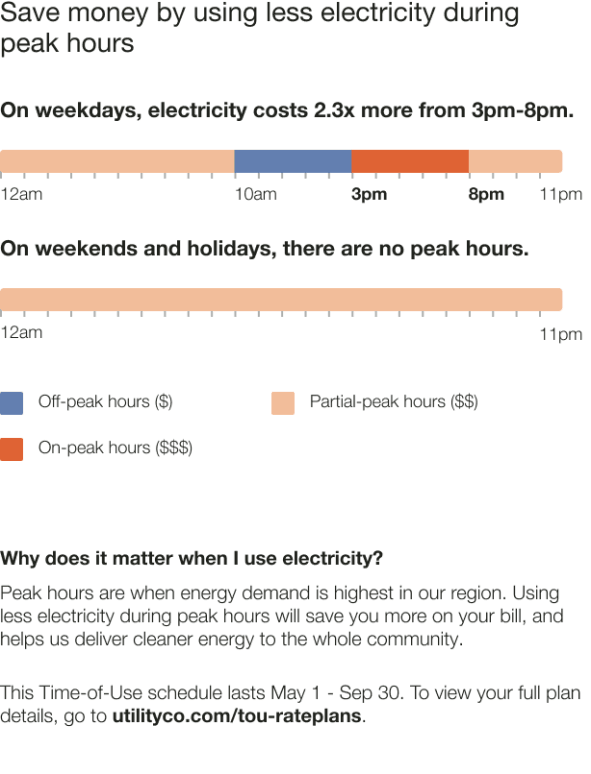
Heading:Explains that customers can save money by using less energy during peak hours.
Weekday Subheading and Graph: Displays a dynamic subheading (based on the rate plan) showing how much more energy costs during weekday peak hours. The graph highlights the price ratio and applicable peak hours.
- Weekday Price Ratio: Compares the highest and lowest weekday rates (dynamic by plan).
- Weekday Peak Hours: Shows the most expensive weekday time period.
Weekend Subheading and Graph: Indicates whether peak pricing applies on weekends.
- Weekend Price Ratio:If applicable, compares the highest and lowest weekend rates (dynamic by plan).
- Weekend Peak Hours: Shows the most expensive weekend time period (if applicable).
Graph Labels: Identify peak, mid-peak, and off-peak periods.
- High Cost Period: Highlighted in a warning color; represents the most expensive time (e.g., "On-peak hours ($$$)").
- Medium Cost Period: Shown in a warm color; represents mid-range pricing (e.g., "Partial-peak hours ($$)").
- Low Cost Period: Shown in a cool color; represents the least expensive time (e.g., "Off-peak hours ($)").
Details Subheading: Explains why energy usage timing matters.
Details Text: Reminds customers that reducing usage during peak hours can lower bills and support cleaner energy delivery.
Call to Action: Encourages customers to view full plan details, with a link to the utility's rate plan page.
User Experience Variations
The user experience of the feature may vary for customers and utilities depending on their service types (gas, electricity, dual fuel, and so on), available data, costs, locale, and other factors. For more information, see the Time of Use 101 description for Home Energy Reports in the Oracle Utilities Opower Energy Efficiency Cloud Service Overview and go to the User Experience Variations section.
Welcome Experience
Heading and Body Text: Varies depending on the report type, whether or not the customer has a dryer, and the number of timelines included in the report.
Timeline Variations: Varies based on the customer's rate plan and the type of days displayed in the sliding scale.
Progress Experience
Timeline Variations: Varies based on the customer's rate plan and the type of days displayed in the sliding scale.
Peak Focused Report
The welcome version of the Time of Use 101 module is included in the Peak Focused Report. The module educates customers about their on-peak use and offers educational insights into why saving energy during peak hours holds particular significance.
Demand Charge
The demand charge version of the module is included in the Peak Focused Report for customers who have a demand charges in addition to their Time of Use rates. The module educates customers about their rate plan's demand charge while emphasizing the critical role of minimizing peak demand to reduce costs. The module provides customers with information such as:
- Demand charges and their impact on overall costs.
- Whether electricity prices differ on weekdays and weekends.
- How much more expensive peak prices are than off-peak prices.
- The hours during which electricity is most expensive.
- A visual timeline that displays off-peak, partial-peak, and peak hours.
This image is an example of a progress version of the Time of Use 101 module with demand charges for a customer with a weekly peak and partial peak periods, and no weekend peak periods.
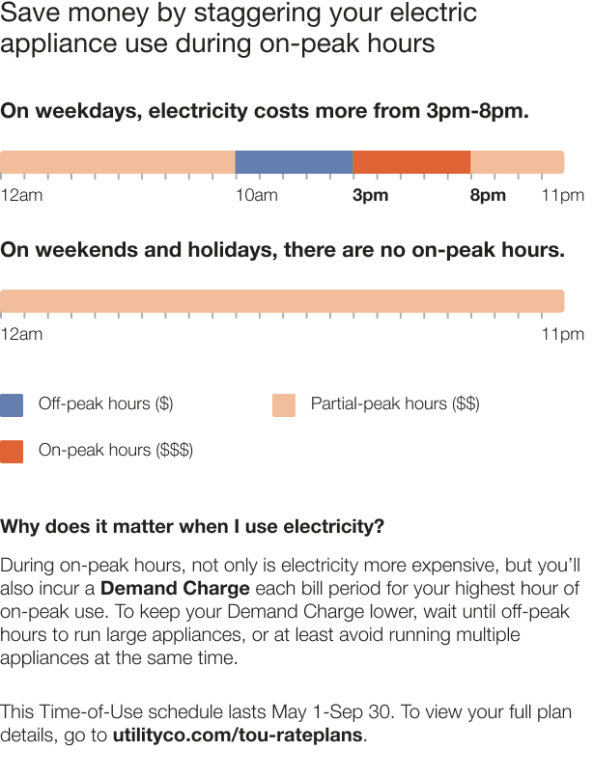
Heading: Informs customers that there are simple steps they can take to save energy during peak hours.
Weekday Subheading and Graph: Displays a dynamic subheading (based on the rate plan) explaining that energy costs are highest during weekday peak hours. The graph highlights the price ratio and relevant peak periods.
- Weekday Price Ratio: Compares the highest and lowest weekday rates (dynamic by plan).
- Weekday Peak Hours: Shows both the most and least expensive time periods during the week.
Weekend Subheading and Graph: Indicates (based on the rate plan) whether peak pricing applies on weekends.
- Weekend Price Ratio: If applicable, compares the highest and lowest weekend rates (dynamic by plan).
- Weekend Peak Hours: Shows the most expensive weekend time period (if applicable).
Graph labels: Identify peak, partial-peak, and off-peak periods.
- High Cost Period: Highlighted in a warning color; represents the most expensive time (e.g., "On-peak hours ($$$)").
- Medium Cost Period: Shown in a warm color; represents mid-range pricing (e.g., "Partial-peak hours ($$)").
- Low Cost Period: Shown in a cool color; represents the least expensive time (e.g., "Off-peak hours ($)").
Details Subheading: Introduces why the timing of energy use matters.
Details Body Text: Explains that electricity costs more during peak hours and that customers may incur a demand charge based on their highest hour of on-peak usage each billing period. Encourages reducing use of large appliances during peak hours to avoid higher charges.
Call to Action: Encourages customers to view full plan details, with a link to the utility's rate plan page.