What Uses Most
The What Uses Most module helps customers understand the top three energy uses in their home during the report period. One of these categories is highlighted at the top of the module.
A category is highlighted if it meets one of the following criteria:
- It is the customer's highest energy use.
- It is the customer's second-highest energy use.
- Its energy use is significantly above the regional average.
The highlighted category heading varies based on the scenario (highest use, second-highest use, or most above regional average) and is paired with a relevant energy-saving tip.
Appears in: Limited Income Report, Electric Vehicle Report
Note:
While this module was designed for the limited income and electric vehicle customer experiences, it can be used for other audience segments as well. Contact your Delivery Team to discuss module options.Requirements
Utility Requirements
| Category | Description |
|---|---|
| Required Cloud Service | Energy Efficiency Cloud Service |
| Scale | Not applicable. |
Customer Requirements
| Category | Description |
|---|---|
| Billing Frequency | Monthly, bi-monthly, or quarterly. |
| Data Delivery Frequency | Not applicable. |
| Data Requirements |
|
| Data History |
|
| Data Coverage | Not applicable. |
| Supported Fuels |
|
Limitations
Report Type: This module is available for the Limited Income Report, and Electric Vehicle Reportby default, but may be included in other report experiences. Contact your Delivery Team for more information.
What Uses Most User Experience
This section describes the user experience for the What Uses Most module for a customer with heating as the highest energy use in the billing period.
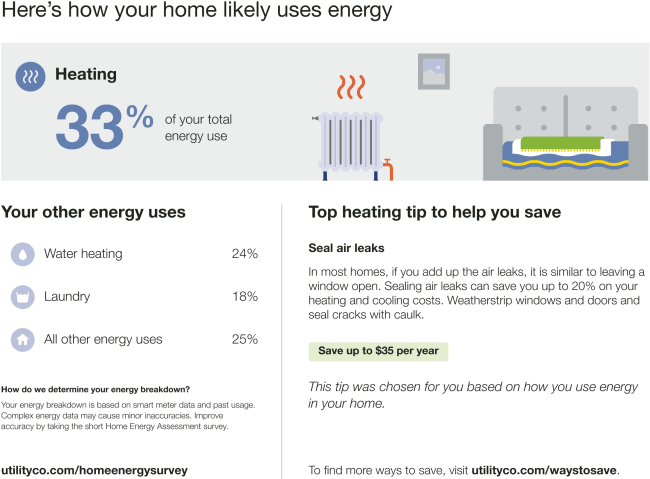
Heading: Indicates the energy-use level of the highlighted category and notes that values are estimates.
Highlighted Usage Category: Displays the customer's top energy-use category and its percentage of total usage, identified through algorithmic analysis. This appears in a gray box at the top of the module..
Other Usage Categories: Lists the next two highest energy-use categories with their corresponding percentages, ordered from highest to lowest. A final category, "All other energy uses," represents the remaining consumption and is shown with a home icon.
-
Disaggregation explainer: Clarifies that the categories are based on data model estimates and encourages customers to improve accuracy by completing the Home Energy Analysis. Includes a link to update their survey.
Paired Tip: Provides a relevant energy-saving tip tied to the highlighted category. Tips are tailored based on available data (e.g., Home Energy Analysis responses) to ensure relevance to the customer's home and equipment. See Paired Tips.
Call to Action: Directs customers to the Home Energy Analysis to provide more details and improve report accuracy.
User Experience Variations
The user experience of the feature may vary for customers and utilities depending on their service types (gas, electricity, dual fuel, and so on), available data, costs, locale, and other factors. For more information, see the What Uses Most description for Home Energy Reports in the Oracle Utilities Opower Energy Efficiency Cloud Service Product Overview and go to the User Experience Variations section.
Highlighted Usage Category
The usage category highlighted in the module heading varies by highlighted category type and module state (highest energy use, second highest energy use, most above regional average). The following table includes an example of the possible heading variations for heating as the highlighted category.
| Highlighted category | Module State - Highest energy use | Module State - Second highest energy use | Module State - Most above regional average |
|---|---|---|---|
| Heating | Here's how your home likely uses energy | Heating was one of your highest energy uses this period | Your heating use was likely above the regional average |
Electric Vehicle Report
The What Uses Most module for the Electric Vehicle Report includes electric vehicle charging as one of the possible energy uses. If Electric Vehicle Charging is the customer's top energy category, a green leaf icon appears next to the top use category heading with a encouraging "smart, green choice" message below. The message is designed to positively reinforce the customer's decision, and ensure that they feel good about their environmentally friendly choices even when it may take up a significant portion of their energy use.
Heat Pump Usage
If the customer has indicated in the Home Energy Analysis that they use a heat pump for heating or cooling, the module varies as follows:
Top Use Category: If a heat pump is the customer's highest energy-use category, it is labeled as "Heat Pump." A green leaf icon appears next to the heading, along with a supportive "smart, green choice" message. This reinforces the customer's environmentally friendly decision, even if it represents a significant portion of their energy use.
Usage category: If heating or cooling with a heat pump appears among the listed categories, it is labeled as "Heat Pump" and displayed with a corresponding heat pump icon.
Calculations
Energy Use Categories
The energy-use category calculation varies based on data availability:
No Smart Meter or Limited Data: If a smart meter is unavailable or data is unreliable, categories are estimated using a combination of weather data, historical usage patterns, and Home Energy Analysis survey responses. These inputs allow data science models to approximate how energy is used across categories or appliances, helping identify opportunities to save.
Smart meter available: When smart meter data is available, it is used to analyze energy usage patterns throughout the day. Data science models detect patterns associated with specific appliances. For example, a refrigerator cycling on and off every 15–20 minutes. By identifying these patterns across common appliances, the models estimate per-appliance energy use and provide a breakdown to help customers understand where to focus their energy-saving efforts.