Mini Time of Use Reminder
Positioned in the top right of the progress version of the Peak Focused Report, the Mini Time of Use Reminder module is a customer's first point of reference for understanding peak electricity cost periods based on their Time of Use plan. The module clearly displays the multiplier for high-cost periods and their specific timings., provides a color-coded timeline that highlights peak times in for easy identification, and adapts to different utility peak times and billing structures, such as demand charges.
Mini Time of Use Reminder Example
The image below is an example of the Mini Time of Use Reminder for a customer with three peak times.
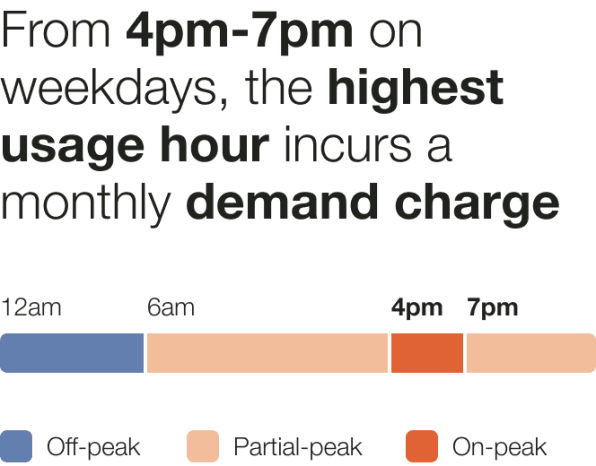
Header: The header informs the customers what the multiplier in cost will be during the peak period and what times the period will occur:
- Weekday price ratio: The multiplier of cost during the peak period.
- High cost period label: Rate plan-specific name for the high cost period. For example, peak period or on-peak.
- Weekday high cost period start time: The time the peak period will start. For example, 4pm.
- Weekday high cost period end time: The time the peak period will end. For example, 7pm.
Cost period bar: The cost period bar provides a visual representation of the cost periods.
- High Cost Period: The high cost period displays the most expensive time range, and is indicated by a warning-color. It is dynamically rendered based on the customer's rate plan details. For example, "On-peak hours ($$$)."
- Medium Cost Period: The medium cost period label identifies the time range that is neither the most or least expensive, and is indicated by a medium warm color. It is dynamically rendered based on rate plan details. For example, "Partial-peak hours ($$)."
- Low Cost Period: The low cost period label identifies the least expensive time range, and is indicated by a light cool color. It is dynamically rendered based on rate plan details. For example, "Off-peak hours ($)."
Cost start and end times: The cost period start time and end time are noted on the bar.
Cost period legend: The cost period legend identifies the cost periods represented in the cost period bar.
Configuration Options
For each element listed in the table, indicate the desired configuration in the Input Value column. If you do not provide an input for optional configurations, the default will be used.
| Configuration Option | Input Value |
|---|---|
|
Header The header informs the customers what the multiplier in cost will be during the peak period and what times the period will occur. Default:
|
Optional Choose one of the following:
|
|
Color Settings Color settings determine the colors assigned to elements within the module. Default: The default module colors are determined by the utility color pallet provided by the utility during Opower Platform configuration. |
Optional
|
|
Footnote An optional footnote may be included under the cost period legend. Default: The footnote is disabled. |
Optional Choose one of the following:
|
User Experience Variations
The user experience of the feature may vary for customers and utilities depending on their service types (gas, electricity, dual fuel, and so on), available data, costs, locale, and other factors. For more information, see the Mini Time of Use 101 Reminder description for Home Energy Reports v3 in the Oracle Utilities Opower Energy Efficiency Cloud Service Overview and go to the User Experience Variations section.