Time of Day Hourly Insight
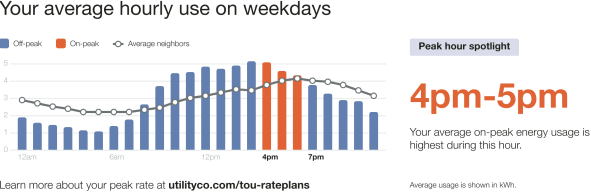
The Time of Day Hourly Insight provides the customer with additional details about when a customer is consuming electricity and how they compare to their nearest comparison group. The module displays the customer’s average hourly electricity use on weekdays, the highest cost period (peak) hours, non-peak hours, and an insight to highlight to the customer in which high cost period hour they are consuming the most energy. A URL is provided to direct customers to where they can learn more about their Time of Day rate plan.
Time of Day Hourly Insights Example
This image is an example of the Time of Day Hourly Insight user experience for a customer with two peak periods.
Configuration Options
| Configuration Option | Input Value |
|---|---|
|
Heading The heading identifies the purpose of the graph. Default: "Your average hourly use on weekdays" |
Optional
|
|
Efficient Neighbors or Average Neighbors Label Identifies the comparison group in the cost period labels. The labels are dependent on the use state. Default: Varies by use state.
|
Optional
|
|
Color Settings Color settings determine the colors assigned to elements within the module. Default: The default module colors are determined by the utility color pallet provided by the utility during Opower Platform configuration. |
Optional
|
|
Insight Heading Reinforces the purpose of the module as a focus on the customer's usage. Default: Varies.
|
Optional
|
| Comparison Group Usage Line
Indicates the comparison group’s average hourly usage. Default: On. |
Optional
|
|
Insight Description Defines the Highest Consumption Time Period. Default: Varies.
|
Optional
|
|
Call to Action Text Redirects the customer to the web portal where they can learn more about their usage or rates. Default: "Learn more about your peak rate at" |
Optional
|
|
Call to Action URL Redirects the customer to where they can learn more. Default: Utility web portal. |
Optional
|
User Experience Variations
The user experience of the feature may vary for customers and utilities depending on their service types (gas, electricity, dual fuel, and so on), available data, costs, locale, and other factors. For more information, see the Time of Day Hourly Insight description in the Energy Efficiency Cloud Services Overview Guide and go to the User Experience Variations section.